Indledning
This manual provides instructions for the use and maintenance of your new replacement remote control. This remote is designed to function as a substitute for the original remote control of Chiq GCBLTV6EA-C4 L32H7N Smart LED TVs. Please note that as a replacement, some advanced or specific functions of your original remote may not be fully replicated.
Opsætning
Installation af batteri
Fjernbetjeningen kræver to AAA-batterier (medfølger ikke). Følg disse trin for at installere dem:
- Find batterirummets dæksel på bagsiden af fjernbetjeningen.
- Tryk ned på tappen, og skub dækslet nedad for at åbne rummet.
- Isæt to AAA-batterier, og sørg for, at de positive (+) og negative (-) poler er justeret korrekt med markeringerne inde i batterirummet.
- Skub batteridækslet tilbage på plads, indtil det klikker sikkert.
Once batteries are installed, the remote control is ready for use. No pairing or programming is typically required for this replacement remote.
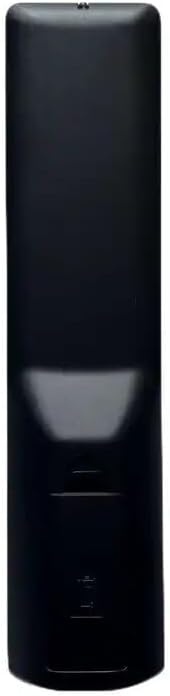
Billede: Bagside view of the remote control, illustrating the location of the battery compartment. The compartment is a rectangular indentation on the lower half of the remote's back, designed to hold two AAA batteries.
Betjeningsvejledning
This section outlines the general functions of the buttons on your replacement remote control. Button layouts may vary slightly depending on the specific model received (black or white version).

Billede: Forside view of the replacement remote control. It is black with various grey and colored buttons, including a power button, number pad, navigation arrows, volume and channel controls, and dedicated buttons for Netflix and YouTube.
- Tænd/sluk-knap (●): Tænder eller slukker for tv'et.
- Nummertastatur (0-9): Indtaster kanalnumre direkte.
- Lydstyrke op/ned (+/-): Justerer lydstyrken.
- Kanal op/ned (P+/P-): Skifter tv-kanal.
- Slå lyden fra (Stum): Slår lyden fra eller til for TV-lyden.
- Navigationspile (op, ned, venstre, højre): Navigerer gennem menuer og muligheder.
- OK knap: Bekræfter valg i menuer.
- Tilbage/retur: Vender tilbage til den forrige skærm eller menu.
- Kilde/Indgang: Ændrer inputkilden (HDMI, AV osv.).
- Netflix knap: Direkte adgang til Netflix-applikationen.
- YouTube-knap: Direkte adgang til YouTube-applikationen.
- Menu/Hjem: Opens the TV's main menu or smart TV home screen.
For specific functions not listed, refer to your television's original user manual, as this remote is designed to mimic common functions.
Opretholdelse
Rengøring af fjernbetjeningen
Brug en blød, tør klud til at rengøre fjernbetjeningen. Ved genstridigt snavs, tør letampRengør kluden med vand eller et mildt, ikke-slibende rengøringsmiddel. Brug ikke skrappe kemikalier, og fjernbetjeningen må ikke nedsænkes i vand.
Udskiftning af batteri
Replace batteries when the remote's responsiveness decreases or it stops functioning. Always replace both batteries at the same time with new AAA batteries. Do not mix old and new batteries, or different types of batteries.
Fejlfinding
| Problem | Mulig årsag | Løsning |
|---|---|---|
| Fjernbetjening virker ikke. | Dead or incorrectly installed batteries. Obstruction between remote and TV. | Check battery polarity and replace batteries. Ensure clear line of sight to TV's IR receiver. |
| Some functions not working. | This is a replacement remote; some specific functions may not be supported. | Confirm if the function is standard. If not, it may be a limitation of the replacement remote. |
| Fjernbetjeningen reagerer ikke. | Low batteries. Remote sensor blocked. | Replace batteries. Clean the remote's IR emitter and TV's IR receiver. |
Specifikationer
- Mærke: Generisk
- Model: Udskiftningsfjernbetjening (ASIN: B0CKWGC1KD)
- Kompatible enheder: Television, Stereo System, Set Top Box, DVD/Blu-ray Player, Home Theater
- Maks. antal understøttede enheder: 5
- Speciel funktion: Ergonomisk
- Farve: Black/White (sent randomly)
- Materiale: ABS plast
Garanti og support
Specific warranty information for this generic replacement remote control is not provided in the product details. For any issues or support inquiries, please contact the seller directly through the platform where the purchase was made. It is recommended to provide your original remote part number or unit model to the seller for better assistance.


