
MOBAPAD PRO-HD
MOBAPAD Hall-effekt driftsikker trådløs switch-controller brugermanual
Model: PRO-HD | Mærke: MOBAPAD
Indledning
Denne manual indeholder omfattende instruktioner til MOBAPAD Hall Effect Drift-Proof Wireless Switch Controller. Denne controller er designet til forbedret gaming og har avanceret kontaktløs joystick-teknologi, der sikrer en længere levetid, større holdbarhed og mere jævn betjening sammenlignet med traditionelle designs. Dens driftsikre ydeevne garanterer præcis og præcis kontrol. Oplev forbedret gaming med realistisk HD Rumble-feedback, der simulerer forskellige taktile fornemmelser for dybere fordybelse.
Nøglefunktioner
- Hall elektromagnetiske joysticks: Kontaktløs teknologi for afdriftssikker, præcis kontrol og forlænget holdbarhed.
- HD-rumlen: Genereret af ALPS dobbeltaksede lineære motorer for realistiske vibrationer og taktil feedback.
- Mekaniske knapper på forsiden: Holdbare knapper med en levetid på 5 millioner klik, der tilbyder kortere slaglængde, hurtigere rebound og øjeblikkelig triggerrespons.
- 6-akset gyroskop: Understøtter bevægelsessensor til kompatible spil.
- Lokal makroprogrammering: Opret og gem makroer direkte på controlleren uden ekstern software.
- Turbofunktion: Uafhængig turboknap med to automatiske optagelsesindstillinger til hurtig input.
- NFC-læser: Superfølsom NFC-læser for Amiibo-kompatibilitet.
- Udskiftelig D-pad: Tilpas din D-pad med de inkluderede muligheder.
- Udskiftelige rygpadler: To programmerbare rygpadler (M1, M2) til personlig kontrol, som også kan deaktiveres.
- Lang batterilevetid: Udstyret med et genopladeligt lithium-batteri på 1000 mAh, der giver cirka 30 timers brug.
- Multi-platform kompatibilitet: Forbindes trådløst til Nintendo Switch (Pro/Lite/OLED), PC (via Bluetooth eller kablet), iOS (version 13 og nyere) og Android-enheder.
Pakkens indhold
- 1 x MOBAPAD Hall-effekt trådløs switch-controller
- 1 x USB-C til USB-A ladekabel
- 1 x Udskiftelig krydsformet D-pad
- 1 x Brugermanual / Opstartsvejledning

Billede: MOBAPAD-controlleren i emballagen, der viser hovedenheden og det medfølgende tilbehør.
Opsætning
Tilslutning til Nintendo Switch
- På din Nintendo Switch skal du navigere til HOME-menuen.
- Vælg "Controllere" i bundmenuen.
- Vælg "Skift greb/rækkefølge".
- Tryk én gang på den lille parringsknap på bagsiden (ved siden af M1/M2-knapperne) på MOBAPAD-controlleren. "M"-logoet lyser, og kanal-LED'en blinker.
- Når controlleren er registreret af switchen, lyser kanalens LED konstant, hvilket indikerer en vellykket forbindelse.

Billede: MOBAPAD-controlleren er tilsluttet og interagerer med en Nintendo Switch-konsol.
Tilslutning til pc (Windows) via Bluetooth
- Sørg for, at controlleren er slukket (ingen LED-lys).
- Tryk på Hjem-knappen (M-logoet), og hold den nede, indtil den midterste kanal-LED blinker hurtigt.
- Gå til Bluetooth-indstillingerne på din pc, og søg efter "MOBAPAD PRO-HD".
- Vælg den enhed, der skal parres. Når den er tilsluttet, lyser LED-lampen konstant.
Tilslutning til pc via kabelforbindelse
Tilslut controlleren til din pc med det medfølgende USB-C-kabel. Controlleren skifter automatisk til kabelbaseret tilstand. For Windows 10- og Steam-spil, der understøtter controllerinput, er tilstanden indstillet til "Switch Pro mode".
Tilslutning til Apple-enheder (iOS version 13 eller nyere)
- Sørg for, at controlleren er slukket (ingen LED-lys).
- Tryk på Hjem-knappen (M-logoet), og hold den nede, indtil den midterste kanal-LED blinker hurtigt.
- Gå til din iOS-enheds Bluetooth-indstillinger, og søg efter "Xbox Wireless Controller".
- Vælg den enhed, der skal parres. Når der er oprettet forbindelse, viser din telefon "Connected", og den midterste kanal-LED lyser konstant.
Tilslutning til Android-enheder
- Sørg for, at controlleren er slukket (ingen LED-lys).
- Tryk på Hjem-knappen (M-logoet), og hold den nede, indtil den midterste kanal-LED blinker hurtigt.
- Gå til din Android-enheds Bluetooth-indstillinger, og søg efter "MOBAPAD PRO-HD".
- Vælg den enhed, der skal parres. Når der er oprettet forbindelse, viser din telefon "Connected", og den midterste kanal-LED lyser konstant.
Betjeningsvejledning
Controllerens layout og funktioner
Billede: Forside view på MOBAPAD-controlleren, der fremhæver knapper og joysticks.
- A/B/X/Y-knapper: Mekaniske knapper på forsiden for skarp og responsiv input.
- Hall-effekt joysticks: Kontaktløse joysticks for præcis og afdriftsfri bevægelse.
- D-Pad: Udskiftelig D-pad (leveres med en cirkulær og en krydsformet mulighed).
- Turbo knap: Aktiverer hurtigskydningsfunktionen.
- Makroprogrammeringsknap: Bruges til at optage og udføre komplekse knapsekvenser.
- Skærmbillede-knap: Tager skærmbilleder fra spillet.
- Hjemknappen: Vender tilbage til startskærmen.
- NFC-område: Placeret i nærheden af Home-knappen, understøtter Amiibo-scanning.
- USB-C-port: Placeret øverst, bruges til opladning og kabelforbindelse.
- M1/M2 Rygpadler: To omprogrammerbare knapper på undersiden til brugerdefinerede kommandoer.
- Parringsknap: Lille knap på bagsiden til at starte Bluetooth-parring.
- Nulstil hul: Lille nålehul til nulstilling af controlleren, hvis det er nødvendigt.
Udskiftelig D-Pad
Controlleren leveres med to D-pad-muligheder: en forudinstalleret cirkulær D-pad og en ekstra krydsformet D-pad. For at skifte D-pad skal du blot løfte den nuværende D-pad af controlleren og justere den nye D-pad med den magnetiske base, og derefter forsigtigt trykke den på plads.
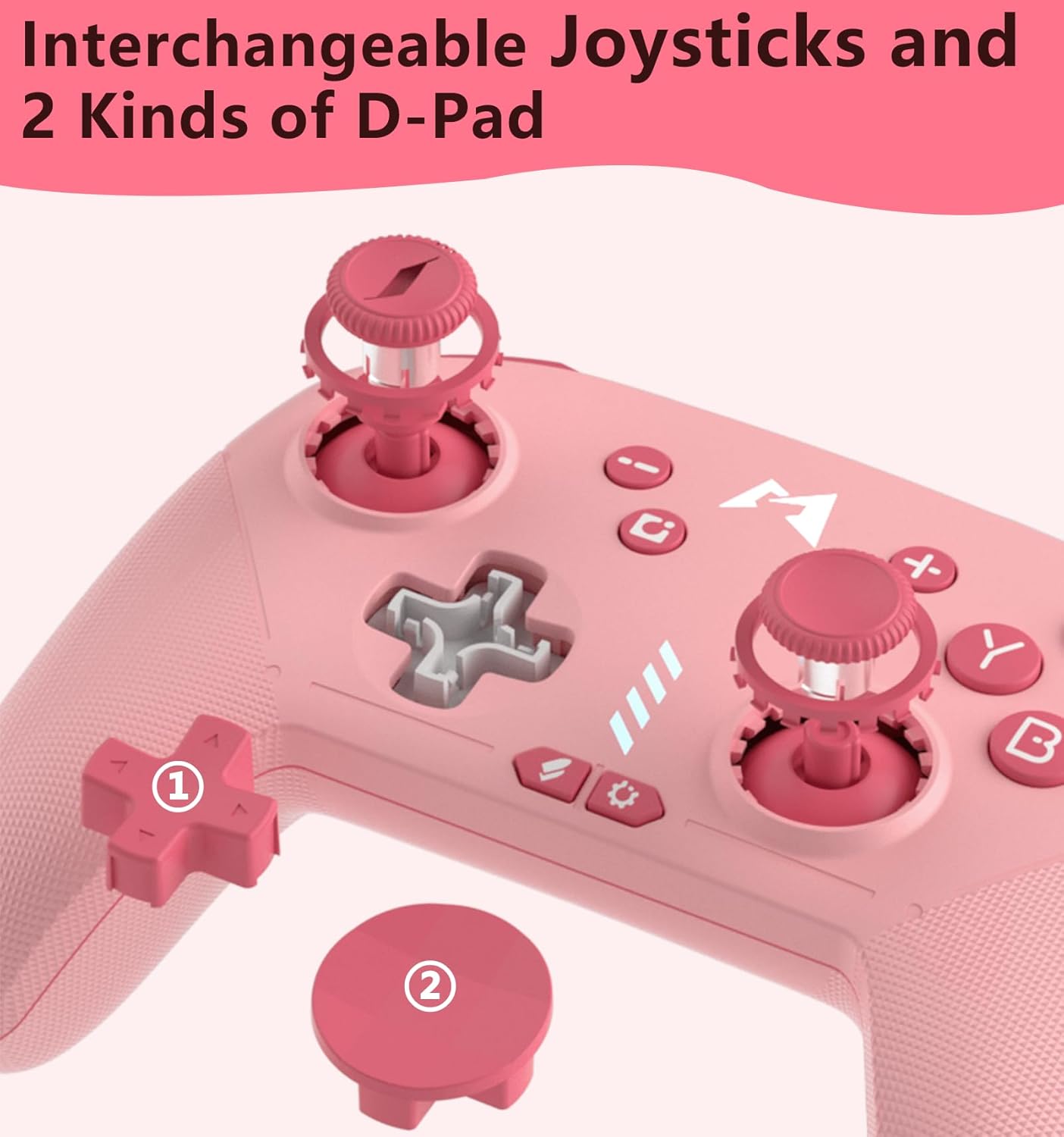
Billede: Nærbillede view af den udskiftelige D-pad-mekanisme og de to D-pad-stile.
Makro programmering
MOBAPAD-controlleren understøtter lokal makroprogrammering. Se den medfølgende opstartsvejledning for detaljerede trin til, hvordan du optager og tildeler makroer til M1- og M2-bagpadlerne.
Automatisk slukning
Controlleren har en automatisk sluk-funktion for at spare batteri. Hvis den er tilsluttet en Nintendo Switch, går controlleren i dvaletilstand, når Switchen går i dvaletilstand. Hvis den ikke er tilsluttet nogen enhed, slukker controlleren automatisk efter 15 minutters inaktivitet.
Opretholdelse
- Hold controlleren ren ved at tørre den af med en blød, tør klud.
- Undgå at udsætte controlleren for ekstreme temperaturer, direkte sollys eller fugt.
- Opbevar controlleren et sikkert sted for at forhindre fysisk skade.
Fejlfinding
- Controlleren parres ikke: Sørg for, at controlleren er fuldt opladet. Prøv at nulstille controlleren ved at indsætte en tynd genstand i nulstillingshullet på bagsiden. Genstart parringsprocessen på både controlleren og din enhed.
- Inputforsinkelse eller afbrydelse: Sørg for, at du er inden for den effektive rækkevidde af din enheds Bluetooth. Minimér interferens fra andre trådløse enheder.
- Knapper reagerer ikke: Kontroller, om controlleren er opladet. Hvis problemet fortsætter, kan du prøve at nulstille controlleren.
Specifikationer
| Feature | Detalje |
|---|---|
| Model nr. | PRO-HD |
| Fabrikant | Dongguan Heng Xun Energiteknologi Co., Ltd. |
| Batterikapacitet | 1000mAh lithium batteri |
| Anslået batterilevetid | ~30 timer |
| Opladningsport | USB-C |
| Joystick-teknologi | ALPS Hall-effekt (driftsikker) |
| Rumble Feedback | HD Rumble (ALPS lineære motorer med to akser) |
| Bevægelseskontrol | 6-akset gyroskop |
| Knaptype | Mekaniske ansigtsknapper |
| NFC support | Ja (til Amiibo) |
Garanti og support
For garantioplysninger og teknisk support henvises til den dokumentation, der følger med dit produkt, eller besøg den officielle MOBAPAD-side. webwebstedet. Behold din købskvittering som købsbevis.
Ask a question about this manual
Ask about setup, troubleshooting, compatibility, parts, safety, or missing instructions. Manuals+ will review the question and use this page’s manual context to help answer it.