
HUBBLE CONNECTED HCSNPCLT
HUBBLE CONNECTED Nursery Pal Cloud Touch Smart Babyalarm Brugermanual
Model: HCSNPCLT
Indledning
The HUBBLE CONNECTED Nursery Pal Cloud Touch Smart Baby Monitor offers advanced monitoring capabilities for parents. Featuring patented Dual Mode technology, it allows simultaneous operation in both Wi-Fi and non-Wi-Fi modes, providing flexibility and security. The system includes a 5-inch HD touchscreen parent unit and a Wi-Fi enabled camera.
Nøglefunktioner omfatter:
- Crystal Clear HD Quality with Next Level Connectivity and Convenience.
- Patented Dual Mode for secure Wi-Fi and non-Wi-Fi viewing.
- 5-inch HD touchscreen parent unit and HubbleClub app for flexible viewing.
- Interactive parent unit with educational games, stories, and videos for toddlers.
- Integrated room temperature monitor, infrared night vision, and two-way talk.
- Preloaded nature sounds, lullabies, and bedtime stories.

Figur 1: Overview of the Nursery Pal Cloud Touch Smart Baby Monitor's key features.
Hvad er der i æsken
Your HUBBLE CONNECTED Nursery Pal Cloud Touch package includes the following components:
- 5" Nursery Pal Touch Screen Parent Unit and Protective Bumper
- Full HD Wi-Fi Camera with Magnetic Stand
- Strømadaptere (x2)
- Hurtig startvejledning
- Brugervejledning (dette dokument)
- Garantioplysninger

Figure 2: Contents of the Nursery Pal Cloud Touch package.
Opsætning
1. Tænder
- Tilslut strømadapteren til kameraenheden, og sæt den i en stikkontakt.
- Connect the second power adapter to the parent unit and plug it into a power outlet.
- Press and hold the power button on the parent unit for a few seconds to turn it on.

Figure 3: The parent unit, camera, and HubbleClub app interface.
2. Dual Mode Connectivity
The Nursery Pal Cloud Touch features patented Dual Mode technology, allowing you to monitor your baby in two ways:
- Wi-Fi-tilstand: Connect the camera to your home Wi-Fi network to view the live feed simultaneously on the 5-inch HD touchscreen parent unit and via the HubbleClub app on your smartphone or tablet.
- Non-Wi-Fi Mode: For enhanced privacy and security, the camera can function as a traditional video monitor through a local connection directly to the parent unit, without requiring a Wi-Fi network.

Figure 4: Dual Mode Viewing options for the baby monitor.
Betjening af monitoren
Forældreenhedskontroller
- Pan, Tilt, and Zoom: Brug retningsknapperne på forældreenheden til at justere kameraets view. The digital pan, tilt, and zoom feature allows you to get a closer look at your baby.
- Justering af lysstyrke: Juster skærmens lysstyrke for optimal viewing, especially useful for low light conditions at night.
- To-vejs snak: Tryk og hold mikrofonknappen på forældreenheden nede for at tale med din baby gennem kameraets højttaler. Slip knappen for at lytte.
- Nattesyn: The camera automatically activates infrared night vision in low light conditions, providing a clear black and white image of your baby.
- Rumtemperaturmåler: The parent unit displays the room temperature detected by the camera, helping you ensure your baby's comfort.
Preloaded Content
The innovative touchscreen parent unit doubles as an interactive console, offering a variety of preloaded content:
- Beroligende lyde: Access a selection of nature sounds to help calm your baby.
- Vuggeviser: Play gentle lullabies to aid in sleep.
- Bedtime Stories: Engage your child with preloaded bedtime stories.
- Educational Games & Videos: The parent unit provides interactive games and videos suitable for toddlers, growing with your child.

Figure 5: Interactive content available on the parent unit.
HubbleClub App Integration
Enhance your monitoring experience by downloading the HubbleClub app on your smartphone or tablet. The app provides additional features and insights:
- Unlimited Live Streaming to ensure you're always connected.
- Your Recordings Live in the Cloud (subscription may be required).
- Share and download precious moments.
- Set Your BabyZone and Receive Activity Alerts.
- Access Nursery Rhymes, Bedtime Stories & Personalized Recordings.
- Track Progressions on the Baby Growth Tracker.
- Routinely Log and Manage Data on Feeding, Pumping, Diapers, and more.
- Membership into the HubbleClub Community for parenting tips and support.
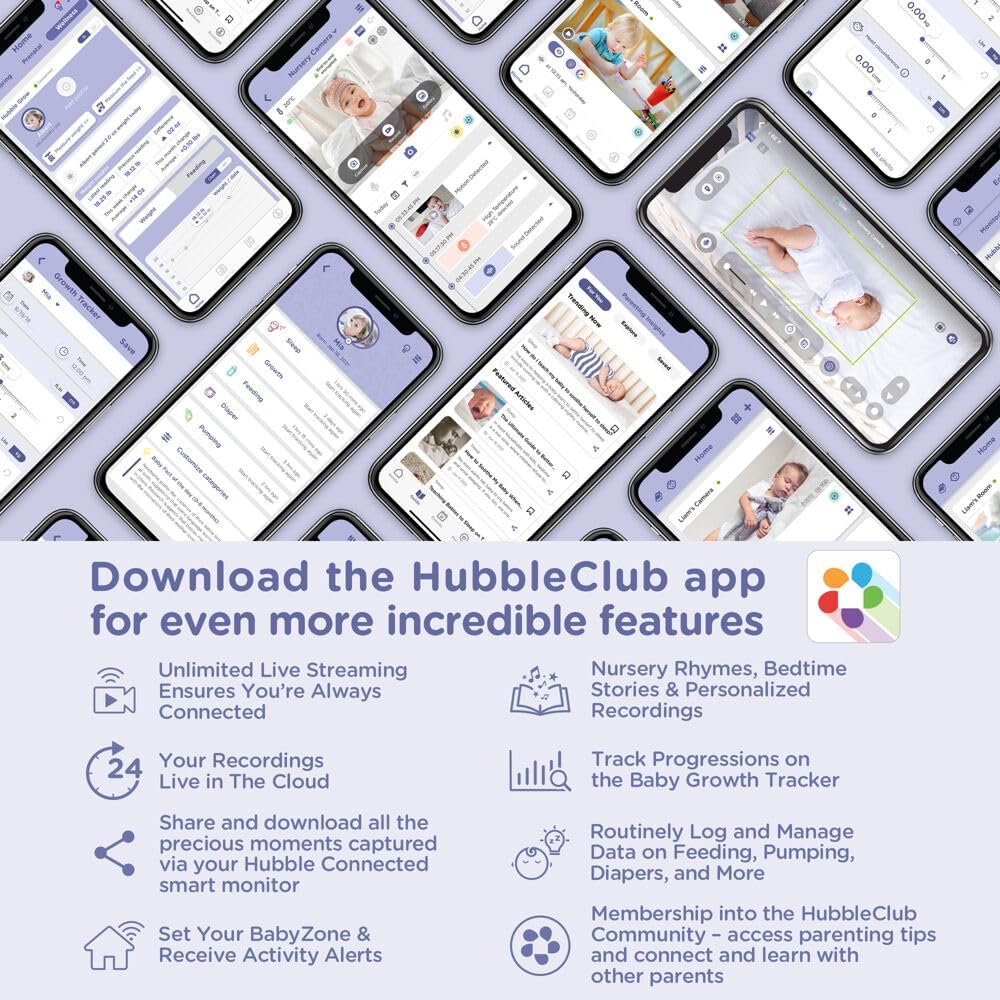
Figure 6: The HubbleClub app offers comprehensive features for baby monitoring and parenting support.
Opretholdelse
To ensure the longevity and optimal performance of your Nursery Pal Cloud Touch monitor, follow these maintenance guidelines:
- Rensning: Gently wipe the parent unit and camera with a soft, dry cloth. Do not use abrasive cleaners or solvents.
- Opbevaring: Hvis enheden opbevares i længere tid, skal du sørge for, at den er fuldt opladet og opbevares et køligt og tørt sted.
- Batteripleje: For the parent unit's rechargeable battery, avoid extreme temperatures and prolonged periods of full discharge or full charge.
Fejlfinding
If you encounter any issues with your Nursery Pal Cloud Touch monitor, please refer to the following common solutions:
| Problem | Mulig løsning |
|---|---|
| No power on parent unit/camera | Ensure power adapters are securely plugged into both the unit and a working electrical outlet. Check if the power button is held long enough to turn on. |
| No image/sound from camera | Verify both units are powered on and within range. Check Wi-Fi connection if in Wi-Fi mode. Re-pair the camera and parent unit if necessary (refer to quick start guide for pairing instructions). |
| Dårlig billedkvalitet | Ensure the camera lens is clean. Adjust the brightness settings on the parent unit. Check for obstructions between the camera and parent unit. |
| Interferens/statisk | Move the monitor away from other electronic devices (e.g., microwaves, cordless phones) that may cause interference. Ensure both units are within optimal range. |
| Parent unit battery not holding charge | Ensure the power adapter is functioning correctly. Allow sufficient time for charging. Battery life may decrease over time with regular use. |
For mere detaljeret fejlfinding eller vedvarende problemer, se venligst den fulde brugermanual eller kontakt kundesupport.
Specifikationer
| Feature | Detalje |
|---|---|
| Mærke | HUBBLE CONNECTED |
| Modelnummer | HCSNPCLT |
| Materiale | Plast |
| Farve | Single Camera with WiFi |
| Kompatible enheder | Smartphones, tablets |
| Varens vægt | 1.15 pund |
| UPC | 810074830942 |
| Produktdimensioner | 3.3 x 3.3 x 5.4 tommer |
| Strømkilde | Rechargeable Battery Powered (Parent Unit) |
| Voltage | 3.8 volt |
| Wattage | 7 watt |
| Monteringstype | Bordplademontering |
| Særlige funktioner | 2-vejs lyd, HD-opløsning, bærbar |
| Brug | Baby Monitoring, Nursery |
Garanti og support
HUBBLE CONNECTED products are designed with quality and reliability in mind. For detailed warranty information, please refer to the warranty card included in your product package or visit the official HUBBLE CONNECTED webwebsted.
For customer support, technical assistance, or to explore more products, please visit the HUBBLE CONNECTED Store on Amazon eller deres officielle supportkanaler.