
XINJI C1 Pros
XINJI COBEE C1 Pros Smart Watch User Manual
Model: C1 Pros
1. Introduktion
This manual provides comprehensive instructions for the XINJI COBEE C1 Pros Smart Watch. It covers setup, operation, maintenance, and troubleshooting to ensure optimal use of your device. The XINJI COBEE C1 Pros features a 1.91" HD display, Bluetooth calling, 100+ sports modes, SpO2 monitoring, and 24/7 heart rate tracking.

Figur 1: Forside view of the XINJI COBEE C1 Pros Smart Watch. This image displays the watch face with various health metrics and the black silicone strap.
2. Hvad er der i æsken
Når du åbner pakken, skal du kontrollere, at alle komponenter er til stede:
- XINJI COBEE C1 Pros Smart Watch
- Ladekabel
- Extra Band (if included in your specific package)
- Brugervejledning (dette dokument)
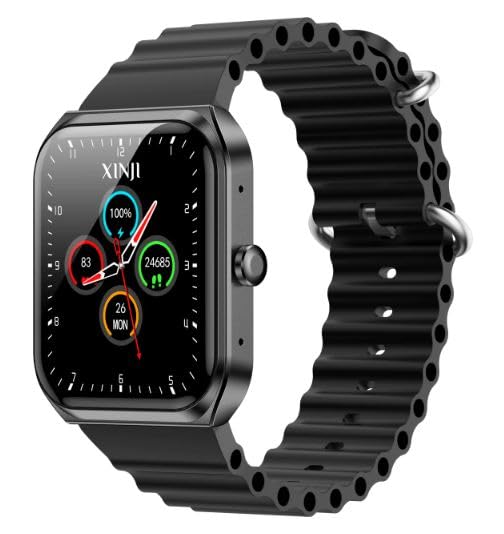
Figure 2: The XINJI COBEE C1 Pros Smart Watch, showcasing dens design og rem.
3. Opsætning
3.1 Indledende opladning
Before first use, fully charge your XINJI COBEE C1 Pros Smart Watch. Connect the magnetic charging cable to the charging points on the back of the watch and plug the USB end into a compatible power adapter (not included) or a computer USB port.
- En fuld opladning tager typisk cirka 2 timer.
- Urets display vil vise opladningsstatus.

Figur 3: Bagside view of the XINJI COBEE C1 Pros Smart Watch, highlighting the optical sensors and magnetic charging contacts.
3.2 Appinstallation og parring
To unlock the full functionality of your smart watch, download and install the companion application on your smartphone. The watch is compatible with Android 5.0 and above, and iOS 10.0 and above.
- Scan the QR code provided in the watch's quick start guide or search for the official XINJI app in your smartphone's app store (Google Play Store for Android, Apple App Store for iOS).
- Installer applikationen og åbn den.
- Aktiver Bluetooth på din smartphone.
- Follow the in-app instructions to search for and pair with your XINJI COBEE C1 Pros Smart Watch. Ensure the watch is powered on and within Bluetooth range.
- Bekræft parringsanmodningen på både din telefon og uret.
Once paired, you can synchronize data, customize settings, and receive notifications directly on your watch.
4. Betjening af dit smartwatch
4.1 Grundlæggende navigation
- Touchskærm: Stryg op, ned, til venstre eller højre for at navigere gennem menuer og skærme. Tryk for at vælge elementer.
- Side knap: Press the side button to return to the home screen or wake the display. A long press may access power options or a quick menu, depending on the context.
4.2 Bluetooth-opkald
The XINJI COBEE C1 Pros supports direct Bluetooth calling. Once paired with your smartphone, you can answer incoming calls or dial out directly from the watch.
- Sørg for, at dit ur er forbundet til din telefon via Bluetooth.
- Når et opkald kommer ind, viser uret nummeret på opkalderen. Tryk på det grønne ikon for at besvare eller det røde ikon for at afvise.
- To dial out, access the call function on the watch (usually through the main menu) and use the on-screen dial pad or contact list.
4.3 sportstilstande
The watch offers over 100 sports modes to track various physical activities. Select your desired sport to monitor metrics such as duration, calories burned, heart rate, and more.
- Navigate to the "Sports" or "Workout" section on your watch.
- Browse and select the specific activity you are performing (e.g., Running, Cycling, Yoga).
- Start the activity. The watch will begin recording data.
- End the activity when finished. Data will be saved and synchronized with the app.
4.4 Sundhedsovervågning
The XINJI COBEE C1 Pros is equipped with advanced sensors for continuous health tracking.
- Heart Rate Monitoring: Uret overvåger løbende din puls. View realtidsdata på uret eller detaljerede historiske data i appen.
- SpO2 (blodilt) overvågning: Mål din blods iltmætning. Sørg for, at uret sidder tæt på dit håndled for at få nøjagtige aflæsninger.
- Søvnsporing: Uret sporer automatisk dine søvnmønstre, herunder dyb søvn, let søvn og vågentidspunkter.view din søvnkvalitet i den ledsagende app.
- Aktivitetssporing: Overvåger antal skridt, tilbagelagt distance og forbrændte kalorier i løbet af dagen.
Note: The health monitoring features are for general fitness and wellness purposes only and should not be used for medical diagnosis or treatment. Consult a medical professional for health concerns.
5. Vedligeholdelse
5.1 Rengøring
Regelmæssig rengøring hjælper med at bevare urets udseende og funktionalitet.
- Tør urets skærm og kabinet af med en blød, fnugfri klud.
- Til genstridige pletter, let dampRengør kluden med vand. Undgå at bruge skrappe kemikalier eller slibende materialer.
- Clean the charging contacts on the back of the watch periodically to ensure proper charging.
5.2 Vandtæthed
The XINJI COBEE C1 Pros is IP68 water-resistant. This means it is protected against dust and can withstand immersion in water up to 1.5 meters for up to 30 minutes. It is suitable for daily use, such as hand washing or light rain.
- Brug ikke uret til dykning, snorkling eller aktiviteter i vand under højt tryk.
- Avoid exposing the watch to hot water, steam, or detergents, as this may compromise the water resistance.
- If the watch gets wet, wipe it dry before charging or operating buttons.
5.3 Pleje af batterier
For at forlænge batterilevetiden:
- Undgå ekstreme temperaturer.
- Oplad uret helt, inden du skal bruge det i længere tid.
- Lad ikke batteriet aflades helt for ofte.
6. Fejlfinding
| Problem | Mulig årsag | Løsning |
|---|---|---|
| Uret tænder ikke | Lavt batteri; Tænd/sluk-knappen er ikke trykket korrekt ind | Oplad uret i mindst 30 minutter. Tryk og hold sideknappen nede i 5-10 sekunder. |
| Kan ikke parres med telefonen | Bluetooth off; Watch not in pairing mode; App issue | Ensure Bluetooth is enabled on both devices. Restart both watch and phone. Reinstall the app. |
| Unøjagtige sundhedsdata | Watch not worn snugly; Sensor obstruction | Ensure the watch is worn snugly on the wrist. Clean the sensors on the back of the watch. |
| Kort batterilevetid | Hyppig brug af strømkrævende funktioner; Høj skærmlysstyrke | Reduce screen brightness. Limit continuous heart rate monitoring or GPS usage if not needed. Disable unnecessary notifications. |
7. Specifikationer
The following table outlines the key technical specifications for the XINJI COBEE C1 Pros Smart Watch:
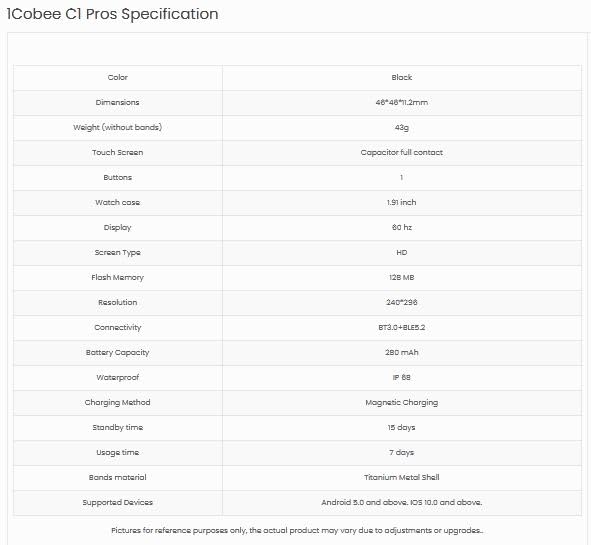
Figure 4: Detailed specifications for the XINJI COBEE C1 Pros Smart Watch, including dimensions, display, memory, and connectivity.
| Feature | Detalje |
|---|---|
| Mærke | XINJI |
| Modelnavn | Cobee C1 Pros |
| Skærmstørrelse | 1.91 Inches HD Display |
| Opdateringshastighed | 60 Hz |
| Opløsning | 240 x 240 |
| Forbindelse | Bluetooth |
| Batterilevetid (gennemsnitlig) | 15 Days (Standby), 7 Days (Usage) |
| Vandmodstand | IP68 |
| Hukommelseslagring | 128 MB |
| Kompatibel OS | Android 5.0+, iOS 10.0+ |
| Dimensioner | 4.6 x 4.6 x 1.12 cm |
| Vægt | 300 g |
| Særlige funktioner | Activity Tracker, Blood Pressure Monitor, Cycle Tracking, Daily Workout Memory, ECG, GPS, Oxymeter (SpO2), Phone Call |
8. Garanti og support
The XINJI COBEE C1 Pros Smart Watch comes with a 1 års garanti fra købsdatoen. Denne garanti dækker fabrikationsfejl og materialefejl ved normal brug.
- Garantikrav: For warranty service, please retain your proof of purchase. Contact XINJI customer support through their official webwebstedet eller de kontaktoplysninger, der følger med din produktemballage.
- Ekskluderinger: Garantien dækker ikke skader forårsaget af misbrug, ulykker, uautoriserede reparationer eller normal slitage.
Kundesupport
For technical assistance, troubleshooting, or general inquiries, please contact XINJI customer support. Refer to the official XINJI webwebstedet eller din produktemballage for at få de mest opdaterede kontaktoplysninger.

Figure 5: The official XINJI brand logo.
Ask a question about this manual
Ask about setup, troubleshooting, compatibility, parts, safety, or missing instructions. Manuals+ will review the question and use this page’s manual context to help answer it.