
Indledning
This manual provides detailed instructions for the installation, operation, and maintenance of your Daytech Freezer Door Alarm, Model USR-1. This device is designed to alert you when a refrigerator or freezer door is left open, helping to preserve food and save energy. Please read this manual thoroughly before using the product to ensure proper function and safety.
Produkt overview
The Daytech Freezer Door Alarm consists of a main unit and a magnetic sensor. When the magnetic sensor is separated from the main unit (indicating an open door), the alarm will activate after a set delay. The device features adjustable volume and multiple delay modes.

Figure 1: Main Unit Components and Dimensions
- Summer: Emits the alarm or chime sound.
- LED-indikator: Provides visual feedback for status and mode selection.
- Chime/Alarm/OFF Switch: Selects between chime mode, alarm mode, or turns the device off.
- Lydstyrkekontrol: Justerer lydniveauet.
- Work Mode Set Key: Selects the delay duration before the alarm activates.
Pakkens indhold
Bekræft at alle varer er til stede i din pakke:
- Produktemballageæske
- Refrigerator Door Alarm (Main Unit and Magnet)
- Brugermanual
- AAA batteries (quantity depends on the set purchased)
- Screws (quantity depends on the set purchased)
Video 1: Product Unboxing and Package Contents. This video demonstrates the items included in the package, such as the alarm units, user manual, and batteries.
Installation
The alarm can be installed on various types of refrigerators and freezers. Ensure the installation surface is clean and dry.
Installationstrin:
- Clean the desired installation area on your refrigerator or freezer door frame.
- Peel off the protective film from the double-sided adhesive tape on the back of the main unit and the magnet.
- Attach the main unit to the door frame and the magnet to the door, ensuring the triangular markings on both parts are aligned. The gap between the main unit and the magnet should be less than 0.98 inches (2.5 cm) when the door is closed.
- Press firmly for a few seconds to secure.

Figure 2: Installation Process
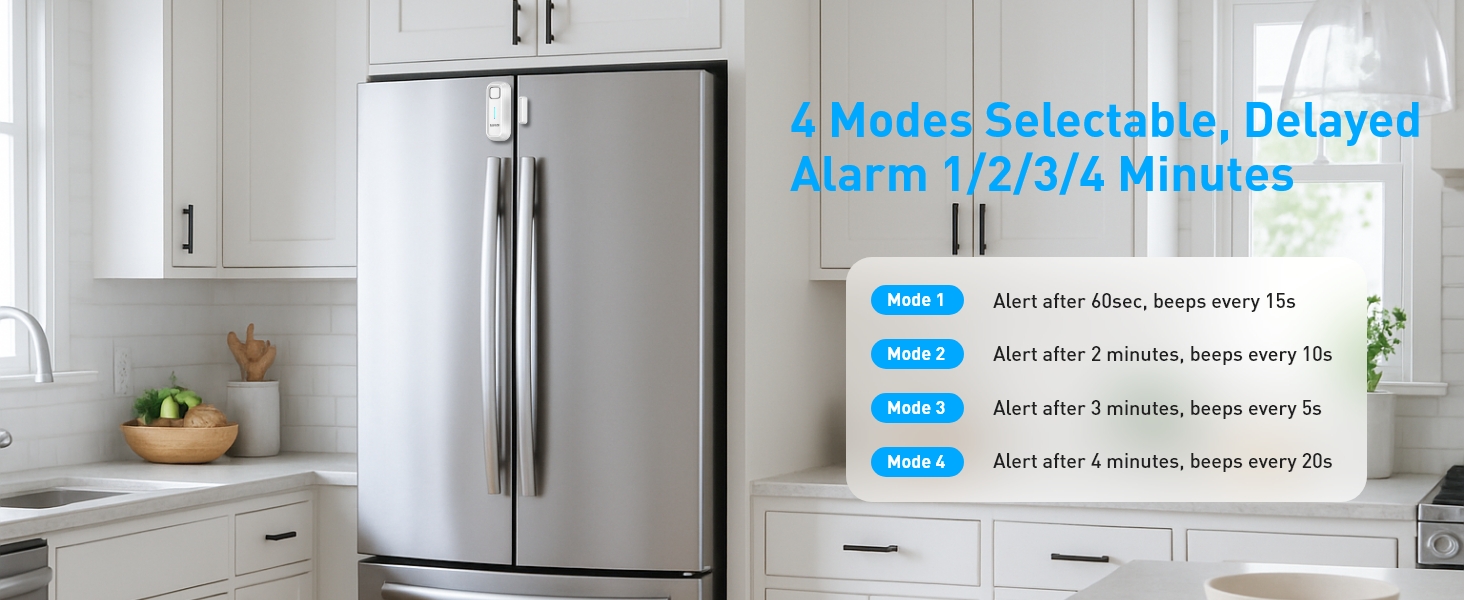
Figure 3: Recommended Installation Positions and Gap Requirements
Betjeningsvejledning
1. Ringtone and Mode Selection:
Use the 'Chime/Alarm/OFF' switch on the side of the main unit to select the desired sound mode:
- Klokketilstand: A gentle reminder sound.
- Alarmtilstand: A loud alert sound.
- OFF: Turns the device off, no sound will be made.
2. Lydstyrkejustering:
The alarm features 5 adjustable volume levels (0-120dB). Use the 'Volume' button on the side to cycle through the volume settings until you reach your preferred level.

Figure 4: Adjustable Volume Levels
3. Delay Mode Selection:
The alarm offers four delay modes, allowing you to choose how long the door can remain open before the alert sounds. Press the 'SET Key' button to cycle through the modes.
Video 2: Functional Adjustment Demonstration. This video illustrates how to switch between chime and alarm modes, adjust volume, and select different delay modes.
Arbejdstilstande
The Daytech Freezer Door Alarm offers four distinct working modes, each with a different delay duration and alert pattern:
| Mode | Forsinkelsesvarighed | Alert Pattern |
|---|---|---|
| Tilstand 1 | 1 minute (60 seconds) | Alarm/Chime sounds for 5 seconds every 15 seconds. |
| Tilstand 2 | 2 minutter (120 sekunder) | Alarm/Chime sounds for 10 seconds every 10 seconds. |
| Tilstand 3 | 3 minutter (180 sekunder) | Alarm/Chime sounds for 15 seconds every 5 seconds. |
| Tilstand 4 | 4 minutter (240 sekunder) | Alarm/Chime sounds for 20 seconds every 15 seconds. |

Figur 5: Overview of Working Modes
Udskiftning af batteri
The Daytech Freezer Door Alarm requires 2 AAA batteries. When the batteries are low, the alarm's performance may be affected. Replace batteries as follows:
- Slide the battery cover on the back of the main unit downwards to open.
- Fjern de gamle AAA-batterier.
- Isæt to nye AAA-batterier, og sørg for at polerne vender korrekt (+/-).
- Skub batteridækslet tilbage på plads, indtil det klikker sikkert.

Figur 6: Trin til batteriudskiftning
Fejlfinding
If you encounter issues with your Daytech Freezer Door Alarm, refer to the following troubleshooting guide:
| Problem | Mulig årsag | Løsning |
|---|---|---|
| Alarm does not sound when door is open. | 1. Device is OFF. 2. Batteries are low or incorrectly installed. 3. Magnet and main unit are too far apart. | 1. Ensure the 'Chime/Alarm/OFF' switch is set to Chime or Alarm mode. 2. Udskift batterierne og kontroller polariteten. 3. Re-position the main unit and magnet to ensure the gap is less than 0.98 inches (2.5 cm) when the door is closed. |
| Alarm sounds too frequently or falsely triggers. | 1. Magnet and main unit are too close or misaligned. 2. Delay mode is set too short. | 1. Adjust the position of the magnet and main unit to ensure proper alignment and a slight gap when the door is closed. 2. Select a longer delay mode using the 'SET Key'. |
| Volume is too low or too high. | Lydstyrkeindstillingen er ikke optimal. | Adjust the volume using the 'Volume' button on the side of the main unit. |
Specifikationer
| Feature | Detalje |
|---|---|
| Modelnummer | USR-1 |
| Dimensioner | 3.9 x 1.6 x 0.86 tommer (100 x 40 x 22 mm) |
| Varens vægt | 3.34 ounce |
| Strømkilde | Batteridrevet |
| Batterier påkrævet | 2 AAA batterier (medfølger) |
| Batteritype | Alkalisk |
| Støjniveau | Up to 120 Decibels |
| Monteringstype | Dørmontering |
| Sensor Technology | Kontakt sensor |
| Kompatible enheder | Home Security System (general) |
| Farve | Hvid |
Garanti og support
Daytech products are manufactured to high-quality standards. For warranty information or technical support, please refer to the contact details provided with your purchase or visit the official Daytech webwebstedet. Behold din købskvittering som købsbevis.