
1. Introduktion
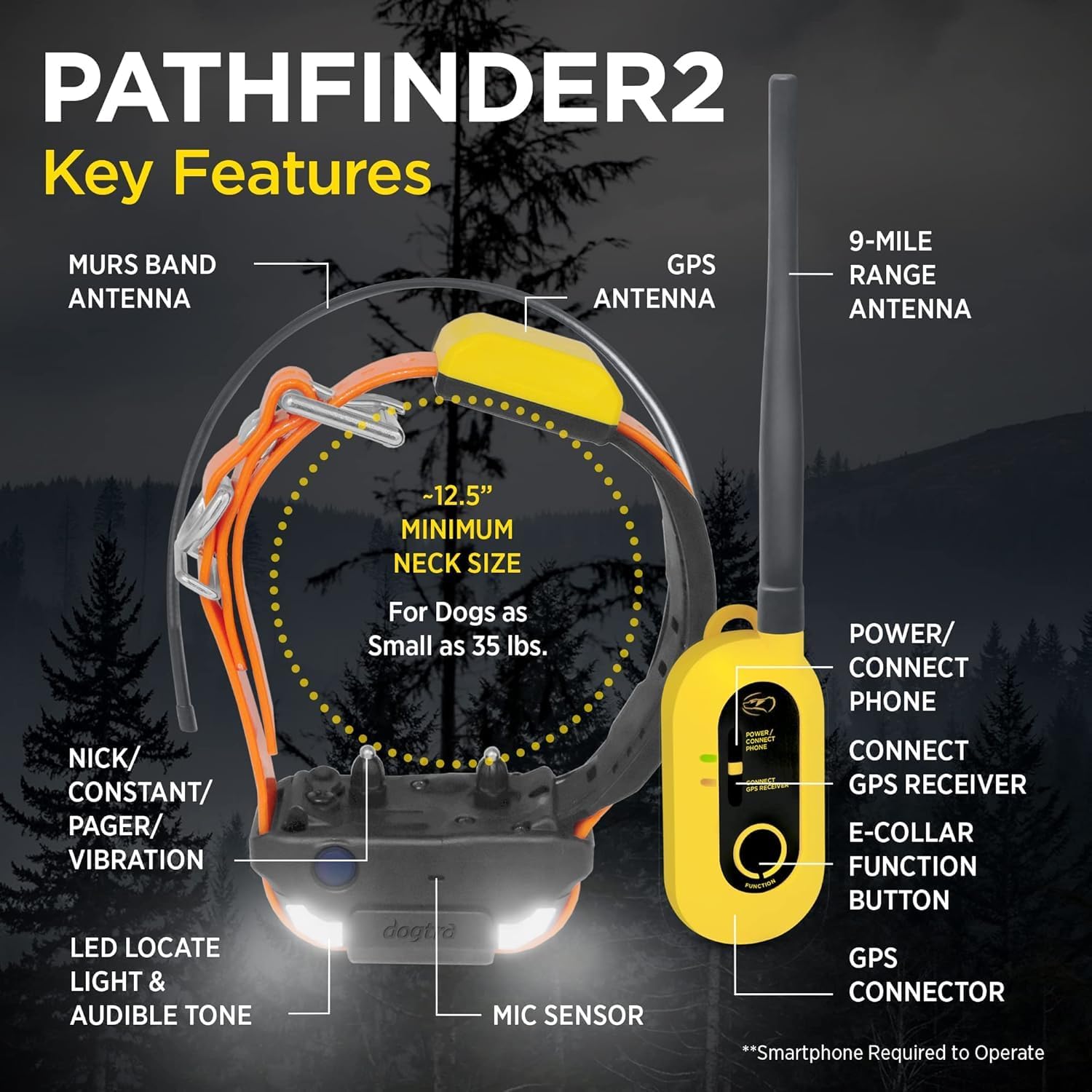
The Dogtra Pathfinder 2 is an advanced GPS dog tracking and e-collar training system designed for professional handlers and multi-dog owners. This system allows for real-time tracking and training of up to 21 dogs within a 9-mile range, utilizing a free smartphone app and compatible smartwatches. It provides precise location information and various e-collar functions to ensure the safety and training of your dogs in diverse outdoor environments.
2. Nøglefunktioner
- GPS-sporing i realtid: Track up to 21 dogs with a 9-mile range using the enhanced Dogtra PATHFINDER2 app.
- E-Collar Functions: Direct corrections via Nick, Constant, Pager, LED Locate Light, and Audible Tone, accessible from the GPS Connector or smartphone app.
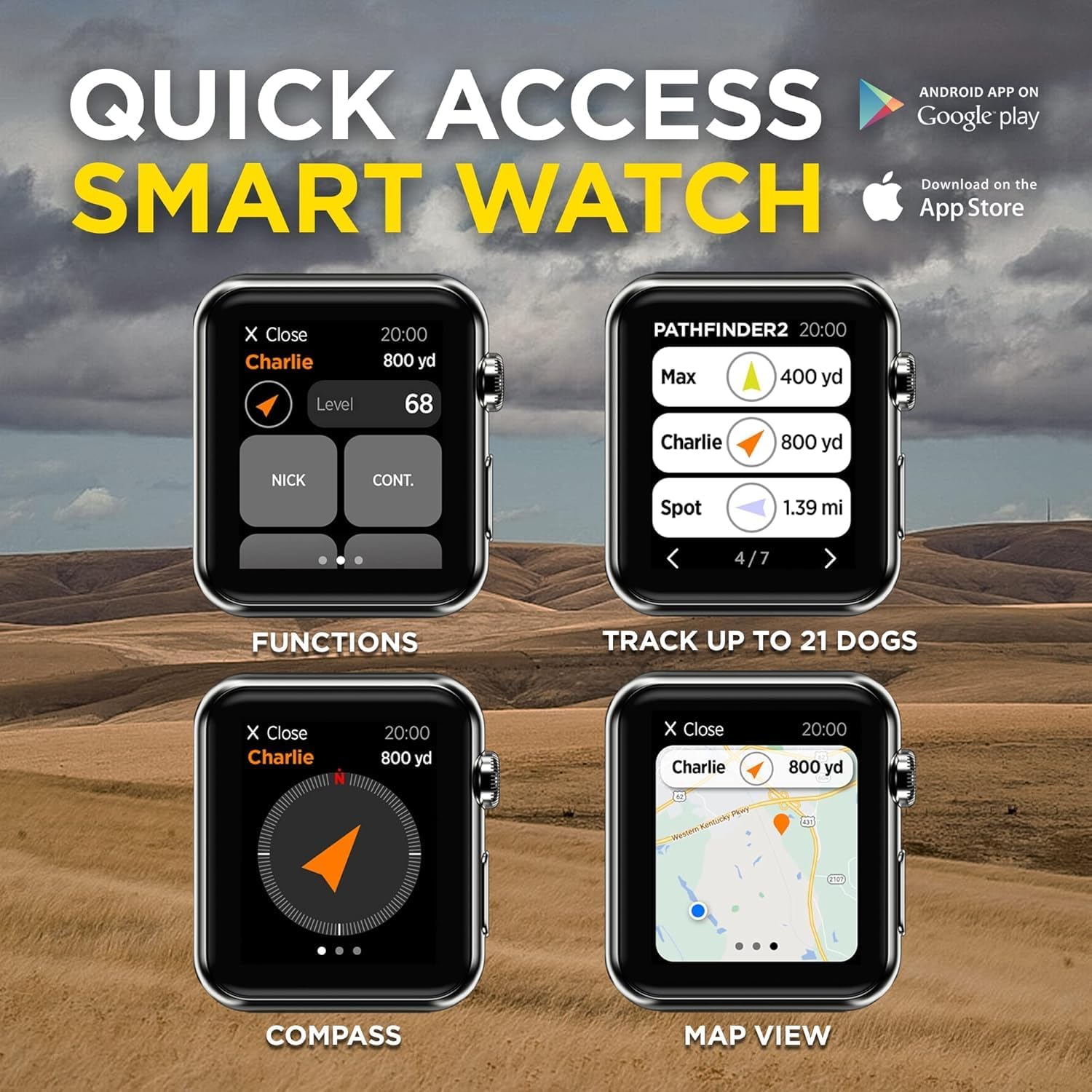
- Smartphone & Smartwatch Compatibility: Control and monitor your dogs from your smartphone (Bluetooth 5.0, iOS 12.1+ or Android 6.0+) or compatible smartwatches (Apple Watch Series 5+, Galaxy Watch4+).
- Free App & Maps: No subscriptions or monthly fees for the tracking app and map views (General, Satellite, Terrain) powered by Map Box. Offline maps are available for download.
- Enhanced GPS Fence Modes: Features Mobile-Fence, Geo-Fence, and E-Fence options for boundary management.
- Sove mode: Conserves battery life for extended use.
- Minimum Dog Size: Suitable for dogs as small as 35 lbs with a minimum neck size of approximately 12.5 inches.
3. Opsætning
- Oplad alle komponenter: Fully charge the GPS Connector handheld device and all receiver collars using the provided charging cables.
- Installer appen: Download the 'Dogtra PATHFINDER2' app from the Apple App Store (for iOS 12.1 or higher) or Google Play Store (for Android 6.0 or higher) on your smartphone.
- Pair GPS Connector with Smartphone: Turn on the GPS Connector. Enable Bluetooth 5.0 on your smartphone and follow the in-app instructions to pair the GPS Connector.
- Pair Receiver Collars: Follow the app's instructions to pair each receiver collar with the GPS Connector. Ensure all collars are powered on and within range.
- Opdater firmware: Regularly check for and install any available firmware updates for your PATHFINDER2 system and app software to ensure optimal performance.
- Kravepasform: Ensure the receiver collar is fitted snugly on your dog's neck, allowing two fingers to fit comfortably under the strap. Proper fit is crucial for effective e-collar function.

4. Betjeningsvejledning
4.1. Tænd/sluk
- To power on/off the GPS Connector and receiver collars, refer to the specific instructions within the Dogtra PATHFINDER2 app or the quick start guide.
4.2. GPS sporing
- Open the Dogtra PATHFINDER2 app on your smartphone or smartwatch.
- View real-time dog locations on the map interface.
- Utilize the compass feature for directional guidance to your dog's position.
- Switch between General, Satellite, and Terrain map views efter behov.
- Download offline maps for use in areas without cellular service.

4.3. E-Collar Functions
- Nick: Provides a quick, momentary stimulation.
- Konstant: Delivers continuous stimulation for up to 12 seconds (or until the button is released).
- Personsøger: Activates a vibration on the collar.
- LED Locate Light: Turns on an LED light on the collar for visibility in low light conditions.
- Hørbar tone: Emits an audible sound from the collar.
- These functions can be activated directly from the GPS Connector's e-collar function button or through the Dogtra PATHFINDER2 app on your smartphone or smartwatch.

4.4. Smartwatch Control
- For compatible smartwatches (Apple Watch Series 5 and above, Galaxy Watch4 Series and above), access the extended PATHFINDER2 app for quick control.
- Features include GPS receiver access, compass, e-collar commands, and map views directly on your wrist.
5. Vedligeholdelse
- Rensning: Regularly clean the receiver collars, especially the contact points, to ensure proper function and prevent skin irritation on your dog. Use a damp cloth and mild soap, then rinse thoroughly.
- Batteripleje: For optimal battery life, avoid fully discharging the units frequently. Charge them regularly, especially before extended periods of non-use. Store devices in a cool, dry place.
- Vandtætning: The devices are waterproof, but ensure all charging port covers are securely closed when not charging to maintain water resistance.
- Opbevaring: When not in use, store the GPS Connector and receiver collars in a dry, temperate environment away from extreme temperatures.
6. Fejlfinding
- Intet GPS-signal: Ensure the receiver collar has a clear view of the sky. Move to an open area away from dense cover or tall buildings. Check that the unit is powered on and fully charged.
- Connectivity Issues (GPS Connector to Smartphone): Verify Bluetooth is enabled on your smartphone and the GPS Connector. Try restarting both devices and re-pairing them through the app. Ensure the app and device firmware are up to date.
- E-Collar Not Functioning: Check the receiver collar's battery level. Ensure the collar is fitted correctly with contact points touching the dog's skin. Verify that the correct e-collar function (Nick, Constant, Pager) is selected in the app or on the GPS Connector.
- Appen reagerer ikke: Close and restart the Dogtra PATHFINDER2 app. If the issue persists, clear the app's cache or reinstall it.
- Inkompatibilitet: Note that the PATHFINDER2 series is NOT compatible with the previous generation PATHFINDER series systems. Ensure all your devices belong to the PATHFINDER2 series.

7. Specifikationer
| Mærke | Dogtra |
| Model | PATHFINDER2 System, PATHFINDER2 ADDITIONAL RECEIVER GREEN |
| Rækkevidde | Op til 9 miles |
| Dog Capacity | Op til 21 hunde |
| Smartphonekompatibilitet | Bluetooth 5.0, iOS 12.1+ or Android 6.0+ |
| Smartwatch-kompatibilitet | Apple Watch Series 5+, Galaxy Watch4 Series+ |
| Materiale | Plast |
| Color (Add-on Receiver) | Grøn |
| Minimumsvægt for hunden | 35 lbs |
| Vandtæt | Ja |
8. Garanti og support
For detailed warranty information, product registration, and technical support, please visit the official Dogtra website or contact Dogtra customer service directly. Dogtra is committed to providing responsive customer support for their products.


