
1. Vigtige sikkerhedsoplysninger
Please read all safety and operating instructions carefully before using your television. Keep these instructions for future reference.
- Strømkilde: Tilslut kun tv'et til den type strømkilde, der er angivet på mærkningen.
- Ventilation: Sørg for tilstrækkelig ventilation. Bloker ikke ventilationsåbninger.
- Vand og fugt: Udsæt ikke tv'et for regn eller fugt. Brug det ikke i nærheden af vand.
- Rensning: Unplug the TV from the wall outlet before cleaning. Use a soft, dry cloth. Do not use liquid or aerosol cleaners.
- Placering: Placer tv'et på en stabil, plan overflade. Undgå at placere det i direkte sollys eller i nærheden af varmekilder.
- Lyn: Tag stikket ud af tv'et under tordenvejr eller når det ikke bruges i længere perioder.
2. Pakkens indhold
Verify that all items listed below are included in your TV package:
- coocaa ROKU 50R5G 50-inch UHD Smart LED TV
- Fjernbetjening med batterier
- TV-bord (2 stk.)
- Standsskruer
- Strømkabel
- Quick Start Guide (denne manual)
3. Opsætning
3.1 Udpakning og montering af stativ
Carefully remove the TV from its packaging. It is recommended to have two people for this process. Place the TV face down on a soft, clean surface to prevent screen damage.
Sådan monteres TV-stativet:
- Juster hvert stativstykke med de tilsvarende riller i bunden af tv'et.
- Fastgør stativerne med de medfølgende skruer. Sørg for, at de er spændt godt fast.
Alternatively, for wall mounting, consult a professional installer and use a VESA-compatible wall mount (not included).

This image illustrates the coocaa Roku TV seamlessly integrated into a modern living room environment, mounted on a light blue wall. The TV is positioned above a minimalist wooden TV cabinet, demonstrating a typical installation scenario.
3.2 Tilslutning af strøm og første opsætning
- Tilslut strømkablet til tv'ets strømindgang og derefter til en stikkontakt.
- Tryk på tænd/sluk-knappen på fjernbetjeningen eller tv'et.
- Follow the on-screen instructions to complete the initial Roku OS setup, including language selection, country, and channel scanning for the triple tuner (satellite, cable, or antenna).
3.3 Netværksforbindelse
To access Smart TV features and streaming services, connect your TV to the internet:
- Wi-Fi: During initial setup or via the Settings menu, select 'Network' and then 'Wireless'. Choose your Wi-Fi network from the list and enter the password.
- LAN (Ethernet): Connect an Ethernet cable from your router to the LAN port on the back of the TV. The TV will automatically detect the wired connection.
4. Betjening af dit TV
4.1 Roku OS Home Screen
The Roku OS home screen provides quick access to all your entertainment. It combines linear TV and streaming services into one intuitive interface.

This image shows the coocaa Roku TV from the front, powered on and displaying its intuitive home screen. The screen features icons for popular streaming services like Netflix, Disney+, Apple TV, and live TV options, alongside inputs for cable box and game console. A '2023 Heimkino Innovation Award' badge is visible on the bottom left bezel.
- Streamingkanaler: Access popular apps like Netflix, Disney+, and Apple TV.
- Live tv: Watch broadcast television via the integrated triple tuner.
- Indgange: Easily switch between connected devices (e.g., game console, cable box).
- Søge: Use the cross-channel search to find content by title, actor, or genre.
4.2 Brug af fjernbetjeningen
The user-friendly remote control provides all necessary functions:
- Navigationsplade: Use the arrow buttons to navigate menus and select items.
- OK knap: Bekræft valg.
- Hjemknappen: Return to the Roku OS home screen.
- Tilbage knap: Gå tilbage til det forrige skærmbillede.
- Øjeblikkelig genafspilning: Replay the last few seconds of video.
- Hurtig adgangsknapper: Dedikerede knapper til populære streamingtjenester.
- Stemmesøgning: Use the voice search feature for hands-free control (if supported by remote model).
4.3 Inputkilder
Connect external devices to your TV using the available ports:
- HDMI: The TV features three HDMI inputs for connecting devices like Blu-ray players, game consoles, or set-top boxes.
- USB: One USB port is available for media playback or Timeshift functions.
- Digital lydudgang: Til tilslutning til eksterne lydsystemer.
4.4 Smart TV-funktioner
Your coocaa Roku TV offers a wide range of smart features:
- Streamingtjenester: Access pre-installed apps like Netflix, Disney+, Apple TV, and more.
- Stemmeassistent support: Compatible with Apple AirPlay, Apple Home, Alexa, and Google Home for integrated smart home control.
- Roku mobilapp: Control your TV, use voice search, and listen to audio via headphones using the free Roku app for iOS and Android devices.
4.5 Lyd- og videoindstillinger
Optimer din viewoplevelse:
- Billedtilstande: Select from various picture modes (e.g., Standard, Movie, Sport) or customize brightness, contrast, and color settings.
- HDR-understøttelse: Enjoy enhanced contrast and color with HDR10 and HLG content.
- Lydtilstande: Choose sound modes (e.g., Standard, Music, Speech) or adjust equalizer settings for optimal audio.
5. Vedligeholdelse
5.1 Rengøring af dit TV
For at bevare TV'ets udseende og ydeevne:
- Tag stikket ud af TV'et før rengøring.
- Brug en blød, tør og fnugfri klud til at tørre skærmen og kabinettet af.
- For genstridige mærker, gnid letampen the cloth with water. Never spray cleaner directly onto the TV.
- Undgå at bruge slibende rengøringsmidler, voks eller opløsningsmidler.
5.2 Softwareopdateringer
Your Roku TV automatically checks for and installs software updates when connected to the internet. These updates provide new features, performance improvements, and bug fixes. Ensure your TV remains connected to the internet for timely updates.
6. Fejlfinding
Hvis du støder på problemer med dit tv, kan du bruge følgende almindelige løsninger:
| Problem | Mulig løsning |
|---|---|
| Ingen strøm | Kontroller, om strømkablet er korrekt tilsluttet til tv'et og stikkontakten. Prøv en anden stikkontakt. |
| Intet billede, men der er lyd | Sørg for, at den korrekte inputkilde er valgt. Kontroller kabelforbindelserne til eksterne enheder. |
| Ingen lyd, men billedet er til stede | Check the volume level and mute status. Ensure external audio systems are correctly connected and powered on. |
| Kan ikke oprette forbindelse til Wi-Fi | Verify your Wi-Fi password. Restart your router and modem. Move the TV closer to the router or use a wired connection. |
| Fjernbetjeningen virker ikke | Udskift batterierne. Sørg for, at der ikke er nogen forhindringer mellem fjernbetjeningen og tv'et. |
7. Specifikationer
Detailed technical specifications for the coocaa ROKU 50R5G TV:

This image displays the official product data sheet (Produktdatenblatt) for the coocaa 50R5G television. It provides comprehensive technical specifications, including energy efficiency class, power consumption, screen resolution, panel technology, and guaranteed software/spare parts availability, as per EU regulations.
| Parameter | Værdi |
|---|---|
| Mærke | coocaa |
| Model Name / Item Model Number | 50R5G |
| Operativsystem | Roku OS |
| Skærmstørrelse | 50 tommer (126 cm) |
| Displayteknologi | LCD LED |
| Opløsning | 3840 x 2160 pixels (4K UHD) |
| Aspektforhold | 16:9 |
| Refresh Rate (Standard) | 50 Hz |
| Forbindelse | Wi-Fi, LAN (Ethernet), 3x HDMI, 1x USB |
| Særlige funktioner | Integrated Speaker, HDR10, HLG, Triple Tuner |
| Understøttede internettjenester | Netflix, Disney+, Apple TV, Prime Video, RTL+ |
| Produktmål (B x H x D) | 110 cm x 65 cm x 9 cm (ca.) |
| Energieffektivitetsklasse (SDR) | G |
| Strømforbrug (SDR) | 70.0 W / 70 kWh/1000t |
| Energieffektivitetsklasse (HDR) | G |
| Strømforbrug (HDR) | 103 W / 103 kWh/1000t |
| Guaranteed Software/Firmware Updates | 8 years (from end of market placement) |
| Guaranteed Spare Parts Availability | 7 years (from end of market placement) |
| Guaranteed Product Support | 7 år |
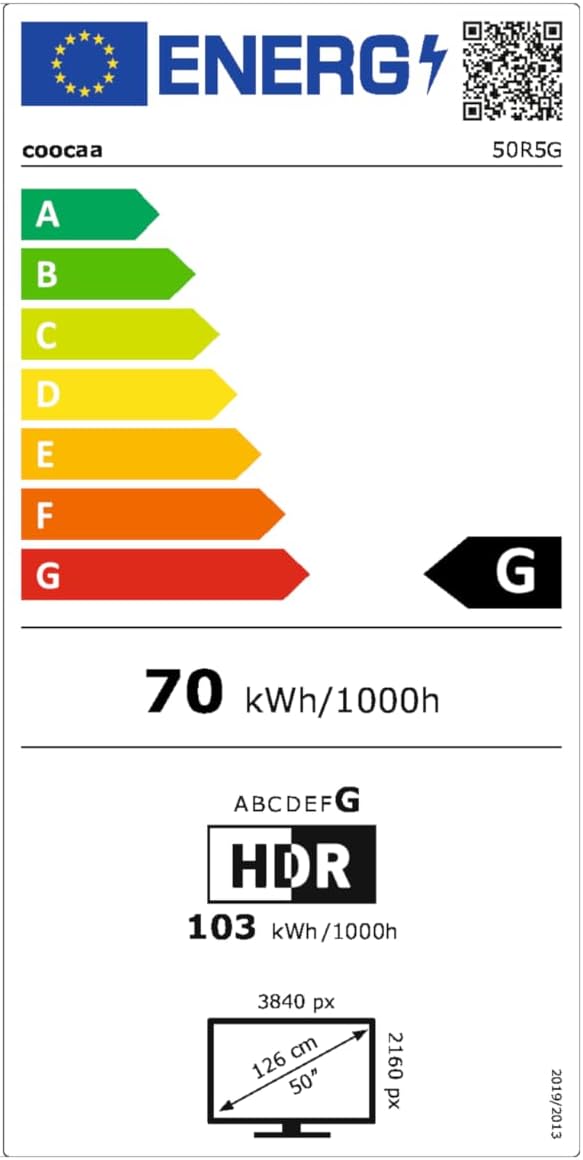
This image presents the EU Energy Label for the coocaa 50R5G TV. It indicates an energy efficiency class of 'G' for both Standard Dynamic Range (SDR) and High Dynamic Range (HDR) content, with power consumption values of 70 kWh/1000h for SDR and 103 kWh/1000h for HDR. The label also shows the screen size of 50 inches (126 cm) and resolution of 3840x2160 pixels. A QR code is included for accessing the EPREL database: EPREL-databaselink
8. Garanti og support
Your coocaa ROKU 50R5G TV comes with a manufacturer's warranty. Please refer to the official product documentation for specific terms and conditions.
- General Warranty Period: 2 år fra købsdatoen.
- Produktsupport: Guaranteed for 7 years.
- Reservedele: Guaranteed availability for 7 years after the product is no longer placed on the market.
- Softwareopdateringer: Guaranteed for 8 years after the product is no longer placed on the market.
For technical assistance or warranty claims, please contact coocaa customer support through their official webwebstedet eller forhandleren, hvor produktet blev købt.