
IN WIN MR24
InWin MR24 ARGB Close-Loop AIO CPU Liquid Cooler Instruction Manual
Model: MR24 | Brand: IN WIN
1. Produktet er slutview
The InWin MR24 ARGB Close-Loop AIO CPU Liquid Cooler is designed to provide efficient and quiet cooling for your computer's central processing unit. Featuring a 240mm radiator and double 120mm ARGB PWM fans, this all-in-one liquid cooler is engineered to combat high temperatures and minimize noise through its radiator-mounted pump design. The rotatable CPU blockhead allows for flexible installation and aesthetic alignment within your PC build.

Image: The InWin MR24 ARGB liquid cooler showcasing its 240mm radiator, two 120mm ARGB fans, and the rotatable CPU blockhead with vibrant illumination.
Nøglefunktioner:
- Universalbeslag: Supports Intel and AMD’s latest CPUs, including AM5.
- High-Performance ARGB Fans: Equipped with Neptune AN120 fans for efficient cooling and customizable lighting.
- Radiator-Mounted Pump: Innovative design minimizes vibrations and suppresses noise for a quieter system.
- Adjustable ARGB CPU Block: Features a rotatable blockhead with ARGB lighting for aesthetic customization.
- Durable Tubing: Nylon mesh sleeves with strengthened rubber tubing to prevent leakage and ensure longevity.
2. Sikkerhedsoplysninger
Please read and understand all safety instructions before installing or operating the InWin MR24 ARGB Liquid Cooler. Failure to follow these instructions may result in damage to the product, personal injury, or voiding of the warranty.
- Sørg for, at dit system er slukket og taget stikket ud af stikkontakten inden installation.
- Håndter komponenterne forsigtigt for at undgå skader på følsomme elektroniske dele.
- Wear anti-static gloves or use an anti-static wrist strap to prevent electrostatic discharge (ESD).
- Do not attempt to open or modify the sealed liquid cooling loop.
- Keep the product away from liquids and excessive humidity.
- Ensure proper ventilation within your PC chassis to maintain optimal performance and prevent overheating.
3. Pakkens indhold
Verify that all components listed below are present in your InWin MR24 ARGB Liquid Cooler package:
- MR24 Radiator with Integrated Pump and Tubing
- 2 x Neptune AN120 ARGB PWM Fans
- Intel Mounting Bracket (LGA 1700/1200/115x/20xx)
- AMD Mounting Bracket (AM5/AM4/AMX/FMX)
- Standoff Screws for Intel and AMD Sockets
- Ventilator skruer
- Kølerskruer
- Thermal Paste Syringe
- PWM Fan forlængerkabel
- ARGB vandblokkabel
- Brugervejledning (dette dokument)

Billede: En omfattende view of all parts and accessories included in the InWin MR24 ARGB Liquid Cooler package, laid out for identification.
4. Opsætning og installation
Follow these steps carefully to install your InWin MR24 ARGB Liquid Cooler. For a visual guide, please refer to the installation video provided below.
Video: Official InWin MR24/36 Installation Guide, demonstrating the step-by-step process for mounting the cooler and connecting its components.
4.1. Ventilatorinstallation
- Attach the Neptune AN120 fans to the radiator using the provided fan screws. Ensure the airflow direction is as desired (typically pushing air through the radiator).
- Connect the PWM cables from the fans to the PWM Fan Extension Cable.
- Connect the ARGB cables from the fans to the ARGB Water Block Cable.

Image: The 240mm radiator with two Neptune AN120 ARGB fans securely mounted, ready for chassis installation.
4.2. Radiator Installation
- Determine the optimal mounting location for the radiator within your PC chassis (e.g., top, front, or rear).
- Secure the radiator and fan assembly to the chassis using the appropriate radiator screws.
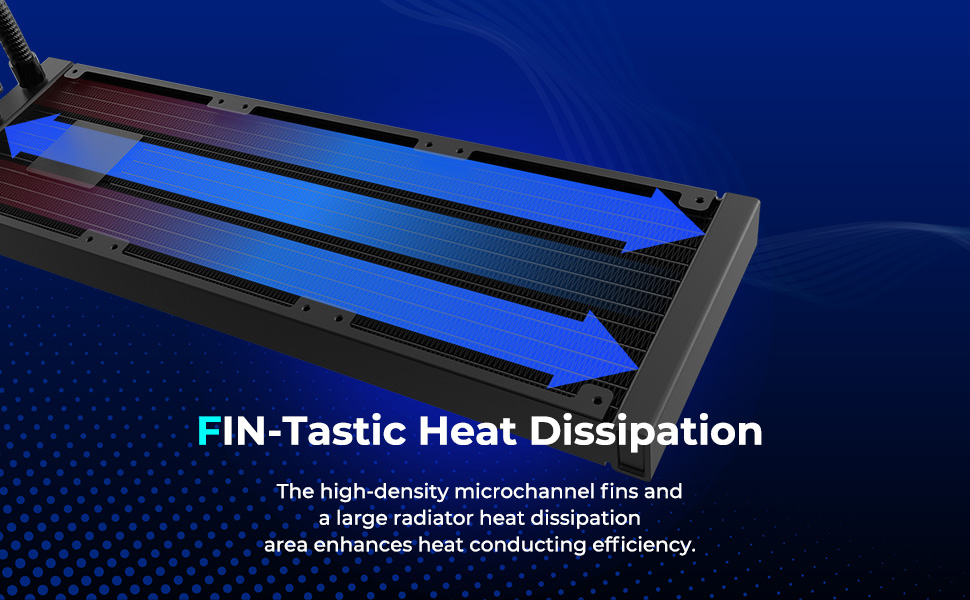
Image: A diagram illustrating the high-density microchannel fins of the radiator, designed for efficient heat dissipation from the liquid coolant.
4.3. Pump Unit Installation
- Select the correct mounting bracket (Intel or AMD) for your CPU socket type.
- Attach the Intel backplate to the bottom of the motherboard if installing on an Intel system.
- Install the standoff screws onto your motherboard, ensuring they are tightened securely.
- Påfør en lille mængde termisk pasta i midten af din CPU's integrerede varmespreder (IHS).
- Carefully place the CPU blockhead onto the CPU, aligning the mounting holes with the standoff screws.
- Secure the CPU blockhead by tightening the spring-loaded screws in a diagonal pattern until firm.

Billede: En detaljeret view of the InWin MR24 CPU blockhead, highlighting its rotatable design and ARGB lighting ring.
4.4. Kabeltilslutning
- Connect the ARGB Water Block Cable to a 5V, 3-pin ARGB header on your motherboard (usually labeled M_B 3-Pin or ARGB_Header).
- Connect the PWM Fan Extension Cable to a 12V, 4-pin PWM fan header on your motherboard (usually labeled M_B 4-Pin or CPU_FAN).
- Connect the Pump Cable (from the radiator) to a dedicated AIO_PUMP or CPU_OPT header on your motherboard.

Image: A visual representation of the various cable connections required for the InWin MR24 liquid cooler, including ARGB and PWM headers.
5. Betjeningsvejledning
Once installation is complete and verified, power on your system. The InWin MR24 ARGB Liquid Cooler will begin operating automatically.
- Ventilatorkontrol: The PWM fans will adjust their speed based on CPU temperature, controlled by your motherboard's fan curves. These can typically be configured in your motherboard's BIOS/UEFI settings or through manufacturer-provided software.
- ARGB-lysstyring: The ARGB lighting on the fans and CPU blockhead can be controlled via your motherboard's ARGB software (e.g., ASUS Aura Sync, MSI Mystic Light Sync, GIGABYTE RGB Fusion, ASRock Polychrome Sync). Ensure your motherboard supports 5V, 3-pin ARGB.
- Pumpedrift: The pump operates continuously to circulate coolant. Ensure the pump header in your BIOS is set to full speed or 'PWM' mode to ensure consistent flow.
6. Vedligeholdelse
Regelmæssig vedligeholdelse er med til at sikre din væskekølers levetid og optimale ydeevne.
- Fjernelse af støv: Periodically clean dust from the radiator fins and fan blades using compressed air or a soft brush. Dust accumulation can impede airflow and reduce cooling efficiency.
- Tjek slanger: Visually inspect the tubing and connections for any signs of leaks, kinks, or damage.
- Ventilatorstøj: If fans become excessively noisy, check for dust buildup or loose mounting screws.
- Kølevæskeniveau: As this is a closed-loop system, no coolant refilling is typically required.
7. Fejlfinding
If you encounter issues with your InWin MR24 ARGB Liquid Cooler, refer to the following common problems and solutions:
| Problem | Mulig årsag | Løsning |
|---|---|---|
| Høje CPU-temperaturer | Insufficient thermal paste, poor contact with CPU, dust buildup on radiator, incorrect fan orientation, pump not running. | Reapply thermal paste, ensure secure mounting, clean radiator/fans, verify fan direction, check pump connection and BIOS settings. |
| Ventilatorer drejer ikke / ingen ARGB-belysning | Loose cable connections, incorrect header connection, motherboard software issues. | Check all PWM and ARGB cable connections, ensure connected to correct headers (12V 4-pin for PWM, 5V 3-pin for ARGB), update/reinstall motherboard ARGB software. |
| Usædvanlig støj fra køler | Air bubbles in pump, fan bearing noise, loose fan/radiator screws. | Gently shake chassis to dislodge air bubbles (with system off), check fan screws, consider fan replacement if noise persists. |
8. Specifikationer
Detailed technical specifications for the InWin MR24 ARGB Liquid Cooler:
| Specifikation | Værdi |
|---|---|
| Mærke | I VIND |
| Model | MR24 |
| Afkølingsmetode | Vand |
| Radiatorstørrelse | 240 mm |
| Fan størrelse | 120 mm (x2) |
| Fan type | ARGB PWM Fans (Neptune AN120) |
| Maksimal rotationshastighed | 2500 RPM |
| Støjniveau | 20.5 dB |
| Strømstik type | 4-benet (PWM) |
| Voltage | 12 volt |
| Kompatible enheder | Desktop (AMD Ryzen AM5/AM4; Intel LGA 1700/1200) |
| Produktmål (LxBxH) | 94.49 x 9.45 x 9.45 tommer |
| Varens vægt | 4.22 pund |
| Dato først tilgængelig | 23. september 2023 |
9. Garanti og support
InWin products are manufactured to the highest quality standards. For specific warranty terms and conditions, please refer to the warranty card included with your product or visit the official InWin website. If you require technical assistance or have questions regarding your InWin MR24 ARGB Liquid Cooler, please contact InWin customer support through their official channels.
For the latest drivers, software, and support resources, please visit the official InWin webwebsted: www.in-win.com
Ask a question about this manual
Ask about setup, troubleshooting, compatibility, parts, safety, or missing instructions. Manuals+ will review the question and use this page’s manual context to help answer it.