
1. Introduktion
Thank you for choosing the Geek AiroCook Helix 12 Litres Air Fryer Oven. This versatile 8-in-1 digital touch oven is designed to simplify your cooking experience, offering functions such as air frying, baking, rotisserie, grilling, toasting, broiling, dehydrating, and keeping food warm. With its 12-litre capacity and 1700W power, it is suitable for preparing a variety of meals. This manual provides essential information for safe operation, maintenance, and optimal use of your appliance.
2. Vigtige sikkerhedsinstruktioner
Læs venligst alle instruktioner omhyggeligt, inden apparatet tages i brug, for at forhindre personskade eller materielle skader. Gem denne manual til senere brug.
- Nedsænk ikke apparatet, ledningen eller stikket i vand eller andre væsker.
- Dette apparat er ikke beregnet til brug af personer (inklusive børn) med nedsatte fysiske, sensoriske eller mentale evner, eller mangel på erfaring og viden, medmindre de er blevet under opsyn eller instruktion i brugen af apparatet af en person, der er ansvarlig for deres sikkerhed. .
- Tæt opsyn er nødvendigt, når et apparat bruges af eller i nærheden af børn.
- Træk stikket ud af stikkontakten, når det ikke er i brug, og før rengøring. Lad det køle af, før du sætter dele på eller af.
- Betjen ikke noget apparat med en beskadiget ledning eller stik, eller efter at apparatet ikke fungerer korrekt eller er blevet beskadiget på nogen måde.
- Brug ikke tilbehør, der ikke er anbefalet af apparatproducenten, da dette kan forårsage skader.
- Må ikke bruges udendørs.
- Lad ikke ledningen hænge ud over kanten af et bord eller bord, eller rør ved varme overflader.
- Må ikke placeres på eller i nærheden af en varm gas- eller elektrisk brænder eller i en opvarmet ovn.
- Der skal udvises ekstrem forsigtighed ved flytning af et apparat, der indeholder varm olie eller andre varme væsker.
- Sæt altid stikket i apparatet først, og sæt derefter ledningen i stikkontakten. For at afbryde forbindelsen skal du slukke for en vilkårlig knap og derefter tage stikket ud af stikkontakten.
- Brug ikke apparatet til andet end tilsigtet brug.
- Sørg for tilstrækkelig ventilation omkring apparatet under drift. Bloker ikke nogen luftåbninger.
- Always use oven mitts when handling hot accessories or food from the oven.
3. Produktet er slutview
Nøglefunktioner
- 8-i-1 alsidighed: Functions as an Air Fryer, Griller, Convection Oven, Pizza Maker, Toaster, Broiler, Dehydrator, and Food Warmer.
- Stor kapacitet: 12 Litres, suitable for family-sized meals.
- Kraftig ydeevne: 1700 W for effektiv madlavning.
- Digital berøringskontrol: User-friendly LED touch screen with 12 preset menus.
- SHA Technology: 360° Swirl Hot Air circulation ensures even and crispy cooking.
- Holdbar konstruktion: Stainless steel interior for long-lasting, rust-free performance.
- Rotisserie funktion: Integrated function for roasting whole chicken, fish, or prawns.
Komponenter og tilbehør
The Geek AiroCook Helix comes with a range of accessories to enhance your cooking versatility:
- Bageplade
- Ovnstativ
- Roterende kurv
- Rotisseriestang
- Hent stativ
- Stegekurv
- Crisp Tray
- Silicon Mitts
- Opskriftsbog
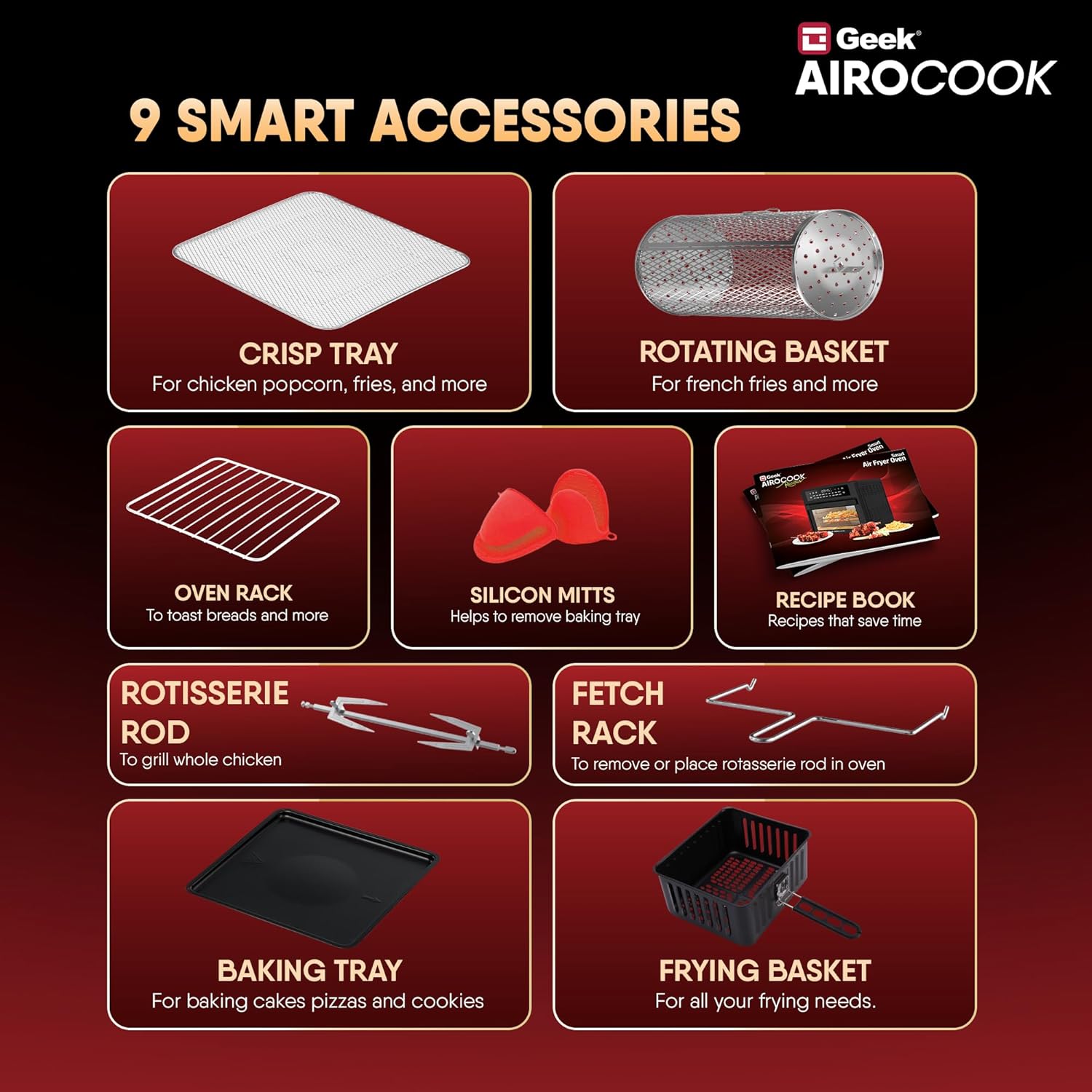
Figure 1: Included Accessories for the Geek AiroCook Helix.

Figure 2: Smart Touch Control Panel.
4. Opsætning
Before first use, ensure the appliance is placed on a stable, heat-resistant surface with adequate clearance from walls and other appliances. Remove all packaging materials and stickers. Clean all accessories and the interior of the oven with a damp cloth and mild detergent, then dry thoroughly. Ensure the crumb tray is properly inserted at the bottom of the oven.
5. Betjeningsvejledning
Tænd/sluk
Plug the appliance into a grounded electrical outlet. Press the Power knap (usually indicated by a universal power symbol) on the control panel to turn the oven on or off.
Selecting Functions (Preset Menus)
The Geek AiroCook Helix features 12 preset menus for common dishes. To select a function:
- Ensure the oven is powered on.
- Browse through the menu options on the LED touch screen.
- Select your desired preset (e.g., Fries, Pizza, Chicken) by tapping its icon. The default time and temperature for that preset will be displayed.
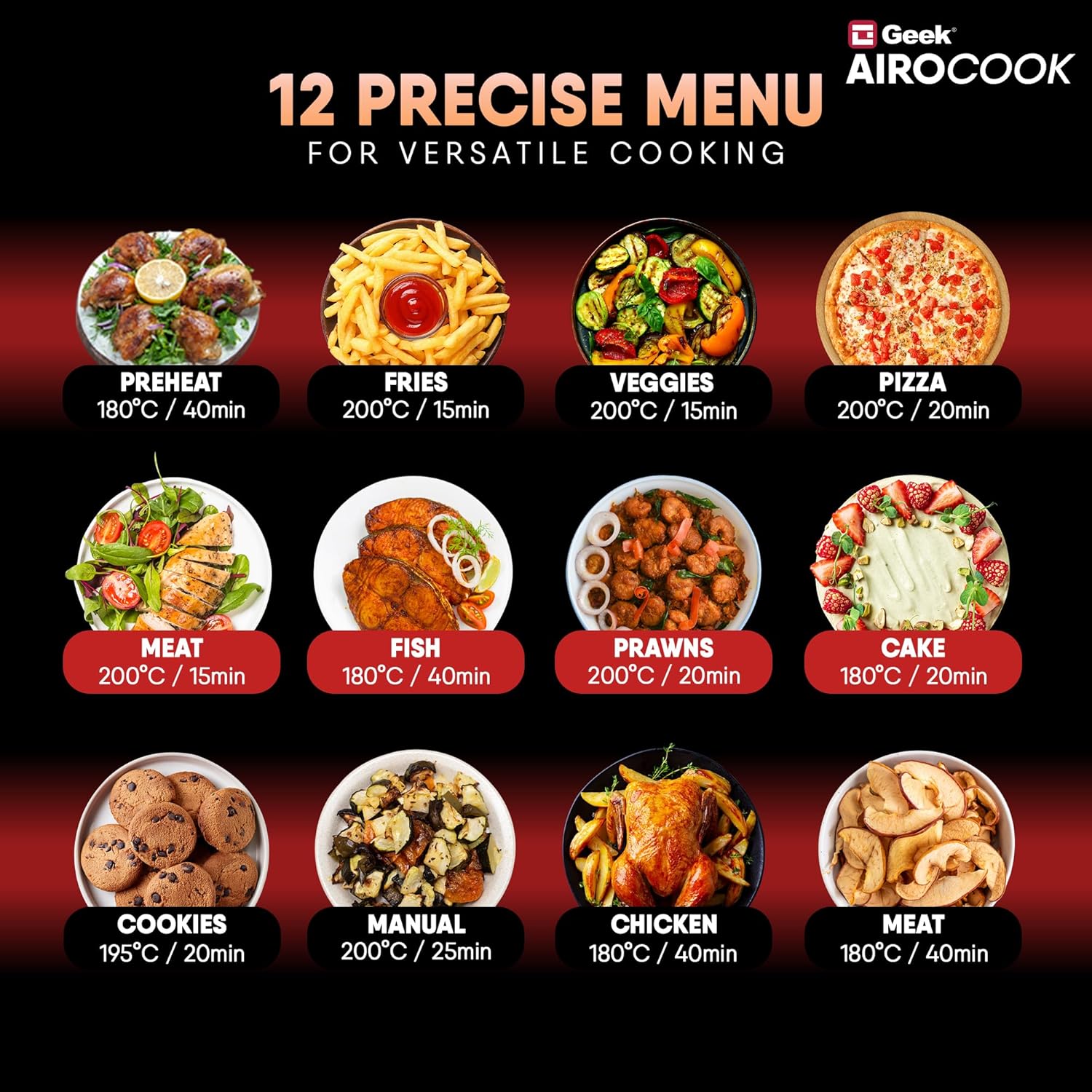
Figure 3: 12 Precise Menu Options.
Justering af tid og temperatur
After selecting a preset or choosing the 'Manual' option, you can fine-tune the cooking time and temperature:
- Tryk på Timer/Temp button (often indicated by a clock or thermometer icon).
- Brug + og - buttons to increase or decrease the temperature (up to 200°C) or cooking time (up to 60 minutes).
- Bekræft dit valg ved at trykke på Afspil/pause button or waiting a few seconds for the setting to lock in.
Pause/Play Function
During cooking, you can pause the process to check food or add ingredients:
- Tryk på Afspil/pause button to temporarily stop cooking.
- Tryk på den igen for at genoptage tilberedningen.
Setting the Delay Timer
To set a delayed start for your cooking:
- Select your desired cooking function, time, and temperature.
- Tryk på Ur-ikon (often with an arrow or 'delay' symbol).
- Brug + og - buttons to set the desired delay time.
- Tryk på Afspil/pause button to activate the delay timer. The oven will start cooking after the set delay time.
Indvendigt lys
To monitor your food without opening the oven door, press the Lys knap (indicated by a light bulb icon) to turn the internal light on or off.
6. Madlavningsvejledning
The Geek AiroCook Helix offers various cooking methods. Refer to the included recipe book or the Geek Recipe App for specific recipes and detailed instructions.
- Luft stegning: Ideal for achieving crispy textures on foods like fries, chicken wings, and vegetables with significantly less oil.
- Bagning: Use the baking tray for cakes, cookies, muffins, and other baked goods.
- Rotisserie: The rotisserie function is perfect for evenly roasting a whole chicken, fish, or other large cuts of meat. Ensure the food is securely fastened to the rotisserie rod.
- Grilling/Broiling: For searing meats, fish, or browning the top of dishes.
- Ristning: Quickly toast bread, bagels, or other items using the oven rack.
- Dehydrerende: Use the dehydrate function to preserve fruits, vegetables, and herbs by removing moisture at low temperatures.
- Hold dig varm: Maintain the temperature of cooked food until ready to serve.

Figure 4: Rotisserie function in action.
7. Rengøring og vedligeholdelse
Regelmæssig rengøring sikrer optimal ydeevne og forlænger apparatets levetid.
- Tag altid stikket ud af ovnen, og lad den køle helt af, inden du rengør den.
- Tør det udvendige af med adamp klæde. Brug ikke slibende rengøringsmidler.
- Rengør det indvendige med en blød, damp klud og mild sæbe. Brug en ikke-slibende svamp til genstridige pletter.
- All accessories (baking tray, oven rack, baskets, rods) should be washed with warm, soapy water and a non-abrasive sponge. Rinse thoroughly and dry completely before storing or re-using.
- The crumb tray should be emptied and cleaned after each use to prevent grease buildup.
- Apparatet tåler ikke opvaskemaskine.
8. Fejlfinding
If you encounter issues with your Geek AiroCook Helix, refer to the following common problems and solutions:
| Problem | Mulig årsag | Løsning |
|---|---|---|
| Apparatet tændes ikke. | Ikke tilsluttet; stikkontaktfejl; tænd/sluk-knap ikke trykket ind. | Ensure the power cord is securely plugged in. Check if the outlet is working. Press the Power Button. |
| Maden tilberedes ikke jævnt. | Overfyldthed; forkert temperatur/tid; maden er ikke vendt rundt. | Do not overcrowd the oven. Adjust temperature and time as needed. Rotate or shake food halfway through cooking. |
| Hvid røg kommer fra ovnen. | Fedtophobning; fed mad. | Clean the oven and accessories thoroughly. For fatty foods, drain excess oil from the crumb tray during cooking. |
| Rotisseriefunktionen virker ikke. | Rotisserie rod not properly installed; food too heavy. | Ensure the rotisserie rod is correctly inserted into the drive socket. Do not exceed the maximum weight capacity for rotisserie. |
Hvis problemet fortsætter, bedes du kontakte kundesupport.
9. Specifikationer
| Specifikation | Detalje |
|---|---|
| Mærke | Nørd |
| Modelnavn | AiroCook Helix |
| Varemodelnummer | KDF-705D |
| Kapacitet | 12 liter |
| Output Wattage | 1700 watt |
| Voltage | 220 volt |
| Kontrolmetode | Røre |
| Min temperaturindstilling | 50 grader Celsius |
| Max temperaturindstilling | 200 grader Celsius |
| Produktdimensioner | 39.5D x 37.5B x 43.5H Centimeter |
| Farve | Grå |
| Materiale | Rustfrit stål |
| Air Frying-teknologi | ægte |
| Har nonstick-belægning | Ingen |
| Tåler opvaskemaskine | Ingen |
| Varens vægt | 10 kilo |
| Inkluderede komponenter | 1x Air Fryer Oven |
10. Garanti og support
Your Geek AiroCook Helix comes with a standard 1-year warranty. Geek provides free doorstep service covering 28+ States, 440+ Cities, and 19000+ Pin-codes. For any product-related queries or to request a free post-purchase virtual demo, please reach out to our customer support team.