
1. Introduktion
The Sonew NLQ3-125/2P Dual Power Automatic Transfer Switch (ATS) is designed to ensure a continuous power supply by automatically switching to a backup power source when the main power supply experiences abnormalities. This device offers both automatic and manual operation modes, providing safety and reliability with its millisecond switching speed. It is suitable for various applications where uninterrupted power is critical.
2. Sikkerhedsoplysninger
ADVARSEL: Installation and maintenance should only be performed by qualified personnel. Always disconnect power before working on the device to prevent electric shock. Ensure all wiring complies with local electrical codes and regulations. Failure to follow these instructions may result in serious injury or property damage.
3. Produktet er slutview
The Sonew NLQ3-125/2P ATS is constructed from flame-retardant PC material, offering excellent insulation and high-temperature resistance. It features silver contacts for enhanced conductivity and longevity. The design facilitates easy installation using a standard 35mm DIN rail method, making it suitable for PZ30 distribution boxes.

Figur 3.1: Forside view of the Sonew NLQ3-125/2P Dual Power Automatic Transfer Switch.

Figur 3.2: Detaljeret view highlighting industrial silver contacts, purple copper terminals, and guide rail installation features.
Video 3.1: An introductory video explaining the features and function of an Automatic Transfer Switch (ATS).
4. Opsætning og installation
Follow these steps for proper installation of your automatic transfer switch:
- Kontrol før installation: Before installation, carefully inspect the integrity of the ATS unit. Use the operating handle to manually switch it on or off to check the flexibility of the transmission device. Verify the generation and disconnection conditions of both normal and backup power loads at each stage.
- Montering: The switch is designed for easy installation using the standard 35mm DIN rail method, typically within a PZ30 distribution box. Ensure the mounting is secure and stable.
- Ledningsføring: Wire the ATS according to the provided wiring diagram. Ensure all connections are tight and secure to prevent loose contacts and potential hazards.
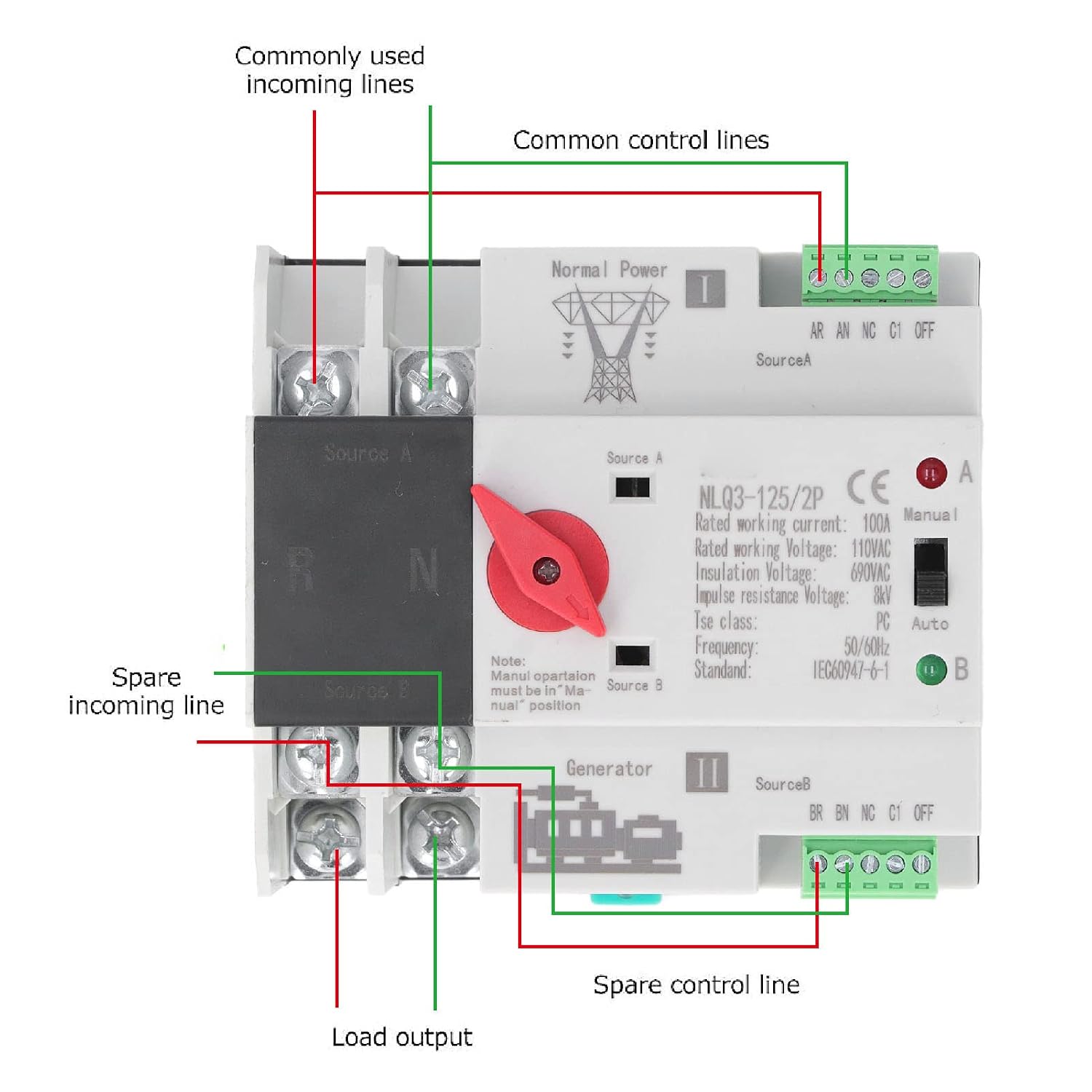
Figure 4.1: Wiring diagram for connecting the normal power, backup power, and load to the ATS.
Video 4.1: A demonstration of the 2-pole Automatic Transfer Switch (ATS) in operation, showing its physical aspects and basic function.
Video 4.2: A video demonstrating the wiring and basic functionality of a 110V 100A Dual Power Automatic Transfer Switch.
5. Betjeningsvejledning
The NLQ3-125/2P ATS offers both automatic and manual operation modes to manage power transfer between your main and backup power sources.
5.1 Automatisk tilstand
In automatic mode, the switch continuously monitors the main power supply. If the main power fails or experiences an abnormality, the ATS will automatically switch the load to the backup power source within milliseconds. When the main power is restored, the switch will automatically transfer the load back to the main power supply.
5.2 Manuel tilstand
The device also allows for manual switching between power sources using the operating handle. This mode is useful for testing or specific maintenance scenarios. Ensure the switch is in the 'Manual' position before attempting to manually transfer power.
Video 5.1: A video demonstrating the operation of the AC110V 100A Dual Power Automatic Transfer Switch.
Video 5.2: A detailed video explaining the various operation modes of an Automatic Transfer Switch.
6. Vedligeholdelse
To ensure optimal performance and longevity of your Sonew NLQ3-125/2P ATS, regular maintenance is recommended:
- Kontrollér regelmæssigt alle ledningsforbindelser for tæthed og tegn på slid eller korrosion.
- Hold enheden ren og fri for støv og snavs.
- Sørg for korrekt ventilation omkring enheden for at forhindre overophedning.
- Test the automatic transfer function periodically by simulating a main power failure (if safe to do so and with proper precautions).
7. Fejlfinding
If you encounter issues with your automatic transfer switch, consider the following:
- Ingen kraftoverførsel: Check if both main and backup power sources are active. Verify all wiring connections are secure. Ensure the switch is in 'Auto' mode if automatic transfer is desired.
- Intermitterende drift: Inspect for loose connections or damaged wiring. Ensure the control voltage er stabil og inden for det angivne område.
- Overophedning: Check for proper ventilation and ensure the unit is not overloaded beyond its rated current.
For persistent issues, please contact customer support or a qualified electrician.
8. Specifikationer
| Feature | Specifikation |
|---|---|
| Model | NLQ3 125 2P (Soneweihtvx9158) |
| Rated Current (le) | 100A |
| Isolering Voltage (Ui) | AC690V |
| Nominel voltage (Ue) | AC110V |
| Frekvens | 50/60Hz |
| Nominel impulsmodstand Voltage | 8kV |
| Nominel kortslutningsstrøm | 50kA |
| Sikring | RT16 00 63A |
| Grad | PC Grade |
| Specifikation | 2P |
| Levetid (elektrisk) | 2000 gange |
| Levetid (mekanisk) | 5000 gange |
| Touch Time | <50 ms |
| Operation Konverteringstid | <50 ms |
| Returtid | <50 ms |
| Lukketid | <50 ms |
| Materiale | Polycarbonat |
| Monteringstype | DIN-skinneophæng |

Figur 8.1: Produktmål til installationsplanlægning.

Figur 8.2: Eksamples of suitable application environments for the ATS.
9. Garanti og support
For warranty information and customer support, please refer to the documentation provided with your purchase or contact the seller directly. Keep your purchase receipt as proof of purchase.