
Sonew Sonew7h986te0iy
Sonew Smart Peephole Camera User Manual
Model: Sonew7h986te0iy
1. Introduktion
This manual provides detailed instructions for the installation, operation, and maintenance of your Sonew Smart Peephole Camera. Please read this manual thoroughly before using the product to ensure proper function and safety. This device is designed to enhance home security by providing a clear view of your doorstep and enabling remote monitoring via the TUYA smartphone application.
2. Pakkens indhold
Bekræft, at alle nedenstående varer er til stede i din pakke:
- 1 x Outdoor Host (Peephole Camera)
- 1 x Indoor Device (Monitor)
- 1 x ladekabel
- 8 x skruer
- 1 x hængeplade
- 1 x Brugermanual (dette dokument)

Billede: Overview of the main components, including the outdoor peephole camera with its connecting cable and the indoor monitor unit.
3. Produktet er slutview
The Sonew Smart Peephole Camera system consists of an outdoor camera unit and an indoor monitor. It offers high-definition monitoring, a wide viewing angle, and remote control capabilities via a smartphone application.

Image: The indoor monitor unit with its display and a button, alongside the circular outdoor peephole camera.
Nøglefunktioner:
- Vidvinkel View: Provides a broad perspective of your doorstep, ensuring you don't miss any details.
- High Definition Monitoring: Delivers clear video images for effective surveillance.
- Remote Control via TUYA App: Allows unlocking and video viewing from your smartphone.
- Dør Viewer Function: See who is at your door without opening it, enhancing security.
- Trådløs bekvemmelighed: Simplifies installation by minimizing complex wiring.
- Automatic Photographing: Captures images automatically (feature indicated in product graphics).
- Ultra Low Power Design: Optimized for extended battery life (feature indicated in product graphics).
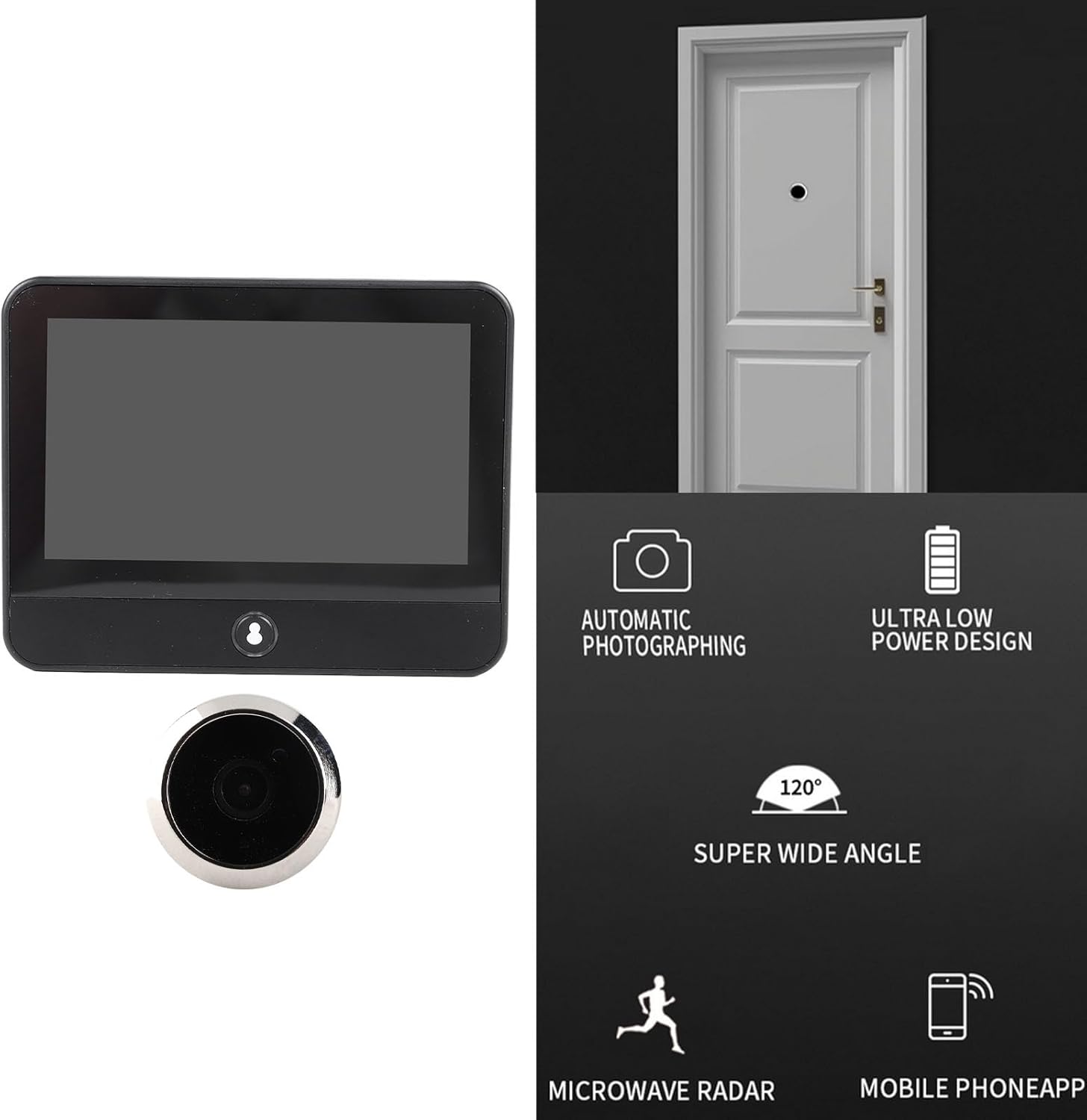
Image: Visual representation of the product's core functionalities, including automatic image capture, power efficiency, wide-angle lens, motion detection, and smartphone app integration.
4. Opsætning og installation
Follow these steps to install your Sonew Smart Peephole Camera:
- Forbered døren: Ensure your door has a standard peephole opening. If not, professional installation may be required to drill a suitable hole.
- Install Outdoor Host: Insert the outdoor peephole camera through the door from the outside. Ensure the ribbon cable passes through the hole to the inside of the door.
- Mount Hanging Plate: On the inside of the door, secure the hanging plate using the provided screws. The ribbon cable from the outdoor unit should pass through the opening in the hanging plate.
- Connect Indoor Device: Carefully connect the ribbon cable from the outdoor host to the corresponding port on the back of the indoor monitor.
- Attach Indoor Device: Slide the indoor monitor onto the hanging plate, ensuring it is securely fastened.
- Tænd og oplad: Connect the charging cable to the indoor monitor and a power source to fully charge the built-in 5000mAh battery before first use.
- App Setup (TUYA):
- Download the TUYA Smart app from your smartphone's app store.
- Registrer dig eller log ind på din TUYA-konto.
- Follow the in-app instructions to add your Sonew Smart Peephole Camera. This typically involves putting the device into pairing mode (refer to the device's button for WiFi indication) and connecting it to your home Wi-Fi network.

Image: The rear panel of the indoor monitor, highlighting the slot where the outdoor camera's ribbon cable connects.
5. Betjeningsvejledning
5.1. Using the Indoor Monitor
Once installed and powered on, the indoor monitor will display the view from the outdoor camera. Press the button on the indoor unit to activate the screen and view who is outside your door.

Image: The indoor monitor screen showing a clear image of individuals, demonstrating its function as a digital door vieweh.
5.2. Using the TUYA App for Remote Monitoring
The TUYA Smart app allows you to access your peephole camera remotely:
- Levende View: Open the TUYA app and select your device to view a live feed from the outdoor camera anytime, anywhere.
- Meddelelser: Receive alerts on your smartphone when motion is detected at your door.
- Tovejs lyd: (If supported by model) Communicate with visitors through the app.
- Recording/Snapshots: Capture video or still images directly from the app. The device also supports automatic photographing.

Image: A visual depicting the camera's ability to monitor activity at the door with high definition clarity, potentially including motion detection.
6. Vedligeholdelse
- Rensning: Use a soft, dry cloth to clean the indoor monitor screen and the outdoor camera lens. Avoid abrasive cleaners or solvents.
- Batteriopladning: The indoor monitor has a built-in 5000mAh lithium battery. Recharge it using the provided charging cable when the battery indicator shows low power.
- Firmwareopdateringer: Periodically check the TUYA app for any available firmware updates for your device to ensure optimal performance and security.
7. Fejlfinding
| Problem | Mulig årsag | Løsning |
|---|---|---|
| Intet billede på indendørsskærmen. |
|
|
| Cannot connect to TUYA app. |
|
|
| Dårlig billedkvalitet. |
|
|
| Kort batterilevetid. |
|
|
8. Specifikationer
| Feature | Detalje |
|---|---|
| Varetype | Digital dør Viewer |
| Materiale | Zinklegering |
| Indoor Device Size (Approx.) | 12 x 10 x 2 cm / 4.72 x 3.94 x 0.79 tommer |
| Batteritype | Lithiumbatteri (indbygget) |
| Batterikapacitet | 5000mAh |
| Modelnummer | Sonew7h986te0iy |
| Produktdimensioner | 20 x 12 x 8 cm; 470 g (Packaging/Overall) |

Image: Detailed measurements of the indoor monitor unit for reference.
9. Garanti og support
For warranty information, technical support, or service inquiries, please refer to the contact information provided with your purchase or visit the manufacturer's official webwebstedet. Behold din købskvittering som købsbevis.
Ask a question about this manual
Ask about setup, troubleshooting, compatibility, parts, safety, or missing instructions. Manuals+ will review the question and use this page’s manual context to help answer it.