
AZIJYV M22
AZIJYV M22 Windshield Speedometer Projector User Manual
Model: M22 | Brand: AZIJYV
Produkt overview
The AZIJYV M22 Windshield Speedometer Projector is a digital GPS speedometer designed to display essential driving data directly onto your car's windshield. This heads-up display (HUD) provides real-time information such as speed, clock, travel time, and distance traveled, enhancing driving safety and convenience.
Unlike traditional flat-screen displays, the M22 utilizes the windshield as a projection surface, offering a clear and easily viewable display. It features a novel design with a color scheme for intuitive data presentation.

Image: The AZIJYV M22 Windshield Speedometer Projector, a compact black device with a reflective screen displaying digital speed and other metrics.
Nøglefunktioner
- GPS Mode Flat Screen Display: Projects data onto the windshield for a heads-up view.
- Multifunktionelt display: Shows speed, clock, travel time, and distance traveled.
- Alarm for overhastighed: Provides audible alerts for exceeding set speed limits.
- GPS-kompas: Indicates driving direction (requires satellite location).
- Automatisk tænd/sluk: Powers on with car ignition and off with engine shutdown.
- Adjustable Units: Speed can be displayed in MPH or KM/H.
- Automatisk lysstyrkejustering: Adapts display brightness to ambient light conditions.

Image: A diagram illustrating the various functions displayed on the M22 HUD, including speed, clock, travel time, distance traveled, compass, and overspeed alarm.

Billede: Eksamples of different display modes available on the M22, showing various layouts for speed, time, and other data.
Opsætning og installation
The M22 HUD is designed for easy plug-and-play installation. It is compatible with all vehicle models.
- Tilslut strøm: Use the provided USB cable to connect the M22 device to a USB port or cigarette lighter adapter in your vehicle.
- Placering: Place the M22 on your dashboard, ensuring it has a clear line of sight to the windshield for projection.
- Tænd: Start your vehicle's engine to power on the device. The M22 will automatically turn on.
- Satellite Acquisition: Upon startup, the small icon on the product will flash continuously, indicating that the device is collecting satellite signals. Speed data will only be displayed once satellites are successfully located.
- Reflekterende film (valgfrit): For improved visibility during bright daylight or to reduce reflection, you may apply the included reflective film to your windshield where the display is projected.
Important Notes for Satellite Acquisition:
- In garages, under overpasses, or within dense building areas, satellite search speed may be affected.
- If another GPS device is installed in your car, it may interfere with the M22's satellite search. Avoid placing two GPS devices together.
- Vehicles with metal film on the windshield may also affect satellite signal reception.

Image: The M22 HUD placed on a car dashboard, demonstrating its compatibility with various vehicle types by showing miniature car models in the background.

Image: A display of the M22 product accessories, including the HUD unit, reflective film, instructions, USB cable, and anti-slip pad.
Video: A demonstration of connecting the M22 HUD to a car's USB port and placing it on the dashboard for operation.
Betjeningsvejledning
The M22 HUD provides various functions to assist with driving. Once powered on and satellites are acquired, the display will show real-time data.
Visningstilstande og indstillinger
The M22 offers multiple display modes. You can switch between these modes to suit your preference. Refer to the product's detailed instructions for specific button operations to change display modes and access settings.
- Speed Unit Switching: You can switch between Kilometers per Hour (KM/H) and Miles per Hour (MPH) in the settings.
- Justering af lysstyrke: The device has an automatic light sensing mode (setting 0). You can also manually adjust brightness from 1-11 in the settings for optimal visibility.
Overhastighedsalarm
The M22 includes an overspeed alarm feature. When your vehicle exceeds a set speed limit, the product will emit a beeping sound to alert the driver, promoting safer driving habits.

Image: The M22 HUD projecting speed and other information onto a car's windshield from the driver's perspective.
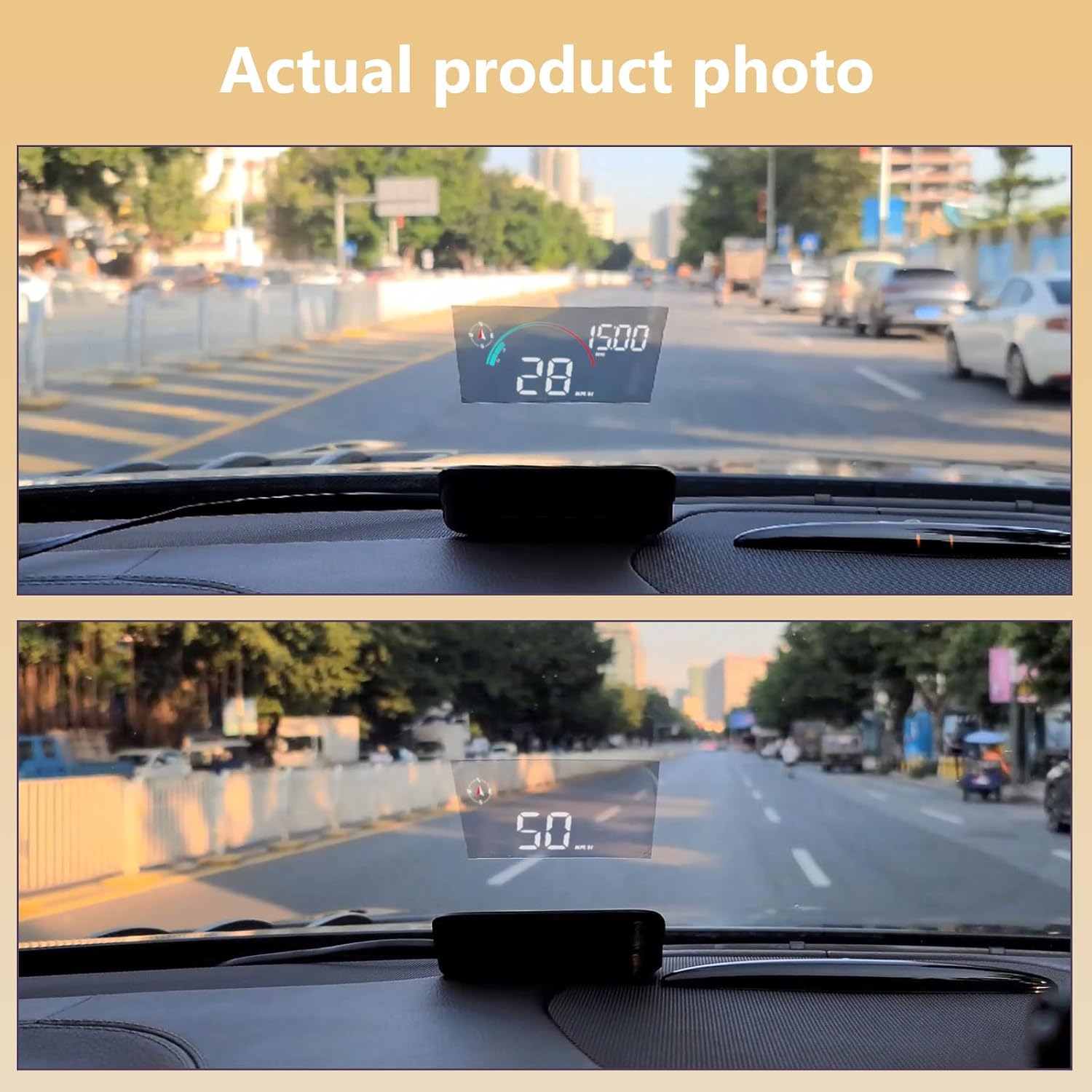
Image: Two comparative photos showing the M22 display during daytime and nighttime driving conditions, highlighting its visibility.
Video: En detaljeret oversigtview of the AZIJYV Windshield Speedometer Projector M22, showcasing its features and display in various driving scenarios.
Opretholdelse
The M22 HUD is designed for continuous use. However, if you do not plan to drive for more than a week, it is recommended to remove the product from your vehicle and store it in a drawer or safe place to prolong its lifespan.
Keep the device clean by wiping it with a soft, dry cloth. Avoid using harsh chemicals or abrasive materials that could damage the display or casing.
Fejlfinding
| Problem | Løsning |
|---|---|
| Unøjagtig hastighedsaflæsning |
|
| Display Not Clear / Reflection During Daytime |
|
| Compass Not Working / Slow Satellite Acquisition |
|
Video: A demonstration of the M22 GPS head-up display for all cars, showing its speedometer and windshield projection features in various conditions.
Specifikationer
| Attribut | Detalje |
|---|---|
| Modelnummer | M22 |
| Mærke | AZIJYV |
| Produktdimensioner | 3.7 x 1.9 x 1 tommer (95 x 50 x 30 mm) |
| Varens vægt | 1.41 ounces (40 gram) |
| Materiale | Acrylonitril Butadien Styren (ABS) |
| Skærmstørrelse | 2.9 tommer |
| GPS-chip | 10 Hz high refresh rate GPS+Beidou dual-mode chip |

Billede: En side view of the M22 HUD, detailing its dimensions and the location of its control buttons (Power, Minus, Increase, Set).

Image: An illustration highlighting the M22's GPS+Beidou dual-mode chip, emphasizing its 10 Hz refresh rate for quick vehicle speed updates.
Garanti og support
Information regarding product warranty and specific support contacts is not available in the provided documentation. Please refer to the original product packaging or the manufacturer's official webwebstedet for garantioplysninger og kundesupportmuligheder.
For additional assistance, you may also check the Brugsanvisning (PDF) leveret af producenten.
Ask a question about this manual
Ask about setup, troubleshooting, compatibility, parts, safety, or missing instructions. Manuals+ will review the question and use this page’s manual context to help answer it.