
1. Introduktion
This manual provides instructions for the installation, operation, and maintenance of your Anderic CHQ9051T Ceiling Fan Wall Control Remote. This device is designed to control 3-speed ceiling fans and their associated lighting functions. It is compatible with various 3-speed fan receivers, including UC7067FMRX and UC7058RY models. Please read these instructions thoroughly before use to ensure proper function and safety.
2. Sikkerhedsoplysninger
- Always disconnect power to the ceiling fan at the circuit breaker before installing or servicing the wall control.
- This wall control is intended for indoor use only.
- Sørg for, at alle elektriske forbindelser overholder lokale forskrifter og bestemmelser. Hvis du er usikker på ledningsføringen, skal du kontakte en kvalificeret elektriker.
- Do not expose the wall control to water or excessive humidity.
- Use only the specified battery type (12V A23) for replacement.
- This wall control operates a ceiling fan receiver (not included). Ensure your ceiling fan has a compatible receiver installed.
3. Pakkens indhold
Bekræft at alle varer er til stede i din pakke:
- Anderic CHQ9051T Wall Control Remote
- Vægmonteringsbeslag
- Monteringsskruer (2)
Note: A 12V A23 battery is required for operation and is not included in the package. A compatible ceiling fan receiver is also required and sold separately.
4. Opsætning og installation
Follow these steps to install and configure your Anderic CHQ9051T wall control.
4.1. Batteriinstallation
- Locate the battery compartment on the back of the wall control.
- Åbn batterirummets dæksel.
- Insert one 12V A23 battery, ensuring correct polarity (+/-).
- Luk batterirummets dæksel forsvarligt.
4.2. Dip Switch Alignment
The wall control communicates with your ceiling fan's receiver via dip switches. These switches must match the pattern set on your ceiling fan's receiver for proper operation.
- Locate the dip switches inside the battery compartment of the wall control.
- Access the dip switches on your ceiling fan's receiver. This usually requires removing the fan's canopy. Refer to your ceiling fan's manual for specific instructions.
- Carefully match the position of the dip switches on the Anderic CHQ9051T wall control to the dip switches on your ceiling fan receiver. Ensure they are an exact match.
- Once matched, replace the battery compartment cover on the wall control and reassemble your ceiling fan canopy.
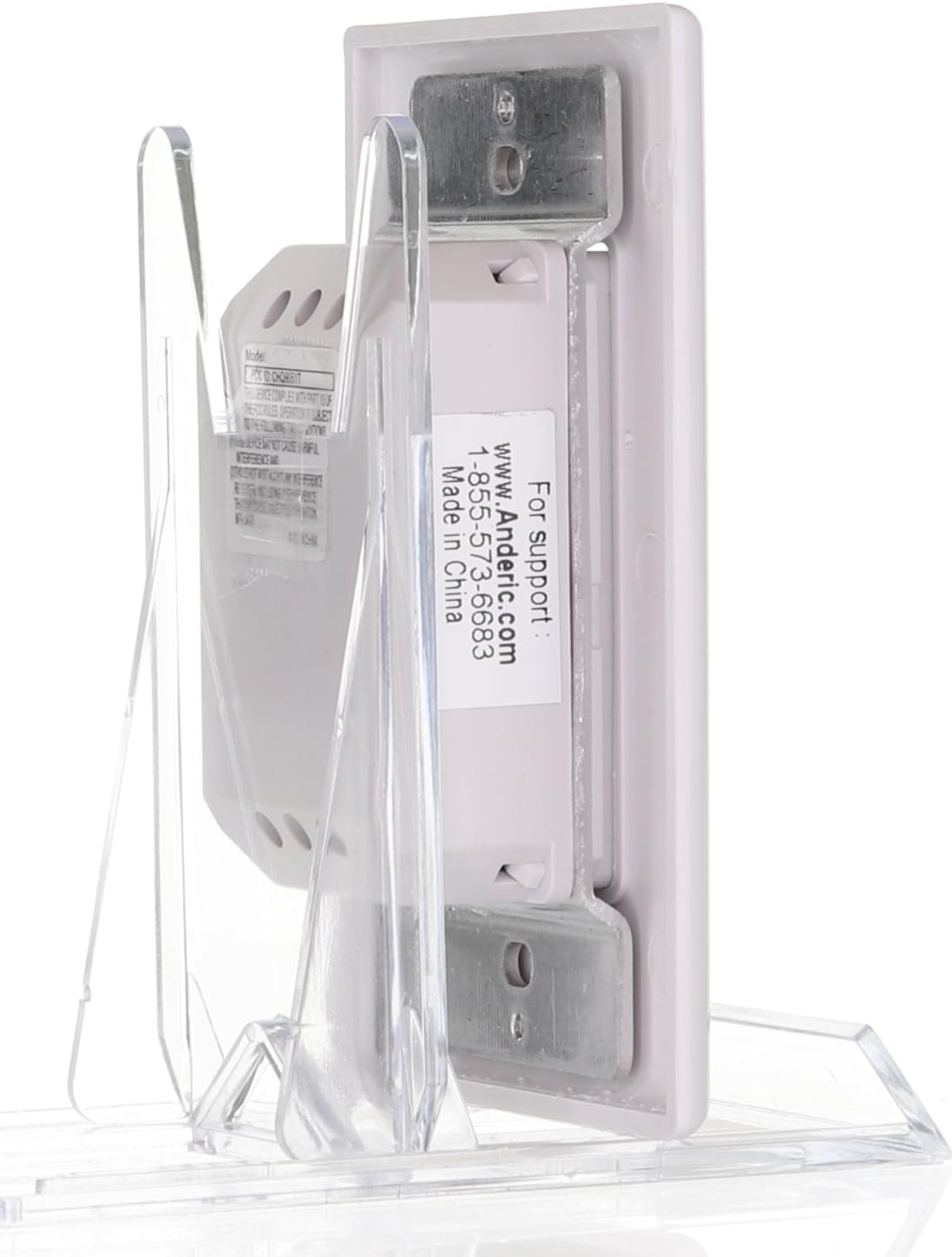
Billede: Bagside view of the Anderic CHQ9051T wall control, illustrating the battery compartment and the location of the dip switches for frequency matching.
4.3. Vægmontering
- Choose a suitable location on your wall for the mount bracket.
- Use the provided screws to secure the wall mount bracket to the wall.
- Slide the Anderic CHQ9051T wall control into the mounted bracket.
5. Betjeningsvejledning
The Anderic CHQ9051T wall control provides comprehensive control over your ceiling fan and its lighting. Refer to the image below for button identification.

Billede: Forside view of the Anderic CHQ9051T wall control, displaying the fan speed, light, and reverse function buttons.
| Knap | Fungere |
|---|---|
| HI | Indstiller ventilatorhastigheden til Høj. |
| MED | Indstiller ventilatorhastigheden til medium. |
| LAV | Indstiller ventilatorhastigheden til Lav. |
| VENTILATOR FRA | Turns the ceiling fan off. |
| LYS | Turns the fan light on/off. Press and hold to dim or brighten the light (requires incandescent bulbs for proper dimming). |
| REV | Reverses the direction of the fan blades. This function is typically used to change airflow for seasonal comfort (downward airflow for cooling, upward for heat circulation). |
The wall control operates both downlights and uplights if your fan is equipped with them.
6. Vedligeholdelse
6.1. Udskiftning af batteri
If the wall control's range decreases or it becomes unresponsive, the battery may need replacement. Follow the steps in Section 4.1 to replace the 12V A23 battery.
6.2. Rensning
Wipe the surface of the wall control with a soft, dry cloth. Do not use abrasive cleaners or solvents, as these can damage the finish or internal components.
7. Fejlfinding
| Problem | Mulig årsag | Løsning |
|---|---|---|
| Fan or light does not respond to wall control. |
|
|
| Lights do not dim properly. | Non-incandescent bulbs are installed. | Replace bulbs with incandescent types for proper dimming functionality. |
| Ventilatoren kører intermitterende. | Weak battery or interference. | Replace battery. Check for sources of radio frequency interference near the fan or wall control. |
8. Specifikationer
- Modelnavn: CHQ9051T
- Mærke: Anderic
- Kontrolmetode: Fjernbetjening (trådløs)
- Antal effektniveauer: 3 (Ventilatorhastigheder)
- Strømkilde: Battery Powered (1x 12V A23 battery, not included)
- Frekvens: 303.875 MHz (compatible with CHQ8BT9051T)
- Produktdimensioner: 3" D x 1.5" B x 4.5" H
- Varens vægt: 2.88 ounce
- Installationstype: Vægmontering
- Indendørs/udendørs brug: Indendørs
- Kompatible modtagere: UC7058GM, UC7058RY, UC7067FMRX (receiver not included)
9. Garantioplysninger
Warranty information for the Anderic CHQ9051T wall control is typically provided with the product packaging or can be obtained directly from the manufacturer. Please retain your proof of purchase for warranty claims.
10. Support
For technical assistance or further inquiries regarding your Anderic CHQ9051T wall control, please contact Anderic support:
- Webwebsted: www.Anderic.com
- Telefon: 1-855-573-6683
Manufacturer: Dan's Electronics Etc., Inc.