
Indledning
Tak for købetasing the HEANTTV Mini Stereo USB Computer Speakers, Model C1. This manual provides essential information for the safe and efficient use of your new speakers. Please read it thoroughly before use and retain it for future reference.
Sikkerhedsoplysninger
- Udsæt ikke højttalerne for vand eller overdreven fugt.
- Undgå at placere højttalerne i nærheden af varmekilder eller i direkte sollys.
- Do not attempt to disassemble or repair the speakers yourself. Contact qualified service personnel.
- Opbevares utilgængeligt for børn.
- Brug kun med kompatible enheder og strømkilder som angivet.
Pakkens indhold
Tjek venligst pakken for følgende varer:
- HEANTTV Mini Stereo USB Computer Speakers (2 units)
- Integrated USB power cable and 3.5mm audio cable with in-line control
- Hurtig startvejledning
Produkt overview
The HEANTTV C1 speakers feature a compact design with integrated LED lighting and convenient in-line controls for volume and LED light management.
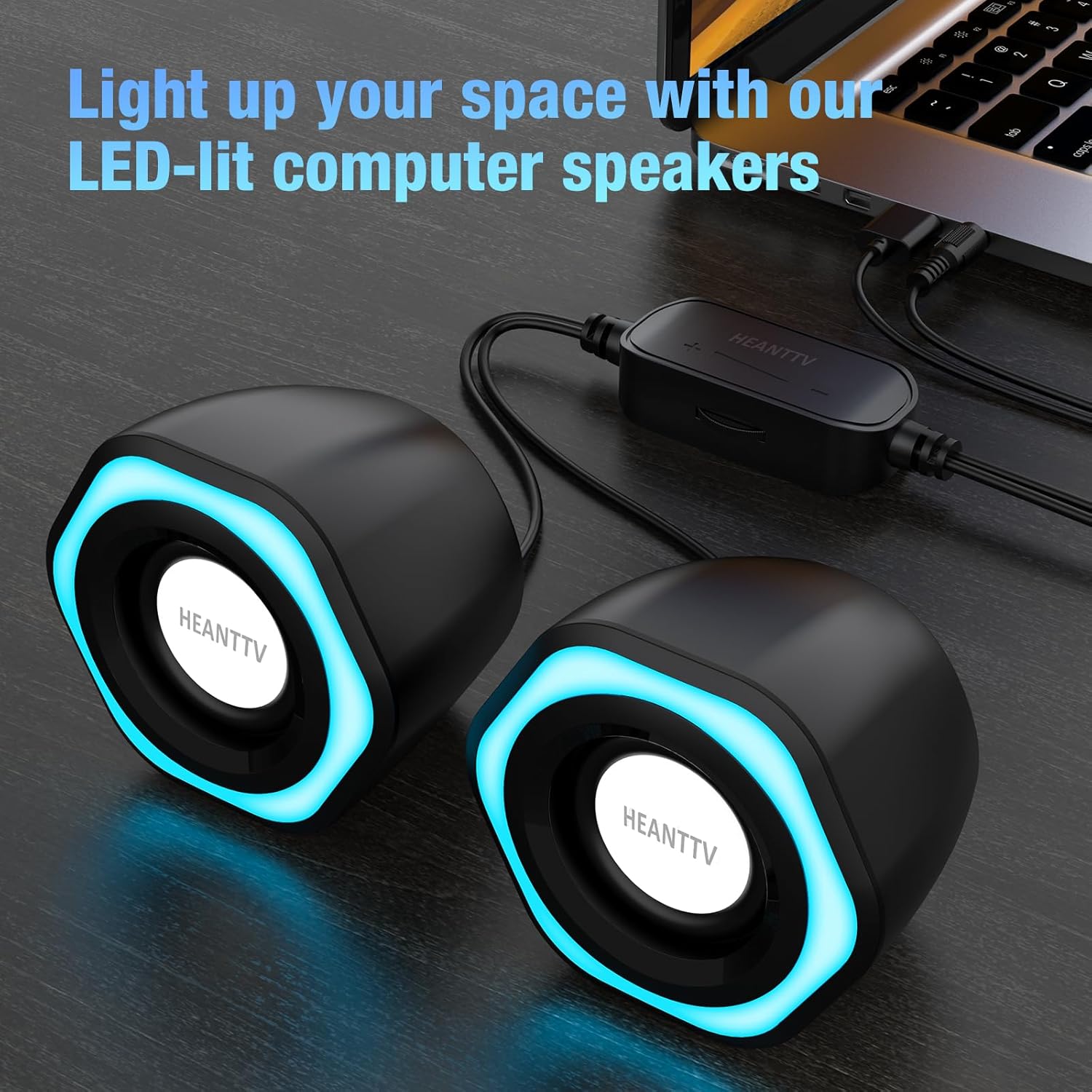
Figur 1: HEANTTV C1 speakers with their distinctive blue LED lighting, connected to a laptop. The speakers are designed to illuminate your workspace.

Figur 2: Detaljeret view of the HEANTTV C1 speaker dimensions, highlighting its compact and portable size. The measurements are approximately 79mm (3.11in) height, 65mm (2.55in) width, and 84mm (3.30in) depth.

Figur 3: A HEANTTV C1 speaker held in a hand, illustrating its mini size and portability.
Opsætningsinstruktioner
Follow these steps to set up your HEANTTV C1 speakers:
- Placering: Position the two speakers on your desk or desired surface, ensuring they are equidistant from your listening position for optimal stereo sound.
- Tilslut lyd: Plug the 3.5mm audio jack into the audio output port of your computer, laptop, or other compatible device.
- Tilslut strøm: Insert the USB-A connector into an available USB port on your computer, laptop, or a USB power adapter (5V/1A recommended). The speakers are USB powered.
- Tænd: Once both cables are connected, the speakers will power on, and the LED lights will illuminate.

Figur 4: Illustration of the easy connection process. The USB cable provides power, and the 3.5mm audio cable transmits sound. The in-line control unit is visible for convenient adjustments.

Figur 5: Et nærbillede view of the USB plug for power and the 3.5mm audio plug for sound input, demonstrating the simple plug-and-play connectivity.
Betjeningsvejledning
The HEANTTV C1 speakers are designed for straightforward operation.
- Lydstyrkekontrol: Use the in-line control wheel located on the cable to adjust the volume. Rotate the wheel upwards to increase volume and downwards to decrease it.
- LED -lysstyring: The in-line control unit also features a button to turn the LED lights on or off. Press the button to toggle the lighting feature.
- Lydafspilning: Once connected and powered, play audio from your connected device. The speakers will output stereo sound.

Figur 6: Detail of the in-line control unit, showing the volume adjustment wheel and the button for controlling the LED lights. This allows for easy access to common functions.
Opretholdelse
For at sikre dine højttaleres levetid og optimale ydeevne skal du følge disse retningslinjer for vedligeholdelse:
- Rensning: Brug en blød, tør klud til at tørre højttalernes yderside af. Brug ikke flydende rengøringsmidler eller slibende materialer.
- Opbevaring: Når højttalerne ikke er i brug i længere perioder, skal de opbevares et køligt, tørt sted væk fra direkte sollys og støv.
- Kabelpleje: Undgå at bøje eller vride kablerne for meget for at forhindre skader.
Fejlfinding
If you encounter issues with your HEANTTV C1 speakers, refer to the following common problems and solutions:
| Problem | Mulig årsag | Løsning |
|---|---|---|
| Ingen lyd |
|
|
| LED-lys virker ikke |
|
|
| Forvrænget lyd |
|
|
Specifikationer
| Feature | Detalje |
|---|---|
| Modelnavn | C1 |
| Mærke | HEANTTV |
| Kompatible enheder | Personal computer, laptop, desktop |
| Forbindelsesteknologi | USB (til strøm), 3.5 mm AUX (til lyd) |
| Lydudgangstilstand | Stereo (2.0-kanals konfiguration) |
| Højttaler udgangseffekt | 6 watt (i alt) |
| Særlige funktioner | LED Light (with on/off control) |
| Kontrolmetode | In-line volume control wheel, LED light button |
| Strømkilde | USB Powered (Electric cable) |
| Materiale | Plast |
| Produktmål (L x B x H) | 3.11 x 6.5 x 7.9 cm (pr. højttaler) |
| Vægt | 400 gram (i alt) |
| Vandtæt | Ingen |
Garanti og support
Information regarding warranty coverage and customer support is typically provided with your purchase documentation or on the manufacturer's official website. Please refer to the included "Quick Start Guide" or visit the HEANTTV website for detailed warranty terms and contact information for support.
For any issues not covered in this manual, please contact HEANTTV customer service.