
AOSHIDA AO300
SMSL AO300 User Manual
Model: AO300 | Brand: AOSHIDA
1. Produktet er slutview
The SMSL AO300 is a versatile audio device combining a Class D power amplifier, DAC (Digital-to-Analog Converter), and headphone amplifier. It is designed to deliver clear and accurate sound output for various audio setups.

Figure 1.1: SMSL AO300 Power Amplifier med fjernbetjening
Nøglefunktioner omfatter:
- MA5332MS & CS43131 Chips: Utilizes MA5332MS power amplifier chip and CS43131 decoding headphone amplifier chip for clear and accurate sound.
- 2.1 Channel Audio System: Supports 165W x 165W output power and 2.1 channel active audio and subwoofer output for deep bass and rich sound.
- Flere indgange og udgange: Provides USB, Optical, Coaxial, HDMI ARC, and Aux inputs, along with 4.4mm and 6.35mm headphone outputs.
- Personalized EQ and Filter Selection: Offers 8 EQ audio modes and 5 filters to adjust audio output based on listening preferences.
- HDMI (ARC) Audio Return: Enables audio and video synchronization by connecting to a TV via HDMI (ARC).
2. Sikkerhedsbemærkninger
Please read the following safety notes carefully before operating the SMSL AO300 to ensure proper use and prevent damage or injury:
- Installer denne enhed på et godt ventileret, køligt, tørt, rent sted væk fra direkte sollys, varmekilder, vibrationer, støv, fugt eller kulde.
- Brug voltagsom er specificeret kun på denne enhed. Brug af denne enhed med en højere lydstyrketage than specified is dangerous and may cause fire, damage to the unit, or personal injury. Our company will not be held responsible for any damage resulting from the use of this unit with a voltage andet end det angivne.
- Forsøg ikke selv at ændre eller reparere denne enhed. Kontakt sælger eller kundeservice, når der er behov for service. Skabet må aldrig åbnes af nogen grund.
- Når du ikke planlægger at bruge denne enhed i længere perioder (dvs. når du skal på ferie), skal du tage strømkablet ud af stikkontakten.
Vigtig bemærkning: Produktspecifikationerne og informationerne nævnt i denne manual er kun til reference. Indholdet af denne manual kan ændres uden varsel.
3. Funktioner
The SMSL AO300 incorporates advanced technologies and design elements to provide a superior audio experience:
- Ny digital høj effekt amplifier chip from Infineon, Germany, with higher efficiency and low power consumption.
- Anvender JRC's elektroniske volumenkontrolchip NJW1194 fra Japan til præcis volumenkontrol og ultralav forvrængning.
- Understøtter MQA-dekodning og MQA-CD-afspilning.
- New 3rd generation XMOS XU-316, supporting PCM up to 32bit/768kHz and DSD up to DSD256.
- New Bluetooth 5.0 reception for longer transmission distance and better sound quality.
- All Aluminum Alloy CNC precision processing shell, anodizing technology and chamfering process, exquisite workmanship and delicate touch.
- User-friendly operating system that is simple and easy to understand, equipped with full-featured remote control function.
- Et stort antal professionelle Hi-Fi-lydkomponenter bruges til at forbedre lydoplevelsen.
- High-quality gold-plated input and output terminals.
- Perfekt beskyttelseskredsløb for overophedning, overstrøm osv.
- Indbygget højkvalitets strømforsyning, specielt designet til lyd.

Figure 3.1: Key Features of SMSL AO300
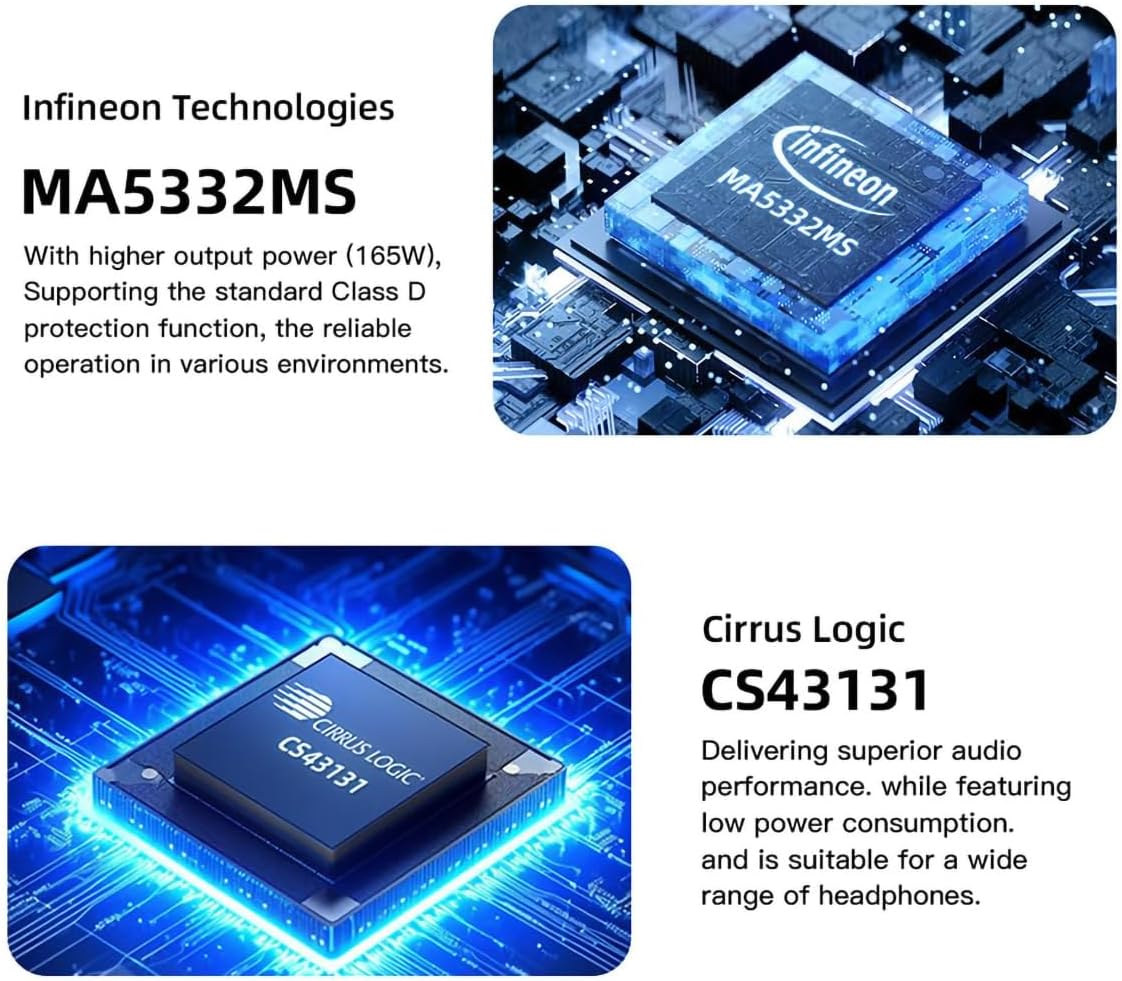
Figure 3.2: Infineon MA5332MS Amplifier Chip

Figure 3.3: Cirrus Logic CS43131 Decoder Chip
4. Specifikationer
| Specifikation | Værdi |
|---|---|
| Input | HDMI (ARC)/RCA/BT/USB/Optisk/Koaksial |
| THD+N | 0.003 % |
| SNR | 107dB |
| Kanaladskillelse | 98dB |
| Indgangsfølsomhed / Indgangsimpedans | 280mV/22kΩ |
| Udgangseffekt (stereofonisk) | 165W x 2 (4Ω) / 85W x 2 (8Ω) |
| USB transmission | USB2.0 (asynkron overførsel) |
| USB-kompatibilitet | Windows 7/8/8.1/10/11, Mac OSX, Linux |
| MQA dekoder | Optisk/koaksial |
| MQA-CD dekoder | Optisk/koaksial |
| Bitdybde (USB) | 1-bit, 16-32-bit |
| Bitdybde (optisk/koaksial) | 1-bit, 16-24-bit |
| Sampling rate (USB PCM) | 44.1-768 kHz |
| Sampling rate (USB DSD) | 2.8224-11.2896 MHz |
| Sampling rate (Optical/Coaxial PCM) | 44.1-192 kHz |
| Sampling rate (Optical/Coaxial DSD) | DSD64(DoP) |
| Strømforbrug | 40W (normal lydstyrke) |
| Størrelse (BxHxD) | 219x42x185 mm |
| Vægt | 1.52kg / 3.35lbs |
5. Hvad er der i æsken
Når du åbner pakken, bør du finde følgende ting:
- 1 x SMSL AO300 Unit
- 1 x fjernbetjening
- 1 x Bluetooth antenne
- 1 x AC strømkabel
- 1 x USB-kabel
- 1 x HDMI kabel
- 1 x SMSL Repair Card
- 1 x brugermanual
Video 5.1: Unboxing and Included Accessories for SMSL AO300.
6. Opsætning og forbindelser
Proper connection of your SMSL AO300 is crucial for optimal performance. Follow the instructions below to connect your devices.
6.1 Indgangsforbindelser

Figur 6.1: Overview of SMSL AO300 Input and Output Ports
- USB-indgang: Connect your PC or other USB audio source using the provided USB cable.
- Optisk indgang: Connect CD/DVD players, DACs, or TVs via an optical cable.
- Koaksial indgang: Connect TV, CD/DVD players, or DACs via a coaxial cable.
- HDMI (ARC) indgang: Use a commercially available HDMI cable to connect to an ARC-compatible TV. Ensure the TV's HDMI IN port is labeled "ARC" or "eARC/ARC". The TV's audio output format must be set to PCM. This product supports digital signal input, not video input. The TV remote control cannot adjust the volume of this product via ARC, nor does it support synchronous power on/off.
- Aux (RCA) Input: Connect CD/DVD players or other analog audio sources using RCA cables.
- Bluetooth-indgang: Connect the Bluetooth antenna to the rear panel. Pair your mobile phone, tablet, or PC via Bluetooth.
Video 6.1: Demonstrating various input connections to the SMSL AO300.
Video 6.2: Important precautions and setup for HDMI ARC connection.
6.2 Udgangsforbindelser
- Speakers Out (L/R): Connect your passive speakers to the red (Right) and black (Left) binding posts.
- Subwooferudgang: Connect an active subwoofer to the SW OUT RCA port for a 2.1 channel system.
- Hovedtelefonudgange: The AO300 features both 4.4mm and 6.35mm headphone jacks on the front panel for direct headphone connection.
7. Betjeningsvejledning
7.1 Fjernbetjening
The SMSL AO300 comes with a full-featured remote control for convenient operation. This remote uses 2 x R03/AAA batteries.
- Tænd/sluk: Tryk på tænd/sluk-knappen for at tænde eller slukke for enheden.
- Navigation: Use the Up, Down, Left, Right arrows to navigate menus.
- MENU/OK: Press to enter menus or confirm selections.
- Retur: Gå tilbage til den forrige menu.
- Input Select (FN): Gennemgå tilgængelige inputkilder.
- Stum: Slå lyden fra eller til.
- Volumen +/-: Juster lydstyrken.
Video 7.1: Guide on how to use the remote control for SMSL AO300.
7.2 Menunavigation og indstillinger
Access the setup menu to customize various settings:
- Input: Select the desired audio input source (USB, Optical, Coaxial, Bluetooth, ARC IN, AUX IN).
- Produktion: Konfigurer outputindstillinger.
- EQ -indstilling: Choose from 8 EQ audio modes (Direct, Tone, SDB, Bass, Super Bass, Rock, Soft, Clear) to adjust audio output.
- Diskantjustering: Adjust treble from -9dB to +9dB. When EQ mode is Direct or other EQ mode, adjusting Treble will automatically change to Tone mode.
- Basjustering: Adjust bass from -9dB to +9dB. When EQ mode is Direct or other EQ mode, adjusting Bass will automatically change to Tone mode.
- Filter: Select from 5 filter options (Fast and Low-latency, Fast and Phase-compensated, Slow and Low-latency, Slow and Phase-compensated, Nonoversampling).
- Farveindstillinger: With 8 menu color settings, you can change the color of the display screen according to your own preferences.
- Bluetooth Clear: To clear the current Bluetooth paired device, press the Up and Down buttons on the remote or twist the knob.
Video 7.2: Exploring the 8 EQ audio modes and 5 filters available on the SMSL AO300.
8. Fejlfinding
If you encounter issues with your SMSL AO300, refer to the following common troubleshooting steps:
- No Sound / Device Not Recognized (HDMI ARC):
- Ensure the ARC input of the product is connected to the HDMI ARC interface of the TV.
- Verify that the output mode of the TV is set to "ARC/ARC+TV speakers" or "PCM out only".
- If the TV does not support ARC, connect the TV's audio output port to the audio IN port (Optical, Coaxial, or AUX) of the AO300.
- Sound Not Loud Enough:
- Check the volume level on your source device and ensure it's set to the maximum.
- Check the volume on your AO300. If the sound is still not loud enough, you may need to use an amplifier with your DAC.
- DAC Not Working / Sounding as Expected:
- Ensure your DAC is properly connected and that your device's sound settings are correctly configured.
- Sørg for din lyd files er af høj kvalitet.
- Difficulty Adjusting DAC's Filter:
- Changes made by adjusting a DAC's filter can often be subtle and may not be easily noticeable, especially if you're not using high-quality audio equipment or listening to high-resolution audio files. Experiment with different settings to see which one you prefer.
Video 8.1: General tips for HiFi DAC setup and troubleshooting.
9. Garanti og support
Garantibetingelser:
- Foshan Shuangmusanlin Technology Co., Ltd promises to offer good quality products. If the product is broken in 7 days after purchasing when you use it normally, you can choose to send it back for return, replacement or repairing (only the product does not affect the second sales can be returned).
- Repairing for free in one year if you use it normally.
- Købsdatoen er i overensstemmelse med datoen på faktura eller kvittering brugt af sælger, og hvis du køber den online, kan du vise skærmbilledet af handel.
- If an inappropriate usage causes the unit damaged, the warranty will be void. All damages by inappropriate use, including using it under non-normal working environment or without following the instructions, disassembling, refitting, repairing by user in private, causing damage by using some fittings instead of the designative or accredited ones, or inability to provide credible proof of purchase, are not covered.
- Kontakt din SMSL Audio-forhandler for returnering eller ombytning.
For further assistance or inquiries, please contact AOSHIDA Audio customer support.
Video 9.1: Overståetview of the SMSL AO300 User Manual, including safety and warranty information.
Ask a question about this manual
Ask about setup, troubleshooting, compatibility, parts, safety, or missing instructions. Manuals+ will review the question and use this page’s manual context to help answer it.