
Audizio Frisco
Audizio Frisco Turntable User Manual
Model: Frisco (102.200)
1. Introduktion
Tak for købetasing the Audizio Frisco Turntable. This multifunctional audio system combines vintage aesthetics with modern technology, allowing you to enjoy your vinyl collection, digital radio, and streaming services. This manual provides essential information for safe operation, setup, and maintenance of your device. Please read it thoroughly before use and retain it for future reference.
2. Sikkerhedsinstruktioner
- Strømkilde: Sørg for, at strømforsyningen voltage matches the rating label on the unit. Use only the provided power cable.
- Vand og fugt: Udsæt ikke enheden for regn, fugt, dryp eller stænk. Placer ikke genstande fyldt med væsker, såsom vaser, på enheden.
- Ventilation: Ensure adequate ventilation. Do not cover ventilation openings with items like newspapers, tablecloths, or curtains.
- Varme: Placer ikke enheden i nærheden af varmekilder såsom radiatorer, varmeapparater, komfurer eller andre apparater (herunder ampløftere), der producerer varme.
- Rensning: Rengør kun med en tør klud.
- Service: Forsøg ikke selv at udføre service på enheden. Overlad al service til kvalificeret servicepersonale.
- Placering: Placer enheden på en stabil, plan overflade for at forhindre skader som følge af fald.
3. Pakkens indhold
Carefully unpack your Audizio Frisco Turntable and ensure all items are present and in good condition.
- Audizio Frisco Turntable Unit
- Strømkabel
- Brugervejledning (dette dokument)
4. Produktet er slutview
Familiarize yourself with the various parts and controls of your Audizio Frisco Turntable.
4.1 Betjeningselementer på frontpanelet

This image displays the front panel of the Audizio Frisco turntable, highlighting the control knobs for volume and tuning/selection, along with buttons for power, scan, menu, info, alarm, mode, and preset. The central display shows 'BBC WS WORLD SERVICE' and 'DAB', indicating DAB+ radio functionality.
- POWER -knap: Tænder eller slukker for enheden.
- SCAN knap: Initiates scanning for radio stations.
- MENU knap: Får adgang til menuindstillingerne.
- INFO knap: Displays information about the current track or station.
- ALARM knap: Indstiller og styrer alarmfunktioner.
- MODE knap: Switches between different input modes (Phono, DAB+, FM, Bluetooth, USB, AUX).
- PRESET knap: Accesses saved radio presets.
- VOLUME knap: Justerer lydudgangsniveauet.
- TUNE / SELECT-knap: Tunes radio frequencies or navigates menu options and confirms selections.
- Skærm: Viser aktuel tilstand, stationsoplysninger, spordetaljer og menupunkter.
4.2 pladespillerkomponenter

Dette billede giver et nærbillede view of the turntable's platter area, showing the speed selector switch (33, 45, 78 RPM) and the auto-stop switch (ON/OFF). These controls are essential for proper vinyl playback.
- Støvdæksel: Beskytter pladespilleren mod støv, når den ikke er i brug.
- Fad: Den roterende platform, hvor plader placeres.
- Spindel: Holder pladen på plads på fadet.
- Tonearm: Holder pennen og sporer pladens riller.
- Stylus (nål): The component that reads the record grooves.
- Løftehåndtag til tonearm: Løfter og sænker tonearmen.
- Hastighedsvælger: Allows selection of 33, 45, or 78 RPM playback speeds.
- Automatisk stopknap: When ON, the platter stops rotating automatically at the end of a record. When OFF, the platter continues to rotate.
4.3 Bagtilslutninger
- USB-port: For connecting USB storage devices for playback.
- AUX IN -stik: Til tilslutning af eksterne lydenheder via et 3.5 mm lydkabel.
- Hovedtelefonstik: Til tilslutning af hovedtelefoner til privat lytning.
- Strømindgang: Til tilslutning af strømkablet.
5. Opsætning
5.1 Udpakning og placering
- Tag forsigtigt enheden ud af emballagen.
- Placer pladespilleren på en stabil, plan overflade væk fra direkte sollys, varmekilder og for meget støv eller vibrationer.
- Sørg for, at der er tilstrækkelig plads omkring enheden til ventilation.

This image shows the Audizio Frisco turntable positioned on a cabinet in a living room, demonstrating a typical setup environment. The dust cover is open, and the unit is ready for use.
5.2 Strømtilslutning
- Connect the provided power cable to the Power Input on the rear of the unit.
- Sæt den anden ende af strømkablet i en passende stikkontakt.
5.3 Indledende tænding
- Tryk på MAGT button on the front panel to turn on the unit.
- The display screen will illuminate.
6. Betjeningsvejledning
6.1 Vinyl Playback
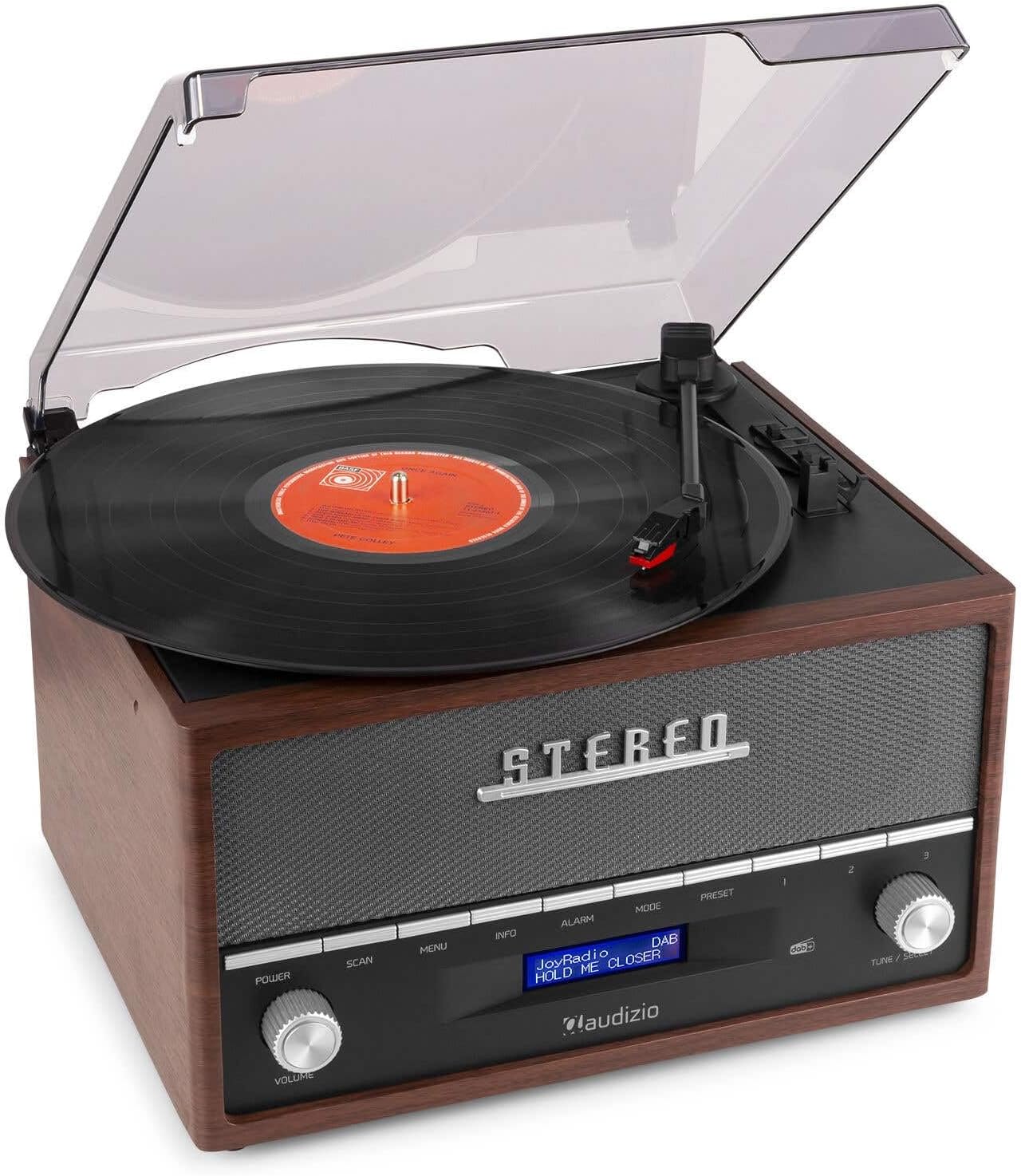
This image shows a vinyl record spinning on the Audizio Frisco turntable, with the tonearm positioned over the record, indicating active playback.
- Åbn støvdækslet.
- Placer en vinylplade på fadet.
- Select the correct speed (33, 45, or 78 RPM) using the Hastighedsvælgerkontakt. For 45 RPM records, place the included adapter on the spindle if needed.
- Indstil Auto-stop kontakt til ON, hvis du ønsker, at pladen skal stoppe automatisk ved slutningen af pladen, eller OFF for kontinuerlig rotation.
- Gently move the tonearm over the record and use the Tonearm løftestang to lower the stylus onto the desired track.
- Juster lydstyrken ved hjælp af BIND knop.
- At the end of the record, lift the tonearm using the lever and return it to its rest.
6.2 DAB+ / FM Digital Radio
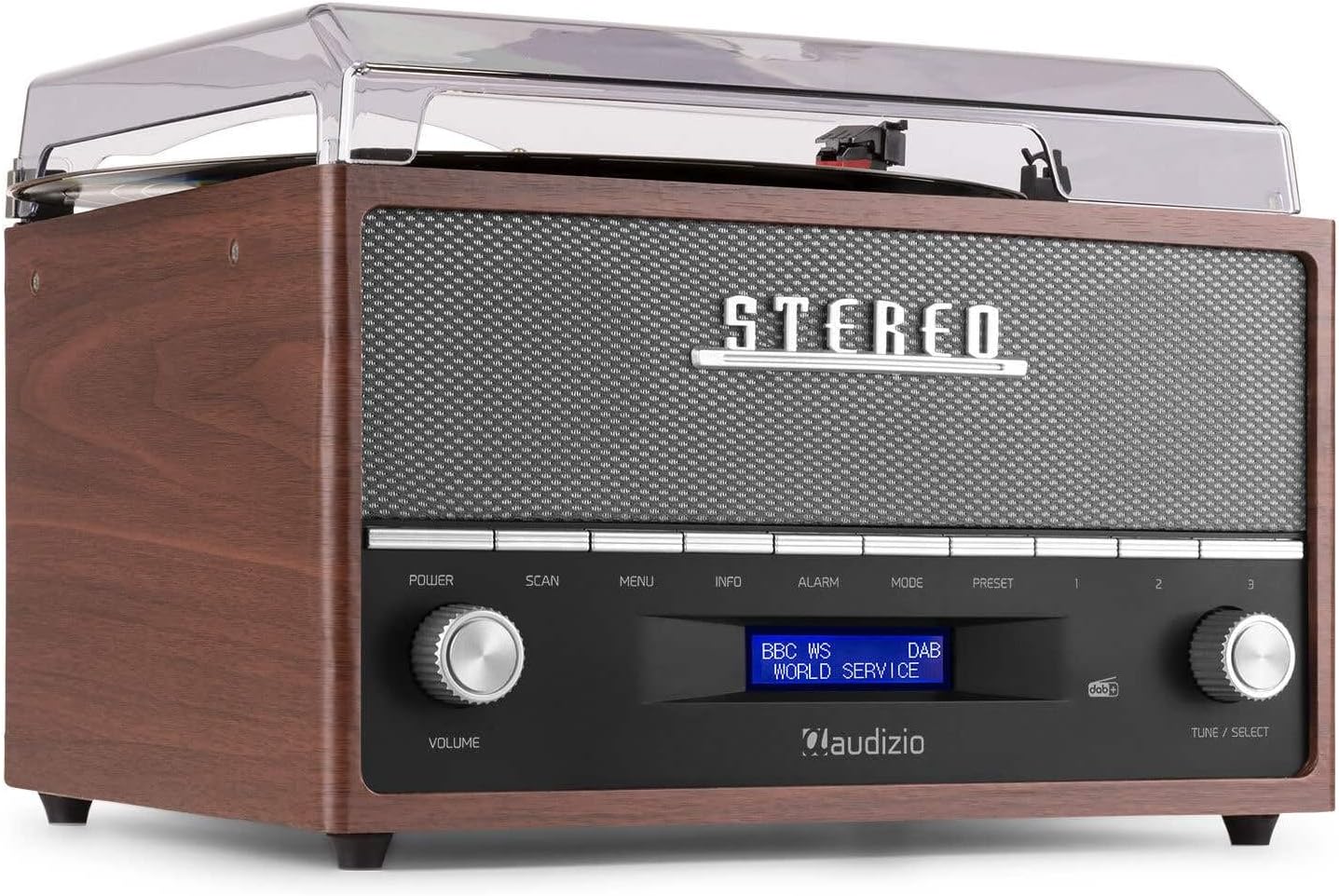
This image focuses on the display screen of the Audizio Frisco turntable, showing 'BBC WS WORLD SERVICE' and 'DAB', confirming active DAB+ radio reception and station identification.
- Tryk på MODE button to select DAB+ or FM radio mode.
- I DAB+-tilstand skal du trykke på SCAN button to perform an auto-scan for available stations.
- I FM-tilstand skal du bruge INDSTILLING / VÆLG knob to manually tune to a station or press SCAN til automatisk scanning.
- To save a preset, tune to the desired station, then press and hold the FORUDINDSTILLING knap. Brug INDSTILLING / VÆLG til at vælge et forudindstillet nummer, og tryk derefter på knappen for at bekræfte.
- For at genkalde en forudindstilling skal du trykke på FORUDINDSTILLING knappen, og brug derefter INDSTILLING / VÆLG knob to select the desired preset.
6.3 Bluetooth-streaming
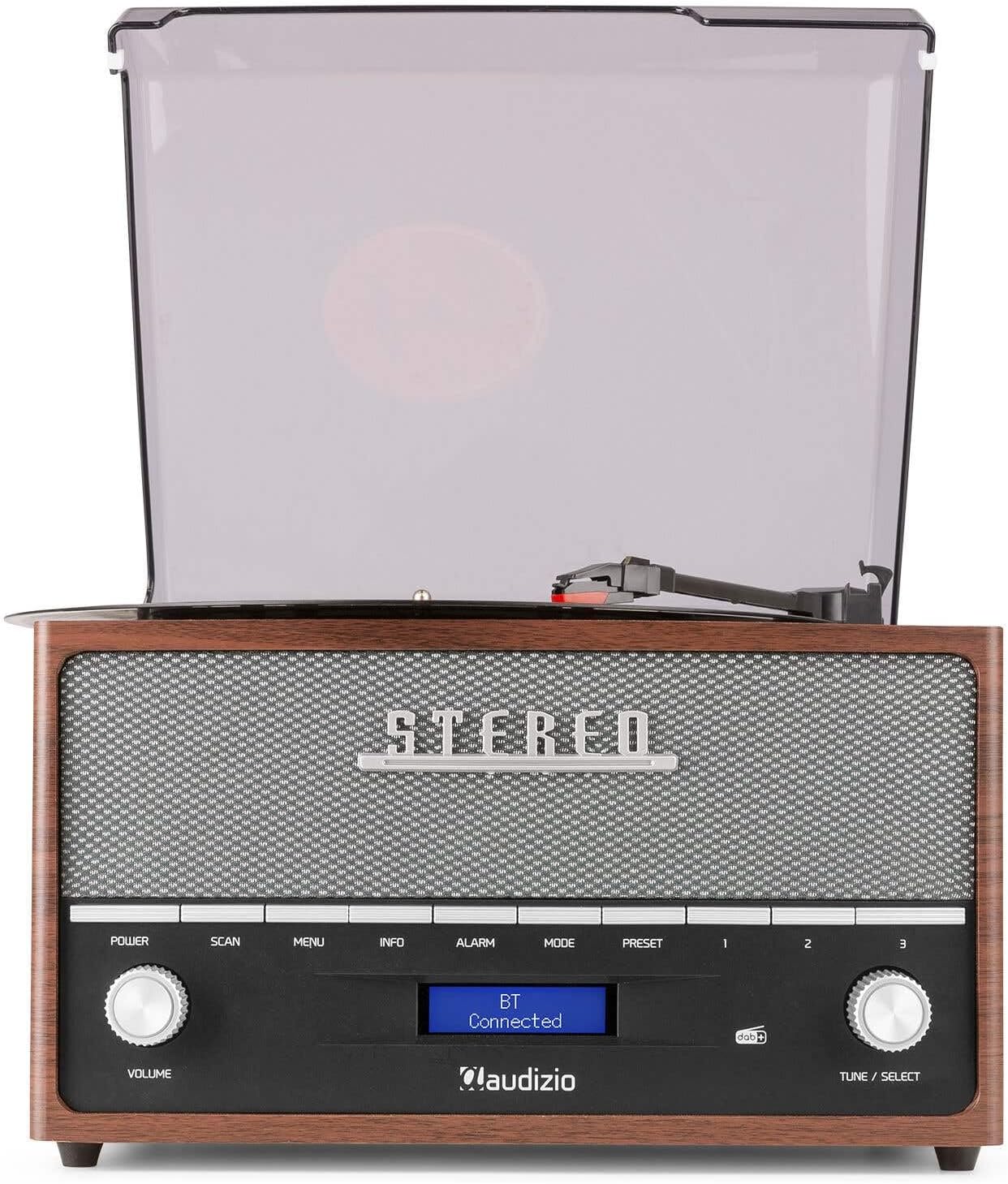
This image shows the Audizio Frisco turntable's display screen indicating 'BT Connected', signifying a successful Bluetooth connection with an external device.
- Tryk på MODE button to select Bluetooth mode. The display will show "BT Pairing" or similar.
- Aktiver Bluetooth på din smartphone eller anden Bluetooth-enhed, og søg efter tilgængelige enheder.
- Select "Audizio Frisco" from the list of devices.
- Once connected, the display will show "BT Connected". You can now play audio from your device through the turntable's speakers.
6.4 USB-afspilning
- Sæt et USB-flashdrev i USB-porten på bagsiden af enheden.
- Tryk på MODE knappen for at vælge USB-tilstand.
- Enheden vil automatisk begynde at afspille kompatibel lyd files fra USB-drevet.
- Brug INDSTILLING / VÆLG knob to navigate tracks or folders.
6.5 AUX-indgang
- Tilslut en ekstern lydenhed (f.eks. MP3-afspiller, CD-afspiller) til AUX IN jack on the rear of the unit using a 3.5mm audio cable (not included).
- Tryk på MODE -knappen for at vælge AUX-tilstand.
- Afspil lyd fra din eksterne enhed. Lyden vil blive udsendt via pladespillerens højttalere.
6.6 Vækkeurfunktion
- Tryk på ALARM button to access alarm settings.
- Brug INDSTILLING / VÆLG knob to set the alarm time and select the alarm source (e.g., DAB+, FM, Buzzer).
- You can set alarms for daily, weekend, or specific days of the week. Follow the on-screen prompts and use the INDSTILLING / VÆLG knob to confirm your selections.
7. Vedligeholdelse
7.1 Rengøring af enheden
- Tag altid stikket ud af stikkontakten før rengøring.
- Brug en blød, tør klud til at tørre de udvendige overflader af.
- Brug ikke slibende rengøringsmidler, voks eller opløsningsmidler, da de kan beskadige finishen.
- Brug en blød klud og et mildt, ikke-slibende rengøringsmiddel til støvdækslet, hvis det er nødvendigt.
7.2 Pleje af pennen
- Pennen er en sart del. Håndter den forsigtigt.
- Rengør pennen med jævne mellemrum med en blød børste, og børst forsigtigt bagfra og forfra.
- En slidt eller beskadiget pen kan beskadige dine plader og forringe lydkvaliteten. Udskift pennen, når det er nødvendigt.
8. Fejlfinding
| Problem | Mulig årsag | Løsning |
|---|---|---|
| Ingen strøm | Strømkabel ikke tilsluttet; stikkontakt ikke aktiv | Sørg for, at strømkablet er korrekt tilsluttet; prøv en anden stikkontakt |
| Ingen lyd | Volume too low; Incorrect mode selected; Headphones connected | Increase volume; Select correct input mode; Disconnect headphones if using speakers |
| Pladespiller drejer ikke | Power off; Auto-stop engaged at end of record | Ensure unit is powered on; Check Auto-Stop switch position |
| Springer over poster | Record dirty or scratched; Stylus worn or dirty; Turntable not level | Clean record; Clean or replace stylus; Place turntable on a level surface |
| Bluetooth forbinder ikke | Turntable not in Bluetooth mode; Device too far; Device already connected to another unit | Select Bluetooth mode; Move device closer; Disconnect from other devices and try again |
| Dårlig radiomodtagelse | Svagt signal; Antennen er ikke trukket ud | Adjust antenna position; Try repositioning the unit for better signal |
9. Specifikationer
| Mærke | Audizio |
| Modelnavn | Frisco |
| Modelnummer | 102.200 |
| Max rotationshastighed | 78 RPM |
| Materiale | Træ |
| Varens vægt | 3.8 kilo |
| Særlige funktioner | DAB+ Radio, Bluetooth streaming, USB playback, Alarm Clock |
| Forbindelsesteknologi | Auxiliary, Bluetooth, USB |
| Strømkilde | Elektrisk med ledning |
| Voltage | 220 volt |
| Strømforbrug | 60 watt |
| Signal-støjforhold | 60 dB |
| Motortype | DC motor |
| Dimensioner (L x B x H) | Refer to product packaging for accurate dimensions (Note: Provided dimensions of 2.8L x 3.18W x 2.35H meters are likely incorrect and should be verified) |
10. Garantioplysninger
This product is designed and manufactured to the highest quality standards. For specific warranty terms and conditions, please refer to the warranty card included with your purchase or the retailer's policy where the product was acquired. Information regarding the availability of spare parts is typically for a period of 2 years from the date of purchase.
11. Kundesupport
If you encounter any issues or have questions regarding your Audizio Frisco Turntable that are not covered in this manual, please contact your retailer or the manufacturer's customer support for assistance. Please have your model number (Frisco, 102.200) and purchase details ready when contacting support.
Relaterede dokumenterFrisco

Ask a question about this manual
Ask about setup, troubleshooting, compatibility, parts, safety, or missing instructions. Manuals+ will review the question and use this page’s manual context to help answer it.