
Indledning
The FOREVER Kids Look Me KW-510 Smartwatch provides a controlled and safe way for children to engage with technology and communication. Designed as an alternative to a smartphone, it features a SIM card slot for constant contact and peace of mind. This manual will guide you through the setup, operation, and maintenance of your new smartwatch.
Sikkerhedsoplysninger
- Kvælningsfare: Hold små dele væk fra små børn.
- Batterisikkerhed: Do not attempt to replace the battery yourself. Use only the provided charging cable and station.
- Vandtæthed: The device is IP67 water-resistant, meaning it can withstand immersion in water up to 1 meter for 30 minutes. It is not suitable for swimming or diving. Ensure the SIM card slot cover is securely closed before exposure to water.
- Driftstemperatur: Undgå at udsætte enheden for ekstreme temperaturer.
- Overvågning: Parental supervision is recommended during initial setup and use.
Pakkens indhold
Markér venligst feltet for følgende elementer:
- FOREVER Kids Look Me KW-510 Smartwatch
- Charging Station / Cable
- SIM Card (if included by your provider)
- Brugervejledning (dette dokument)

Image: The retail packaging for the FOREVER Kids Look Me KW-510 Smartwatch, showing the watch and its features.
Opsætning
1. SIM-kort installation
The smartwatch requires a Standard size 4G SIM card for communication features. Ensure the SIM card is active and has a data plan.
- Sluk smartwatchet.
- Find SIM-kortstikket på siden af uret.
- Åbn forsigtigt dækslet til SIM-kortstikket.
- Insert the Standard size SIM card into the slot with the gold contacts facing up and the notched corner aligned correctly.
- Tryk forsigtigt SIM-kortet ind, indtil det klikker på plads.
- Luk dækslet til SIM-kortstikket ordentligt for at bevare dets vandtæthed.
- Power on the smartwatch.
2. Appinstallation og parring
To manage the smartwatch features, you need to install the dedicated companion application on your smartphone (compatible with iOS and Android devices).
- Download the 'Forever KidsCare' or similar companion app from your smartphone's app store.
- Register an account and follow the on-screen instructions to add your child's smartwatch. This usually involves scanning a QR code displayed on the watch screen or entering a device ID.
- Når de er parret, kan du konfigurere kontakter, sikkerhedszoner og andre indstillinger via appen.

Image: Various screenshots of the companion mobile application, showing features like activity tracking, safety zone settings, and rewards.
3. Indledende konfiguration
After pairing, use the companion app to set up essential features:
- Nødkontakter: Add phone numbers for the SOS function.
- Telefonbog: Add trusted contacts for your child to call.
- Sikkerhedszoner: Define geographical areas (e.g., home, school) and receive notifications when your child enters or leaves them.
- Tid og dato: Ensure the watch displays the correct time and date.
Betjeningsvejledning

Image: The FOREVER Kids Look Me KW-510 Smartwatch, featuring a pink strap and a digital display with a dog face graphic.
1. Foretage og modtage opkald
The smartwatch supports 4G cellular calls.
- Foretag et opkald: Navigate to the phonebook on the watch, select a contact, and initiate a call.
- Modtagelse af et opkald: When a call comes in, the watch will ring. Tap the answer icon to accept or the decline icon to reject.
2. SOS-funktion
In an emergency, your child can activate the SOS function.
- Aktivering af SOS: Press and hold the designated SOS button on the watch for a few seconds.
- The watch will automatically call the pre-set emergency contacts until one answers. It will also send a location alert to these contacts.
3. GPS-sporing og sikkerhedszoner
The integrated GPS allows for precise location tracking.
- Sporing i realtid: Forældre kan view the child's current location on a map via the companion app.
- Sikkerhedszoner: Receive notifications when your child enters or exits predefined safe areas.
4. Camera and Remote Monitoring
The smartwatch includes a camera and remote monitoring capabilities.
- Tager billeder: Your child can take photos directly from the watch.
- Remote Camera Access: Parents can remotely activate the watch's camera via the app to view the child's surroundings.
- Remote Microphone Access: Parents can remotely activate the watch's microphone to listen to the child's surroundings.
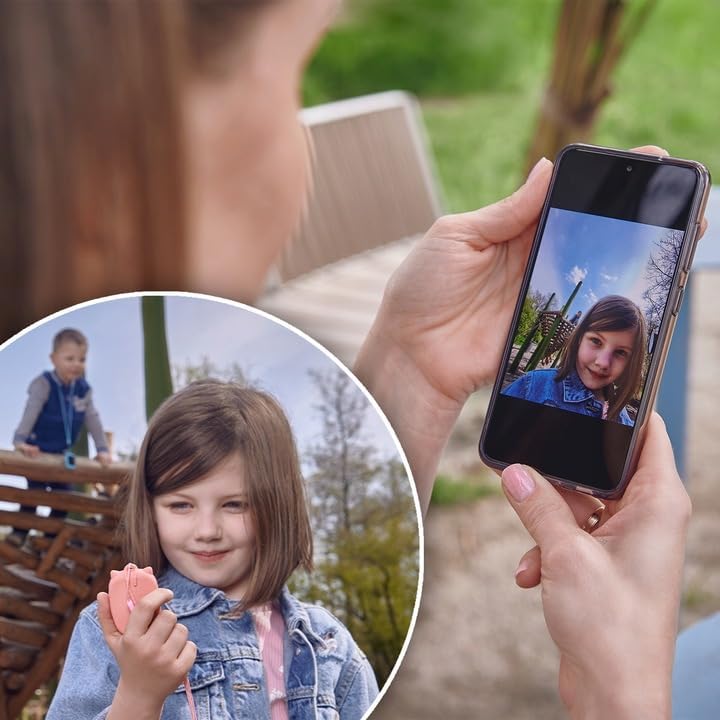
Image: A parent's hand holding a smartphone displaying a photo taken by the smartwatch, with a child playing in the background.
5. Chat Function
The watch supports a chat function for communication between the child and approved contacts.
- Afsendelse af beskeder: Children can send voice messages or pre-set text messages to contacts.
- Modtagelse af beskeder: The watch will display incoming messages.
6. Alarm
Set alarms for reminders or wake-up calls through the companion app.
7. Uddannelsesspil
The smartwatch includes an educational math game designed to entertain and teach.
Opretholdelse
1. Opladning
Sådan oplader du smartwatchet:
- Tilslut ladekablet til ladestationen.
- Place the smartwatch onto the charging station, ensuring the charging pins align correctly.
- Connect the charging cable to a compatible USB power adapter (not included) or a computer USB port.
- Urets display vil vise opladningsstatus.
2. Vandtæthed (IP67)
The KW-510 is rated IP67, meaning it is protected from dust and can withstand immersion in water up to 1 meter for 30 minutes. This makes it suitable for everyday splashes, rain, and brief accidental immersion. However, it is not designed for swimming, showering, or prolonged water exposure. Always ensure the SIM card slot cover is tightly sealed.
3. Rensning
Sådan rengør du dit smartwatch:
- Tør skærmen og kabinettet af med en blød kludamp klæde.
- Undgå at bruge skrappe kemikalier eller slibende materialer.
- Ensure the watch is completely dry before charging.
Fejlfinding
| Problem | Mulig løsning |
|---|---|
| Uret tænder ikke. | Sørg for, at uret er fuldt opladet. Tryk på tænd/sluk-knappen og hold den nede i flere sekunder. |
| Kan ikke foretage/modtage opkald. | Check if the SIM card is correctly inserted and active. Verify 4G network coverage. Ensure contacts are added to the watch's phonebook via the app. |
| GPS-placeringen er unøjagtig. | Sørg for, at uret har en klar view of the sky. GPS accuracy can be affected by buildings, dense foliage, or indoor environments. |
| Watch not pairing with app. | Ensure the watch is powered on and has network connectivity. Restart both the watch and your smartphone. Re-attempt the pairing process. |
| Kort batterilevetid. | Reduce screen brightness. Limit frequent GPS updates if not necessary. Close unused applications on the watch. |
Specifikationer
- Modelnummer: KW-510
- Mærke: FOR ALTID
- Forbindelse: 4G Cellular, Wi-Fi (802.11b/g)
- GPS: Integreret GPS
- SIM-kortstørrelse: Standard
- Skærmtype: Digital
- Skærmstørrelse: 20 Centimeters (diagonal)
- Batterisammensætning: Lithium-ion
- Vandtæthed: IP67 (Waterproof up to 1 meter for 30 minutes)
- Båndmateriale: Silikone
- Etui materiale: Aluminium
- Understøttet applikation: GPS (via companion app)
- Funktioner: Phone Calls, SOS Button, Camera, GPS, Notifications, Alarm, Chat Function, Remote Microphone, Remote Camera
- Kompatible enheder: Smartphones (iOS og Android)
Garanti og support
For warranty information and technical support, please refer to the warranty card included with your product or visit the official FOREVER webwebsted. Gem din købsbevis i tilfælde af garantikrav.


