
KIWI design QC03BlackHJT-482
KIWI design Charging Dock for Meta Quest VR Headsets (Models 3S, 3, 2, Pro) Instruction Manual
1. Introduktion
Thank you for choosing the KIWI design Charging Dock, an accessory developed under the Made for Meta program. This vertical charging stand is designed to provide a convenient and organized solution for charging and displaying your Meta Quest 3S, Meta Quest 3, Meta Quest 2, or Meta Quest Pro VR headset. Its sleek design and customizable RGB lighting enhance your gaming setup while ensuring your devices are always ready for use.
The dock features an effortless magnetic connector for secure headset charging and adjustable holders for your controllers. Please note that this charging stand is designed for the headset and does not charge the controllers directly.
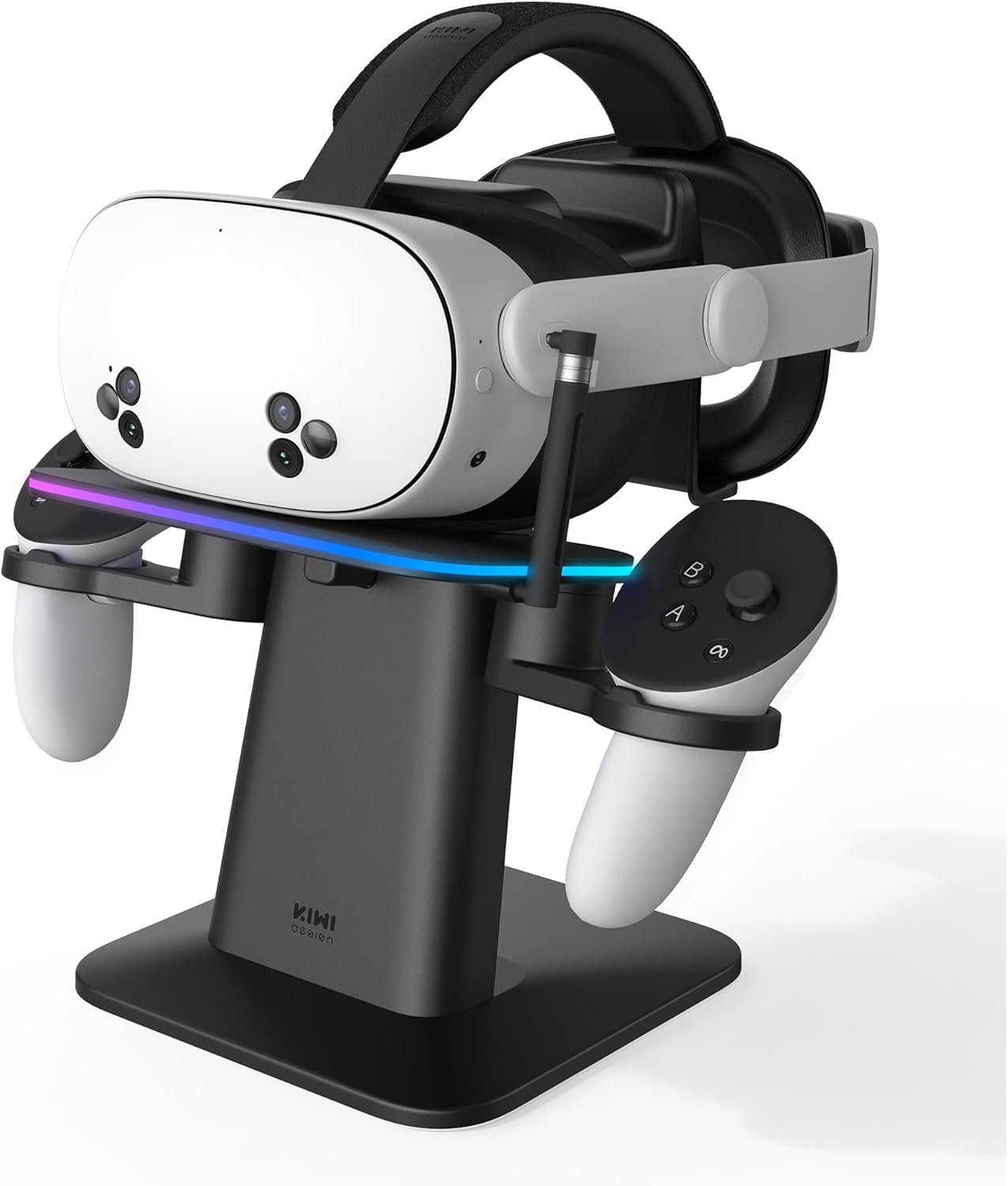
Figure 1: KIWI design Charging Dock with a Meta Quest headset and controllers.
2. Hvad er der i æsken
Please ensure all components are present before proceeding with assembly:
- Opladningsdockingstation
- Support kolonne
- Headset Platform with RGB Lighting
- Adjustable Controller Holders (2x)
- Magnetic USB-C Charging Connector
- USB-C to USB-A Charging Cable (for the dock)
- Brugervejledning (dette dokument)
Note: A certified power adapter (DC 5V output) is recommended but not included with this product.
3. Opsætning
3.1. Montering
- Pak forsigtigt alle komponenter ud af kassen.
- Slide the headset platform onto the support column.
- Snap the assembled support column with the platform onto the charging dock base.
- Slide the two controller holders onto the sides of the headset platform.
- Attach the magnetic charging connector to the designated port on the side of the headset platform.
3.2. Første tilslutning
- Plug the USB-C end of the provided charging cable into the back USB port of the charging dock.
- Connect the USB-A end of the cable to a certified power adapter (not included) and plug it into a wall outlet.
- Insert the small USB-C magnetic tip into your Meta Quest headset's charging port. This tip is designed to remain in the headset for convenient magnetic charging.

Figure 2: Effortless magnetic charging of the Meta Quest headset.
4. Betjeningsvejledning
4.1. Opladning af dit headset
- With the magnetic USB-C tip inserted into your headset, simply place your Meta Quest headset onto the headset platform of the charging dock.
- The magnetic connector on the dock will automatically align and attach to the tip in your headset, initiating the charging process.
- A charging indicator light on your headset will confirm it is charging.
4.2. Organizing Controllers
- Place your Meta Quest controllers into the adjustable holders on either side of the headset platform. The holders are designed to accommodate controllers even with protective covers or other accessories.
- Note: The charging dock does not provide charging functionality for the controllers.
4.3. RGB-lysstyring
- The headset platform features 16 multicolor ambient RGB lights.
- Use the two buttons located on the underside of the main platform to cycle through different colors and lighting patterns to customize your display.

Figure 3: Customize your setup with 16 RGB lighting options.
5. Kompatibilitet
The KIWI design Charging Dock is compatible with the following Meta Quest VR headsets:
- Meta Quest 3S
- Meta Quest 3
- Meta Quest 2
- Meta Quest Pro

Figure 4: The charging dock supports various Meta Quest headset models.
6. Vedligeholdelse
- Hold opladningsdocken ren ved at tørre den af med en blød, tør klud.
- Undgå at bruge slibende rengøringsmidler eller opløsningsmidler, der kan beskadige overfladen.
- Ensure the magnetic charging connector and headset port are free from dust and debris for optimal connection.
7. Fejlfinding
- Headsettet oplader ikke: Ensure the magnetic USB-C tip is securely inserted into the headset and the headset is properly seated on the dock, allowing the magnetic connector to attach. Verify the charging cable is firmly plugged into the dock and the power adapter is connected to a live outlet.
- RGB-lys virker ikke: Check if the dock is powered on. Press the control buttons on the underside of the platform to cycle through lighting modes and ensure they are not turned off.
- Loose connection with headset: If using a thick silicone face shield cover on your headset, it might slightly alter the height, potentially affecting the magnetic connection. Ensure the headset is positioned correctly to establish a firm connection.
8. Specifikationer
- Mærke: KIWI design
- Modelnummer: QC03BlackHJT-482
- Materiale: Plast
- Farve: Sort
- Strømkilde: DC
- Udgang Voltage: 5 volt
- Connector Type: Magnetisk stik
- Varens vægt: 3.89 pund
- Pakkedimensioner: 11.93 x 8.62 x 4.25 tommer
9. Officielle produktvideoer
KIWI design RGB Charging Stand Overview
Video 1: En officiel overview of the KIWI design RGB Charging Stand, highlighting its features and design.
Produkt overview Video
Video 2: Et kortfattet produkt overview showcasing the charging dock's functionality and aesthetic.
10. Garanti og support
For warranty information and customer support, please refer to the documentation included with your purchase or visit the official KIWI design webwebsted. Gem din købsbevis i tilfælde af garantikrav.
Ask a question about this manual
Ask about setup, troubleshooting, compatibility, parts, safety, or missing instructions. Manuals+ will review the question and use this page’s manual context to help answer it.