
Indledning
The Havit Gamenote KB885L mechanical keyboard is engineered for precision, durability, and customization. It features a gasket structure design, providing a soft and stable typing experience while minimizing noise. The full key rollover with multi-key response ensures fast and accurate input, crucial for gaming. With customizable RGB backlighting, you can personalize your keyboard with various lighting modes and effects. The detachable USB-C cable enhances portability and simplifies cable management. This keyboard is built with mechanical switches rated for 50 million key presses, making it suitable for gamers, typists, and professionals who require long-lasting performance.
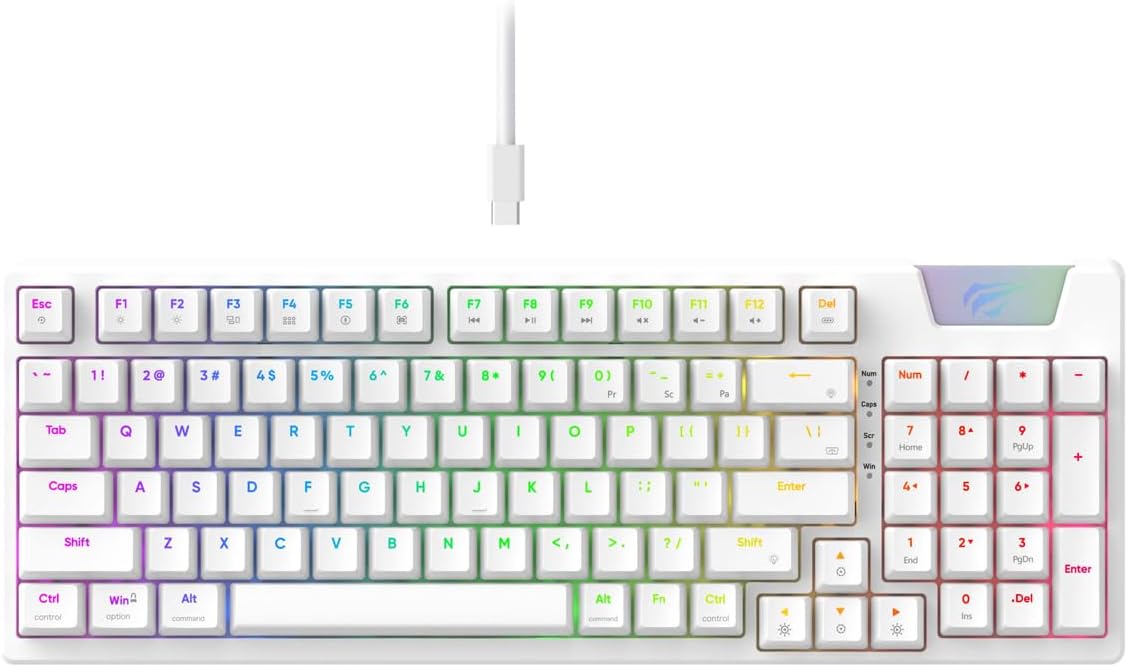
Image: The Havit Gamenote KB885L mechanical keyboard in white, showcasing its full layout and detachable USB-C cable.
Opsætningsvejledning
Follow these steps to set up your Havit Gamenote KB885L mechanical keyboard:
- Pak tastaturet ud: Tag forsigtigt tastaturet og dets tilbehør ud af emballagen.
- Tilslut USB-C-kablet: Insert the detachable USB Type-C cable into the port on the keyboard.
- Tilslut til computer: Sæt den anden ende af USB-kablet i en ledig USB-port på din computer.
- Driver installation: The keyboard is plug-and-play and typically does not require additional drivers. Your operating system should automatically detect and install the necessary drivers.
- Test funktionalitet: Open a text editor or browser to test key presses and ensure all functions are working correctly.

Image: A close-up of the Havit Gamenote KB885L keyboard highlighting its portable design and detachable cable for easy setup and transport.
Betjeningsvejledning
The Havit Gamenote KB885L keyboard offers various features for an enhanced user experience:
RGB-baggrundsbelysningskontrol
Tastaturet har brugerdefinerbar RGB-baggrundsbelysning. Brug følgende tastekombinationer til at justere lyseffekter:
- Fn + [Tast]: Cycle through different RGB lighting modes. (Specific key combinations may vary, refer to on-keyboard legends if available).
- Fn + Piletaster: Adjust brightness and speed of lighting effects.

Image: The Havit Gamenote KB885L keyboard displaying its vibrant RGB backlighting, illustrating customizable lighting effects.
Fuld nøgleoverførsel (NKRO)
This keyboard supports Full Key Rollover, meaning every key press is registered independently, regardless of how many keys are pressed simultaneously. This feature is essential for fast-paced gaming and typing, preventing ghosting or missed inputs.
Ergonomisk design
The keyboard is designed with ergonomics in mind to provide comfort during extended use. Its layout and keycap profile aim to reduce strain on your wrists and fingers.

Billede: A view of the Havit Gamenote KB885L keyboard highlighting its ergonomic design for comfortable use.
Opretholdelse
Korrekt vedligeholdelse sikrer dit tastaturs levetid og optimale ydeevne:
- Rensning: Rengør tastaturet regelmæssigt med en blød, tør klud. Brug trykluft til at fjerne støv og snavs mellem tasterne for at opnå en grundigere rengøring. Ved genstridigt snavs kan du bruge en let tør klud.amp en klud med mild sæbe kan bruges, så det sikres, at der ikke kommer væske ind i tastaturet.
- Undgå spild: Hold væsker væk fra tastaturet for at forhindre skader på de interne komponenter. I tilfælde af spild skal du straks frakoble tastaturet og lade det tørre helt, før du tilslutter det igen.
- Kabelpleje: Handle the detachable USB-C cable with care. Avoid sharp bends or excessive pulling to prevent damage to the cable or connectors.
- Opbevaring: Når tastaturet ikke er i brug, skal det opbevares et rent og tørt sted væk fra ekstreme temperaturer.
Fejlfinding
If you encounter issues with your Havit Gamenote KB885L keyboard, try the following solutions:
- Tastaturet reagerer ikke:
- Sørg for, at USB-C-kablet er korrekt tilsluttet til både tastaturet og computeren.
- Prøv at tilslutte tastaturet til en anden USB-port på din computer.
- Test tastaturet på en anden computer for at afgøre, om problemet skyldes tastaturet eller dit system.
- RGB-lys virker ikke:
- Check if the lighting is turned off using the Fn key combinations.
- Sørg for, at tastaturet er korrekt strømforsynet via USB-forbindelsen.
- Nøgler registreres ikke / ghosting:
- Due to full key rollover, this is unlikely. However, ensure no debris is lodged under the keycap.
- If a specific key is consistently failing, it might indicate a switch issue. Contact support if the problem persists.
Specifikationer
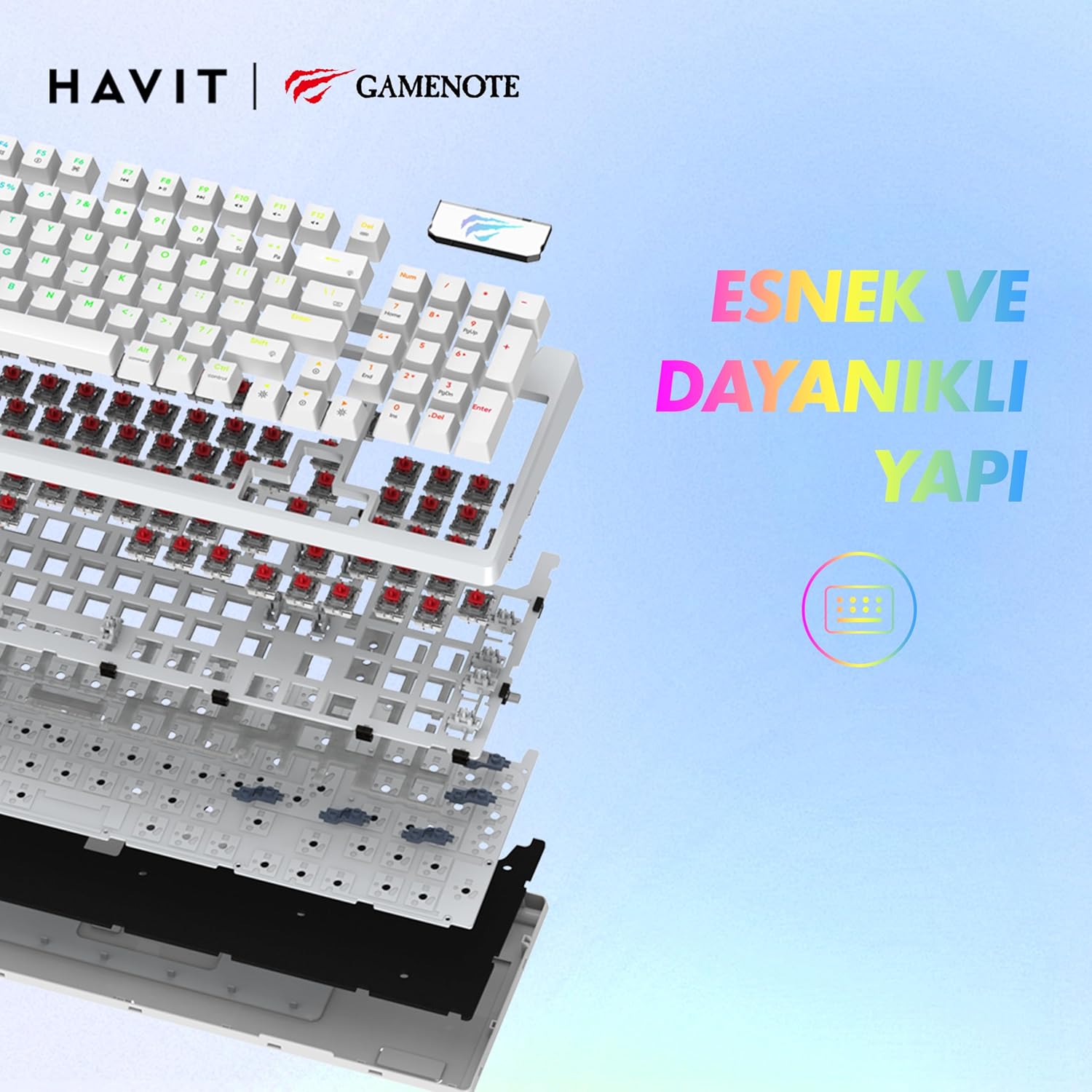
Billede: En eksploderet view of the Havit Gamenote KB885L keyboard, illustrating its internal gasket structure for enhanced stability and typing feel.
| Feature | Detalje |
|---|---|
| Mærke | Havit |
| Modelnummer | KB885L |
| Kompatible enheder | Computer |
| Forbindelsesteknologi | USB |
| Tastaturbeskrivelse | Spil |
| Anbefalede anvendelser | Spil |
| Speciel funktion | Transportabel |
| Farve | Hvid |
| Understøttelse af baggrundsbelysningsfarver | RGB (Red, Green, Blue model) |
| Stil | Moderne |
| Produktmål (L x B x H) | 38.7 x 14 x 4.5 cm |
| Sprog | engelsk |
| Strømkilde | USB-strøm |
| Switch Type | Taktil |
| Tastaturlayout | QWERTY |
| Håndorientering | Ambidekstrøs |
| Antal nøgler | 95 |
| Knap Antal | 104 |
| Inkluderede komponenter | USB kabel |
| Materiale | Plast |
| Key Press Lifespan | 50 Million (from description) |

Image: An illustration highlighting the Havit Gamenote KB885L's durable mechanical switches, rated for a 50 million key press lifespan.
Garantioplysninger
The Havit Gamenote KB885L Mechanical Keyboard comes with a et års garanti fra købsdatoen. Denne garanti dækker fabrikationsfejl og problemer, der opstår ved normal brug. Den dækker ikke skader forårsaget af misbrug, ulykker, uautoriserede ændringer eller forkert vedligeholdelse. Gem venligst din købsbevis i tilfælde af garantikrav.
Kundesupport
For further assistance, technical support, or warranty inquiries, please contact Havit customer service through their official website or the retailer where you purchased the product. Have your model number (KB885L) and proof of purchase ready when contacting support.