
1. Introduktion
The Texet KLS-2 Microcurrent Facial Device is a versatile 6-in-1 home-use skincare tool designed to enhance your facial care routine. This device combines microcurrent technology with light therapy and various massage functions to promote skin tightening, lifting, and rejuvenation for the face, eyes, and neck. Please read this manual thoroughly before use to ensure safe and effective operation.
2. Sikkerhedsoplysninger
Af hensyn til din sikkerhed og for at forhindre skader på enheden, bedes du overholde følgende forholdsregler:
- This device is for cosmetic use only and is not intended for medical purposes. Consult a physician before use if you have any medical conditions, especially if you are pregnant, have a pacemaker, or suffer from epilepsy.
- Do not use on broken, irritated, or infected skin, or on areas with sunburn, open wounds, or recent surgical scars.
- Opbevar enheden utilgængeligt for børn.
- Enheden må ikke nedsænkes i vand, og den må ikke anvendes i meget fugtige omgivelser.
- Undgå direkte kontakt med øjnene.
- Stop brugen med det samme, hvis du oplever ubehag eller bivirkninger.
- Brug kun det medfølgende ladekabel.
3. Pakkens indhold
Kontroller venligst, at alle varer er til stede i pakken:
- Texet KLS-2 Microcurrent Facial Device
- USB opladningskabel
- Brugermanual
4. Produktegenskaber og fordele
The Texet KLS-2 device offers a comprehensive skincare experience with its multiple functions:
4.1. 6-in-1 Skincare Modes
- Rensning: Deep pore cleansing to remove impurities.
- Penetration: Promotes the absorption of skincare essences.
- Løft: Helps shape and firm the face.
- Skønhed: Brightens skin tone and reduces the appearance of wrinkles.
- Særlig: Targets smooth wrinkles around the eyes.
- Afkøle: Calms the skin and helps shrink pores.

Figur 1: Overview of the 6-in-1 Skincare Modes.
4.2. 7 Core Benefits
- Hudopstramning: To smooth wrinkles and fine lines.
- Skin Lifting: To firm sagging skin and enhance contours.
- Skin Toning: To improve skin radiance.
- Hudforyngelse: To reshape facial features.
- Øjenpleje: To remove wrinkles, fine lines, dark circles, eye bags, and puffiness around eyes.
- Forkølelsesterapi: To remove facial swelling, puffiness, shrink pores, and soothe redness.
- High Frequency Massage: To promote blood circulation and relax muscles.

Figure 2: The 7 Core Benefits of the Texet KLS-2 Device.
4.3. Face LED Light Therapy
The device incorporates various LED light modes to target specific skin concerns:
- Orange lys: For clean export and purifying pores.
- Amberlys: To brighten skin tone and lighten skin lines.
- Crimson Light: For tight lifting and full face plasticity.
- Blåt lys: To calm skin, control oil, and fight acne.
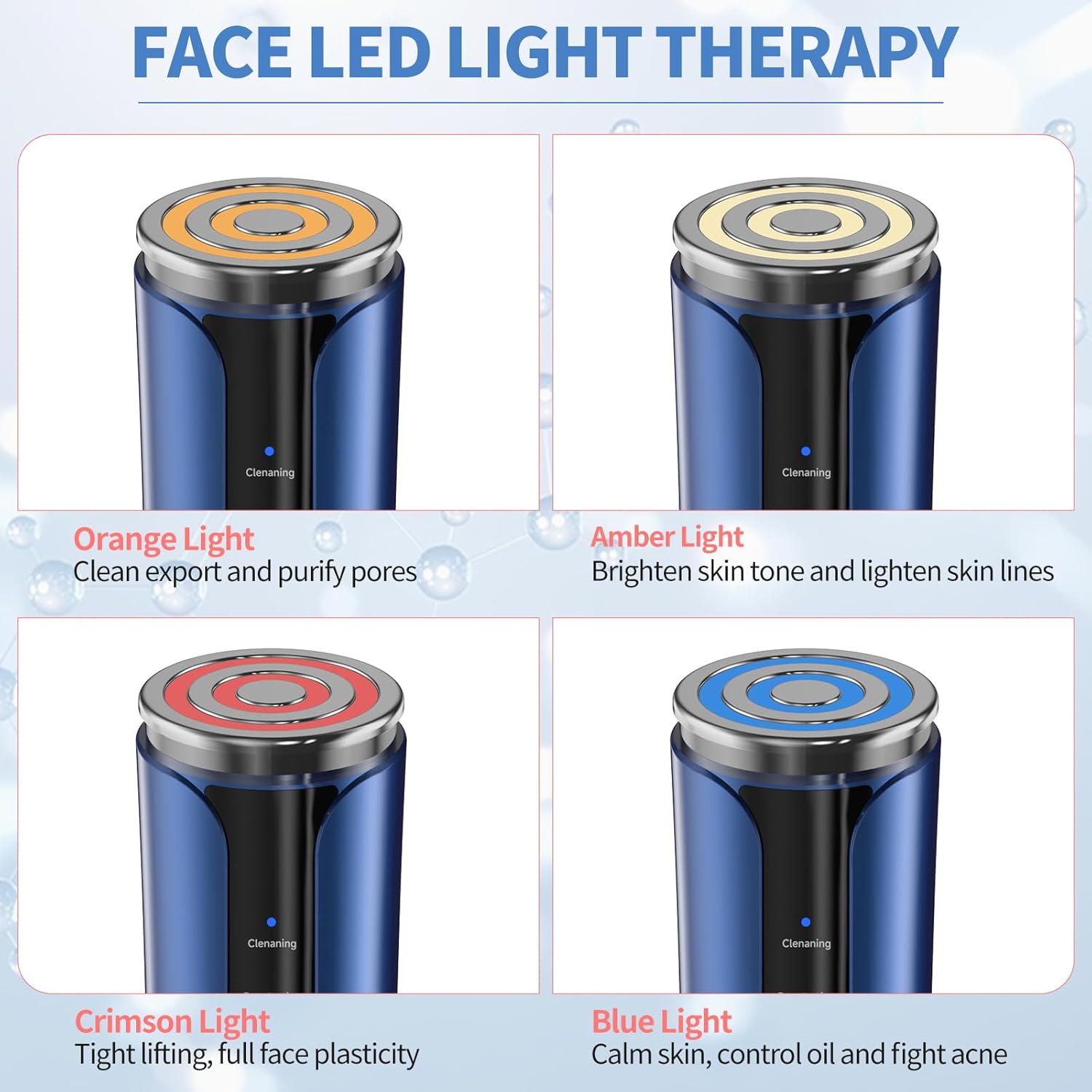
Figure 3: Face LED Light Therapy Modes.
4.4. Design og bærbarhed
The Texet KLS-2 is designed to be lightweight and portable, making it a convenient companion for your skincare journey. It features a modern style and is USB rechargeable for ease of use.

Figure 4: Lightweight, Portable, and USB Rechargeable Design.
5. Opsætning
5.1. Opladning af enheden
- Connect the provided USB charging cable to the charging port at the bottom of the device.
- Sæt den anden ende af USB-kablet i en kompatibel USB-strømadapter (medfølger ikke) eller en USB-port på computeren.
- The charging indicator light will illuminate, typically blinking while charging and solid when fully charged.
- En fuld opladning tager normalt cirka 2-3 timer.
5.2. Indledende forberedelse
- Oplad enheden helt før første brug.
- Clean the device head with a soft, damp klæde. Brug ikke slibende rengøringsmidler eller nedsænk enheden i vand.
6. Betjeningsvejledning
Follow these steps for optimal use of your Texet KLS-2 Microcurrent Facial Device:
- Rens dit ansigt: Thoroughly clean your face and neck before using the device. Ensure your skin is free of makeup and impurities.
- Apply Skincare Product: For best results, apply a conductive gel, serum, or moisturizer to the treatment area. This helps the device glide smoothly and enhances the effectiveness of the microcurrent.
- Tænd: Press and hold the power button (usually the lower button) for a few seconds to turn on the device.
- Vælg tilstand: Press the mode selection button (usually the upper button) to cycle through the available modes (Cleaning, Penetration, Lifting, Beauty, Special, Cool) and LED light therapies (Orange, Amber, Crimson, Blue). Refer to Section 4.3 for light therapy benefits.
- Juster indstillinger (hvis relevant): Some modes may allow for intensity or temperature adjustments. Follow the device's indicators to select your preferred level.
- Anvend enhed: Gently place the device head onto your skin. Move it slowly and smoothly across your face, eyes, or neck in upward and outward motions. Avoid staying in one spot for too long.
- Focus on Areas: For eye care, use the 'Special' mode and gently glide around the eye area, avoiding direct contact with the eyeball. For lifting and tightening, focus on jawline, cheekbones, and forehead.
- Køletilstand: After other treatments, you may use the 'Cool' mode to help soothe skin, reduce puffiness, and close pores.
- Sluk: After your treatment, press and hold the power button to turn off the device.
- Rengør enhed: Wipe the device head clean with a soft, damp klud umiddelbart efter hver brug.

Figure 5: Device Controls and Mode Indicators.
6.1. Recommended Usage Frequency
For visible improvements, consistent use is recommended. Many users observe noticeable changes within one month of regular use. Consult the device's specific mode guidelines for daily or weekly recommendations.

Figure 6: Visible Skin Improvement with Consistent Use.
7. Vedligeholdelse
7.1. Rensning
- Sluk altid enheden før rengøring.
- Wipe the device head and body with a soft, slightly damp klud efter hver brug.
- Do not use alcohol, abrasive cleaners, or harsh chemicals, as these can damage the device.
- Sørg for, at der ikke kommer væske ind i opladningsporten eller andre åbninger.
7.2. Opbevaring
- Opbevar enheden et køligt, tørt sted, væk fra direkte sollys og ekstreme temperaturer.
- Keep it away from moisture and dust.
- Ensure the device is fully charged before storing for extended periods to maintain battery health.
8. Fejlfinding
If you encounter any issues with your Texet KLS-2 device, please refer to the following common problems and solutions:
| Problem | Mulig årsag | Løsning |
|---|---|---|
| Enheden tændes ikke. | Batteriet er lavt eller afladet. | Oplad enheden helt ved hjælp af det medfølgende USB-kabel. |
| Enheden oplader ikke. | Opladningskablet eller adapteren er defekt; opladningsporten er snavset. | Prøv et andet USB-kabel eller en anden strømadapter. Sørg for, at opladningsporten er ren og fri for snavs. |
| No sensation or weak sensation during use. | Insufficient conductive gel/serum; low intensity setting. | Apply more conductive gel or serum to the skin. Increase the intensity setting if available for the selected mode. |
| Hudirritation efter brug. | Device used on sensitive or broken skin; allergic reaction to skincare product. | Discontinue use immediately. Ensure skin is healthy before use. Change skincare products if irritation persists. Consult a dermatologist if necessary. |
Hvis problemet fortsætter efter at have prøvet disse løsninger, bedes du kontakte kundesupport.
9. Specifikationer
| Mærke | Tekst |
| Modelnavn | KLS-2 |
| Varemodelnummer | s3 |
| Fabrikant | Shenzhen Keri Technology Co., LTD |
| Strømkilde | Corded Electric (USB Rechargeable) |
| Materiale | Plast |
| Farve | Hvid-blå |
| Varens vægt | 0.32 kilo |
| Pakkedimensioner | 17.5 x 10.7 x 7 cm |
| Produktfordele | Forbedrer hudens elasticitet |
| Anbefalede produktanvendelser | Improving skin elasticity and firmness |
10. Garantioplysninger
The Texet KLS-2 Microcurrent Facial Device comes with a standard manufacturer's warranty. Please refer to the warranty card included in your package or contact Texet customer support for detailed information regarding warranty terms and conditions.
11. Kundesupport
For any questions, technical assistance, or support regarding your Texet KLS-2 Microcurrent Facial Device, please contact our customer service team. Contact details can typically be found on our official webwebstedet eller på produktemballagen.