
1. Produktet er slutview
The AOPUTTRIVER AP-5000A is a professional digital light meter designed for accurate measurement of illumination in various environments. It supports measurement of fluorescent, incandescent, and LED lamps up to 400,000 Lux (40,000 FC). Key features include a 270-degree rotatable detector, data logging capabilities, and connectivity for real-time monitoring.

Figure 1: AOPUTTRIVER AP-5000A Digital Light Meter highlighting its main features.
2. Pakkens indhold
Bekræft, at alle nedenstående varer er til stede og i god stand, når du åbner pakken. Hvis der mangler eller er beskadigede varer, bedes du kontakte kundesupport.
- AP-5000A Light Meter x 1
- Bærepose x 1
- AAA batterier x 2
- Skruetrækker x 1
- Brugervejledning x 1

Figure 2: All items included in the AP-5000A package.
3. Produktkomponenter
Familiarize yourself with the different parts of your AP-5000A Digital Light Meter:
- Fotodetektor: Sensor for light measurement.
- Liquid Crystal Display (LCD): Displays measurement readings and settings.
- ON/OFF knap: Tænder eller slukker for enheden.
- HOLD knap: Fryser den aktuelle måling på displayet.
- MEM knap: Accesses data logging memory.
- LUX/FC knap: Toggles between Lux and Foot-Candle measurement units.
- MAX/MIN knap: Viser maksimale eller minimale registrerede værdier.
- Backlight Switch Button: Aktiverer eller deaktiverer LCD-baggrundsbelysningen.

Figure 3: Labeled components of the AP-5000A Digital Light Meter.
4. Opsætning
4.1 Batteriinstallation
- Find batterirummet på bagsiden af enheden.
- Brug den medfølgende skruetrækker til at åbne batteridækslet.
- Isæt to AAA-batterier, og sørg for at polariteten (+/-) vender korrekt.
- Sæt batterirummets dæksel på igen og fastgør det med skruen.
4.2 Indledende tænding
Tryk på ON/OFF button to power on the device. The LCD will illuminate and display the current light and temperature readings.
5. Betjeningsvejledning
5.1 Udførelse af målinger
Remove the protective cap from the photodetector. Point the photodetector towards the light source you wish to measure. The current light intensity will be displayed on the LCD.
5.2 Valg af enhed (Lux/FC)
Tryk på LUX/FC button to switch between Lux and Foot-Candle measurement units. The selected unit will be indicated on the LCD.
5.3 Valg af temperaturenhed (°C/°F)
The device also measures temperature. Refer to the manual for specific button combinations to switch between Celsius (°C) and Fahrenheit (°F) temperature units.
5.4 Datahold
Tryk på HOLDE knappen for at fryse den aktuelle aflæsning på displayet. Tryk igen for at slippe den og genoptage livemålingen.
5.5 MAX/MIN-måling
Tryk på MAX/MIN button to cycle through maximum, minimum, and real-time values recorded during a measurement session. This helps identify peak and lowest light levels.
5.6 Baggrundsbelysning
Tryk på Baggrundslyskontakt button to turn the LCD backlight on or off, improving readability in low-light conditions.
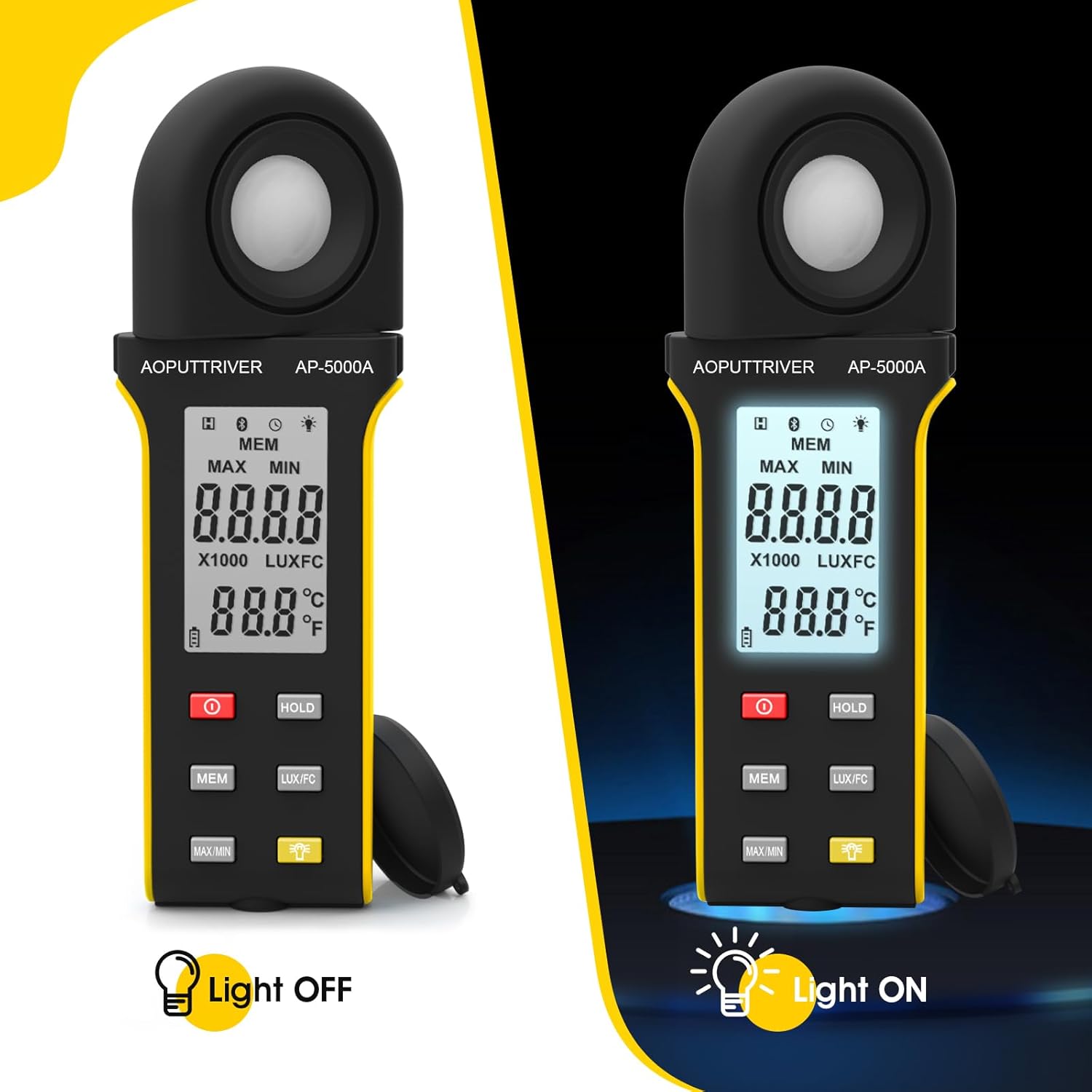
Figure 4: Comparison of the AP-5000A with backlight off and on.
6. Rotatable Detector
The AP-5000A features a 270-degree rotatable silicon filter diode sensor. This design allows you to measure photometric intensity from various angles without needing to reposition the entire meter. Simply rotate the sensor to face the light source while keeping the display visible for easy reading.
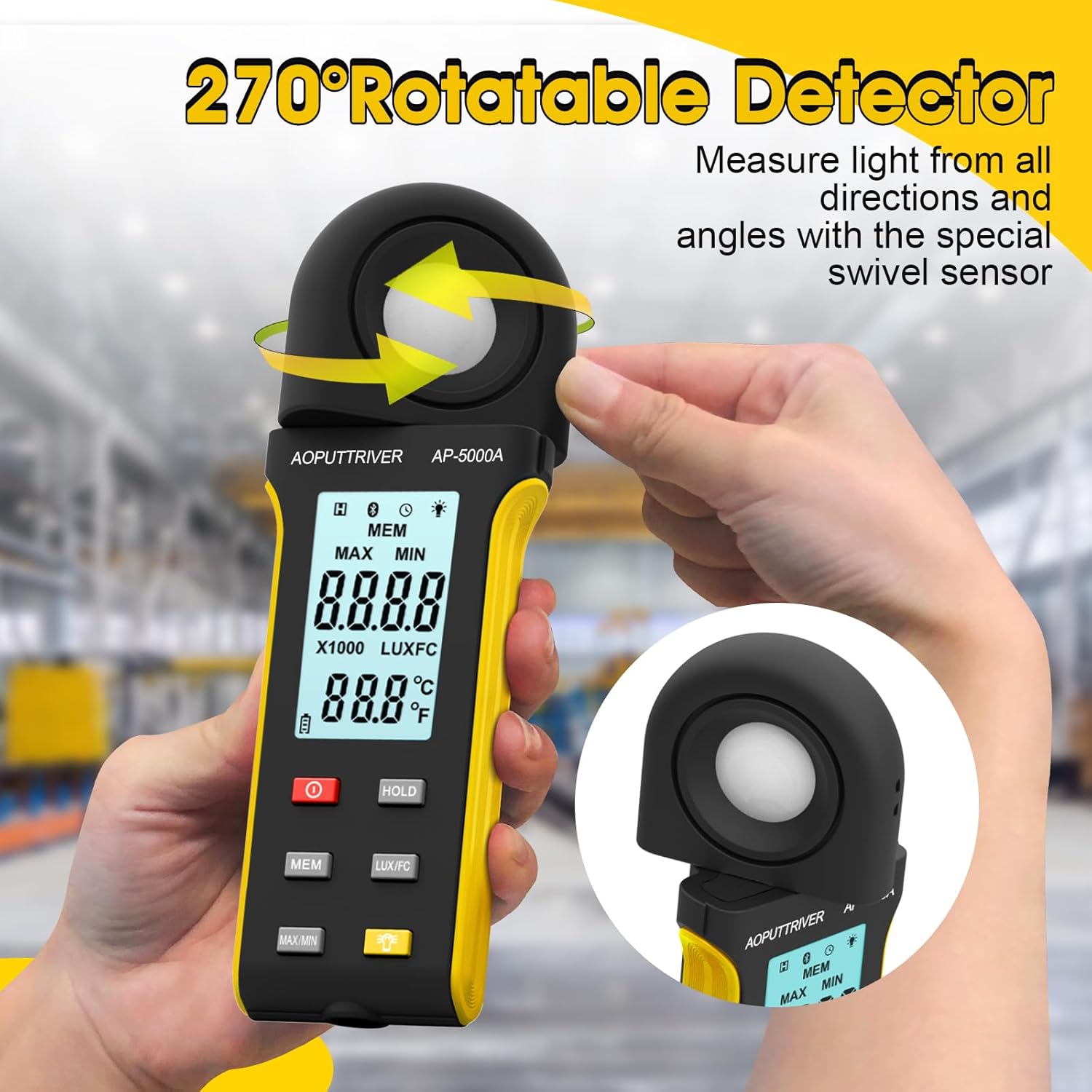
Figure 5: The 270-degree rotatable detector for flexible measurement.
7. Datalogning
The meter supports data logging for up to 30 groups of measurements. This feature allows you to record and review light level data over time, which is useful for monitoring changes in lighting conditions for applications like plant growth or aquarium environments. Refer to the detailed instructions in the full user manual for specific steps on how to initiate, save, and recall data logs using the MEM knap.
8. App-forbindelse
The AP-5000A can connect to a smartphone application via Bluetooth. This allows for real-time tracking of data, remote control of certain functions, and advanced data analysis. Download the official AOPUTTRIVER app from your device's app store and follow the in-app instructions to pair your light meter.
9. Ansøgninger
The AOPUTTRIVER AP-5000A is a versatile tool suitable for a wide range of applications requiring precise light measurement:
- Indoor Plant Growing: Optimizing light levels for various plant species.
- Akvarier: Ensuring appropriate lighting for aquatic life.
- Foto og video: Setting up ideal lighting conditions.
- Workplace and School Environments: Assessing illumination for comfort and productivity.
- Offentlige rum: Measuring light in libraries, stages, and street lighting.
- Industrielle indstillinger: Monitoring lighting in factories and warehouses.

Figure 6: Diverse applications of the AP-5000A Light Meter.
10. Vedligeholdelse og pleje
- Rensning: Use a soft, dry cloth to clean the device. Do not use abrasive cleaners or solvents. Ensure the photodetector is kept clean and free of dust for accurate readings.
- Opbevaring: When not in use, store the meter in its carrying bag with the protective cap on the photodetector. Store in a cool, dry place away from direct sunlight and extreme temperatures.
- Udskiftning af batteri: Replace batteries when the low battery indicator appears on the LCD to ensure continuous accurate operation.
- Automatisk nedlukning: The device features an automatic shutdown function after 15 minutes of inactivity to conserve battery life.
11. Fejlfinding
- Ingen skærm/tændt: Kontroller batteriinstallationen, og sørg for, at batterierne ikke er afladede. Udskift om nødvendigt.
- Upræcise læsninger: Ensure the photodetector is clean and unobstructed. Verify that the correct measurement unit (Lux/FC) is selected. Avoid measuring in rapidly changing light conditions.
- Problemer med appforbindelse: Ensure Bluetooth is enabled on your smartphone and the meter. Restart both the app and the meter. Check that the app is up to date.
- "OL"-visning: Indicates an overload, meaning the measured light intensity exceeds the meter's maximum range.
12. Specifikationer
| Feature | Specifikation |
|---|---|
| Modelnummer | AP-5000A |
| Måleområde | 0.1 ~ 400,000 Lux (0.1 ~ 40,000 FC) |
| Opløsning | 0.1 LUX/FC |
| Nøjagtighed | ≤10000Lux: +/-4% rgd+/-1.0% f.s. ≥10,000Lux: ±5% rgd+/-1.5% f.s ≥200,000Lux: +/-8% rdg+/-2.0%f.s |
| Detector Rotation | 270 grader |
| Datalogningskapacitet | Op til 30 grupper |
| Automatisk nedlukning | Efter 15 minutters inaktivitet |
| Vise | HD Backlight LCD |
| Strømkilde | 2 x AAA batterier |
| Varens vægt | 7.8 ounce |
| Pakkedimensioner | 7.99 x 3.43 x 1.93 tommer |
13. Garanti og support
AOPUTTRIVER products are manufactured to high-quality standards. For warranty information, technical support, or service inquiries, please refer to the contact details provided on the product packaging or visit the official AOPUTTRIVER webwebsted. Behold din købskvittering som købsbevis i tilfælde af garantikrav.


