
1.Overview
The Moukey MAMP1 is a compact yet powerful 2.0 channel Bluetooth audio stereo amplifier receiver designed for various home audio applications. It delivers 400 watts of maximum power output, providing a high-quality audio experience for karaoke, home theater, acoustic sound systems, and monitor headphones. Featuring multiple input and output modes, EQ controls, Bluetooth 5.0 connectivity, and an HD LED screen, the MAMP1 offers versatile and user-friendly operation.
2. Vigtige sikkerhedsoplysninger
- Read and heed all instructions.
- Brug ikke dette produkt i nærheden af vand.
- Rengør kun med en tør klud.
- Sørg for, at voltage of your local mains supply matches the product's requirements.
- Bloker ikke ventilationsåbninger. Installer i henhold til producentens anvisninger.
- Må ikke installeres i nærheden af varmekilder såsom radiatorer, varmeapparater, komfurer eller andre apparater (inklusive ampløftere), der producerer varme.
- Brug kun tilbehør/tilbehør specificeret af producenten.
- Tag stikket ud af dette produkt under tordenvejr, eller når det ikke skal bruges i længere perioder.
- Overlad al service til kvalificeret servicepersonale.
3. Pakkens indhold
- Moukey MAMP1 Audio Stereo Amplivligere
- Fjernbetjening
- FM antenne
- Strømkabel
- Brugermanual
4. Produktfunktioner
- 400 watt maks. effekt: Compact yet powerful 2.0 Channel Bluetooth Audio Stereo Amplifier Receiver, ideal for karaoke, home theater, acoustic sound systems, and monitor headphones.
- Multiple Input and Output Modes: Supports 2 pairs of RCA audio inputs (for CD/DVD players), 2 x 1/4 inch (6.35mm) microphone inputs, USB (Max 64G), SD card (Max 32G), 3.5mm AUX IN, and FM radio. Features RCA Line Out and banana plug speaker outputs. Includes a 1/4 inch (6.35mm) headphone connection.
- EQ kontrol: Features clear, responsive buttons and knobs for microphone echo/volume, balance, bass, treble, master volume, input source, and unique folder/track control.
- Bluetooth 5.0-forbindelse: Professional indoor stereo receiver with Bluetooth music streaming up to 40 feet / 10 meters or more. Easily pairs with smartphones, tablets, iPads, iPhones, and computers.
- HD LED Screen: Integrated FM radio with built-in LED display and front panel audio control center. FM Antenna and Remote Control included for distant audio adjustments.
5. Kontroller på frontpanelet
The front panel provides access to all essential controls for operating your Moukey MAMP1 amplivligere.
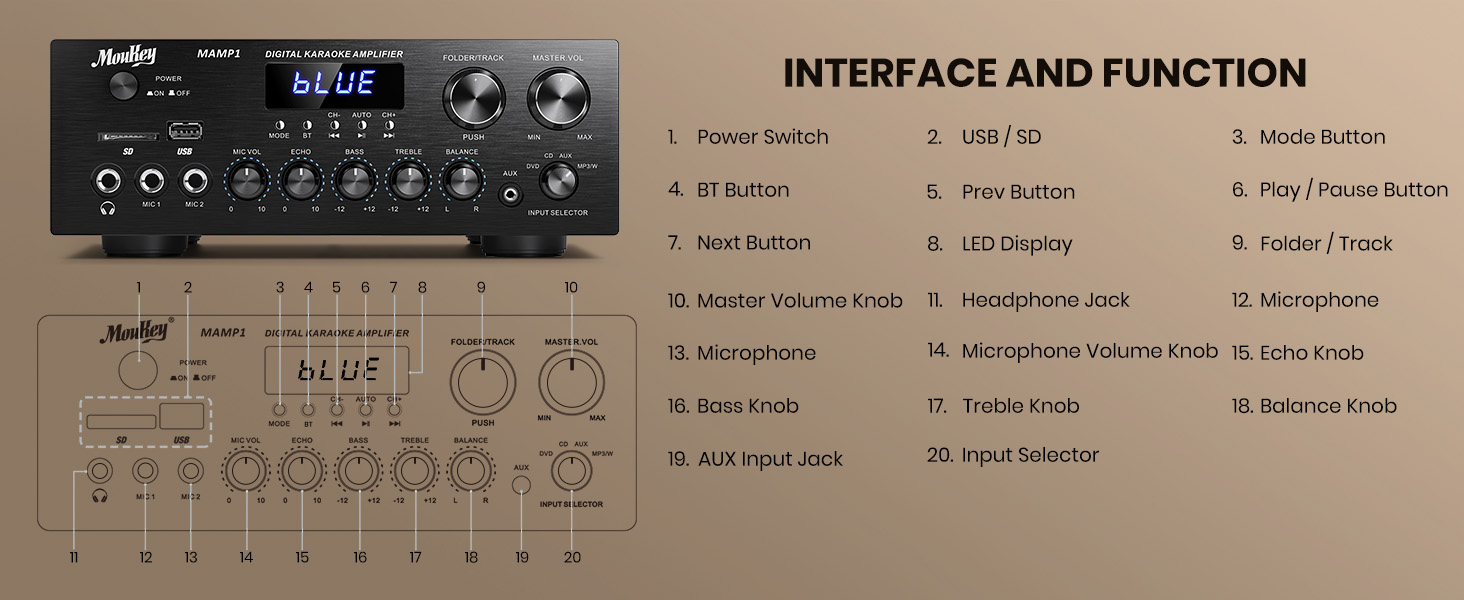
Figure 1: Moukey MAMP1 Frontpanelets layout
- Afbryderen: Tryk for at tænde eller slukke enheden.
- USB / SD Card Slot: Insert USB flash drives (max 64GB) or SD cards (max 32G) for MP3 playback.
- Mode knap: Press to cycle through input sources (USB/SD, Bluetooth, FM, AUX, CD, DVD).
- BT knap: Tryk for at vælge Bluetooth-tilstand.
- Forrige/Næste knapper: Navigate tracks in USB/SD/Bluetooth mode or stations in FM mode.
- Afspil/pause knap: Afspil eller sæt lydafspilning på pause.
- LED display: Viser aktuel tilstand, sporinformation eller FM-frekvens.
- Folder/Track Knob: Select folders or tracks.
- Master volumen knap: Justerer den samlede udgangslydstyrke.
- Hovedtelefonstik (6.35 mm): Tilslut hovedtelefoner for privat lytning.
- Microphone Inputs (MIC1, MIC2 - 6.35mm): Tilslut op til to mikrofoner til karaoke eller højttaleroptræden.
- Mikrofonvolumenknap: Justerer lydstyrken på tilsluttede mikrofoner.
- Ekko-knap: Justerer ekkoeffekten for mikrofoner.
- Basknap: Justerer lavfrekvensudgangen.
- Diskant-knap: Justerer højfrekvent udgang.
- Balanceknap: Justerer balancen mellem venstre/højre kanal.
- Indgangsvælgerknap: Manually select input sources (CD, AUX, DVD, MP3/BT).
6. Bagpaneltilslutninger
The rear panel provides all necessary ports for connecting your audio sources and speakers.

Figure 2: Moukey MAMP1 Bagpanellayout
- FM-antennestik: Tilslut den medfølgende FM-antenne for radiomodtagelse.
- Audio Input (DVD/CD - RCA): Connect external audio sources like DVD or CD players using RCA cables.
- Line Out (RCA): Opret forbindelse til en anden amplivligere eller optageenhed.
- Speaker Output (Banana Plugs): Tilslut dine passive højttalere. Sørg for korrekt polaritet (+ til + og - til -).
- Strømindgang: Connect the power cable to a standard AC outlet.
7. Opsætning
7.1 Højttalertilslutning
To connect your passive speakers to the Moukey MAMP1 amplifier, følg disse trin:

Figure 3: Speaker Connection Diagram
- Sørg for ampApparatet er slukket og taget ud af stikkontakten.
- Identificér de positive (+) og negative (-) terminaler på både dine højttalere og amplivligere.
- For bare wire connections: Rotate and loosen the speaker knob on the amplifier. Insert the bare wire (remove approximately 10mm insulation). Tighten the knobs to secure the wires.
- Connect the positive (+) terminal of your speaker to the positive (+) terminal of the amplivligere.
- Connect the negative (-) terminal of your speaker to the negative (-) terminal of the amplivligere.
- Repeat for all speakers. Ensure all connections are secure to prevent short circuits.
7.2 Tilslutning af lydkilder
- RCA Devices (CD/DVD Player): Use RCA cables to connect the audio output of your CD or DVD player to the corresponding RCA input jacks on the ampliferens bagpanel.
- AUX-enheder: Connect devices with a 3.5mm audio output (e.g., smartphone, tablet) to the 3.5mm AUX IN jack on the front panel.
- Mikrofoner: Plug 1/4 inch (6.35mm) microphones into the MIC1 or MIC2 jacks on the front panel.
- FM-antenne: Connect the included FM antenna to the FM ANT jack on the rear panel for radio reception.
7.3 Strømtilslutning
- Ensure all audio and speaker connections are made.
- Connect the power cable to the AC POWER INPUT on the rear panel of the amplivligere.
- Sæt den anden ende af strømkablet i en passende stikkontakt.
8. Betjeningsvejledning
8.1 Tænd/sluk
Tryk på MAGT kontakten på frontpanelet for at tænde amplifier ON or OFF. The LED display will illuminate when powered on.
8.2 Valg af indgangskilde
Brug MODE knappen eller INPUTVÆLGER knob on the front panel to choose your desired audio source (Bluetooth, USB, SD, AUX, FM, CD, DVD).
8.3 Lydstyrke- og tonekontrol
- Hovedvolumen: Drej på MASTER BIND knappen til at justere det samlede lydniveau.
- Mikrofonlydstyrke: Brug MIC VOL knob to adjust microphone volume independently.
- Ekko: Adjust the microphone echo effect with the EKKO knop.
- Bas/diskant: Fine-tune the low and high frequencies using the BASS og DISKANT knapper.
- Balance: Adjust the left/right channel balance with the BALANCE knop.
8.4 Bluetooth -parring
- Tryk på MODE knappen eller BT button to select Bluetooth mode. The LED display will show "BLUE".
- Aktiver Bluetooth på din mobilenhed, og søg efter tilgængelige enheder.
- Select "MAMP1" from the list to pair. A confirmation tone will sound upon successful connection.
8.5 USB/SD-afspilning
- Insert a USB flash drive or SD card into the respective slot on the front panel.
- De amplifier will automatically switch to USB/SD mode and begin playback. If not, press the MODE knappen for at vælge den.
- Brug FORRIGE NÆSTE buttons to skip tracks and the AFSPIL/PAUSE knap til at styre afspilningen.
8.6 FM-radiofunktion
- Sørg for, at FM-antennen er tilsluttet bagpanelet.
- Tryk på MODE button to select FM radio mode. The LED display will show the frequency.
- Tryk på AUTO knappen for automatisk at scanne og gemme tilgængelige FM-stationer.
- Brug CH- og CH+ knapper til at navigere gennem gemte stationer.
9. Vedligeholdelse
- Hold enheden ren ved at tørre den af med en blød, tør klud.
- Undgå at bruge skrappe kemikalier eller slibende rengøringsmidler.
- Ensure proper ventilation by keeping the vents clear of obstructions.
- Opbevar ampOpbevar apparatet på et køligt, tørt sted væk fra direkte sollys og ekstreme temperaturer.
10. Fejlfinding
| Problem | Mulig årsag | Løsning |
|---|---|---|
| Ingen strøm | Power cable not connected; Power switch off; Outlet malfunction | Kontroller strømkablets forbindelse; Tænd for strømmen; Test stikkontakten med en anden enhed. |
| Ingen lydudgang | Incorrect input source; Volume too low; Speaker connections loose/incorrect; Faulty audio cable | Select correct input source; Increase master volume; Check speaker wiring; Replace audio cables. |
| Bluetooth forbinder ikke | Not in Bluetooth mode; Device too far; Device already connected to another unit | Switch to Bluetooth mode; Move device closer; Disconnect from other devices and try again. |
| Dårlig FM -modtagelse | Antenne ikke tilsluttet; Svagt signal | Connect FM antenna; Adjust antenna position for better reception. |
11. Specifikationer
| Feature | Specifikation |
|---|---|
| Mærke | Moukey |
| Model | MAMP1 |
| Udgangseffekt | 400 Watt Maks |
| Kanaler | 2.0 kanal |
| Bluetooth version | 5.0 |
| Bluetooth rækkevidde | Op til 40 meter |
| Indgangsgrænseflader | 2x RCA (CD/DVD), 2x 1/4" (6.35mm) MIC, USB, SD, 3.5mm AUX IN, FM Antenna |
| Udgangsgrænseflader | RCA Line Out, Banana Plug Speaker Outputs, 1/4" (6.35mm) Headphone |
| USB/SD Max Capacity | USB: 64G, SD: 32G |
| Frekvensrespons | 20Hz-20kHz |
| Tuner-teknologi | FM |
| Produktdimensioner | 81.28 x 78.74 x 43.18 cm; 3.19 kg |
12. Garanti og support
Moukey products are designed and manufactured to the highest quality standards. For detailed warranty information and customer support, please refer to the warranty card included in your package or visit the official Moukey website. If you encounter any issues or have questions regarding your MAMP1 amplifier, please contact Moukey customer service for assistance.