
1. Introduktion
This manual provides detailed instructions for the proper use and maintenance of your Tzone Temperature Humidity Data Logger, Model TempU07B. This device is designed for accurate and reliable monitoring and recording of temperature and humidity data in various industrial and cold chain applications, including freezers, refrigerators, greenhouses, and laboratories. Please read this manual thoroughly before operating the device.

Image 1.1: The Tzone TempU07B Temperature Humidity Data Logger, featuring an external temperature and humidity probe, an LCD display, and a detachable magnetic mounting bracket.
2. Produktfunktioner
- Industriel kvalitet: Designed for robust performance in demanding environments, featuring an IP65 waterproof rating.
- Ekstern sonde: Equipped with a 1.5-meter external temperature and humidity probe for measuring data in hard-to-reach or enclosed spaces.
- High Data Capacity: Stores up to 34,560 groups of temperature and humidity data.
- Automatic Report Generation: Generates PDF and CSV reports automatically upon connection to a computer via USB, requiring no special software for basic report viewing.
- Bredt måleområde: Temperature range of -40 ℉ to 185 ℉ (-40 ℃ to 85 ℃) and humidity range of 5% to 95% RH.
- Kvalitetscertificering: Complies with FDA CFR Part 21 requirements.
- Konfigurerbare parametre: Allows setting of alarm ranges, logging intervals, startup modes, and calibration via dedicated Windows software.
- Digital LCD-skærm: Shows real-time, maximum (MAX), and minimum (MIN) temperature and humidity values.
- Strømbesparende: LCD screen automatically turns off after 1 minute of inactivity to conserve battery life.
- Praktisk montering: Features a wall-mounted bracket with a magnet for easy installation and space-saving placement.
3. Pakkens indhold
Kontroller venligst pakkens indhold ved modtagelse for at sikre, at alle varer er til stede:
- 1 x Tzone Temperature and Humidity Data Logger (Model TempU07B)
- 1 x Brugermanual (dette dokument)
- 1 x CR2032-batteri (forinstalleret eller medfølger separat)
- 1 x Magnetic Wall-Mounted Bracket
4. Specifikationer

Image 4.1: Key specifications of the TempU07B data logger.
| Parameter | Værdi |
|---|---|
| Modelnummer | TempU07B |
| Temperaturmåleområde | -40 ℉ til 185 ℉ (-40 ℃ til 85 ℃) |
| Fugtmåleområde | 5% til 95% RH |
| Temperatur nøjagtighed | ±0.3 ℃ (0-60 ℃) |
| Fugtighedsnøjagtighed | ±3% RH (10%-90%) |
| Datakapacitet | 34,560 grupper |
| Rapportformat | PDF & CSV (automatic generation) |
| Forbindelse | USB |
| Batteritype | 1 x CR2032 (inkluderet) |
| Batterilevetid | Approx. 2 years (at 25 ℃) |
| Vandtæt vurdering | IP65 |
| Dimensioner | Approx. 100mm x 43mm (main unit) |
| Inkluderede komponenter | Data Logger, User Manual |
5. Enhedslayout

Billede 5.1: Overview of the TempU07B data logger's components and approximate dimensions.
The Tzone TempU07B features a clear LCD display, two control buttons (START and STOP), a USB port for data transfer, and an integrated external probe for temperature and humidity sensing. The device also comes with a magnetic bracket for flexible placement.
6. Indledende opsætning
6.1 Batteriinstallation
The device typically comes with a CR2032 battery pre-installed. If not, or if replacement is needed, carefully open the battery compartment and insert a new CR2032 battery, ensuring correct polarity.
6.2 Montering af enheden
The TempU07B includes a magnetic wall-mounted bracket for convenient placement.
- Attach the bracket to a suitable surface using screws or its magnetic backing.
- Securely place the data logger into the bracket. The magnetic design ensures it stays in place.
6.3 Placering af sonde

Image 6.1: The external probe allows for monitoring conditions inside a freezer or refrigerator without opening the door.
Position the 1.5-meter external probe in the area where temperature and humidity need to be monitored. Ensure the probe tip is not obstructed and is exposed to the environment you wish to measure. The main unit can remain outside the monitored area, allowing for easy viewindlæsning af data.
7. Grundlæggende betjening
7.1 Start og stop af logning
- Sådan starter du logføring: Tryk på STARTE button to wake the unit. Then, press and hold the STARTE button until the logging indicator appears on the LCD.
- Sådan stopper du logføring: Tryk og hold på STOP button until the logging indicator disappears. Alternatively, logging can be stopped automatically if a pre-set stop time is configured via the software.
7.2 LCD-displayinformation

Image 7.1: Explanation of LCD display icons and values.
LCD-skærmen viser forskellige oplysninger:
- Real-time Values: Aktuel temperatur og luftfugtighed.
- MAX/MIN Values: Tryk på STARTE button briefly to cycle through real-time, maximum, and minimum recorded values.
- Alarmindikatorer: Icons will appear if temperature or humidity exceeds pre-set alarm thresholds (H1/H2 for high, L1/L2 for low).
- Logningsstatus: An icon indicates if the device is actively recording data.
- Batteriindikator: Viser det aktuelle batteriniveau.
The screen will automatically turn off after 1 minute of no operation to save battery life. Press any button to reactivate the display.
8. Advanced Settings & Data Management
8.1 Automatisk rapportgenerering
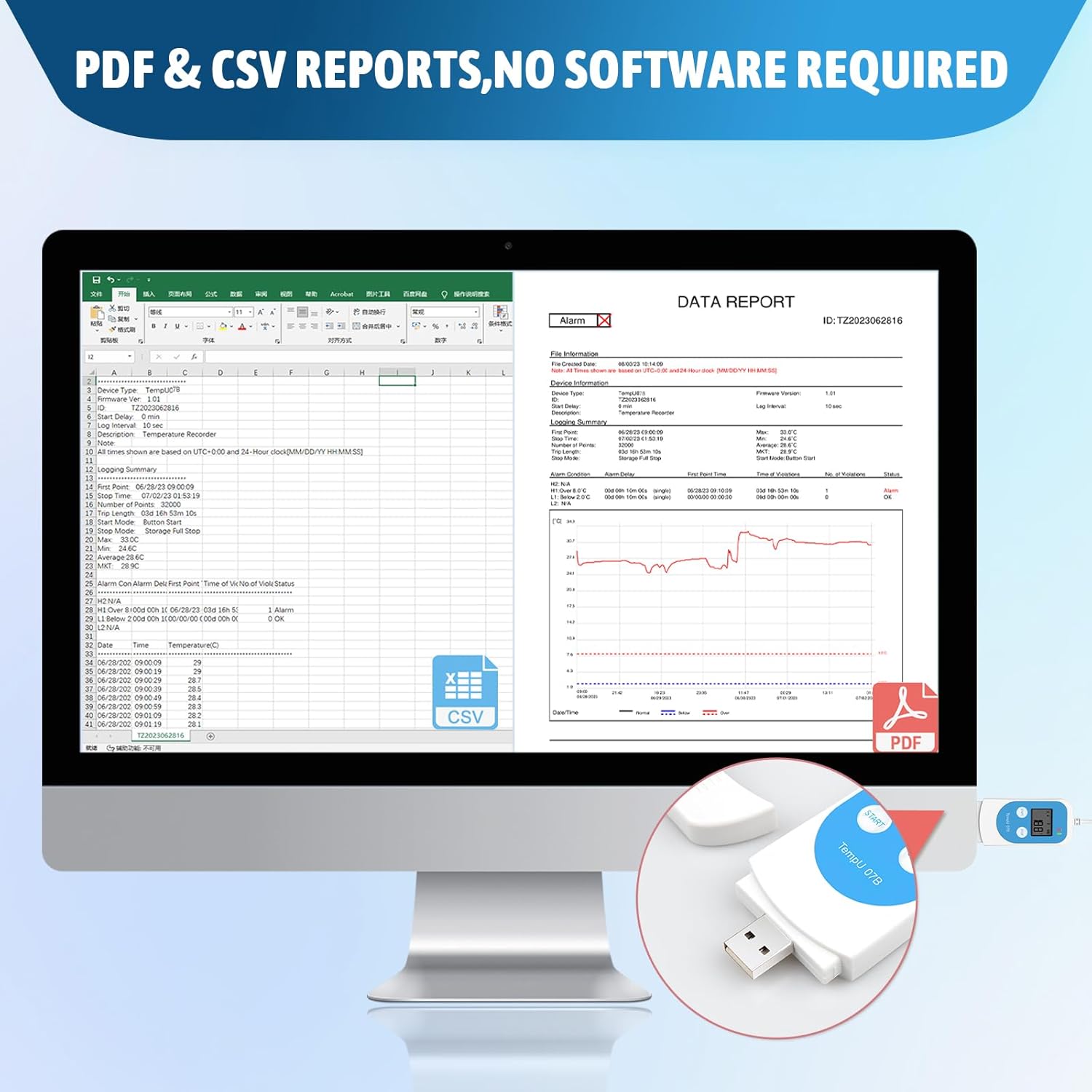
Billede 8.1: Eks.ample of automatically generated PDF and CSV reports.
After logging is complete, connect the data logger to a computer's USB port. The device will automatically generate PDF and CSV reports containing the recorded data. No special software installation is required to view these basic reports.
8.2 Using the Data Management Software (Windows Only)

Image 8.2: Workflow for setting parameters using the Tzone software.
For advanced configuration and detailed data analysis, download the free data management software from the official Tzone website (typically www.tzonedigital.com). This software is compatible with Windows operating systems.
- Download og installer: Obtain the software from the Tzone webwebsted og følg installationsvejledningen.
- Tilslut enhed: Plug the data logger into your computer's USB port.
- Konfigurer parametre: Use the software to set various parameters, including:
- Temperature and humidity alarm ranges (high and low)
- Logningsinterval
- Startup mode (manual, timed)
- Kalibreringsindstillinger
- Password protection for reports
- Gem indstillinger: After configuring, save the parameters to the device. You can also save parameter templates for future use.
- Dataanalyse: The software supports data graph comparison across multiple loggers, aiding in comprehensive data analysis.
9. Vedligeholdelse
9.1 Rengøring
The device is designed to be freezer safe and can be wiped clean. Use a soft, damp cloth to clean the exterior of the data logger. Do not use abrasive cleaners or immerse the device in water.
9.2 Udskiftning af batteri
When the battery indicator shows low power, replace the CR2032 battery. Ensure the device is not actively logging data before replacing the battery. Dispose of old batteries according to local regulations.
10. Fejlfinding
- Device not starting/displaying: Check battery level. Replace if necessary.
- No data report generated: Ensure the device has completed logging. Connect securely to a USB port. Try a different USB port or computer.
- Kan ikke ændre indstillinger: Parameter changes require the dedicated Windows software. Ensure the software is correctly installed and the device is connected.
- Unøjagtige aflæsninger: Ensure the probe is correctly positioned and not obstructed. Consider recalibrating using the software if discrepancies persist.
- Magnet detached from bracket: Reattach the magnet to the bracket using a suitable adhesive if it has come loose.
11. Support og garanti
For technical support, warranty information, or further inquiries, please refer to the official Tzone website or contact Tzone customer service. Keep your purchase receipt for warranty claims.