
MEGATEK CP27BR
MEGATEK Bærbar CD-afspiller Brugermanual
Model: CP27BR
Indledning
Thank you for choosing the MEGATEK Portable CD Player. This device is designed to provide a versatile and high-quality audio experience, supporting various media formats and offering multiple connectivity options. Please read this manual carefully to ensure proper use and maintenance of your new CD player.

Image: The MEGATEK Portable CD Player, showcasing its compact design, integrated speakers, control buttons, and included accessories like headphones and USB-C charging cables.
Sikkerhedsoplysninger
For at sikre sikker drift og forhindre skader, bedes du overholde følgende forholdsregler:
- Udsæt ikke enheden for ekstreme temperaturer, fugt eller direkte sollys.
- Undgå at tabe eller udsætte enheden for kraftige stød.
- Du må ikke selv adskille eller forsøge at reparere enheden. Overlad al service til kvalificeret personale.
- Brug kun det medfølgende opladningskabel og en kompatibel strømadapter.
- Hold enheden væk fra vand og andre væsker.
- Rengør enheden med en blød, tør klud. Brug ikke slibende rengøringsmidler eller opløsningsmidler.
- Langvarig lytning ved høj lydstyrke kan forårsage høreskader. Juster lydstyrken til et sikkert niveau.
Pakkens indhold
Bekræft at alle varer er til stede i pakken:
- MEGATEK Portable CD Player - Black
- Kablede hovedtelefoner
- USB-C ladekabel
- Brugermanual

Image: A visual representation of the package contents, including the CD player, headphones, USB-C cable, and user manual.
Produkt overview
Familiarize yourself with the various parts and controls of your MEGATEK Portable CD Player.
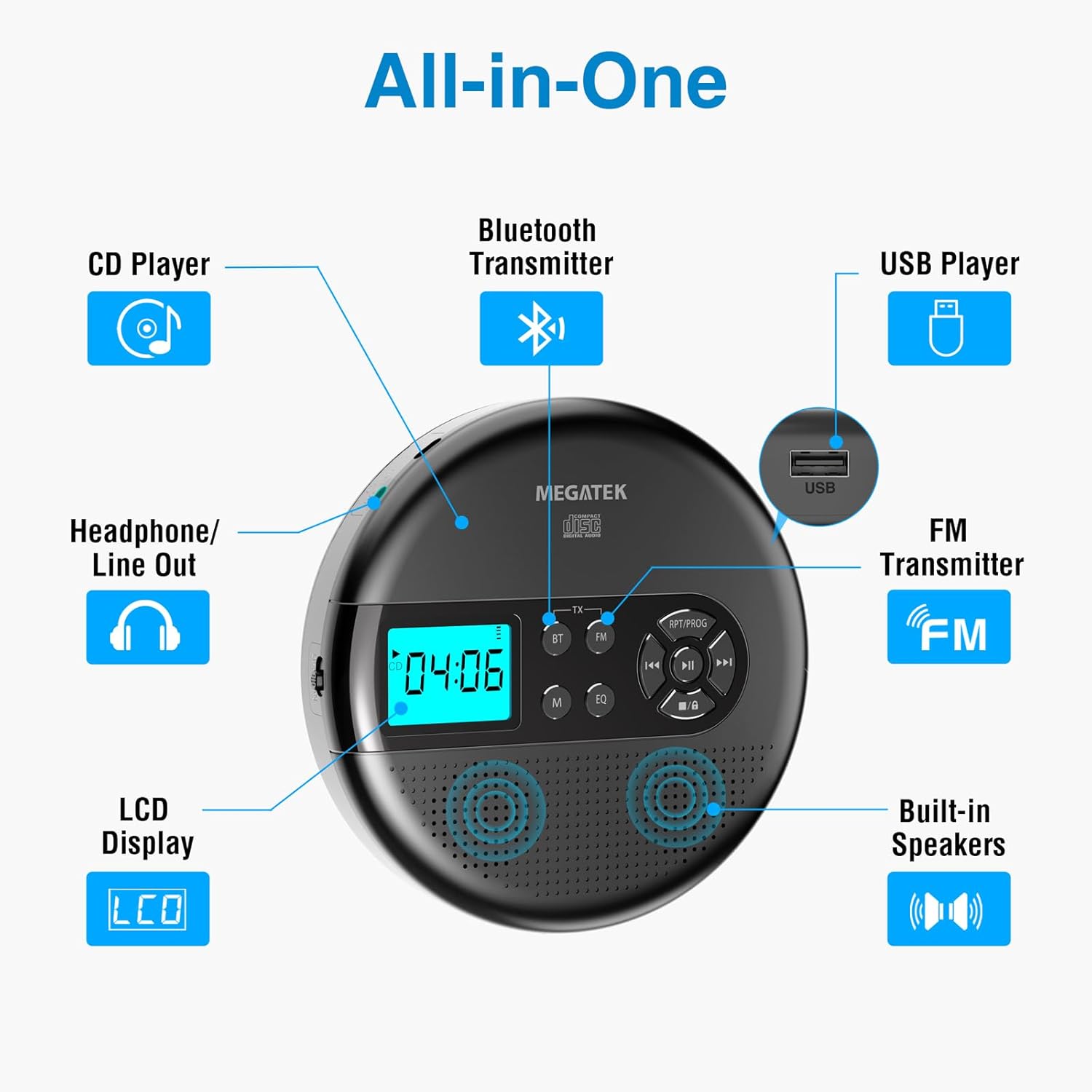
Image: An "All-in-One" diagram highlighting key features such as the CD Player, Bluetooth Transmitter, USB Player, FM Transmitter, Built-in Speakers, LCD Display, and Headphone/Line Out port.
Kontrol og porte:
- LCD-skærm: Viser spornummer, tid, tilstand og batteristatus.
- Afspil/pause knap: Starter eller sætter afspilning på pause.
- Forrige/Næste knapper: Skips tracks or fast-forwards/rewinds.
- Stop-knap: Stopper afspilning.
- RPT/PROG Button: Controls repeat modes and programming tracks.
- BT knap: Aktiverer Bluetooth-transmissionstilstand.
- FM knap: Activates FM transmission mode.
- M (tilstand) knap: Switches between CD, USB, Bluetooth, and FM modes.
- EQ knap: Skifter gennem equalizer-forudindstillinger.
- Lydstyrkekontrol: Justerer lydudgangsniveauet.
- USB-port: Til afspilning af lyd files fra et USB-drev.
- Type-C opladningsport: Til opladning af det interne batteri.
- 3.5mm Audio Out Jack: Til tilslutning af hovedtelefoner eller eksterne højttalere.
- Indbyggede stereohøjttalere: Til direkte lydafspilning.
Opsætning
Opladning af batteriet:
The device is equipped with a built-in 2000mAh rechargeable Li-ion battery. Before first use, fully charge the player.
- Connect the provided USB-C charging cable to the Type-C charging port on the player.
- Tilslut den anden ende af USB-C-kablet til en USB-strømadapter (medfølger ikke) eller en computers USB-port.
- The battery indicator on the LCD display will show charging status. A full charge provides up to 15 hours of playtime at medium volume.

Image: The portable CD player connected to a power source via its USB-C cable, resting on a nightstand next to a bed.
Isætning af en cd:
- Locate the CD compartment latch/button on the side of the player and slide/press it to open the lid.
- Carefully place the CD onto the center spindle with the label side facing up.
- Gently press the CD down until it clicks into place.
- Luk låget til cd-rummet godt, indtil det klikker på plads.

Image: The portable CD player with its lid open, showing a blue CD disc inserted into the compartment, ready for playback.
Betjeningsvejledning
CD-afspilning:
- Insert a CD as described in the Setup section.
- Tryk på Afspil/pause knappen for at starte afspilningen.
- Brug Forrige/Næste buttons to navigate between tracks. Hold to fast-forward or rewind.
- Tryk på RPT/PROG button to cycle through repeat modes (repeat one, repeat all, random) or to program a custom playback order.
- Tryk på Stop knappen for at afslutte afspilningen.
- Adjust volume using the dedicated volume control.
USB-afspilning:
The player supports MP3, WMA, and WAV audio files fra et USB-drev.
- Indsæt et USB-flashdrev i USB-porten.
- Tryk på M (tilstand) knappen for at skifte til USB-tilstand.
- Brug Afspil/pause, Forrige/Næste, og RPT/PROG knapperne, som du ville gøre ved CD-afspilning.
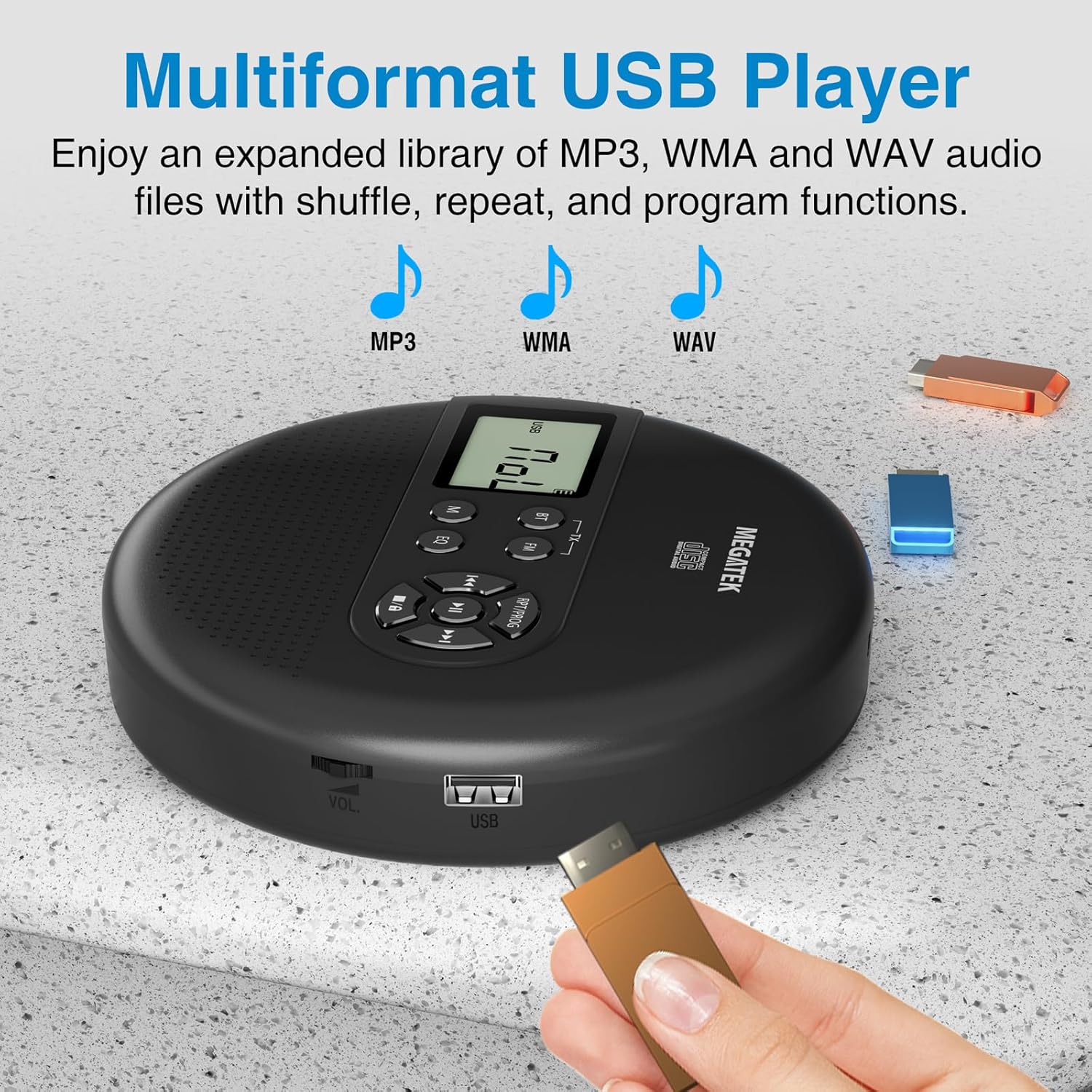
Image: The portable CD player with a USB flash drive inserted into its side port, illustrating its multi-format USB playback capability.
Bluetooth transmission:
Stream audio wirelessly to Bluetooth-enabled headphones or speakers. Note: This feature does not support connections to car stereo systems.
- Sørg for, at dine Bluetooth-hovedtelefoner eller -højttaler er i parringstilstand.
- On the CD player, press the BT button. The Bluetooth indicator on the display will flash.
- The player will automatically search for and connect to nearby Bluetooth devices. Once connected, the indicator will stop flashing.

Image: The portable CD player wirelessly transmitting audio to two external Bluetooth speakers, demonstrating its Bluetooth transmission capability.
FM transmission:
Transmit audio signals to nearby FM radios, including car FM stereos and home stereo systems.
- Tryk på FM button on the CD player. The display will show an FM frequency.
- Tune your FM radio (car stereo, home stereo) to the same frequency displayed on the CD player.
- Adjust the frequency on the CD player using the Forrige/Næste buttons if interference occurs or to find a clearer channel.

Image: The portable CD player placed on a car dashboard, transmitting audio to the car's FM stereo system, indicated by an FM frequency on the car's display.
Using Headphones/External Speakers:
For private listening or connecting to wired audio systems:
- Plug the included wired headphones into the 3.5mm audio out jack.
- Alternatively, connect an audio cable (not included) from the 3.5mm audio out jack to the AUX input of external speakers or an audio system.
- The built-in speakers will automatically mute when headphones or external speakers are connected.

Image: A close-up of the portable CD player, visually representing sound waves emitting from its dual stereo speakers, emphasizing the built-in audio capability.
Opretholdelse
- Rensning: Use a soft, dry, lint-free cloth to clean the exterior of the player. For the CD lens, use a specialized CD lens cleaner. Do not use liquids or aerosol cleaners directly on the device.
- Opbevaring: Når afspilleren ikke er i brug i længere perioder, skal den opbevares køligt og tørt, væk fra direkte sollys og ekstreme temperaturer.
- Batteripleje: For at forlænge batteriets levetid bør du undgå at aflade batteriet helt ofte. Oplad enheden regelmæssigt, selvom den ikke er i aktiv brug.
Fejlfinding
| Problem | Mulig årsag | Løsning |
|---|---|---|
| Afspilleren tænder ikke. | Batteriet er afladet. | Charge the player using the USB-C cable. |
| Ingen lyd fra højttalere/hovedtelefoner. | Volume is too low; headphones not fully plugged in; incorrect mode selected. | Increase volume; ensure headphones are securely connected; press the M (tilstand) knappen for at vælge den korrekte kilde. |
| CD'en springer over eller afspiller ikke. | CD is dirty, scratched, or inserted incorrectly; anti-skip function overwhelmed. | Clean the CD; ensure CD is properly seated; avoid strong vibrations. |
| Problemer med Bluetooth-forbindelse. | Device not in pairing mode; too far from player; interference. | Ensure receiving device is in pairing mode; move closer to the player; restart both devices. |
| FM transmission static/poor quality. | Interference; incorrect frequency. | Adjust the FM frequency on the player and receiver to find a clear channel. |
Specifikationer
| Feature | Detalje |
|---|---|
| Modelnummer | CP27BR |
| Produktdimensioner | 5.91 x 5.91 x 1.32 tommer |
| Varens vægt | 10.9 ounce |
| Batteri | 2000mAh litium-ion (genopladeligt) |
| Spilletid | Op til 15 timer (ved medium volumen) |
| Understøttede cd-formater | CD, CD-R/RW, MP3 CD, Audio Book CD |
| Understøttede USB-formater | MP3, WMA, WAV |
| Anti-Spring beskyttelse | 60 sekunder |
| Forbindelse | USB, Bluetooth Transmitter, FM Transmitter, 3.5mm Audio Out |
| Særlige funktioner | Built-in Stereo Speakers, Resume Play, Shuffle, Repeat, Program Functions, 5 EQ Options |
Garanti og support
MEGATEK offers comprehensive support for its products:
- 12-måneders udskiftning: In case of product defects or issues within 12 months of purchase.
- Livsvarig teknisk support: Assistance with product usage, troubleshooting, and general inquiries.
- 24/7 kundeservice: Available through Amazon buyer-seller messaging.
For any questions or problems, please contact MEGATEK customer service via the Amazon platform or refer to the contact information provided in the product packaging.
Image: A graphic detailing MEGATEK's customer support, including 12-month replacement, lifetime technical support, and 24/7 Amazon buyer-seller messaging, alongside an image of customer service representatives.
Ask a question about this manual
Ask about setup, troubleshooting, compatibility, parts, safety, or missing instructions. Manuals+ will review the question and use this page’s manual context to help answer it.