
1. Introduktion
Tak for købetasing the SKKTKT TV Stand. This entertainment center is designed to accommodate TVs up to 75 inches and features integrated LED lighting with body sensor activation, a 3-mode charging station (wireless, USB, Type-C), and ample storage. This manual provides detailed instructions for assembly, operation, maintenance, and troubleshooting to ensure optimal use and longevity of your product.

Figur 1: Forside view of the SKKTKT TV Stand with LED lights activated.
2. Sikkerhedsinstruktioner
- Læs alle instruktioner omhyggeligt før montering og brug.
- Hold børn og kæledyr væk fra samleområdet. Små dele kan være en kvælningsfare.
- Ensure all connections are secure before placing a TV or other items on the stand.
- Overskrid ikke den maksimale vægtkapacitet på 50 kg.
- Placer TV-stativet på en plan og stabil overflade for at forhindre, at det vælter.
- Avoid exposing the LED lights and charging station to water or excessive moisture.
- Tag netledningen ud af stikkontakten, før du rengør eller udfører vedligeholdelse.
- Forsøg ikke at modificere produktet. Enhver ændring kan ugyldiggøre garantien og udgøre en sikkerhedsrisiko.
3. Pakkens indhold
Kontroller, at alle komponenter er til stede, før monteringen påbegyndes. Hvis der mangler eller er beskadigede dele, bedes du kontakte kundeservice.
- Toppanel (1)
- Midterste hylde (1)
- Nederste hylde (1)
- Side Frames (2, X-shape reinforced)
- Support Legs (5, with floor protectors)
- Dividing Panels (4)
- LED Light Strip (1)
- Charging Station Unit (1, with wireless, USB, Type-C)
- Samlebeslag (skruer, dyvler, kamlåse osv.)
- Monteringsvejledning

Figur 2: TV-bordets vigtigste komponenter og funktioner.
4. Monteringsvejledning
Assembly typically requires two people. Follow the numbered steps in the included assembly instructions. Ensure all parts are correctly oriented before tightening screws.
- Udpak og identificer: Carefully unpack all components and hardware. Refer to the parts list to identify each piece.
- Saml siderammer: Attach the X-shape reinforced side frames to the main support legs using the provided hardware.
- Fastgør bundhylde: Secure the bottom shelf to the assembled side frames. Ensure it is level and stable.
- Install Dividing Panels: Insert the four dividing panels into the designated slots on the bottom shelf and secure them.
- Attach Middle Shelf: Place and secure the middle shelf onto the dividing panels and side frames.
- Installer toppanel: Carefully place the top panel onto the assembled structure and secure it with the remaining hardware.
- Installer LED-lysstrimmel: Adhere the LED light strip to the designated area, typically along the underside of the top panel or middle shelf, following the clear installation stickers.
- Integrer ladestation: Install the charging station unit into its designated cutout on the top surface. Connect its power cable to the main power supply.
- Endelig kontrol: Ensure all screws are tightened, and the stand is stable.
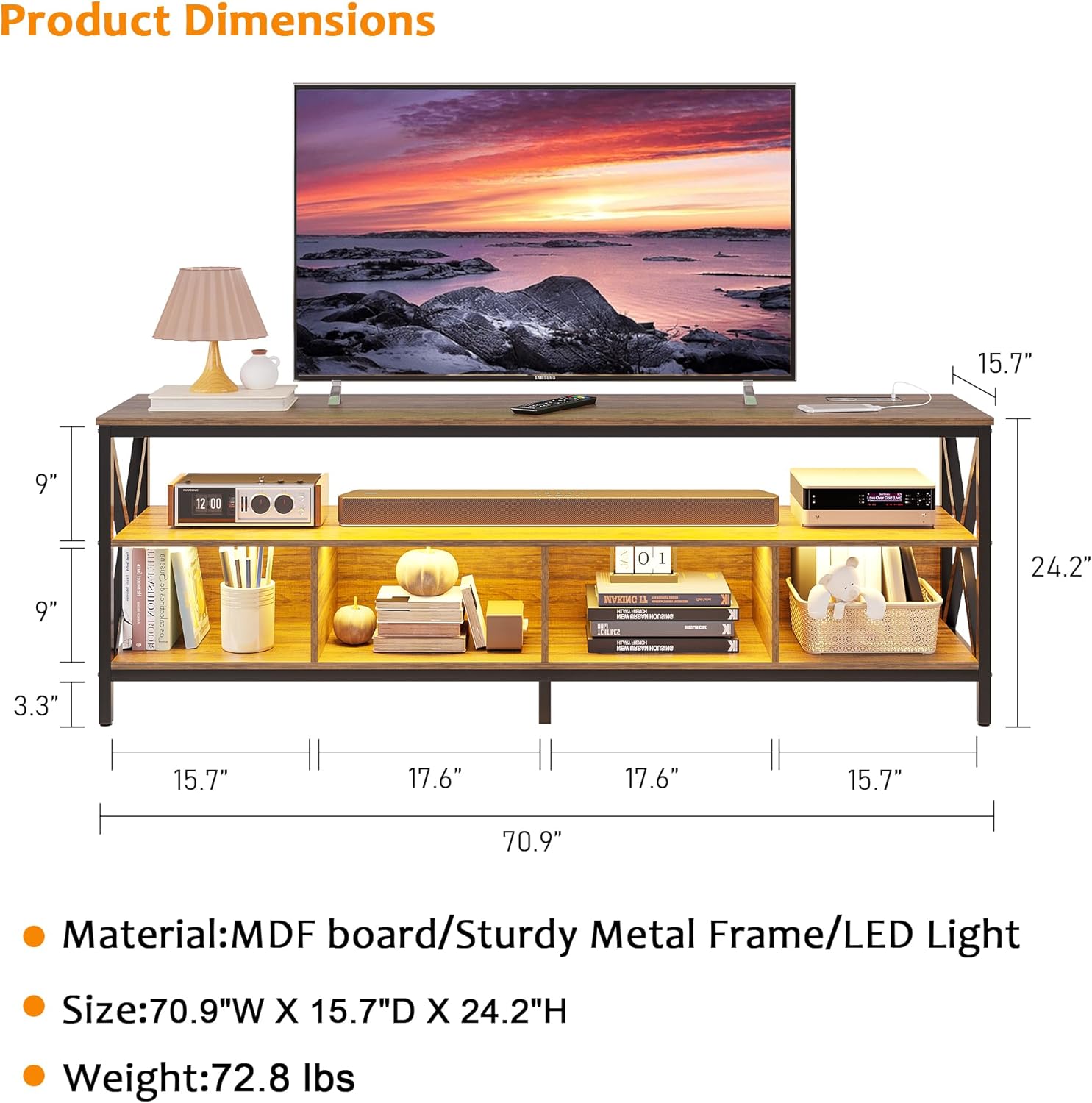
Figur 3: Produktmål til planlægning af placering.
5. Betjeningsvejledning
5.1 LED lys
The integrated LED lights offer three color options and adjustable brightness, along with a body sensor mode.
- Body Sensor Mode: Activate the body sensor mode using the 'Body' button on the control panel. The lights will automatically turn on when motion is detected nearby and turn off when no motion is detected for a period.
- Farveændring: Short press the 'Light' button on the control panel to cycle through the three available colors: white, yellow, and blue.
- Justering af lysstyrke: Long press the 'Light' button to adjust the brightness level. Release the button when the desired brightness is reached.

Figure 4: Smart control panel for LED lights and charging.
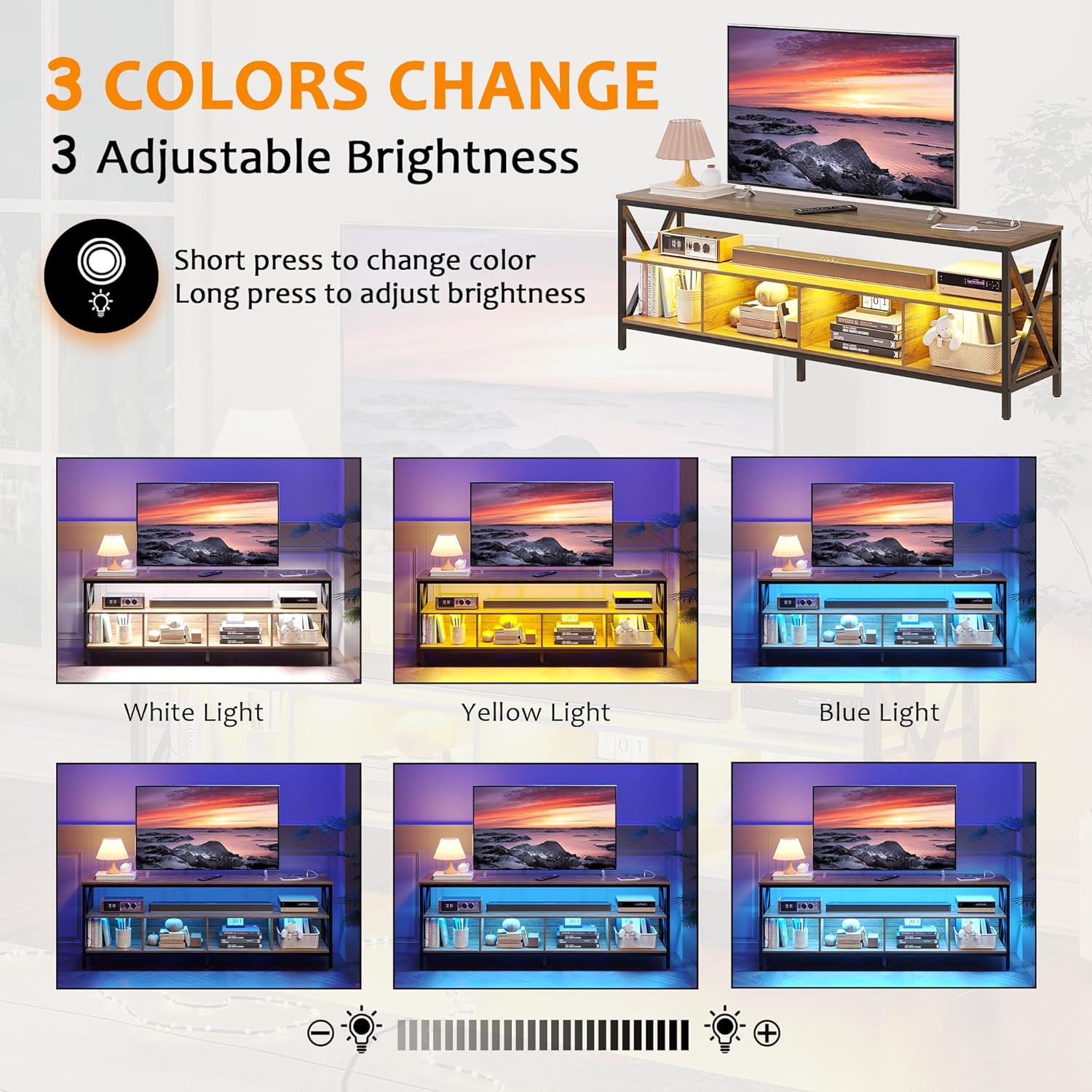
Figure 5: LED light color and brightness options.
5.2 Ladestation
The TV stand includes a versatile charging station with wireless, USB, and Type-C charging options.
- Trådløs opladning: Place your compatible device on the wireless charging pad. Ensure the device is centered for optimal charging.
- USB-opladning: Connect your device's USB cable to the USB port on the charging station.
- Type-C opladning: Connect your device's Type-C cable to the Type-C port on the charging station.
6. Vedligeholdelse
To maintain the appearance and functionality of your TV stand, follow these simple care instructions:
- Rensning: Tør overfladerne af med en tør, blød klud. Undgå at bruge skrappe kemikalier eller slibende rengøringsmidler, da disse kan beskadige overfladen.
- Spild: Immediately wipe up any spills with a dry cloth to prevent staining or damage to the wood and electronic components.
- Inspektion: Kontrollér regelmæssigt alle hardwareforbindelser for at sikre, at de forbliver tætte. Efterspænd om nødvendigt.
- Floor Protectors: Ensure the floor protectors on the legs are intact to prevent scratches on your flooring.
7. Fejlfinding
7.1 LED-lys virker ikke
- Tjek strøm: Ensure the TV stand is properly plugged into a working power outlet.
- Light Strip Connection: Verify that the LED light strip is securely connected to the power source and control unit.
- Kontrolpanel: Ensure the 'Light' button on the control panel is pressed to turn on the lights.
7.2 Ladestationen virker ikke
- Strømtilslutning: Confirm the TV stand is plugged in and receiving power.
- Enhedskompatibilitet: For wireless charging, ensure your device is wireless charging compatible and properly aligned on the pad.
- Kabeltjek: For USB/Type-C, ensure your charging cable is functional and securely connected to both the device and the port.
- Overbelaste: Avoid charging too many high-power devices simultaneously, which might exceed the station's capacity.
7.3 Stabilitetsproblemer
- Plan overflade: Sørg for, at TV-stativet er placeret på en flad, jævn overflade.
- Spænd hardware: Recheck and tighten all assembly screws and bolts.
- Vægtfordeling: Distribute items evenly across the shelves and top surface.
8. Specifikationer
| Feature | Detalje |
|---|---|
| Mærke | SKKTKT |
| Model | B0CGJ4MCZF |
| Materiale | MDF Board, Sturdy Metal Frame |
| Farve | Brun |
| Produktmål (B x D x H) | 180 cm x 40 cm x 61.5 cm (70.9" x 15.7" x 24.2") |
| Varens vægt | 72.8 pund (33 kg) |
| Weight Capacity (Maximum) | 110 pund (50 kg) |
| Tv -størrelse kompatibilitet | Op til 75 tommer |
| LED lys | Auto Sensor, 3 Colors (White/Blue/Yellow), 3 Level Brightness |
| Opladning Station | Wireless Charging, USB Port, Type-C Port |
| Rammetype | Metal (X-shape reinforced) |
| Gulvbeskyttelse | Included on legs |
9. Kundesupport
If you have any questions, concerns, or require assistance with your SKKTKT TV Stand, please contact us directly via Amazon. We are committed to providing the best solution for you within 24 hours.
For further information or to explore other products, visit the SKKTKT Store on Amazon.