
Indledning
Thank you for choosing the DEPSTECH 8V Cordless Mini Rotary Tool, Model A1L. This versatile tool is designed for a wide range of DIY, craft, and household projects, offering precision and power in a compact, cordless design. This manual provides essential information for safe operation, proper setup, maintenance, and troubleshooting to ensure you get the most out of your tool.

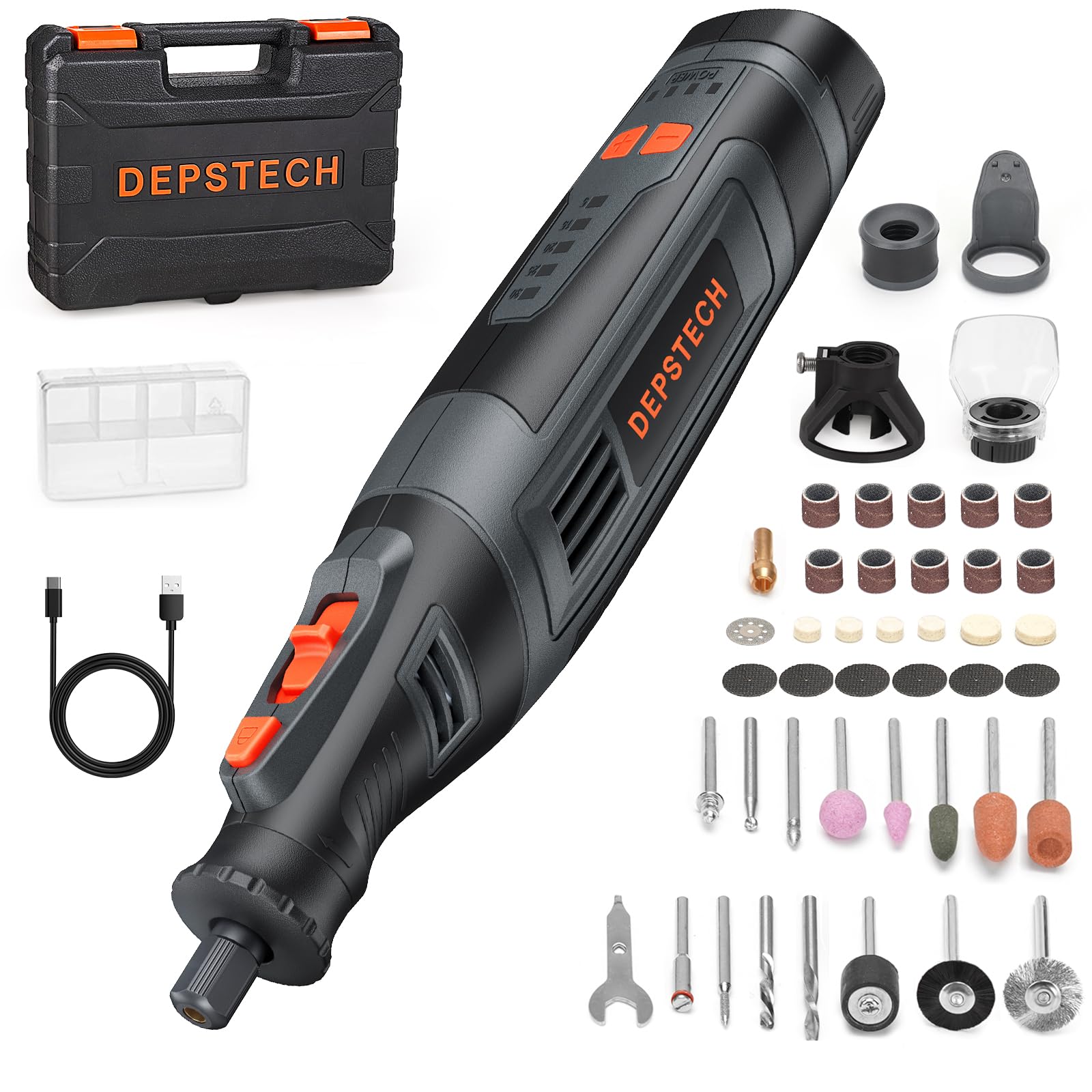
The DEPSTECH 8V Cordless Mini Rotary Tool A1L, a compact and powerful device for various tasks.
Vigtige sikkerhedsinstruktioner
Følg altid grundlæggende sikkerhedsforanstaltninger, når du bruger elektrisk værktøj, for at reducere risikoen for brand, elektrisk stød og personskade.
- Øjenbeskyttelse: Brug altid sikkerhedsbriller eller beskyttelsesbriller for at beskytte dine øjne mod flyvende genstande.
- Arbejdsområde: Keep your work area clean, well-lit, and free from clutter. Ensure adequate ventilation.
- Sikkert arbejdsemne: Fastgør altid dit emne med clamps eller en skruestik for at forhindre bevægelse under drift.
- Proper Bits: Use only accessories and bits designed for rotary tools and appropriate for the task. Ensure bits are correctly installed and tightened.
- Avoid Accidental Start: Ensure the power switch is off before making any adjustments, changing accessories, or storing the tool.
- Bevar grebet: Hold the tool firmly with both hands if necessary, maintaining control at all times.
- Opladning: Use only the provided Type-C cable and a compatible power adapter for charging. Do not charge in damp forhold.
- Børn og tilskuere: Hold børn og omkringstående væk fra arbejdsområdet.
Pakkens indhold
The DEPSTECH A1L Mini Rotary Tool kit includes the following items:
- DEPSTECH A1L Cordless Mini Rotary Tool
- Opbevaringskasse
- Plastik tilbehørsæske
- USB-C ladekabel
- LED Light Attachment
- Skærevejledning
- Skjoldfastgørelse
- Double-sided Reinforced Cutting Discs (x6)
- Diamond Cutting Bit (x1)
- Cutting Bit Mandrel (x1)
- Cylindrical Sanding Paper + Drum Mandrel (x1)
- Sanding Drum Mandrel (x1)
- Mounted Grinding Stones (x4)
- Siliciumcarbid slibesten
- Spændetang (x1)
- Skruenøgle (x1)
- Diamond Drill Bits (x2)
- High-Speed Steel (HSS) Drill Bits (Spherical) (x1)
- HSS Drill Bit (x1)
- Felt Buffs (x6)
- Felt Buff Mandrel (x1)
- Wire Brush (x1)
- Bristle Brush (x1)

The complete set of 47 accessories for diverse applications.
Produkt overview
Familiarize yourself with the components of your DEPSTECH A1L Mini Rotary Tool:

Labeled diagram of the DEPSTECH A1L Mini Rotary Tool components.
- Knap til ændring af hastighed: Adjusts the rotation speed.
- Hastighedsindikator: Viser den aktuelle hastighedsindstilling.
- Afbryderen: Tænder og slukker for værktøjet.
- Spindellåseknap: Engages the spindle lock for accessory changes.
- Batteriindikator: Viser den resterende batteriopladning.
- Opladningsport: Type-C port for recharging the battery.
- Ventilationshuller: Sikrer korrekt køling af motoren.
- chuck: Holds the collet and accessory.
- Spændetang: Secures the accessory bit in the chuck.
Opsætning
1. Opladning af batteriet
Before first use, fully charge the tool. The 2500mAh battery provides extended operation, and the Type-C port allows convenient charging.
- Connect the provided USB-C charging cable to the charging port on the tool.
- Connect the other end of the cable to a compatible USB power source (e.g., mobile battery, laptop, wall adapter, car charger).
- The battery indicator lights will show the charging status. Ensure the tool is fully charged before use for optimal performance.

The Type-C fast charging feature allows convenient power replenishment.
2. Montering af tilbehør
Properly attaching accessories is crucial for safe and effective operation.
- Sørg for, at værktøjet er slukket.
- Tryk og hold på Spindellåseknap.
- Løsn Chuck Cover by rotating it counter-clockwise and remove it.
- Vælg det relevante Spændetang for your desired accessory bit. Insert the collet into the chuck cover.
- Insert the shank of the desired accessory bit into the collet.
- Mens du stadig holder Spindellåseknap, stram til Chuck Cover by rotating it clockwise until the bit is securely held. Do not overtighten.
- Release the spindle lock button. Gently pull on the bit to ensure it is firmly seated.

Illustrated steps for securely installing accessories.
Betjeningsvejledning
1. Tænd/sluk
Tryk på Strømafbryder to turn the tool on or off.
2. Hastighedsjustering
The tool features 5 variable speed settings, ranging from 5,000 to 30,000 RPM. Use the Speed Change Buttons (+/-) to select the desired speed for your task. The tool will remember the last speed setting for 5 minutes after being turned off, returning to the default speed after this period.
Powerful motor with 5-stage variable speed for efficient work.
3. LED-lysets betjening
For enhanced visibility in dimly lit areas or for detailed work, activate the integrated LED light. This ensures clear illumination of your workpiece.

The LED light provides clear visibility for precision tasks.
4. Accidental Operation Prevention
The tool is designed with a safety mechanism to prevent sudden stops caused by unintentional contact with the spindle lock button during operation, ensuring a smoother workflow.

The accidental operation prevention feature enhances safety during use.
5. Ansøgninger
The DEPSTECH A1L is suitable for various tasks:
- slibning: Smooth surfaces on wood, plastic, and metal.
- Gravering: Create intricate designs on various materials.
- Boring: Make small holes in wood, plastic, and soft metals.
- Polering/slibning: Shine and refine surfaces, remove rust.
- Skæring: Use with cutting discs for precise cuts on thin materials.


The included cutting guide provides stability for precise cuts:

Using the cutting guide for stable and precise cuts.
6. Produktdemonstrationsvideo
Watch this video for a visual demonstration of the DEPSTECH A1L Mini Rotary Tool's features and various applications.
This video demonstrates the DEPSTECH 8V Cordless Mini Rotary Tool in action, showcasing its various functions and ease of use for different applications.
Opretholdelse
Regelmæssig vedligeholdelse sikrer dit værktøjs levetid og optimale ydeevne.
- Rensning: After each use, wipe down the tool with a clean, dry cloth. Use a soft brush to remove dust and debris from the ventilation holes. Do not use harsh chemicals or abrasive cleaners.
- Vedligeholdelse af tilbehør: Clean accessories after use. Store them in the provided plastic accessory box to prevent damage and loss.
- Opbevaring: Store the tool and its accessories in the sturdy storage case in a dry, cool place, away from direct sunlight and moisture.
- Batteripleje: For long-term storage, charge the battery to approximately 50% to prolong its lifespan. Recharge every 3-6 months if not in use.
Fejlfinding
If you encounter issues with your DEPSTECH A1L Mini Rotary Tool, refer to the following common problems and solutions:
| Problem | Mulig årsag | Løsning |
|---|---|---|
| Værktøjet tænder ikke | Batteriet er opbrugt Afbryderen er slukket | Oplad batteriet helt Sørg for, at tænd/sluk-knappen er trykket godt ned |
| Reduceret effekt eller hastighed | Lav batteriopladning Forkert hastighedsindstilling Overbelastning af værktøjet | Genoplad batteriet Juster til en højere hastighedsindstilling Reducer trykket på emnet |
| Overdreven vibration eller støj | Accessory bit is not properly installed Damaged or worn accessory bit Forkert spændehylsterstørrelse | Reinstall the accessory bit securely Replace the accessory bit Ensure the correct collet is used for the bit shank size |
| LED lys virker ikke | Batteriet er opbrugt Lysfunktion ikke aktiveret | Oplad batteriet Ensure the LED light is turned on |
Specifikationer
Key technical specifications for the DEPSTECH A1L Mini Rotary Tool:
| Feature | Detalje |
|---|---|
| Mærke | DEPSTECH |
| Model | A1L (DC08) |
| Voltage | 8V |
| Batterikapacitet | 2500mAh |
| Hastighedsområde | 5,000 - 30,000 RPM (5 levels) |
| Vægt | 372 g |
| Dimensioner | 22.5 x 4.6 x 4.7 cm |
| Opladningsport | Type-C |
| Særlige funktioner | Variable Speed, Cordless, LED Illumination, Multi-purpose, Compact |
Garanti og support
DEPSTECH provides a 12 måneders producentgaranti for the A1L Mini Rotary Tool. Your order number serves as proof of purchase for warranty claims.
For professional support, inquiries, or warranty claims, please contact us:
E-mail: support@depstech.com
Our support team aims to respond within 24 hours (excluding weekends and holidays).

DEPSTECH customer support contact details.