
Indledning
Thank you for choosing the Vivitar Singimals Kids Karaoke Speaker. This manual provides essential information for the safe and effective use of your new karaoke speaker. Please read it thoroughly before operation and retain it for future reference.
Hvad er der i æsken:
- Singimals Kids Karaoke Speaker (Asher The Fox)
- Kablet mikrofon
- Ladekabel
- Brugermanual
Produkt overview
The Vivitar Singimals Kids Karaoke Speaker is designed for interactive fun, featuring a 5W speaker, Bluetooth v5.1 connectivity, and multicolor LED lighting. It offers up to 12 hours of playtime on a single charge.
Nøglefunktioner:
- 5W højttaler: Delivers clear and crisp audio for an engaging karaoke experience.
- Bluetooth v5.1: Ensures stable and efficient wireless connection to compatible devices.
- 12-timers spilletid: Enjoy extended entertainment with the built-in rechargeable battery.
- Flerfarvet LED-belysning: Dynamic lights that pulse and dance to the music, enhancing the performance atmosphere.
- Bærbart design: Compact and lightweight for easy transport and use anywhere.
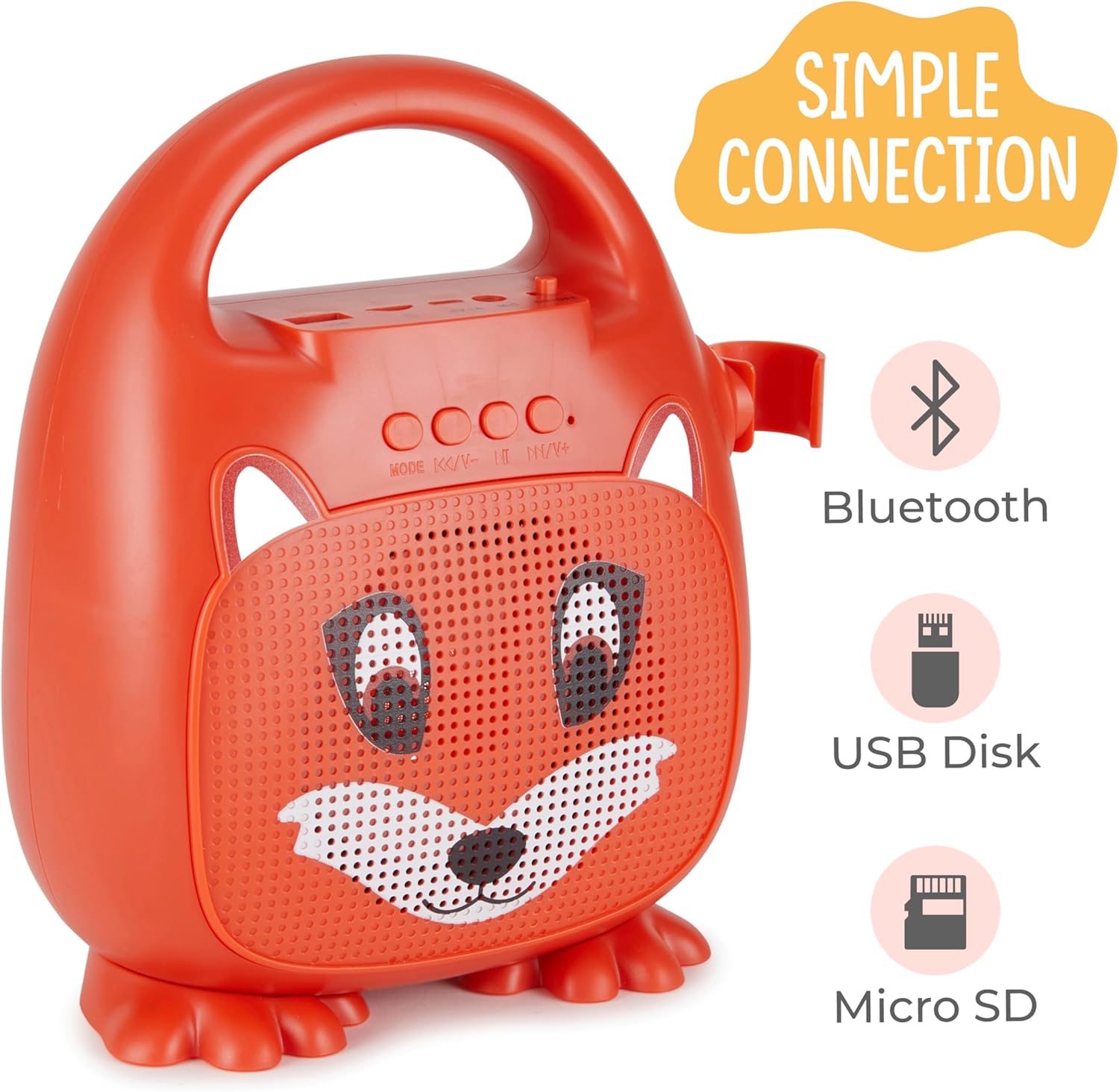
Figur 1: Forside view of the Singimals Kids Karaoke Speaker (Asher The Fox).
Opsætning
1. Opladning af højttaleren:
Before first use, fully charge the speaker. Connect the provided charging cable to the speaker's charging port (usually labeled "5V 1A" or similar) and the other end to a USB power adapter (not included) or a computer's USB port. The charging indicator light will show the charging status.
2. Tilslutning af mikrofonen:
Insert the microphone's plug into the MIC input port on the speaker. Ensure the microphone's ON/OFF switch is in the 'ON' position when in use.

Figure 2: Wired Microphone with ON/OFF switch.
3. Tænd/sluk:
Locate the ON/OFF switch on the speaker. Slide it to the 'ON' position to power on the device. Slide it to 'OFF' to power down.
4. Bluetooth-parring:
- Power on the karaoke speaker. It will automatically enter Bluetooth pairing mode, indicated by a flashing LED light.
- Gå til Bluetooth-indstillingerne på din smartphone eller anden Bluetooth-aktiveret enhed.
- Søg efter available devices and select "Singimals" (or similar name) from the list.
- Once connected, the LED indicator on the speaker will stop flashing and remain solid, and you may hear an audible confirmation.
5. USB Disk and Micro SD Card Playback:
Indsæt et USB-flashdrev eller et Micro SD-kort (med forudindlæst lyd files) into the respective ports on the speaker. The speaker will automatically detect the media and begin playback. Use the 'MODE' button to switch between input sources (Bluetooth, USB, Micro SD).

Figure 3: Control panel and input ports.
Betjeningsvejledning
Kontrolknapper:
| Knap | Fungere |
|---|---|
| MODE | Switches between input modes (Bluetooth, USB, Micro SD). |
| Forrige nummer / Lydstyrke ned | Kort tryk for forrige nummer. Langt tryk for at sænke lydstyrken. |
| Afspil / pause | Plays or pauses the current audio track. |
| Næste spor / lydstyrke op | Kort tryk for næste nummer. Langt tryk for at øge lydstyrken. |
LED belysning:
The speaker features multicolor LED lights that illuminate the speaker grille. These lights automatically pulse and change colors with the music. There is no separate control for the LED lighting; it operates automatically when the speaker is on.
Opretholdelse
- Rensning: Tør højttaleren og mikrofonen af med en blød, tør klud. Brug ikke slibende rengøringsmidler eller opløsningsmidler.
- Opbevaring: Opbevar enheden et køligt, tørt sted væk fra direkte sollys og ekstreme temperaturer.
- Batteripleje: For at forlænge batteriets levetid skal du oplade højttaleren regelmæssigt, selvom den ikke bruges hyppigt. Undgå at aflade batteriet helt i længere perioder.
- Vandeksponering: Denne enhed er ikke vandtæt. Hold den væk fra vand og fugt.
Fejlfinding
| Problem | Løsning |
|---|---|
| Højttaleren tænder ikke. | Ensure the ON/OFF switch is in the 'ON' position. Charge the speaker if the battery is depleted. |
| Ingen lyd fra mikrofonen. | Check if the microphone is securely plugged into the MIC port. Ensure the microphone's ON/OFF switch is in the 'ON' position. |
| Kan ikke parres via Bluetooth. | Ensure the speaker is in Bluetooth mode (flashing LED). Turn off and on Bluetooth on your device. Move your device closer to the speaker. |
| Dårlig lydkvalitet. | Ensure the audio source is of good quality. Adjust the volume on both the speaker and the connected device. Check for obstructions around the speaker grille. |
Specifikationer
| Feature | Detalje |
|---|---|
| Mærke | Vivitar |
| Modelnummer | SNG200-FOX |
| Forbindelsesteknologi | Bluetooth |
| Bluetooth version | v5.1 |
| Output Wattage | 5 watt |
| Strømkilde | Batteridrevet |
| Varedimensioner (L x B x H) | 4.72 x 8.7 x 9.25 tommer |
| Varens vægt | 0.94 kilo |
| Materiale | Plast |
| Lydindgang | Microphone, USB, Micro SD |
Sikkerhedsoplysninger
- Udsæt ikke enheden for ekstreme temperaturer, direkte sollys eller høj luftfugtighed.
- Hold enheden væk fra vand og andre væsker.
- Forsøg ikke at skille enheden ad eller ændre den. Dette vil ugyldiggøre garantien og kan forårsage skade.
- Brug kun det medfølgende ladekabel.
- Supervise young children during use to ensure safe operation.
- Undgå langvarig lytning ved høj lydstyrke for at forhindre høreskader.
Garanti og support
For warranty information and customer support, please refer to the warranty card included with your product or visit the official Vivitar webwebstedet. Behold din købskvittering som købsbevis.
Fabrikant: Sakar International, Inc.