
PTHTECHUS A22
PTHTECHUS Children's Smartwatch User Manual
Model: A22
Mærke: PTHTECHUS
1. Introduktion
This manual provides comprehensive instructions for the PTHTECHUS Children's Smartwatch, Model A22. This device is designed for children aged 4-12 and features a 1.68-inch HD touchscreen, a variety of educational and entertainment functions, and robust construction.
Key features include 22 pre-installed games, an HD camera for photos and videos, an MP3 player, a pedometer, an alarm clock, a timer, a child lock, an audio book function, a flashlight, and a calculator. It also incorporates learning tools such as flashcards and a habit tracking system to support children's development.

Figure 1.1: PTHTECHUS Children's Smartwatch (Model A22)
2. Sikkerhedsoplysninger
Please read the following safety guidelines carefully before using the smartwatch to ensure safe operation and prevent damage.
- Kvælningsfare: This device contains small parts and is not suitable for children under 3 years of age.
- Batterisikkerhed: Do not attempt to disassemble, strike, or throw the device into fire. The battery is not replaceable. Only use the provided charging cable and a power source in 5V/1A while charging.
- Vandtæthed: The smartwatch is designed to withstand splashes but is not fully waterproof. Avoid submerging the watch in water or exposing it to heavy rain.
- Temperatur: Do not expose the device to extreme temperatures (hot or cold) or direct sunlight for extended periods.
- Rensning: Brug en blød, tør klud til rengøring. Undgå at bruge skrappe kemikalier eller slibende materialer.

Figure 2.1: Safety warnings and product details on packaging.
3. Pakkens indhold
Upon opening the gift box, please verify that all the following items are included:
- PTHTECHUS Children's Smartwatch (Model A22)
- USB opladningskabel
- Brugervejledning (dette dokument)

Figure 3.1: Smartwatch packaging box.
4. Opsætning
4.1 Opladning af smartwatchet
Before first use, fully charge the smartwatch. The watch has a 500 mAh Lithium Ion battery.
- Connect the small end of the USB charging cable to the charging port on the smartwatch.
- Connect the larger end of the USB cable to a 5V/1A USB power adapter (not included) or a computer's USB port.
- The charging indicator will appear on the screen. A full charge typically takes 3-4 hours.
- Når det er fuldt opladet, skal du frakoble kablet.
4.2 Tænd/sluk
- For at tænde: Tryk og hold tænd/sluk-knappen nede (normalt på siden af uret) i et par sekunder, indtil skærmen lyser.
- For at slukke: Tryk på tænd/sluk-knappen, og hold den nede, indtil der vises en sluk-mulighed på skærmen. Tryk for at bekræfte.
4.3 Initial Settings (Time, Date, Language)
Upon first power-on or after a factory reset, you may need to set the time, date, and language.
- From the main watch face, swipe to access the app menu.
- Tap the "Settings" icon.
- Navigate to "Time & Date" to adjust.
- Navigate to "Language" to select from the 8 available languages.
5. Betjeningsvejledning
The smartwatch features a 1.68-inch HD touchscreen for easy navigation. Swipe left/right or up/down to browse through applications and menus.
5.1 Hovedgrænseflade og navigation
- Se ansigt: The default screen displays the time and date. Swipe left or right to change watch faces.
- App menu: Swipe up or down from the watch face to access the main application menu.
- Tilbage knap: Use the physical button on the side or an on-screen arrow to go back to the previous screen.
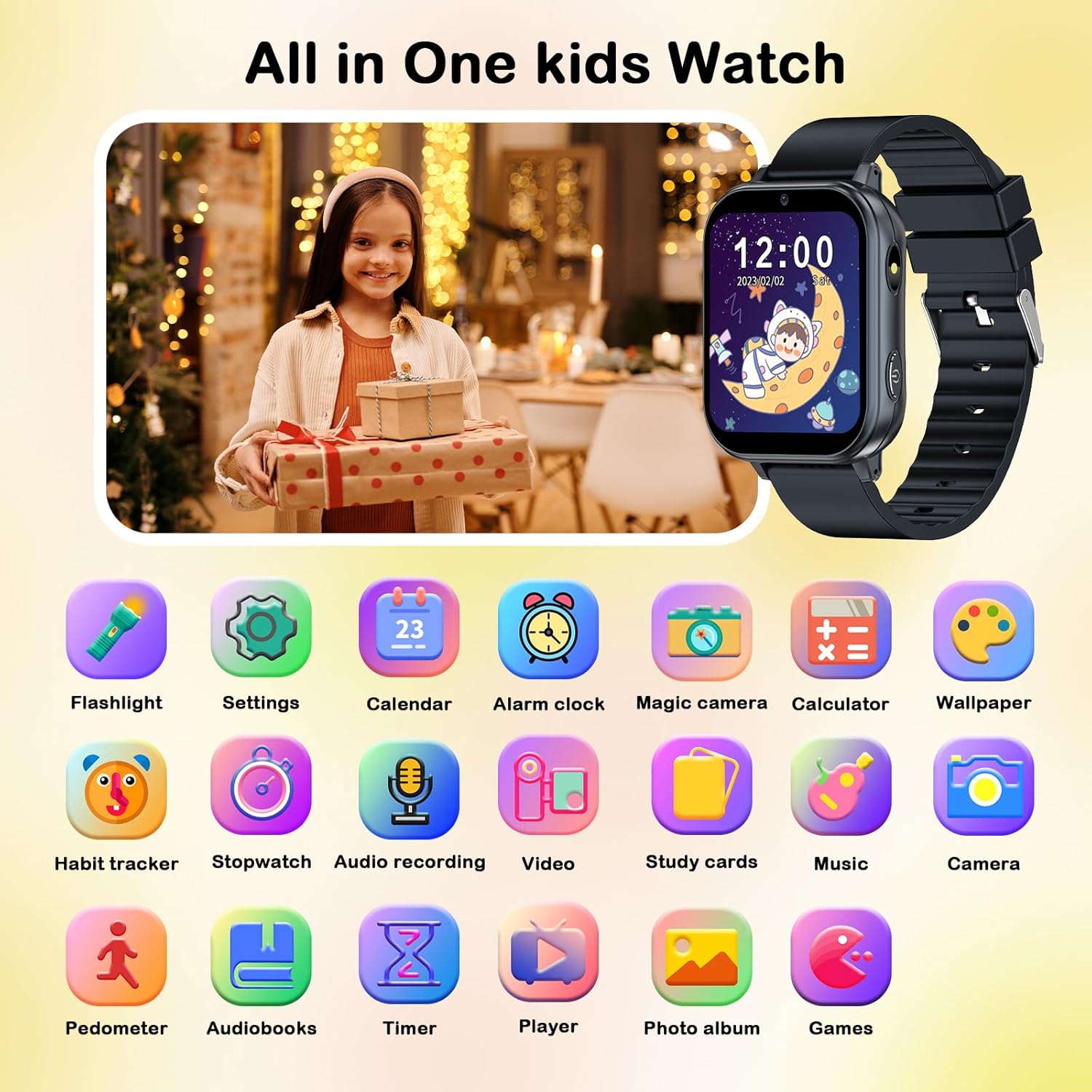
Figur 5.1: Overview of smartwatch applications.
5.2 Nøglefunktioner
5.2.1 Games (22 Educational Games)
The smartwatch includes 22 pre-installed educational games designed to enhance logical thinking, responsiveness, and hand-eye coordination. Access them via the "Games" icon in the app menu.

Figure 5.2: Games and Parental Control feature.
Forældrekontrol: The watch includes a child lock feature to manage game access. Refer to the "Child Lock" section for details.
5.2.2 HD Camera and Video Recorder
Capture photos and videos with the built-in HD camera. The watch supports pop-up head shots and includes 10 fun stickers for creative expression.
- Tap the "Camera" icon to open the camera app.
- Tap the shutter button to take a photo or switch to video mode to record.
- Access saved photos and videos in the "Photo Album" or "Video Player" apps.

Figure 5.3: Camera and fun stickers.
5.2.3 MP3 Player and Audio Recorder
The smartwatch functions as an MP3 player. Music files can be transferred to the watch's storage (via USB connection to a computer). It also has an audio recorder.
- Tap the "Music" icon to play MP3 files.
- Tap the "Audio Recording" icon to record voice notes.

Figure 5.4: MP3 Player, Audio Books, and Learning Cards.
5.2.4 skridttæller
Track daily steps with the built-in pedometer. Access it via the "Pedometer" icon to view aktivitetsdata.
5.2.5 Alarm Clock, Timer, and Calculator
These utility functions are accessible from the app menu:
- Vækkeur: Indstil flere alarmer som påmindelser.
- Timer: Use for timed activities.
- Lommeregner: Udfør grundlæggende aritmetiske operationer.

Figure 5.5: Timer, Alarm Clock, Calculator, and Pedometer functions.
5.2.6 Habit Tracking and Flashcards
The watch includes educational tools to help children develop good habits and learn new concepts.
- Vanesporing: Set reminders for daily activities like "Get Up," "Brush Your Teeth," "Breakfast," "Homework," etc.
- Flashcards: Learn about different vegetables, fruits, animals, and colors.

Figure 5.6: Habit Tracking feature.
5.2.7 Audio Books and Torch
- Audio Books: Access pre-loaded audio stories for listening.
- Fakkel: Aktiver den indbyggede lommelygte for at få lyset til at virke.
5.2.8 Børnelås
The child lock feature allows parents to control access to certain functions, such as games, to manage screen time. This setting can be found within the "Settings" menu.
6. Vedligeholdelse
6.1 Rengøring
Sådan holder du dit smartwatch rent og i god stand:
- Tør skærmen og urhuset af med en blød, fnugfri klud.
- For genstridige mærker, let dampen the cloth with water. Do not use harsh cleaning agents, solvents, or abrasive materials.
- Sørg for, at opladningsporten er fri for støv og snavs.
6.2 Pleje af batterier
- Undgå at aflade batteriet helt ofte.
- Oplad uret regelmæssigt, selvom det ikke er i brug, for at opretholde batteriets sundhed.
- Do not leave the watch charging for excessively long periods after it is fully charged.
7. Fejlfinding
Hvis du støder på problemer med dit smartwatch, kan du bruge følgende almindelige løsninger:
| Problem | Mulig løsning |
|---|---|
| Uret tænder ikke. | Ensure the watch is fully charged. Connect it to the charger for at least 30 minutes. If it still doesn't turn on, try holding the power button for 10-15 seconds for a forced restart. |
| Skærmen reagerer ikke. | Restart the watch by holding the power button. If the issue persists, ensure the screen is clean and dry. |
| Batteriet aflades hurtigt. | Reduce screen brightness. Close unused applications. Limit continuous game playing or video playback. Ensure the watch is fully charged before use. |
| Kan ikke overføre files (music/photos). | Ensure the watch is properly connected to the computer via the USB cable. Check if the watch is in data transfer mode (if prompted). Try a different USB port or cable. |
| Games are locked or inaccessible. | Check the Parental Control settings. Ensure the child lock feature is not enabled or is configured correctly. |
Hvis problemet fortsætter efter at have prøvet disse løsninger, bedes du kontakte kundesupport.
8. Specifikationer
| Feature | Detalje |
|---|---|
| Modelnummer | A22 |
| Vise | 1.68 Inches HD Touchscreen (LCD) |
| Batteritype | Lithium Ion |
| Batterikapacitet | 500 mioamp Timer |
| Forbindelse | USB (for charging and data transfer), Bluetooth |
| Materiale | Silikone (rem) |
| Human Interface Input | Touchskærm |
| Dimensioner (pakke) | 12.8 x 7.7 x 2.9 cm; 90 g |
| Fabrikant | PTHTECHUS |
9. Garanti og support
The PTHTECHUS Children's Smartwatch comes with a 1 års garanti fra købsdatoen.
For any questions, technical support, or warranty claims, please contact PTHTECHUS customer service. Contact information can typically be found on the product packaging or the official PTHTECHUS webwebsted.
Based on the packaging, you may contact:
- EU-repræsentant: APEX CE SPECIALISTS GmbH, Langenhorner Chaussee 277, 22419 Hamburg, Germany. Email: info@apex-ce.de
- Storbritanniens repræsentant: APEX CE SPECIALISTS LIMITED, 89 Princess Street, Manchester, M1 4HT, United Kingdom. Email: info@apex-ce.de
Ask a question about this manual
Ask about setup, troubleshooting, compatibility, parts, safety, or missing instructions. Manuals+ will review the question and use this page’s manual context to help answer it.