
Indledning
This manual provides detailed instructions for the YOTON Portable DVD Player, Model YD155M. Designed for portable entertainment, this device features a 14.1-inch HD swivel screen, a built-in rechargeable battery, and broad media compatibility. Please read this manual thoroughly to ensure proper use and maintenance of your device.

Image: The YOTON Portable DVD Player YD155M, showcasing its sleek design and screen.
Opsætning
Pakkens indhold
Før du starter, skal du kontrollere, at alle dele er til stede i pakken:
- YOTON Portable DVD Player YD155M
- AC oplader
- Car Charger (1.8 meters)
- 3-i-1 AV-kabel
- Fjernbetjening
- Brugervejledning (dette dokument)

Image: The YOTON Portable DVD Player YD155M alongside its accessories, including the AC charger, car charger, AV cable, and remote control.
Indledende opladning
For optimal performance, fully charge the device before first use. Connect the AC charger to the player's power input and plug it into a wall outlet. The charging indicator will illuminate. A full charge typically takes several hours.
Tænd/sluk
Tryk og hold på MAGT button located on the device to turn it on or off.
Betjeningsvejledning
Screen Rotation and Swivel
The 14.1-inch HD screen can be rotated 270 degrees and flipped 180 degrees, allowing for multiple viewing angles. Adjust the screen to your preferred position for comfortable viewing.

Image: The portable DVD player's screen demonstrating its 270-degree rotation and 180-degree flip capabilities.
Diskkompatibilitet
The player supports a wide range of disc formats, including:
- DVD, CD, CD-R/RW
- DVD-R/+R, DVD+RW/-RW
It also supports DVDs from any region. Note: This player supports DVDs with a resolution of 720x480. It does not support 1080P, 4K, or Blu-ray discs.

Image: An illustration showing the YOTON Portable DVD Player's compatibility with various disc types, including DVD and CD formats.
USB/SD-kortafspilning
Insert a USB drive or SD card (up to 16 GB) into the designated slot to play media files. Supported formats include WMA, MPG/MPG2, DIVX, and AVI.
Sidste hukommelsesfunktion
The player features a last memory function. If playback is interrupted (e.g., by powering off), the device will resume from the last stopped point when powered on again.

Image: A visual representation of the last memory function, showing how the player resumes playback from where it left off after being powered off and on.
Strømindstillinger
The YD155M can be powered in several ways:
- Strømadapter: For home use, connect the included AC charger to a wall outlet.
- Indbygget batteri: The 2500 mAh rechargeable battery provides 4-6 hours of playback time.
- Biloplader: Use the 1.8-meter car charger for power during travel.
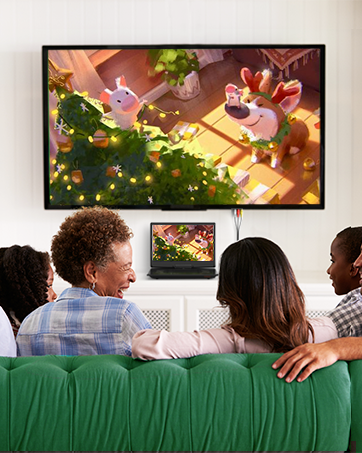
Image: An illustration depicting the various power options for the portable DVD player: AC adapter, internal battery, and car charger.
Connecting to External Displays
Use the included 3-in-1 AV cable to connect the portable DVD player to external displays such as a television or projector. This allows you to synchronize the screen content for a larger viewoplevelse.
- Sync to Television: Connect the AV cable from the player's AV OUT port to your TV's AV IN ports.
- Sync to Projector: Connect the AV cable from the player's AV OUT port to your projector's AV IN ports.
- Sync to Similar Player: Connect two compatible players using an AV cable for synchronized playback.

Image: The portable DVD player connected to a television, demonstrating its capability to sync content to larger screens or other similar players.
Lydudgang
The player features dual built-in stereo speakers for clear sound. For private listening, use the 3.5mm headphone jack.
Opretholdelse
Rengøring af enheden
Use a soft, dry cloth to clean the exterior of the DVD player. For the screen, use a specialized screen cleaning cloth. Avoid using liquid cleaners or abrasive materials.
Diskpleje
Handle discs by their edges to avoid fingerprints. Store discs in their cases when not in use to prevent scratches. Clean dirty discs with a soft, lint-free cloth, wiping from the center outwards.
Opbevaring
When not in use for extended periods, store the player in a cool, dry place away from direct sunlight and extreme temperatures. Ensure the battery is partially charged before storage to prolong its lifespan.
Fejlfinding
If you encounter issues with your YOTON Portable DVD Player, refer to the following common solutions:
- Ingen strøm: Ensure the AC adapter or car charger is securely connected, or that the internal battery is charged.
- Disken afspilles ikke: Check if the disc is inserted correctly with the label side up. Ensure the disc is clean and free of scratches. Verify that the disc format is supported (not Blu-ray, 1080P, or 4K).
- Ingen lyd: Check the volume level on the player and any connected external speakers or headphones. Ensure headphones are fully plugged into the 3.5mm jack. Note that sound quality can be affected by the original disc's soundtrack.
- Dårlig billedkvalitet: Ensure the disc is clean and undamaged. If connected to an external display, check the AV cable connections.
- Fjernbetjeningen virker ikke: Check the remote control's batteries and ensure there are no obstructions between the remote and the player's IR sensor.
For more detailed troubleshooting or persistent issues, please contact YOTON customer service.
Specifikationer
| Feature | Detalje |
|---|---|
| Mærke | YOTON |
| Modelnummer | YD155M |
| Skærmstørrelse | 14.1 tommer |
| Display Type | LCD |
| Skærmopløsning | 1366x768 |
| Produktdimensioner | 34L x 23.6B x 4.6H cm |
| Varens vægt | 1800 gram (1.8 kg) |
| Batteri | 1 Lithium Ion (inkluderet) |
| Playtime (Battery) | 4-6 timer |
| Medietype | DVD, CD, CD-R/RW, DVD-R/+R, DVD+RW/-RW, WMA, MPG/MPG2, DIVX, AVI |
| Forbindelsesteknologi | 3.5 mm Headphone Jack, AV Input/Output, USB, SD Card Slot |
| Kompatible enheder | Television |
| Farve | Sort |
| UPC | 850048157248 |
Garanti og support
Garantioplysninger
YOTON offers a 12-month warranty for this product. Please retain your proof of purchase for warranty claims.
Kundeservice
For any questions, technical support, or assistance with defective/missing parts, please contact YOTON customer service. We provide 24-hour customer service and professional technical support.
- Teknisk support: Our team offers 100% technical support within one day.
- Tilbehør: For defective or missing parts, contact customer service directly to receive new parts free of charge.
- Detaljeret manual: A more detailed manual may be available for download on the Amazon product page or by contacting YOTON directly.