
1. Introduktion
The Jebao Jecod DP-5 is a programmable auto dosing pump designed for precise and consistent liquid dispensing in aquarium environments. This 5-channel unit allows for individual programming of each pump, ensuring stable tank parameters by automating the addition of supplements. This manual provides detailed instructions for the setup, operation, maintenance, and troubleshooting of your DP-5 dosing pump.

Figur 1: Vinklet view of the Jebao Jecod DP-5 Auto Dosing Pump. This image shows the overall design with five dosing heads and the control panel.
2. Produktfunktioner
- 5 Independent Dosing Channels: Each channel can be programmed to dispense liquids independently.
- Programmable Dosing Volume: Each channel can dispense from 1ml to 9999ml per day.
- Stable Tank Parameters: Automates supplement addition, reducing manual effort and maintaining consistent water chemistry.
- Brugervenlig controller: Easy to navigate interface for individual pump programming.
- Flexible Dosing Increments: Suitable for both large and small volume dosing requirements.
3. Pakkens indhold
Før du fortsætter med opsætningen, skal du kontrollere, at alle komponenter er til stede i pakken:
- Jebao Jecod DP-5 Auto Dosing Pump Unit
- Strømadapter
- Instruktionsmanual
- Dosing Tubes and Connectors (typically included, though not explicitly listed in product features, it's standard)

Figure 2: Contents of the Jebao Jecod DP-5 package. This image displays the dosing pump unit, power adapter, and instruction manual.
4. Opsætningsvejledning
- Placering: Position the dosing pump on a stable, dry surface near your aquarium. Ensure it is above the water level of your dosing containers to prevent siphoning.
- Tilslut doseringsrør: Connect one end of the dosing tubes to the pump's output nozzles (P1-P5). Connect the other ends to the appropriate dosing solution containers. Ensure tubes are securely fitted to prevent leaks.
- Strømtilslutning: Connect the power adapter to the pump's power input port and then plug it into a suitable electrical outlet. The unit should power on.
- Kalibrering:
- A 100ml graduated cylinder (not included) is required for accurate calibration.
- Access the calibration menu on the pump's controller.
- Follow the on-screen instructions to calibrate each pump channel individually. This typically involves running a pump for a set duration and measuring the dispensed volume to adjust for accuracy.
- Accurate calibration is crucial for precise dosing.
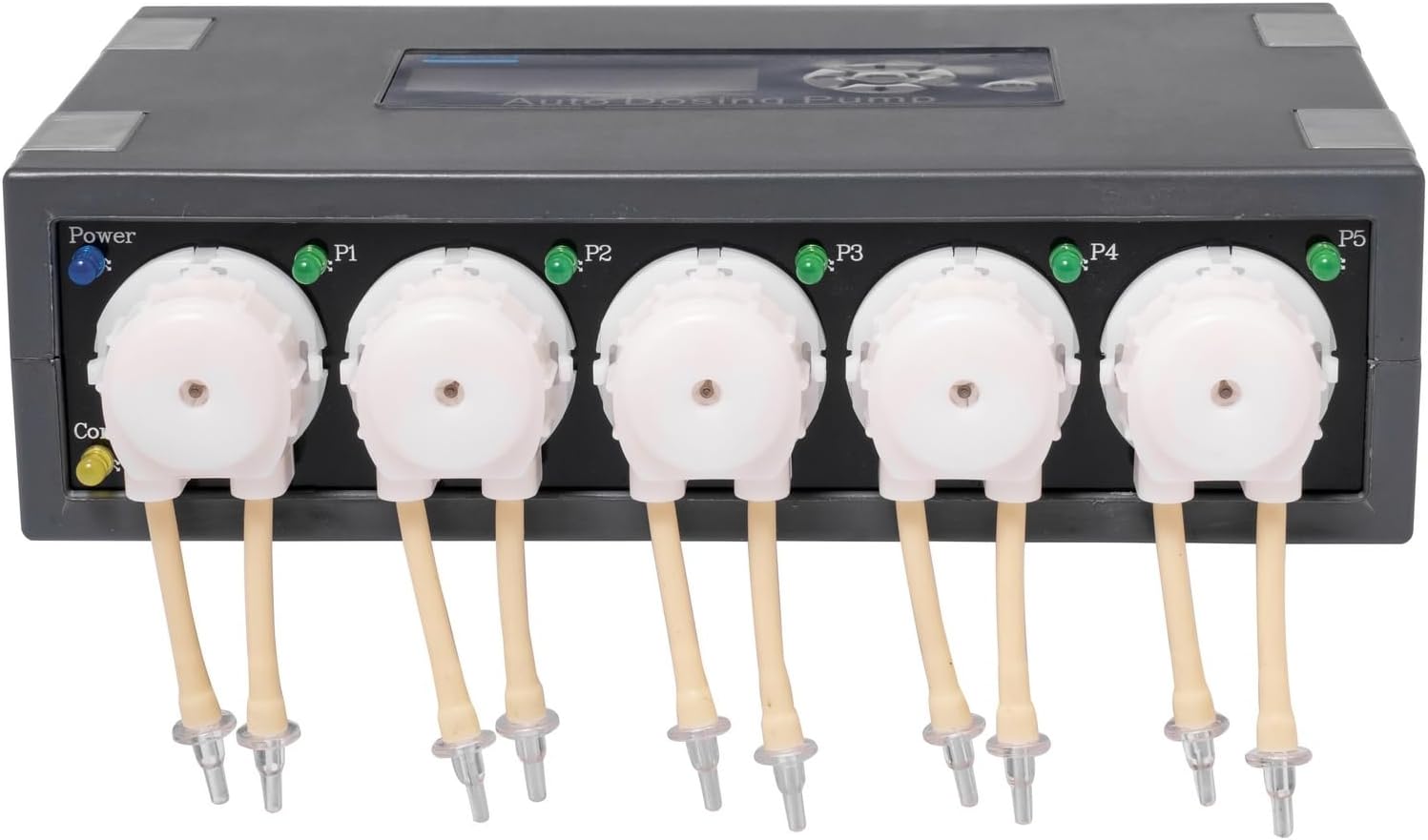
Figur 3: Forside view of the DP-5 unit, showing the five pump channels labeled P1 through P5, and the power indicator.
5. Betjeningsvejledning
The DP-5 features an easy-to-use controller for programming each dosing channel.
5.1. Navigating the Controller
Use the directional buttons (up, down, left, right) and the 'Enter' button (usually the center button) on the control panel to navigate through menus and confirm selections. The 'ESC' button is used to go back or exit a menu.

Figur 4: Forside view of the DP-5, highlighting the LCD screen and control buttons for programming.
5.2. Programming Dosing Channels
- Vælg kanal: From the main menu, select the pump channel (P1-P5) you wish to program.
- Indstil doseringsvolumen: Enter the desired volume (in ml) to be dispensed per day for the selected channel. The range is typically 1ml to 9999ml.
- Set Dosing Frequency: Specify how many times per day the dose should be administered. The pump will divide the total daily volume by the frequency to determine the volume per dose.
- Indstil doseringstider: For each dose, set the specific time of day it should occur. Ensure these times are spread out appropriately for your aquarium's needs.
- Gem indstillinger: Confirm and save your programming for the channel. Repeat for all other channels as needed.
Exampdet: To dose 100ml of a supplement daily in two equal doses, you would set the daily volume to 100ml, frequency to 2, and then set two specific times (e.g., 9:00 AM and 9:00 PM) for 50ml each.
6. Vedligeholdelse
Regular maintenance ensures the longevity and accurate operation of your dosing pump.
- Rørinspektion: Periodically inspect dosing tubes for kinks, blockages, or wear. Replace any damaged tubes immediately.
- Rengøring af pumpehoved: If dosing solutions are prone to crystallization or residue buildup, periodically clean the pump heads. Refer to the specific instructions in the included manual for detailed cleaning procedures.
- Genkalibrering: It is recommended to recalibrate the pumps every few months, or if you notice inconsistencies in dosing volumes, to maintain accuracy.
- Kontrol af strømforsyning: Sørg for, at strømadapteren og kablet er fri for skader.
7. Fejlfinding
| Problem | Mulig årsag | Løsning |
|---|---|---|
| Pumpen doserer ikke væske. |
|
|
| Unøjagtig doseringsmængde. |
|
|
| LCD screen not displaying. |
|
|
8. Specifikationer
| Feature | Detalje |
|---|---|
| Model | DP-5 |
| Antal kanaler | 5 |
| Doseringsvolumen pr. kanal | 1 - 9999 ml/day |
| Produktmål (L x B x H) | 9.25 x 6.75 x 2.5 tommer |
| Pakkedimensioner (L x B x H) | 12.95 x 8.11 x 3.98 tommer |
| Varens vægt | 3.05 pund |
| Strømindgang | DC 12V (from power adapter) |
| Fabrikant | Jebao |
9. Garantioplysninger
This product typically comes with a limited manufacturer's warranty. Please refer to the warranty card included in your product packaging or contact the retailer/manufacturer directly for specific warranty terms, conditions, and duration. Keep your proof of purchase for any warranty claims.
10. Kundesupport
For technical assistance, troubleshooting beyond this manual, or inquiries regarding parts and service, please contact your retailer or the manufacturer's customer support. Have your product model number (DP-5) and purchase date ready when contacting support.
Producent: Jebao
Note: Contact information such as phone numbers or email addresses are typically provided on the manufacturer's official webwebsted eller i produktemballagen.