
Indledning
This manual provides detailed instructions for the setup, operation, maintenance, and troubleshooting of your PTHTECHUS Smart Watch for Kids. Please read this manual thoroughly before using the device to ensure proper functionality and a safe user experience.
Pakkens indhold
Kontroller venligst, at alle nedenstående varer er til stede i din pakke:
- 1 x PTHTECHUS Smart Watch
- 1 x ladekabel
- 1 x Brugermanual (dette dokument)
Kom godt i gang
Opladning af uret
Before first use, fully charge the smart watch. Connect the provided charging cable to the watch's charging port and plug the other end into a standard USB power adapter (not included) or a computer's USB port. The watch typically requires approximately 3 hours for a full charge.
Tænd/sluk
- For at tænde: Press and hold the power button located on the side of the watch until the screen illuminates.
- For at slukke: Press and hold the power button until a power-off option appears on the screen, then confirm to shut down.
Grundlæggende navigation
The PTHTECHUS Smart Watch features a 1.54-inch full-color LCD touchscreen for intuitive interaction. Swipe left or right to navigate between different applications and functions. Tap on an icon to open an application. Swipe down from the top to access quick settings or notifications.

Image: The PTHTECHUS Smart Watch, showcasing its design and touchscreen interface.
Nøgleegenskaber og funktioner
Kamera- og videooptagelse
The watch is equipped with an HD camera for capturing photos and videos. Access the camera application from the main menu. You can apply 10 fun effect magic stickers to your photos. Captured media can be viewdirekte på uret.

Image: Children interacting with the smart watch's camera feature, capturing moments and applying fun stickers.
Musikafspiller
The built-in music player allows for audio playback. Connect the watch to a computer via USB to transfer MP3 music files or audio stories to the watch's internal storage (500 MB capacity). The watch supports standard audio formats.
Skridttæller
A motion sensor tracks daily steps and estimates calories burned. This feature encourages physical activity and can be viewed in the Pedometer application.
Pædagogiske funktioner
The watch includes learning flashcards and 8 audio books. Flashcards cover vocabulary for animals, colors, vegetables, and fruits. Audio books provide stories with pictures and sounds, suitable for bedtime or quiet time.

Image: The smart watch's educational features, including audio books and learning cards for vocabulary development.
Games and Parental Controls
The watch features 22 pre-installed puzzle games designed to stimulate imagination. A parental control function allows parents to set time limits for game play, helping to manage screen time.

Image: The smart watch displaying its game selection and parental control feature.
Vanesporing
A habit tracker feature helps children cultivate good daily routines. Users can set and monitor habits such as waking up, brushing teeth, eating meals, doing homework, and going to bed.

Image: The habit tracking interface on the smart watch, showing various daily activities.
Time Management Tools
- Vækkeur: Set multiple alarms for reminders throughout the day.
- Timer: Brug nedtællingstimeren til forskellige aktiviteter.
- Kalender: View the current date and plan activities.

Image: Icons representing the timer, alarm clock, calculator, and pedometer functions.
Yderligere hjælpeprogrammer
The watch includes a flashlight, calculator, voice recorder, and customizable wallpapers to enhance usability and personalization.
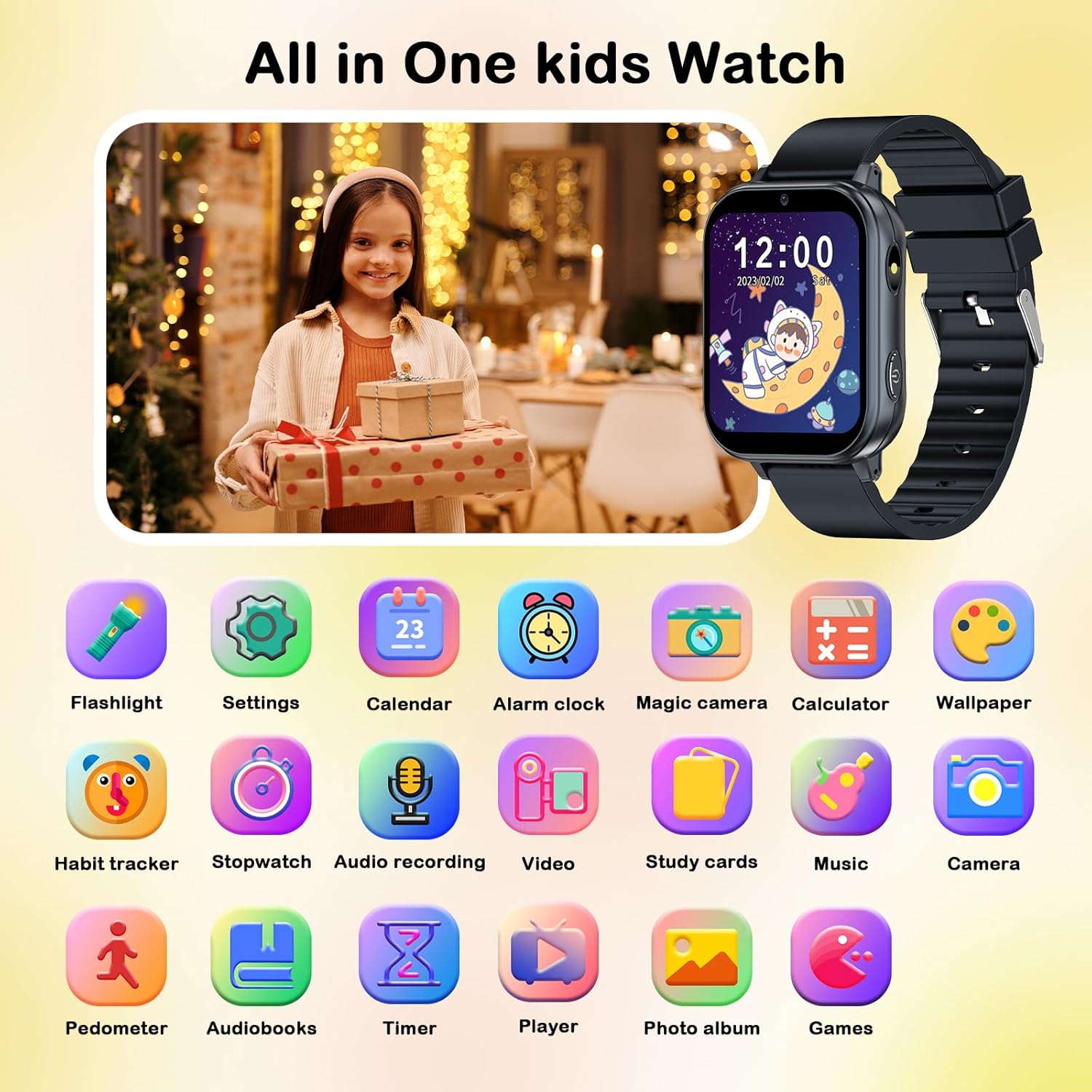
Image: A comprehensive display of all available applications and features on the smart watch.
Vedligeholdelse og pleje
Rensning
To clean the watch, gently wipe the screen and strap with a soft, dry, lint-free cloth. Avoid using abrasive cleaners, solvents, or aerosol sprays, as these can damage the watch's surface and internal components. The watch is not waterproof; avoid submerging it in water or exposing it to excessive moisture.
Batterioplysninger
The watch uses a Lithium Polymer battery. To prolong battery life, avoid extreme temperatures and store the watch in a cool, dry place when not in use. Do not attempt to replace the battery yourself; contact customer support if battery issues arise.
Fejlfinding
| Problem | Mulig årsag | Løsning |
|---|---|---|
| Uret tænder ikke. | Lavt batteri; enheden er frosset. | Oplad uret i mindst 30 minutter. Hvis det stadig ikke reagerer, skal du udføre en total nulstilling ved at holde tænd/sluk-knappen nede i 10-15 sekunder. |
| Skærmen reagerer ikke. | Softwarefejl; skærmskade. | Genstart uret. Sørg for, at skærmen er ren og tør. Hvis problemet fortsætter, skal du kontakte kundesupport. |
| Kan ikke overføre files to watch. | Forkert USB-forbindelse; driverproblem. | Ensure the USB cable is securely connected to both the watch and the computer. Try a different USB port or cable. Check if the watch is recognized as a storage device on your computer. |
| Batteriet aflades hurtigt. | Frequent use of power-intensive features; background apps. | Reduce screen brightness. Close unused applications. Limit continuous video recording or game play. Ensure the watch is fully charged before use. |
Produktspecifikationer
- Model: 4GS05 (A22-Black)
- Vise: 1.54 Inches LCD, 240 x 240 resolution, Color Screen
- Hukommelseslagringskapacitet: 500 MB
- Operativsystem: Smartwatch OS
- Batteritype: Lithium Polymer (inkluderet)
- Batterikapacitet: 500 mioamp Timer
- Opladningstid: Cirka 3 timer
- Gennemsnitlig batterilevetid: Op til 3 dage (afhængig af brug)
- Forbindelse: USB
- Human Interface Input: Touchskærm
- Produktdimensioner: 22 x 2 x 1 cm; 55 g
- Særlige funktioner: Alarm Clock, Calendaring, Camera, Music Player, Touchscreen, Pedometer, Games, Audio Books, Study Cards, Habit Tracker, Flashlight, Calculator, Voice Recorder
Garanti og support
PTHTECHUS is committed to providing high-quality products and service. For any questions, technical support, or warranty inquiries, please refer to the contact information provided with your purchase or visit the official PTHTECHUS webwebsted. Gem venligst din købsbevis til garantikrav.