
PTHTECHUS A22
PTHTECHUS Smart Watch for Kids A22 User Manual
Brand: PTHTECHUS | Model: A22
Indledning
This user manual provides comprehensive instructions for the PTHTECHUS A22 Smart Watch for Kids. Designed for children aged 4-14, this multifunctional smartwatch offers a range of features including a high-definition camera, 22 engaging puzzle games, a music player, pedometer, alarm clock, and various educational tools like audio books and learning cards. Please read this manual carefully to ensure proper use and maintenance of the device.
Pakkens indhold
Når du åbner pakken, skal du kontrollere, at alle følgende varer er inkluderet:
- 1 x PTHTECHUS A22 Smart Watch
- 1 x USB ladekabel
- 1 x brugermanual
Opsætningsvejledning
1. Opladning af enheden
Before first use, fully charge the smartwatch. Connect the provided USB charging cable to the watch's charging port and the other end to a standard USB power adapter (not included) or a computer's USB port. The charging indicator will appear on the screen. A full charge typically takes 2-3 hours.

Image: The PTHTECHUS A22 Smart Watch, highlighting its design and the location of the charging port (typically on the side or back).
2. Tænd/sluk
- For at tænde: Tryk og hold tænd/sluk-knappen (normalt placeret på siden) nede i et par sekunder, indtil skærmen lyser.
- For at slukke: Press and hold the Power button until a power-off option appears on the screen. Tap to confirm.
3. Initial Settings (Time, Date)
Upon first power-on or after a factory reset, you may need to set the correct time and date. Navigate to the 'Settings' menu on the watch, then locate 'Time' or 'Date' options to adjust. Ensure these are set correctly for accurate timekeeping and activity tracking.
Betjeningsvejledning
1. Navigering i grænsefladen
The PTHTECHUS A22 Smart Watch features a 1.54-inch full-color touchscreen for easy navigation. Swipe left or right to browse through different applications and functions. Tap on an icon to open the corresponding application. Use the physical button on the side to return to the home screen or as a back button in some applications.

Billede: Urets display viserasing its touch screen capabilities and various interface elements.
2. Kamera- og videooptagelse
The watch is equipped with an HD camera, allowing children to capture photos and record videos. Access the 'Camera' application from the main menu. You can switch between photo and video modes. The watch also includes 10 fun magic stickers to add creative effects to photos.

Image: The watch's camera function in use, demonstrating its ability to record happy moments and apply fun stickers.

Image: Illustrates the magic camera and video recording feature, showing how children can capture moments and use creative filters.
3. Musikafspiller
The watch includes an MP3 music player. You can transfer your child's favorite music or audio stories to the watch by connecting it to a computer via the USB cable. The watch supports standard MP3 audio files. This feature provides musical enlightenment and entertainment.

Image: Depicts the music player interface on the watch and a child enjoying music, alongside other educational features.

Image: Highlights the music playback feature, showing the watch's interface and a child enjoying audio.
4. Skridttæller og aktivitetsmåler
The built-in motion sensor tracks your child's steps and estimated calories burned. This feature encourages physical activity and can be viewed in the 'Pedometer' application. It helps children stay active and healthy.

Image: Shows the pedometer icon and children engaged in physical activity, illustrating the tracking feature.

Image: Features the pedometer function alongside other utilities, demonstrating its role in tracking activity.
5. Games and Parental Controls
The watch includes 22 built-in puzzle games designed to develop imagination and cognitive skills. Parents can set game time limits through the parental control function to manage screen time and prevent excessive gaming.

Image: Illustrates the gaming feature and the parental control interface, emphasizing responsible play.
Image: Shows the variety of puzzle games available on the watch.
6. Educational Features (Audio Books, Learning Cards)
The watch supports learning through 8 audio books and interactive learning flashcards. These resources help children learn vocabulary related to animals, colors, vegetables, and fruits. The story books are designed to be engaging and can serve as bedtime companions.

Image: Illustrates the audio story feature, showing children engaged in reading with the watch.

Image: Shows the learning card feature, demonstrating how children can learn new words and concepts.
7. Habit Tracking
The habit tracker function helps cultivate good habits in children by allowing them to track daily routines such as waking up, brushing teeth, breakfast, walking the dog, going to school, lunch, reading, homework, housework, dinner, going home, sports, and going to bed. This visual tracking encourages consistency.
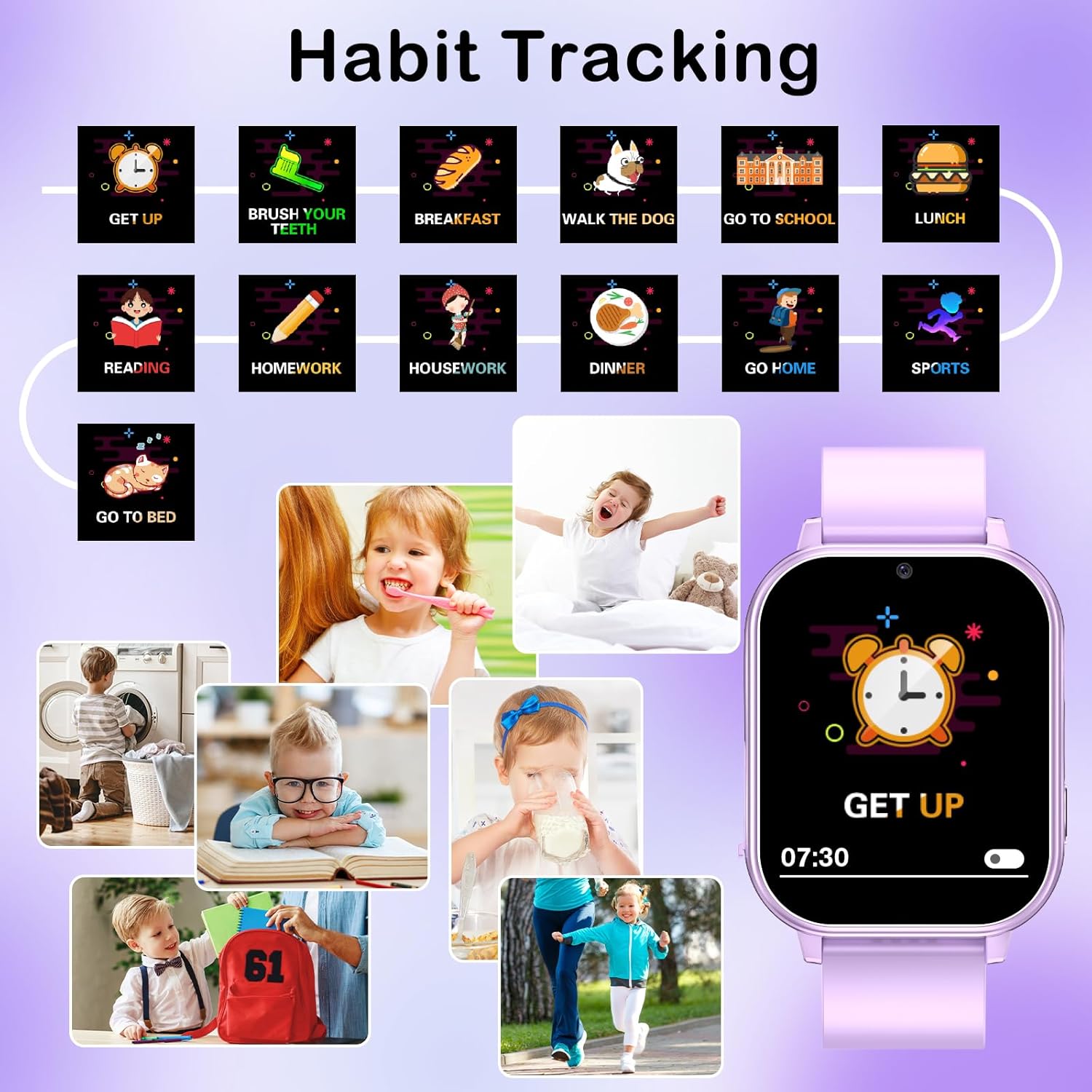
Image: Illustrates the habit tracking feature with various daily activities and the watch displaying a habit reminder.

Image: A visual representation of the habit tracking system, encouraging children to cultivate good routines.
8. Other Functions (Alarm Clock, Timer, Calculator, Flashlight)
Uret indeholder adskillige praktiske værktøjer:
- Vækkeur: Set multiple alarms for reminders like waking up or study time.
- Timer: Useful for timed activities or games.
- Lommeregner: En grundlæggende lommeregner til simpel aritmetik.
- Lommelygte: A small LED light for convenience in dark environments.
- Baggrunde: Customize the watch face with 12 different wallpapers.
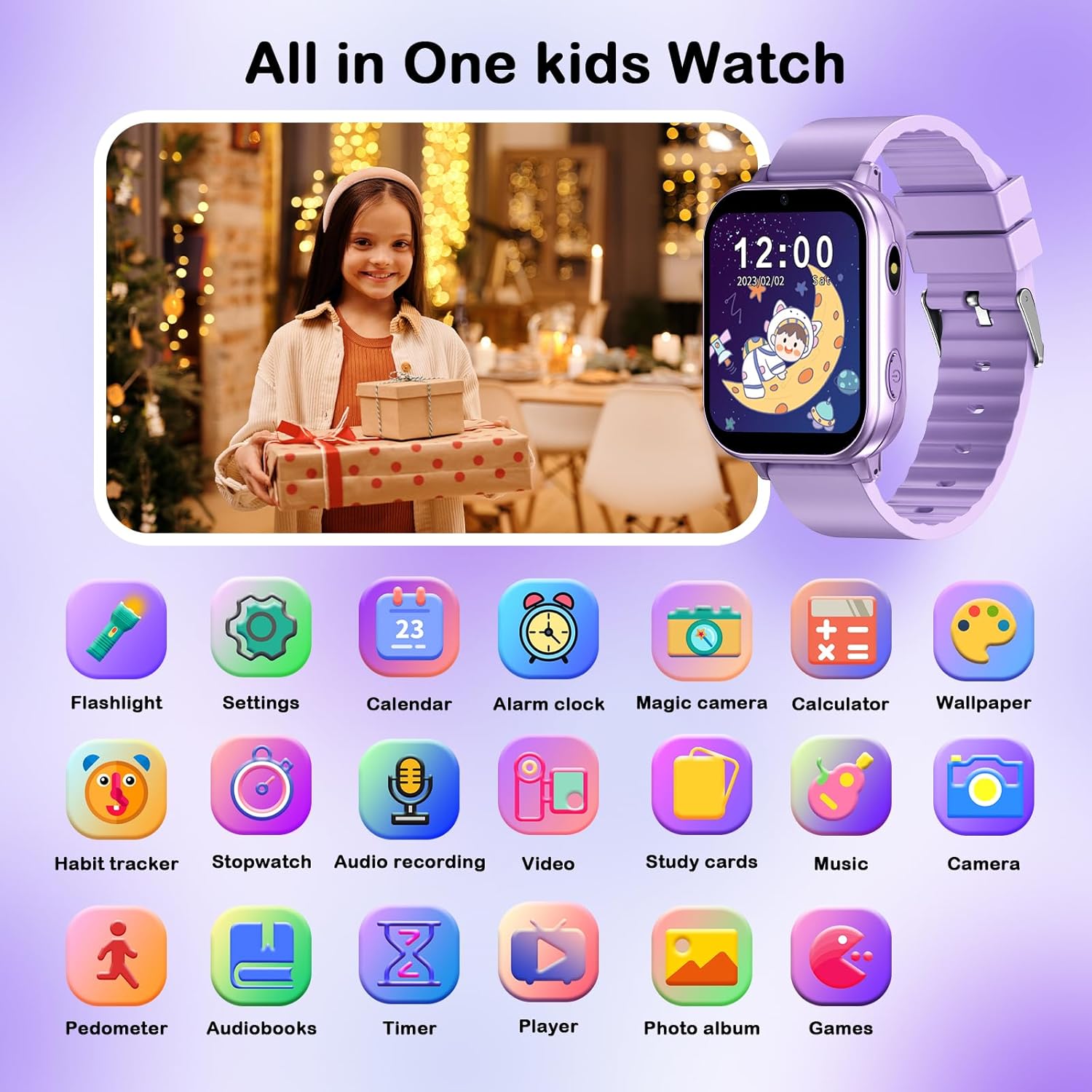
Image: Displays a comprehensive overview of all the functions available on the watch, including the alarm, timer, calculator, and flashlight.

Image: Highlights the time management tools such as the calendar, alarm clock, stopwatch, and timer.
Image: Shows the watch's display with various wallpaper options, demonstrating customization.
Pleje og vedligeholdelse
- Rensning: Wipe the watch regularly with a soft, dry cloth. For stubborn smudges, slightly dampRengør kluden med vand. Brug ikke skrappe kemikalier eller slibende rengøringsmidler.
- Vandtæthed: The watch is designed for daily use but is not waterproof. Avoid submerging it in water or exposing it to heavy rain.
- Batteripleje: To prolong battery life, avoid extreme temperatures. Charge the watch regularly and do not let the battery drain completely for extended periods.
- Opbevaring: When not in use for a long time, store the watch in a cool, dry place away from direct sunlight.
Fejlfinding
If you encounter issues with your PTHTECHUS A22 Smart Watch, please refer to the table below for common problems and their solutions.
| Problem | Mulig årsag | Løsning |
|---|---|---|
| Uret tænder ikke. | Lavt batteri; enheden er frosset. | Charge the watch for at least 30 minutes. If still unresponsive, perform a forced restart by holding the power button for 10-15 seconds. |
| Skærmen reagerer ikke. | Softwarefejl; skærmskade. | Genstart uret. Sørg for, at skærmen er ren og tør. Hvis problemet fortsætter, skal du kontakte kundesupport. |
| Kan ikke overføre musik files. | Incorrect USB connection; unsupported file format. | Ensure the USB cable is securely connected to both the watch and the computer. Verify that the music files are in MP3 format. Try a different USB port or cable. |
| Batteriet aflades hurtigt. | Frequent use of power-intensive features; old battery. | Reduce screen brightness. Limit continuous use of games or video recording. Ensure background apps are closed. If the watch is old, battery degradation may occur. |
Produktspecifikationer
| Feature | Detalje |
|---|---|
| Modelnavn | A22 |
| Skærmstørrelse | 1.54 tommer |
| Produktdimensioner | 8.66 x 1.57 x 0.79 tommer |
| Varens vægt | 1.94 ounces (55 gram) |
| Batteritype | Lithiumpolymer (1 påkrævet, inkluderet) |
| Hukommelseslagringskapacitet | 500 MB |
| Forbindelsesteknologi | USB |
| Særlige funktioner | Alarm Clock, Camera, Music Player, Touchscreen, Video, Pedometer, Games, Audiobooks, Learning Cards, Habit Tracker, Flashlight, Calculator |
| Fabrikant | yangjiangshiyangdongquzhangtongjiayuankejico.LTD. |
| Dato først tilgængelig | 17. august 2023 |
Garanti og support
For any questions, technical support, or warranty inquiries regarding your PTHTECHUS A22 Smart Watch, please refer to the official PTHTECHUS brand store or contact their customer service directly. Detailed warranty information may be provided with your purchase documentation or on the official brand webwebsted.
Du kan finde mere information og support på PTHTECHUS Store on Amazon.
En digital version af brugermanualen kan også downloades: Brugervejledning (PDF).
Ask a question about this manual
Ask about setup, troubleshooting, compatibility, parts, safety, or missing instructions. Manuals+ will review the question and use this page’s manual context to help answer it.