
1. Introduktion
Thank you for choosing the Minifire 24-inch Gaming Monitor. This monitor is designed to provide an immersive visual experience with its 1920x1080P IPS display, 165Hz refresh rate, and 1ms response time. It features AMD FreeSync technology for smooth gameplay, a wide 110% sRGB color gamut for vibrant visuals, and multiple connectivity options. Please read this manual carefully before using the monitor to ensure proper setup and operation.

Figur 1: Overview of Minifire 24-inch Gaming Monitor key features.
2. Pakkens indhold
Kontroller venligst pakkens indhold for at sikre, at alle varer er til stede og ubeskadigede:
- Minifire 24-inch Gaming Monitor
- Monitorstativ (base og hals)
- Strømadapter
- HDMI kabel
- Brugermanual
3. Opsætningsvejledning
3.1 Samling af stativet
- Tag forsigtigt skærmen ud af emballagen, og beskyt skærmen.
- Fastgør stativets hals til skærmpanelet. Sørg for, at den klikker sikkert på plads, eller at den er fastgjort med skruer, hvis de medfølger.
- Fastgør stativets base til stativets hals. Spænd fingerskruen i bunden af basen for at fastgøre den.
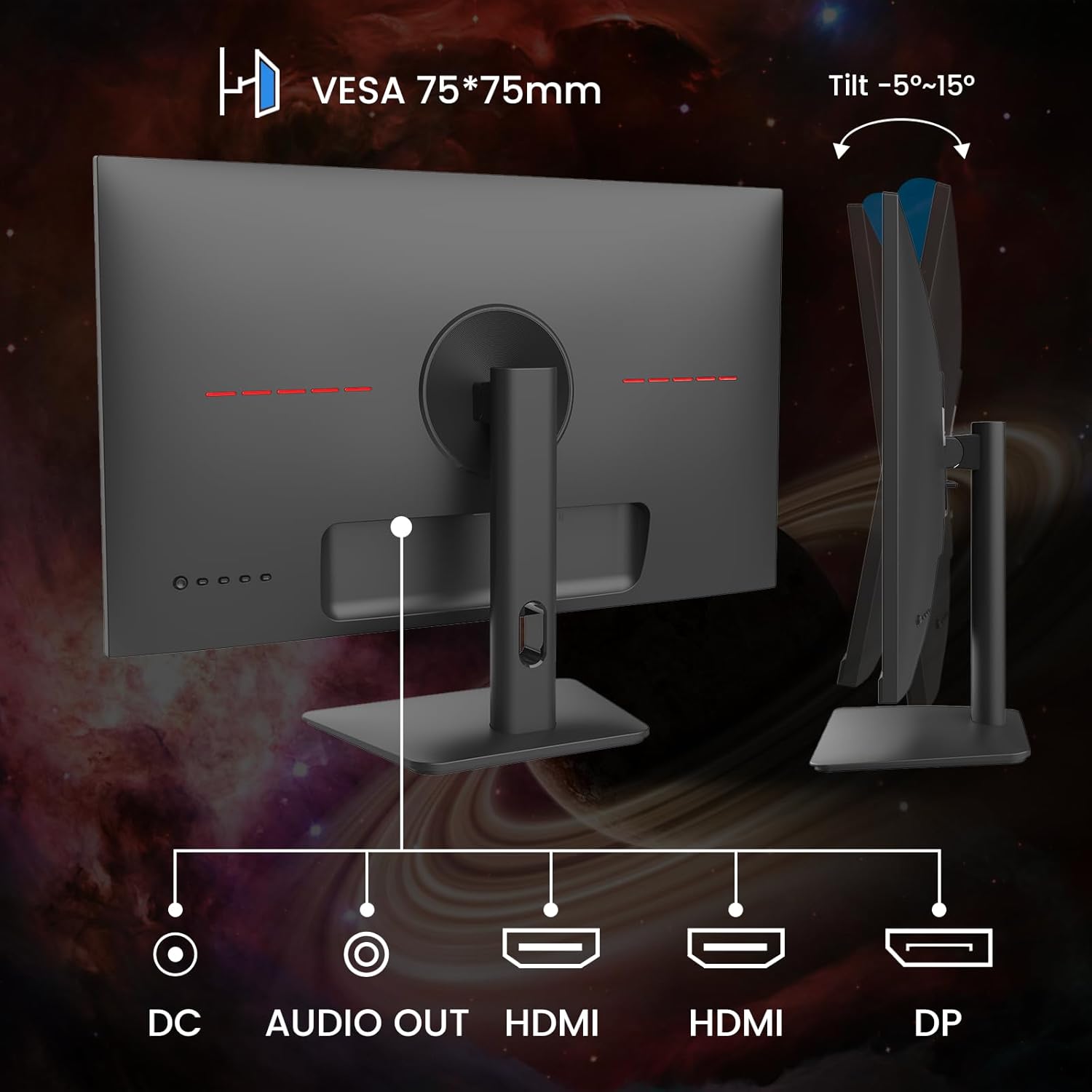
Figur 2: Bagside view of the monitor showing stand attachment and tilt adjustment.
3.2 Tilslutning af skærmen
Tilslut skærmen til din computer eller andre enheder ved hjælp af de relevante kabler.
- Strømtilslutning: Connect the power adapter to the DC input port on the monitor and then plug it into a power outlet.
- Videoforbindelse: Use the provided HDMI cable to connect your computer's HDMI output to one of the monitor's HDMI input ports. Alternatively, use a DisplayPort (DP) cable to connect to the DP input port for higher refresh rates and FreeSync functionality.
- Lydudgang: If you wish to connect external speakers or headphones, use the Audio Out port.
Figure 3: Monitor input ports for power, video, and audio.
3.3 VESA-montering
The monitor supports VESA 75x75mm mounting for wall mounts or alternative monitor arms. Ensure the VESA mount is compatible and can support the monitor's weight.
4. Betjeningsvejledning
4.1 Tænd/sluk
Tryk på tænd/sluk-knappen på skærmen for at tænde eller slukke den. Strømindikatorlampen lyser, når skærmen er tændt.
4.2 On-Screen Display (OSD) menu
Use the control buttons on the monitor to navigate and adjust settings in the OSD menu. Common settings include:
- Lysstyrke/kontrast: Juster billedets luminans.
- Farveindstillinger: Rediger farvetemperatur, gamma og mætning.
- Inputkilde: Manually select between HDMI and DP inputs.
- Lyd: Adjust volume for the Audio Out port.
- Spilfunktioner: Access FreeSync, MPRT, Crosshair, and game modes.
4.3 Nøglefunktioner
This monitor includes several features to enhance your experience:
- 165Hz opdateringshastighed og 1ms responstid: Provides smooth, fluid visuals, reducing motion blur for fast-paced games.
- AMD FreeSync-teknologi: Synkroniserer skærmens opdateringshastighed med din GPU's billedhastighed for at eliminere skærmrivning og hakken.
- HDR10-understøttelse: Offers a wider range of colors and contrast for more realistic images.
- BluelightShield / Eye Care: Reducerer udledning af blåt lys for at minimere øjenbelastning ved længerevarende brug.
- Gaming Modes (RTS/FPS/RACING): Pre-calibrated display settings optimized for specific game genres.
- Hårkors: An on-screen crosshair overlay for improved aiming in games.

Figure 4: AMD FreeSync technology in action, preventing screen tearing.
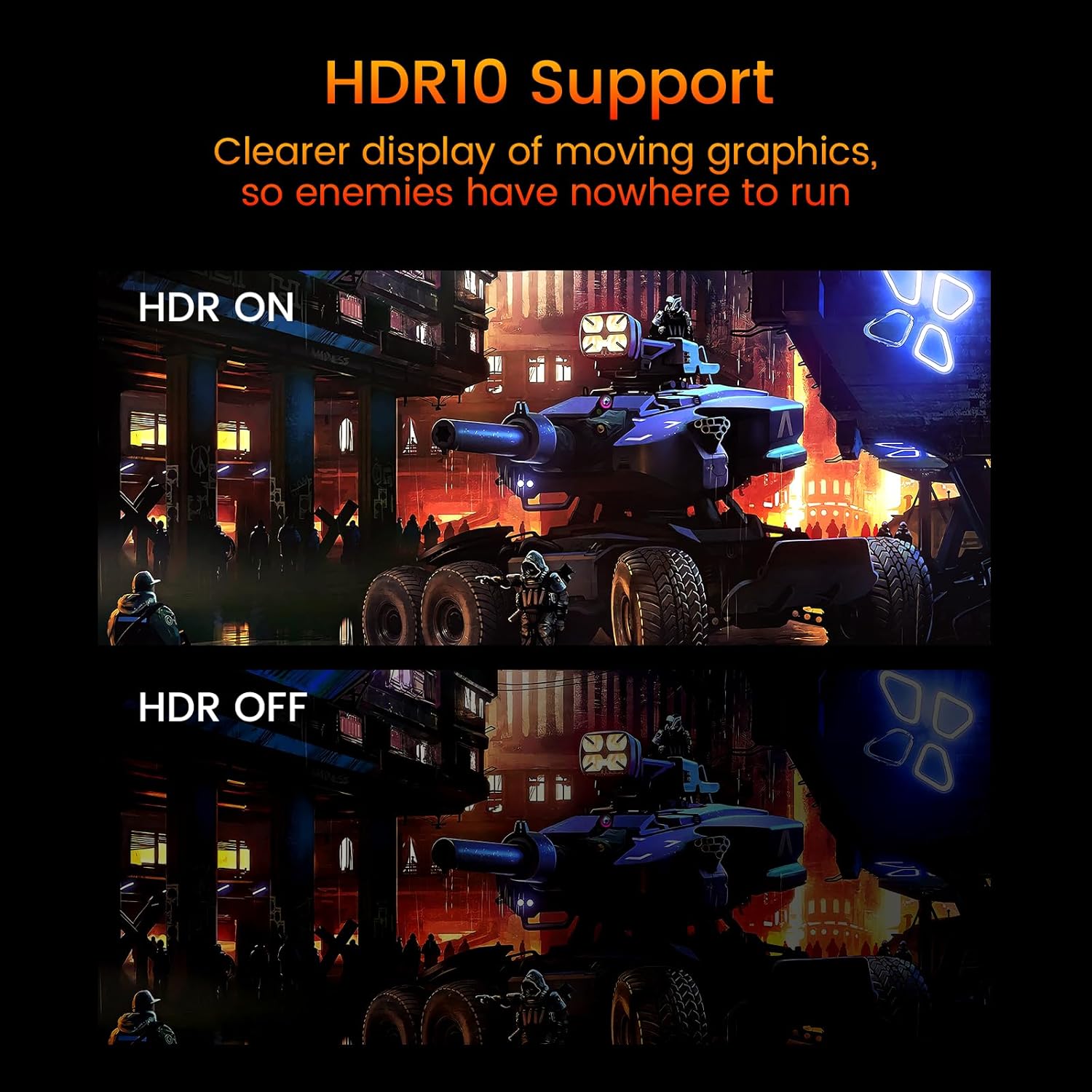
Figure 5: HDR10 support enhancing visual clarity.

Figure 6: Exclusive Gaming Modes (RTS, FPS, Racing).
Video 1: An official Minifire video showcasing the 24-inch gaming monitor's features, including its design, stable stand, Full HD resolution, 165Hz refresh rate (note: video mentions 180Hz, but this model is 165Hz), 1ms response time, AMD FreeSync technology, color gamut, brightness, and various input ports. It also demonstrates gaming modes and the Crosshair feature.
5. Vedligeholdelse
For at sikre din skærms levetid og optimale ydeevne skal du følge disse vedligeholdelsesretningslinjer:
- Rengøring af skærmen: Tør forsigtigt skærmen af med en blød, fnugfri klud. Tør forsigtigt genstridige mærker afampRengør kluden med vand eller en skærmrengøringsopløsning. Undgå skrappe kemikalier eller slibende materialer.
- Rengøring af Casing: Brug en blød, tør klud til at rengøre skærmenasing.
- Ventilation: Sørg for, at skærmens ventilationsåbninger ikke er blokerede for at forhindre overophedning.
- Opbevaring: Når skærmen ikke er i brug i længere perioder, skal den opbevares køligt og tørt, helst i dens originale emballage.
6. Fejlfinding
Hvis du støder på problemer med din skærm, kan du se følgende almindelige problemer og løsninger:
| Problem | Mulig årsag | Løsning |
|---|---|---|
| Intet billede på skærmen | Ingen strøm, forkert inputkilde, løst videokabel. | Check power connection, select correct input source via OSD, ensure video cable is securely connected. |
| Billedet er sløret eller forvrænget | Incorrect resolution, dirty screen. | Set display resolution to 1920x1080. Clean the screen. |
| Skærmrivning eller hakken | FreeSync not enabled, incompatible GPU. | Ensure FreeSync is enabled in OSD and your GPU settings. Verify GPU compatibility. |
| Ingen lyd | Audio cable not connected, volume too low, incorrect audio output selected on PC. | Connect external speakers/headphones to the Audio Out port. Adjust monitor and PC volume. |
7. Specifikationer
Detailed technical specifications for the Minifire MFG24X5 monitor:
| Feature | Beskrivelse |
|---|---|
| Modelnummer | MFG24X5 |
| Skærmstørrelse | 24 tommer |
| Display Type | IPS |
| Opløsning | 1920 x 1080 (FHD 1080p) |
| Aspektforhold | 16:9 |
| Opdateringshastighed | 165 Hz |
| Svartid | 1 ms |
| Lysstyrke | 300 cd/m² |
| Kontrastforhold | 1000:1 |
| Farveskala | 110 % sRGB |
| Forbindelse | 2x HDMI 1.4, 1x DisplayPort 1.2 |
| Lyd | Lyd ud |
| VESA Mount | 75 x 75 mm |
| Tilt justering | -5° til 15° |
| Særlige funktioner | AMD FreeSync, HDR10 Support, BluelightShield |

Figur 7: Produktmål.
8. Garanti og support
Minifire offers comprehensive support for its products:
- 30-dages refusion: Hvis du ikke er tilfreds med dit køb, kan du være berettiget til en refusion inden for 30 dage.
- 24-måneders garanti: The monitor is covered by a 24-month warranty from the date of purchase, covering manufacturing defects.
- Livsvarig teknisk support: Free technical assistance is available for the lifetime of the product.
For further assistance, please contact Minifire customer support through their official webwebstedet eller den forhandler, hvor du købte produktet.