
1. Introduktion
This manual provides detailed instructions for the installation, operation, and maintenance of your Biorunn Android Car Stereo. Please read this manual thoroughly before using the product to ensure proper function and safety. This device is designed for specific Nissan Xtrail, Qashqai, and Rogue models manufactured between 2014 and 2018.
2. Sikkerhedsoplysninger
- Professionel installation anbefales: På grund af kompleksiteten af bilers elektriske systemer anbefales professionel installation for at forhindre skader på enheden eller dit køretøj.
- Køretøjskompatibilitet: Ensure this unit is compatible with your specific vehicle model and year. If unsure, consult with a professional or the manufacturer.
- Kørselssikkerhed: Brug ikke enheden på en måde, der distraherer dig fra kørslen. Prioritér altid trafiksikkerhed.
- Strømforsyning: Tilslut kun enheden til en 12V DC strømforsyning med negativ jord.
- Undgå fugt: Udsæt ikke enheden for vand eller overdreven fugt.
3. Pakkens indhold
Bekræft, at alle nedenstående varer er inkluderet i din pakke:

Various accessories included with the car stereo, such as power cables, RCA cables, reversing camera, 4G antenna, microphone, GPS antenna, USB plugs, and a Canbus box.
- Main Head Unit (10.1 Inch Display)
- Strømkabel
- RCA-kabel
- Reversing Camera (if included in package)
- 4G-antenne
- Mikrofon (MIC)
- GPS antenne
- USB Plugs (x2)
- Canbus Box (if required for your vehicle model)
4. Opsætning og installation
Before beginning installation, ensure your vehicle's ignition is off and the battery is disconnected. It is crucial to verify compatibility with your vehicle's center console. If you are unsure, please provide a picture of your car's center console to the manufacturer or a professional installer for confirmation.
4.1 Installation overview
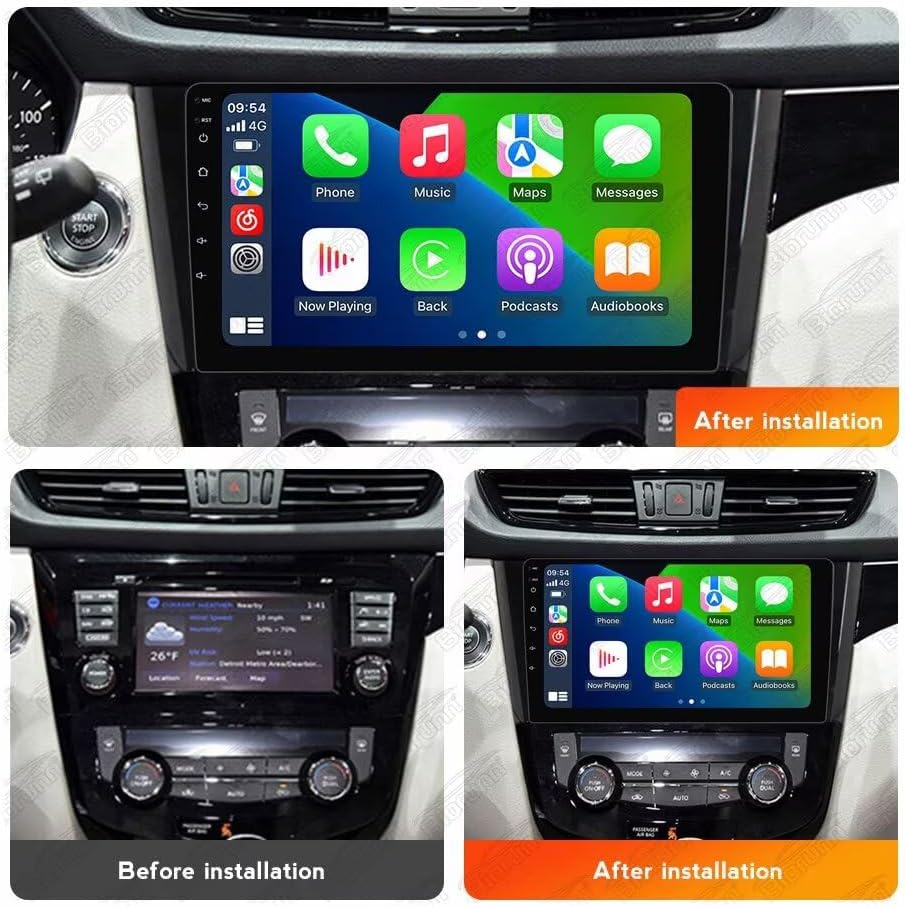
Visual comparison of the car's dashboard before and after the installation of the Biorunn Android Car Stereo, demonstrating the integrated appearance.
4.2 Ledningsforbindelser
- Strømtilslutning: Connect the main power harness to the vehicle's wiring. Ensure correct connections for constant 12V, accessory 12V, and ground.
- Højttalerforbindelser: Connect the speaker wires to the corresponding vehicle speaker wires. Pay attention to positive and negative terminals.
- GPS-antenne: Monter GPS-antennen på et sted med frit view af himlen, typisk på instrumentbrættet eller under forruden.
- 4G antenne: Connect the 4G antenna for cellular data connectivity.
- USB-forbindelser: Route the USB cables to an accessible location, such as the glove compartment or center console.
- Bakkamera: If installing a reversing camera, connect its video input to the designated RCA input on the head unit and its power to the reverse light circuit.
- Canbus-boks: If your vehicle requires a Canbus decoder for steering wheel controls or other vehicle data, connect it as per the specific wiring diagram.
- Mikrofon: Tilslut den eksterne mikrofon for forbedret opkaldskvalitet.
After all connections are made, carefully reassemble the dashboard components. Reconnect the vehicle battery and test the unit's functionality.
5. Betjeningsvejledning
5.1 Grundlæggende betjening
- Tænd/sluk: Enheden tændes typisk med køretøjets tænding. Tryk og hold tænd/sluk-knappen nede (hvis tilgængelig) for manuel styring.
- Berøringsskærm: The 10.1-inch IPS capacitive multi-touch screen allows for intuitive operation. Tap, swipe, and pinch to navigate menus and applications.
- Lydstyrkekontrol: Juster lydstyrken ved hjælp af skærmknapperne eller rattets knapper.
5.2 Trådløs CarPlay og Android Auto
The unit supports both wireless and wired CarPlay (for iOS devices) and Android Auto (for Android devices), allowing seamless integration of your smartphone's features.

Connection steps for Wireless CarPlay (iOS) and Wireless Android Auto (Android) via Bluetooth and the 'Car Link' application. Wired connection via USB is also an option.
Tilslutningstrin:
- Tilslut Bluetooth: On your smartphone, enable Bluetooth and pair it with the car stereo.
- Open Car Link: On the car stereo, open the "Car Link" application.
- Vent på forbindelse: The system will attempt to connect to your phone. Follow any on-screen prompts on both devices.
- Kablet forbindelse (valgfrit): Alternatively, connect your smartphone directly to one of the USB ports using a compatible USB cable.
5.3 GPS-navigation
The unit features a built-in global positioning system (GPS) for intelligent navigation. It supports various map applications and can display real-time traffic conditions for accurate positioning.
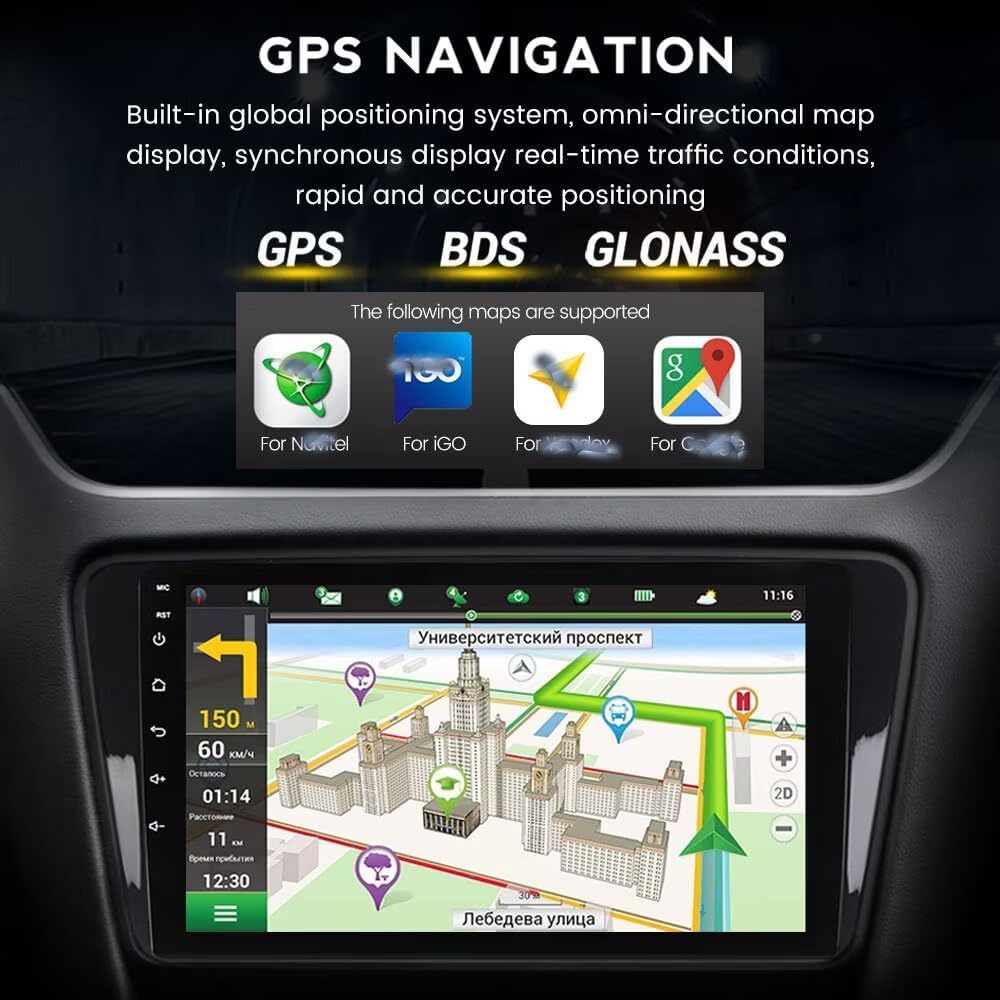
The GPS navigation interface displaying a map, route information, and supported satellite systems (GPS, BDS, GLONASS) and map applications.
5.4 FM/AM RDS-radio
The integrated radio supports FM and AM bands with RDS (Radio Data System) functionality. You can search for stations automatically or manually.

The FM/AM RDS radio interface, showing current frequency and preset station list.
Radiodrift:
- Automatisk søgning: Use the auto-search function to scan and save available stations.
- Manuel søgning: Indstil manuelt til bestemte frekvenser.
- Forudindstillede stationer: Save your favorite stations for quick access. The unit supports 18 preset stations.
5.5 Bluetooth-funktion
Bluetooth 5.0 enables hands-free calling, phone book download, and music streaming from your paired smartphone.

Illustration of the Bluetooth function, highlighting hands-free calling, music streaming, and contact synchronization. Emphasizes safe driving practices.
Bluetooth funktioner:
- Håndfri opkald: Foretag og modtag opkald direkte fra stereoanlægget.
- Phone Book Download: Sync your phone's contacts for easy dialing.
- Bluetooth musikstreaming: Play audio from your phone wirelessly.
- Opkalds-id: Display incoming caller names.
5.6 Wi-Fi-forbindelse
The unit supports 5GHz Wi-Fi (802.11 b/g/n) for fast internet access, low latency, wide coverage, and stable connection.

Illustration of 5GHz Wi-Fi support, indicating the antenna connection and benefits such as fast transmission and stable connectivity.
5.7 Yderligere funktioner
- Ratstyring: The unit supports original steering wheel remote control for convenient operation.
- Opdelt skærm: Brug split-screen-funktionen til at køre to applikationer samtidigt.
- 4G LTE Support: For models with 4G LTE capability, insert a SIM card for independent internet access.
- Indbygget DSP-processor: Enhances audio quality and customization.
- Multimedieafspilning: Supports various audio (MP3, WMA, AAC, RM, FALC), video (MPEG-1/2/4, H264, H263, VC1, RV, RMVB, DivX, VP8, AVS Stream), and photo (JPG/BMP/JEPG/GIF/PNG) formats.
- ADAS DVR-understøttelse: Compatible with ADAS DVR anti-collision warning driving recorders (DVR not included).
- OBD II-understøttelse: Compatible with OBD II diagnostic tools (OBD II not included).
- TPMS-understøttelse: Compatible with TPMS (Tire Pressure Monitoring System) (TPMS not included).
- Multi-sprog support: Supports English, German, French, Spanish, Italian, Portuguese, Russian, Dutch, Polish, Japanese, Simplified & Traditional Chinese, Arabic, etc.
6. Vedligeholdelse
- Rengøring af skærm: Brug en blød, fnugfri klud til at rengøre skærmen. Tør let ved genstridige mærker.ampRengør kluden med vand eller et skærmsikkert rengøringsmiddel. Undgå skrappe kemikalier.
- Generel rengøring: Wipe the unit's exterior with a dry, soft cloth.
- Softwareopdateringer: Tjek regelmæssigt for softwareopdateringer fra producenten for at sikre optimal ydeevne og adgang til nye funktioner.
- Køleventilator: The unit is equipped with a powerful cooling fan to maintain stable operation in various temperatures. Ensure the fan vents are not obstructed.

Bag view of the car stereo, showing the powerful cooling fan designed for stable operation.
7. Fejlfinding
Hvis du støder på problemer, kan du se følgende almindelige problemer og løsninger:
| Problem | Mulig årsag | Løsning |
|---|---|---|
| Ingen strøm | Forkert ledningsføring, sprunget sikring, problem med bilens batteri. | Check power connections (12V constant, accessory, ground). Inspect vehicle fuses. Ensure battery is charged. |
| Ingen lyd | Speaker wiring issue, volume too low, mute activated. | Kontroller højttalerforbindelser. Skru op for lydstyrken. Kontroller, om lydløs er aktiv. |
| GPS virker ikke / unøjagtig | GPS antenna not connected, poor antenna placement, software issue. | Sørg for, at GPS-antennen er korrekt tilsluttet og har en klar view of the sky. Restart the unit. Check map software settings. |
| Bluetooth forbinder ikke | Bluetooth off on phone/unit, incorrect pairing, interference. | Sørg for, at Bluetooth er aktiveret på begge enheder. Slet tidligere parringer, og par dem igen. Flyt tættere på enheden. |
| CarPlay/Android Auto starter ikke | Incorrect connection steps, incompatible phone, app issues. | Follow connection steps carefully (Bluetooth then Car Link, or USB). Ensure phone OS is compatible. Update phone apps. |
| Berøringsskærm reagerer ikke | Softwarefejl, fysisk skade. | Genstart enheden. Kontakt support, hvis problemet fortsætter. |
If the problem persists after trying these solutions, please contact Biorunn customer support.
8. Specifikationer
| Feature | Beskrivelse |
|---|---|
| Operativsystem | Android |
| Processor | 8-kerne |
| Skærmstørrelse | 10.1 tommer |
| VÆDDER | 4 GB |
| ROM (intern lagring) | 32 GB |
| Opløsning | 1280 x 720, IPS Screen |
| Bluetooth | Bluetooth 5.0 |
| DSP processor | Indbygget |
| CarPlay / Android Auto | Built-in, Wireless & Wired Support |
| Split Screen | Understøttet |
| 4G LTE | Understøttet |
| Wi-Fi | 5 GHz (802.11 b/g/n) |
| GPS-navigation | Built-in Global Positioning System (GPS, BDS, GLONASS) |
| Radio | FM/AM RDS, 18 preset stations |
| Ratkontrol | Understøttet |
| USB-stik | USB1; USB2 |
| Lydformater | MP3, WMA, AAC, RM, FALC osv. |
| Videoformater | MPEG-1/2/4, H264, H263, VC1, RV, RMVB, DivX, Sorenson SparK, Spark, VP8, AVS Stream |
| Fotoformater | JPG/BMP/JEPG/GIF/PNG |
| Kompatible enheder | Smartphone, højttaler |
| Kontrolmetode | Røre |
| Fabrikant | Shenzhen Rongnan International Electronics Co., Ltd. |
9. Garanti
This Biorunn Car Stereo comes with a 1 års garanti fra købsdatoen. Garantien dækker fabrikationsfejl og funktionsfejl ved normal brug. Gem venligst din købsbevis i forbindelse med garantikrav. Garantien dækker ikke skader forårsaget af forkert installation, misbrug, ulykker eller uautoriserede ændringer.
10. Support
For technical assistance, troubleshooting beyond this manual, or warranty inquiries, please contact Biorunn customer support. Refer to the contact information provided with your purchase or visit the official Biorunn webwebsted for supportressourcer.
Online ressourcer:
- Biorunn Official Store: Visit Biorunn Store on Amazon