
1. Introduktion
The CALEX Smart Home Indoor Ambiance Aroma Diffuser 590100500 is designed to enhance your indoor environment by improving air quality, diffusing pleasant aromas, and providing ambient lighting. This smart device integrates seamlessly into your smart home ecosystem, offering control through the Calex app, voice commands, and programmable features.
Nøglefunktioner omfatter:
- Aroma diffusion with essential oils.
- Realistic flame effect for ambiance.
- Adjustable ambient lighting with 16 million color options.
- Smart control via Calex app (timers, programmable scenarios).
- Voice control compatibility with Google Assistant, Siri, and Amazon Alexa.
- 300ml water tank capacity with automatic shut-off.
2. Sikkerhedsoplysninger
Læs venligst alle sikkerhedsinstruktioner, inden du bruger enheden, for at forhindre personskade eller beskadigelse.
- Always place the diffuser on a stable, flat surface away from direct sunlight, heat sources, and electronic devices.
- Do not exceed the maximum water fill line (300ml) to prevent overflow.
- Brug kun rent postevand eller destilleret vand. Brug ikke varmt vand.
- Only use 100% pure, water-soluble essential oils. Other oils or corrosive liquids may damage the device.
- Hold enheden utilgængeligt for børn og kæledyr.
- Dæk ikke tågeudløbet til under drift.
- Tag apparatets stik ud af stikkontakten før rengøring eller genopfyldning.
- The device features an automatic shut-off function when the water tank is empty, and sends a notification to your phone.
- A built-in safety configuration will cause the diffuser to flash if the remaining water in the tank needs to cool down after a maximum of 72 hours of continuous operation.
- Forsøg ikke selv at reparere eller ændre enheden. Kontakt kundesupport for at få hjælp.
3. Pakkens indhold
Bekræft at alle varer er til stede i pakken:
- CALEX Smart Home Indoor Ambiance Aroma Diffuser (Model 5901000500)
- Strømadapter
- Brugermanual
4. Produktet er slutview
Familiarize yourself with the components of your aroma diffuser.
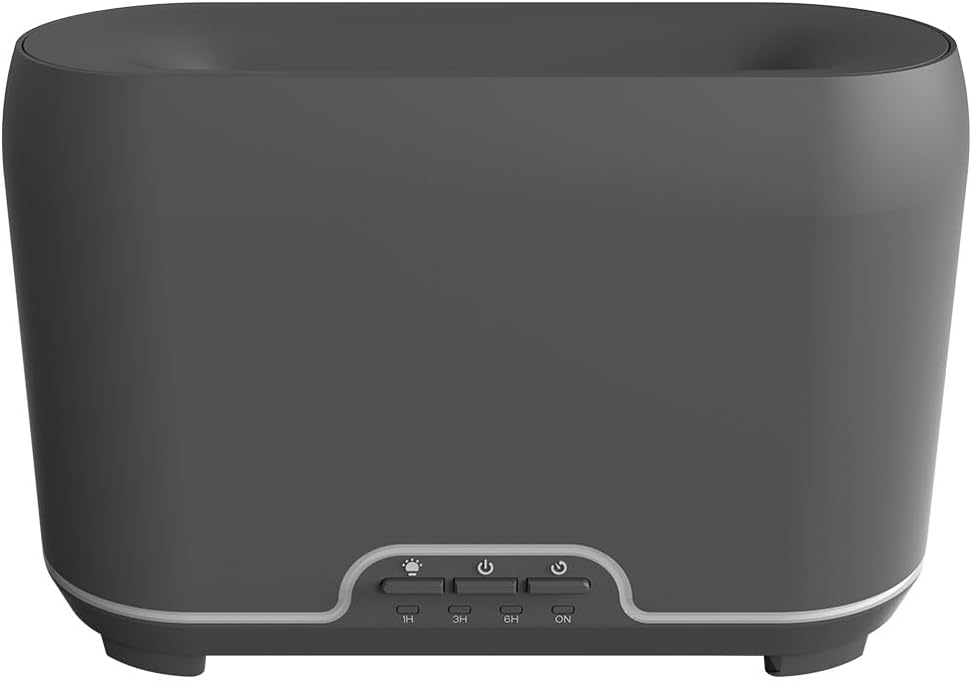
Billede: Forside view of the CALEX Smart Home Aroma Diffuser, showing the control panel with buttons for light, power, and timer settings (1H, 3H, 6H, ON).

Image: The CALEX Smart Home Aroma Diffuser operating on a wooden table, displaying its ambient flame effect and mist output.
The diffuser typically consists of a water tank, an ultrasonic plate, a mist outlet, and a control panel with buttons for power, light, and timer functions. The power input port is usually located at the back or bottom of the device.
5. Opsætning
Følg disse trin for indledende opsætning:
- Placering: Placer diffusoren på en flad, stabil overflade.
- Åbent låg: Fjern forsigtigt det øverste dæksel på diffuseren.
- Fyld vandtank: Fill the water tank with clean water up to the 300ml maximum fill line. Do not overfill.
- Tilføj æterisk olie: Add a few drops of your preferred essential oil directly into the water tank.
- Luk låget: Sæt topdækslet sikkert på igen.
- Tilslut strøm: Plug the power adapter into the diffuser's power input port, then plug the adapter into a wall outlet.
- Download Calex App: Download the free Calex Smart app from your smartphone's app store (available for iOS and Android).
- Opret forbindelse til WiFi: Follow the in-app instructions to connect your diffuser to your home WiFi network. Ensure your WiFi is 2.4GHz.
6. Betjeningsvejledning
The CALEX Smart Home Aroma Diffuser can be operated via the Calex app or its integrated control buttons.
6.1 Using the Calex Smart App
The Calex app provides full control over your diffuser's functions:
- Tænd/sluk: Turn the diffuser on or off remotely.
- Tågekontrol: Adjust the mist output level.
- Lysstyring: Change the ambient light color from over 16 million options, adjust brightness, and select lighting modes.
- Flamme effekt: Activate or deactivate the flame effect.
- Timere: Set schedules for the diffuser to turn on or off automatically.
- Programmerbare scenarier: Create custom scenarios based on time, weather, or other smart home triggers.
- Meddelelser: Receive alerts when the water tank is empty.
6.2 Stemmekontrol
Integrate your diffuser with voice assistants for hands-free control:
- Google Assistant: Link your Calex account in the Google Home app. Use commands like "Hey Google, turn on the diffuser."
- Siri: Create custom shortcuts in the Apple Home app or through the Calex app for Siri commands.
- Amazon Alexa: Enable the Calex skill in the Alexa app. Use commands like "Alexa, set diffuser light to blue."
6.3 Manuelle kontrolknapper
The control panel on the diffuser allows for basic operation:
- Power knap: Press once to turn on/off the mist and flame effect.
- Lys knap: Press to cycle through light colors or turn the light on/off.
- Timer Buttons (1H, 3H, 6H, ON): Select a desired operating duration. The diffuser will automatically shut off after the selected time. 'ON' typically means continuous operation until water runs out or manually turned off.
7. Vedligeholdelse
Regelmæssig rengøring sikrer optimal ydeevne og forlænger levetiden på din diffuser.
- Daglig rengøring: Tøm eventuelt resterende vand ud af tanken efter hver brug. Tør tankens inderside af med en ren, blød klud.
- Ugentlig rengøring: For a more thorough clean, unplug the device. Add a small amount of white vinegar (about 10ml) to the water tank and let it sit for 10-15 minutes to dissolve mineral buildup. Gently wipe the ultrasonic plate with a cotton swab or soft brush. Rinse the tank thoroughly with clean water, avoiding the air outlet.
- Udvendig rengøring: Tør diffusorens yderside af med en blød kludamp klæde. Brug ikke slibende rengøringsmidler eller opløsningsmidler.
- Ensure the device is completely dry before refilling or storing.
8. Fejlfinding
Hvis du støder på problemer, kan du se følgende almindelige problemer og løsninger:
| Problem | Mulig årsag | Løsning |
|---|---|---|
| Ingen tåge eller svag tåge | Lav vandstand Ultralydsplade beskidt Tågeudløb blokeret | Fyld vand på til det passende niveau. Rengør ultralydspladen i henhold til vedligeholdelsesanvisningerne. Sørg for, at tågeudløbet er rent. |
| Enheden tænder ikke | Ingen strøm Vandbeholder tom Enhedsfejl | Kontroller strømtilslutningen og stikkontakten. Genfyld vandtanken. Kontakt kundesupport, hvis problemet fortsætter. |
| Problemer med appforbindelse | Forkert WiFi-adgangskode Routeren er for langt væk 2.4GHz vs 5GHz WiFi | Bekræft WiFi-adgangskode. Move diffuser closer to the router. Ensure your router is broadcasting a 2.4GHz network and connect to it. |
| Flammeeffekt virker ikke | Feature deactivated in app Enhedsfejl | Check app settings to ensure flame effect is enabled. Kontakt kundesupport. |
9. Specifikationer
| Feature | Specifikation |
|---|---|
| Modelnummer | 5901000500 |
| Mærke | CALEX |
| Kapacitet | 300 milliliter |
| Materiale | Plast |
| Automatisk sluk | Ja |
| Forbindelse | WiFi (2.4 GHz) |
| Kontrolmetoder | Calex Smart App, Voice Control (Google Assistant, Siri, Amazon Alexa), Manual Buttons |
| Lysindstillinger | 16 millioner farver |
| Anbefalet brugsområde | Medium space |
| International artikelkode (EAN/UPC) | 08712879157090 |
10. Garanti og support
For garantioplysninger eller teknisk support henvises til den dokumentation, der fulgte med dit køb, eller kontakt forhandleren/producenten direkte. Gem din købsbevis til garantikrav.