
Cuifati Cuifatig8c3hmvd9n
FS01 Digital Camera User Manual
Brand: Cuifati | Model: Cuifatig8c3hmvd9n
Indledning
Tak for købetasing the Cuifati FS01 Digital Camera. This camera is designed for photography enthusiasts, offering 4K video resolution and 64MP image resolution. It features dual LCD screens (2.8-inch rear and 2-inch front), 16x digital zoom, and anti-shake capabilities, making it suitable for various photography needs. This manual provides detailed instructions on how to set up, operate, and maintain your camera to ensure optimal performance and longevity.

Vigtig advarsel: Please read the product instructions carefully before use to ensure correct and safe operation.
Pakkens indhold
Kontroller venligst pakkens indhold for at sikre, at alle varer er til stede:
- 1 x Cuifati FS01 Digital Camera
- 1 x USB-kabel
- 1 x BL-5B Lithium Ion Battery (1200mAh, built-in)
- 1 x brugermanual
- 1 x bærbart reb
Produkt overview
Gør dig bekendt med kameraets komponenter og betjeningselementer.

Billede: For og bag view of the Cuifati FS01 Digital Camera, showcasing the dual screens and main controls.

Billede: Front view of the camera, highlighting the lens, flash, and front display.

Billede: Bag view of the camera, showing the main LCD screen and control buttons (T/W for zoom, WiFi, Flash, Mode, Delete, Menu, Display).
Nøglekomponenter:
- Linse: Optager billeder og videoer.
- Front LCD Screen (2-inch): For convenient self-portraits and vlogging.
- Rear LCD Screen (2.8-inch): Main display for framing shots, reviewmedier og navigering i menuer.
- Power knap: Tænder/slukker kameraet.
- Udløserknap: Tager billeder eller starter/stopper videooptagelse.
- Zoom Buttons (T/W): Justerer 16x digital zoom.
- Menu-knap: Giver adgang til kameraindstillinger og -valgmuligheder.
- DISP-knap: Slår visning af information på skærmen til/fra.
- Mode-knap (M): Switches between different shooting modes.
- Flash knap: Controls flash settings.
- Slet knap: Deletes selected photos or videos.
- WiFi knap: Activates Wi-Fi for connectivity.
- Mikrofon: Built-in for audio recording with videos.
- USB-port: Til opladning og dataoverførsel.
- Micro SD -kortplads: Til ekstern hukommelseslagring.
- Batterirum: Houses the BL-5B battery.
Opsætning
1. Opladning af batteriet
The camera comes with a built-in 1200mAh BL-5B Lithium Ion Battery. Before first use, ensure the battery is fully charged.
- Tilslut kameraet til en strømkilde (f.eks. en computers USB-port eller en USB-vægadapter) ved hjælp af det medfølgende USB-kabel.
- Opladningsindikatorlampen lyser. Den slukker eller skifter farve, når opladningen er færdig.
2. Inserting a Micro Memory Card
A micro memory card (not included) is required to store photos and videos. The camera supports up to 256GB Class 10 micro memory cards.
- Locate the micro SD card slot on the camera.
- Insert the micro SD card with the gold contacts facing down until it clicks into place.
- For at fjerne det skal du forsigtigt skubbe kortet ind, indtil det springer ud.
3. Tænd/sluk
Press and hold the Power button (usually located on the top of the camera) for a few seconds to turn the camera on or off.
Betjeningsvejledning
1. Grundlæggende foto- og videooptagelse
- Tager billeder: Turn on the camera. Frame your shot using the LCD screen. Press the Shutter button fully down to take a photo.
- Optagelse af videoer: Switch to video mode using the Mode button (M). Press the Shutter button to start recording. Press it again to stop recording.
- Zoom: Use the T (Telephoto) button to zoom in and the W (Wide) button to zoom out. The camera supports 16x digital zoom.
2. Using Dual Screens for Selfies and Vlogging
The camera features a 2.8-inch rear screen and a 2-inch front screen, ideal for self-portraits and vlogging.
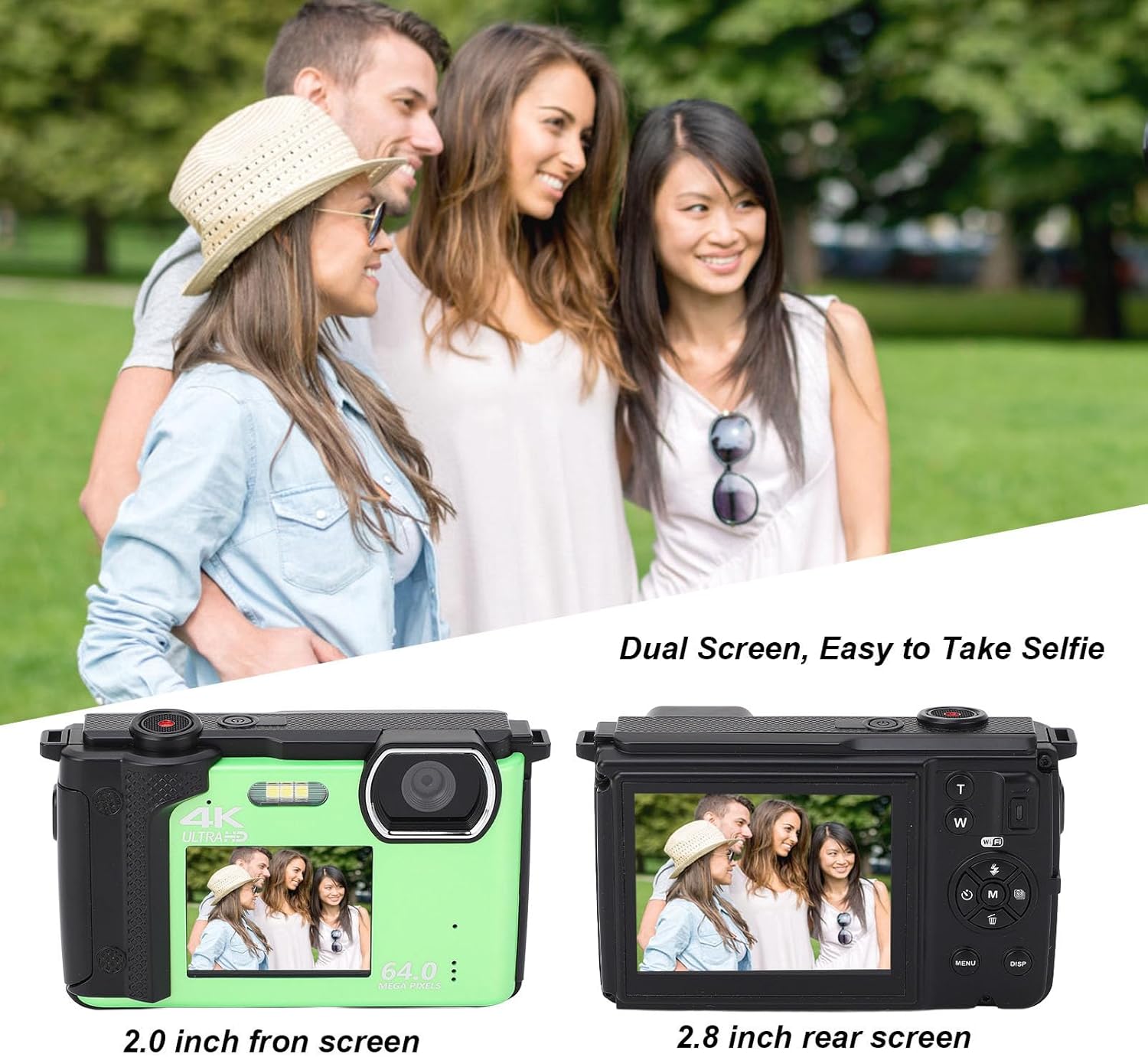
Billede: Illustration of the dual screen functionality, showing how the front screen aids in taking selfies or group photos.
- To switch to the front screen, typically there is a dedicated button or a setting in the menu.
- Utilize the built-in 2s, 5s, and 10s selfie timer functions for timed shots.
- Continuous shooting mode allows you to capture a series of photos rapidly.
3. Wi-Fi-forbindelse og appbrug
The camera can connect to smart devices for remote control and sharing.

Billede: Demonstrates the camera's Wi-Fi wireless sharing capability, allowing connection to a smartphone for photo and video transfer.
- Download applikationen: Søg efter 'IDC' on Google Play (for Android) or the iOS App Store (for iOS) to download the companion application.
- Aktivér kameraets Wi-Fi:
- Tænd kameraet.
- Tryk på MENU knappen for at gå ind i menuen.
- Use the left/right navigation keys to switch to Systemindstillinger.
- Use the up/down navigation keys to find the Hotspot undermenu.
- Tryk på M key to open Wi-Fi. The Wi-Fi ID and password will be displayed on the camera screen.
- Connect from Smartphone:
- Open your smartphone's settings and navigate to WLAN or Wi-Fi.
- Vælg det navngivne netværk 4K_xxxx (matching the camera's displayed ID).
- Enter the password displayed on the camera screen.
- Once connected, you can use your smartphone to control the camera for taking photos and recording videos.
4. Brug som en Web Kamera
The Cuifati FS01 can function as a web camera when connected to a computer.
- Tilslut kameraet til din computer ved hjælp af det medfølgende USB-kabel.
- Select the "PC Camera" or "Webcam" option on the camera's screen (if prompted).
- Din computer burde genkende kameraet som en webcam, allowing you to use it for video calls or live streaming.
Specifikationer
| Feature | Beskrivelse |
|---|---|
| Produkt materiale | Plast |
| Vægt | Ca. 380 g / 13.4 oz |
| Billedopløsning | 64M, 56M, 48M, 30M, 24M, 20M, 12M, 8M, 5M |
| Video opløsning | 4K 60fps/30fps, 2.7K 30fps, 1080P 60fps/30fps, 720P 120fps/60fps/30fps |
| Dobbelt skærm | 2.8 Inch Rear Screen, 2 Inch Front Screen |
| Mikrofon | Indbygget |
| File Format | MP4, JPEG |
| Opbevaring | Supports Up To 256G Class10 Micro Memory Cards (Not Included) |
| Kameraets batterikapacitet | 1200mAh Lithium Ion Battery x 1, BL-5B (Built-In) |
| Digital Zoom | 16x |
| Kontinuerlig optagelseshastighed | 30 fps |
| Optagelseskapacitet | 136 minutter (ca.) |
| Billedstabilisering | Ingen |
| Autofokus | Ingen |
Fejlfinding
Hvis du støder på problemer med dit kamera, kan du se følgende almindelige fejlfindingstrin:
- Kamera tænder ikke:
- Sørg for, at batteriet er fuldt opladet.
- Kontroller, om batteriet er korrekt isat.
- Try connecting the camera to a power source via USB to see if it powers on.
- "Memory Card Error" or unable to save photos:
- Ensure a compatible micro SD card (Class 10, up to 256GB) is inserted correctly.
- Format the memory card through the camera's menu (this will erase all data on the card).
- Try a different memory card.
- Dårlig billed-/videokvalitet:
- Sørg for, at linsen er ren og fri for pletter.
- Check lighting conditions; use flash in low light if necessary.
- Verify that the selected image/video resolution settings are appropriate.
- Problemer med Wi-Fi-forbindelse:
- Ensure Wi-Fi is enabled on the camera and your smartphone.
- Double-check the Wi-Fi ID and password.
- Genstart både kameraet og din smartphone.
- Ensure the 'IDC' app is installed and up to date on your smartphone.
- Kameraet fryser eller reagerer ikke:
- If possible, remove and reinsert the battery (if accessible, otherwise hold power button for 10 seconds).
- Perform a factory reset via the camera's menu (note: this will reset all settings).
Opretholdelse
Proper care and maintenance will extend the life of your camera.
- Rengøring af kameraet:
- Brug en blød, fnugfri klud til at rengøre kamerahuset.
- For the lens and screens, use a specialized lens cleaning cloth and solution. Avoid abrasive materials.
- Brug ikke stærke rengøringsmidler eller opløsningsmidler.
- Opbevaring:
- Store the camera in a cool, dry place away from direct sunlight, dust, and moisture.
- Hvis produktet opbevares i længere tid, skal batteriet fjernes for at forhindre lækage.
- Batteripleje:
- Undgå at udsætte batteriet for ekstreme temperaturer.
- Undlad at skille batteriet ad eller punktere det.
- Oplad batteriet regelmæssigt, selvom det ikke er i brug, for at bevare dets sundhedstilstand.
Garanti og support
For warranty information and technical support, please refer to the warranty card included with your product or visit the official Cuifati website. You can also visit the Cuifati store on Amazon for additional product information and support resources.
Cuifati Store Link: https://www.amazon.com/stores/Cuifati/page/092BE1D7-D029-428E-9855-7943182E7680
Ask a question about this manual
Ask about setup, troubleshooting, compatibility, parts, safety, or missing instructions. Manuals+ will review the question and use this page’s manual context to help answer it.