
1. Introduktion
Thank you for choosing the AWEI T36 Wireless Sport Earbuds. These in-ear earphones are designed to provide a high-quality audio experience with convenience and durability, especially for active lifestyles. Featuring Bluetooth 5.0 connectivity, touch controls, and an IPX4 water resistance rating, the T36 earbuds are suitable for various activities, including sports.
2. Pakkens indhold
Tjek venligst pakken for følgende varer:
- AWEI T36 Wireless Sport Earbuds (Left and Right)
- Opladningsetui
- USB opladningskabel
- Brugermanual
3. Produktet er slutview
Familiarize yourself with the components of your AWEI T36 earbuds.
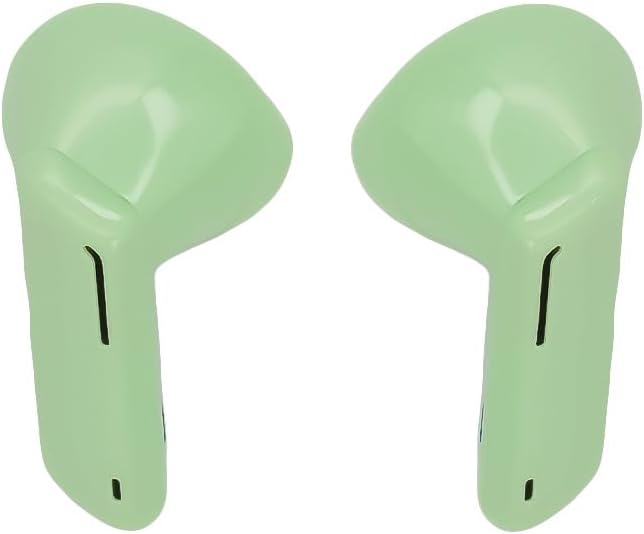
Image 1: AWEI T36 Wireless Sport Earbuds. This image displays the two green earbuds, highlighting their ergonomic design for in-ear fit.

Image 2: AWEI T36 Charging Case. This image shows the compact green charging case with the 'awei' brand logo on its lid.
4. Opsætning
4.1 Opladning af øretelefoner og etuiet
- Indledende opkrævning: Oplad opladningsetuiet og ørepropperne helt inden første brug.
- Opladning af etuiet: Connect the USB charging cable to the charging port on the case and to a power source. The case takes approximately 90 minutes to fully charge.
- Opladning af øretelefoner: Place the earbuds into the charging case. Ensure they are correctly seated. The earbuds will charge automatically from the case. The earbuds take approximately 1.5 hours to fully charge.
4.2 Parring med en enhed
- Første gangs parring:
- Åbn opladningsetuiet, og fjern begge ørepropper. De vil automatisk gå i parringstilstand.
- Aktiver Bluetooth på din enhed (smartphone, tablet osv.).
- Søg efter tilgængelige Bluetooth-enheder, og vælg "AWEI T36" fra listen.
- Når der er forbindelse, hører du en bekræftelseslyd, og ørepropperne er klar til brug.
- Automatisk genforbindelse: Efter den første parring opretter ørepropperne automatisk forbindelse til den sidst parrede enhed, når de tages ud af opladningsetuiet, forudsat at Bluetooth er aktiveret på enheden, og den er inden for rækkevidde.
5. Betjeningsvejledning
5.1 Sådan tager du ørepropperne på
Gently insert the earbuds into your ears, ensuring a comfortable and secure fit. Adjust them until the sound quality is optimal and they feel stable, especially during physical activity.
5.2 Tryk på kontrolelementer
The AWEI T36 earbuds feature touch-sensitive controls on each earbud. The following actions can be performed:
- Afspil/pause: Et enkelt tryk på begge øretelefoner.
- Næste nummer: Dobbelttryk på den højre øreprop.
- Forrige nummer: Dobbelttryk på den venstre øreprop.
- Besvar/afslut opkald: Enkelt tryk på en af øretelefonerne under et indgående opkald eller et aktivt opkald.
- Afvis opkald: Tryk og hold en af øretelefonerne nede i 2 sekunder under et indgående opkald.
- Aktiver stemmeassistent: Tryk tre gange på en af øretelefonerne.
6. Vedligeholdelse
6.1 Rengøring
Rengør dine ørepropper og opladningsetui regelmæssigt for at sikre optimal ydeevne og hygiejne.
- Brug en blød, tør og fnugfri klud til at tørre ørepropperne og opladningsetuiet af.
- Brug ikke slibende rengøringsmidler, opløsningsmidler eller aerosolspray.
- Fjern forsigtigt ørevoks eller snavs fra øreproppernes net med en lille, blød børste eller vatpind.
6.2 Opbevaring
Når ørepropperne ikke er i brug, skal de opbevares i deres opladningsetui for at beskytte dem mod støv og skader og for at holde dem opladet.
7. Fejlfinding
Hvis du støder på problemer, kan du bruge følgende almindelige løsninger:
- Ørepropper parrer ikke: Ensure both earbuds are removed from the case and are in pairing mode. Turn off and on Bluetooth on your device, then try pairing again.
- Kun én øreprop virker: Place both earbuds back into the charging case, close the lid, wait a few seconds, then remove them again. This often re-syncs them.
- Ingen lyd: Kontrollér lydstyrkeniveauet på din enhed, og sørg for, at ørepropperne er korrekt tilsluttet.
- Opladningsproblemer: Ensure the charging cable is securely connected to both the case and the power source. Check if the charging contacts on the earbuds and inside the case are clean.
- Dårlig lydkvalitet: Ensure the earbuds are properly seated in your ears. Try cleaning the earbud mesh.
8. Specifikationer
| Mærke | AWEI |
| Model | T36 |
| Hovedtelefontype | In-Ear |
| Bluetooth version | 5.0 |
| Earbud batterikapacitet | 45 mAh (hver) |
| Opladningsetui Batterikapacitet | 320 mAh |
| Musik Spilletid | Op til 5 timer |
| Taletid | Op til 8 timer |
| Opladningstid | Approx. 1.5 hours (earbuds/case) |
| Standby tid | Op til 210 timer |
| Vandmodstandsvurdering | IPX4 |
| Kontroltype | Tryk på kontrol |
| Farve | Grøn |
9. Garantioplysninger
Specific warranty details may vary by region and retailer. Please refer to the warranty card included with your product or contact your point of purchase for detailed warranty terms and conditions.
10. Support
For further assistance or inquiries, please contact AWEI customer support. You may also find additional resources and support via the official AWEI channels.
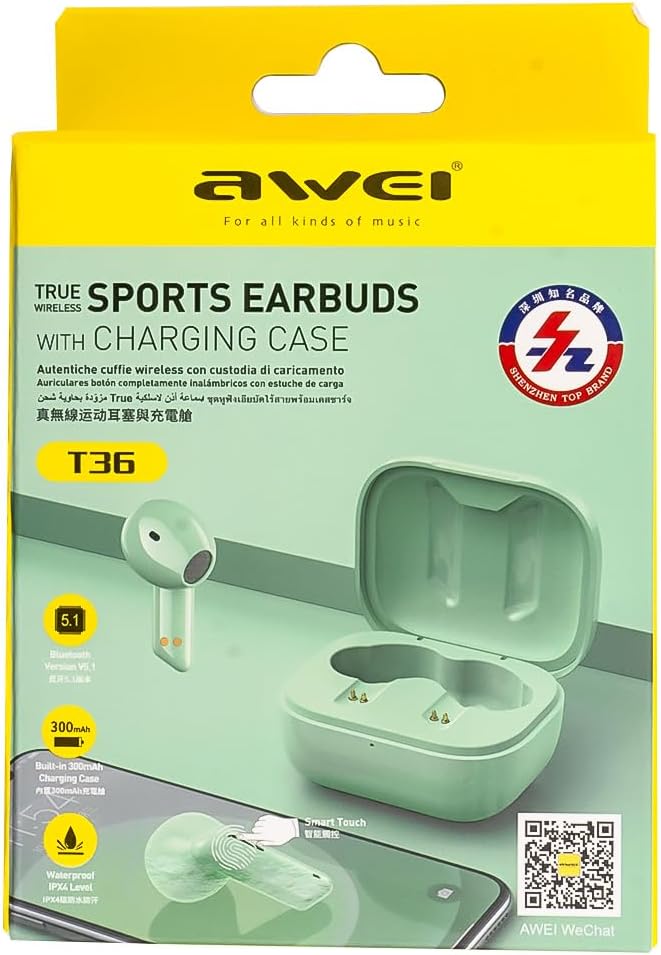
Image 3: AWEI T36 Product Packaging. This image shows the product box, which includes a QR code for WeChat support.
Scan QR-koden på produktemballagen eller besøg http://weixin.qq.com/r/7XQ0O7vEfoUBh6pYnyHJ for WeChat support.