
1. Introduktion
This manual provides instructions for the safe and efficient use of your De'Longhi Rivelia Perfetto EXAM440.55.G automatic coffee machine. Please read all instructions carefully before operating the appliance and retain this manual for future reference.

The De'Longhi Rivelia Perfetto EXAM440.55.G machine with prepared coffee and milk beverages.
Nøglefunktioner:
- Interchangeable Bean Hoppers: Two 250g containers allow for easy switching between different coffee blends.
- Intuitiv berøringsskærm: A 3.5-inch full-touch color display with animations for direct selection of 16 beverages.
- Coffee Routines Function: Remembers user habits and adapts the menu throughout the day.
- Bean Adapt-teknologi: Automatically adjusts grinding, dose, and temperature for optimal extraction based on selected beans.
- LatteCrema Hot Technology: Produces rich and creamy milk foam at an ideal temperature with automatic cleaning, suitable for dairy and plant-based milks.
- Kompakt design: Elegant and space-saving design with soft angles and polished finishes.
2. Opsætning
2.1 Udpakning og placering
Carefully remove the machine from its packaging. Place the machine on a stable, level surface away from water splashes and heat sources. Ensure adequate space around the machine for ventilation and access to components.

Product dimensions for placement: 24.5 cm (width) x 43 cm (depth) x 38.5 cm (height).
2.2 Inkluderede komponenter
Kontroller, at alle komponenter er til stede i kassen:

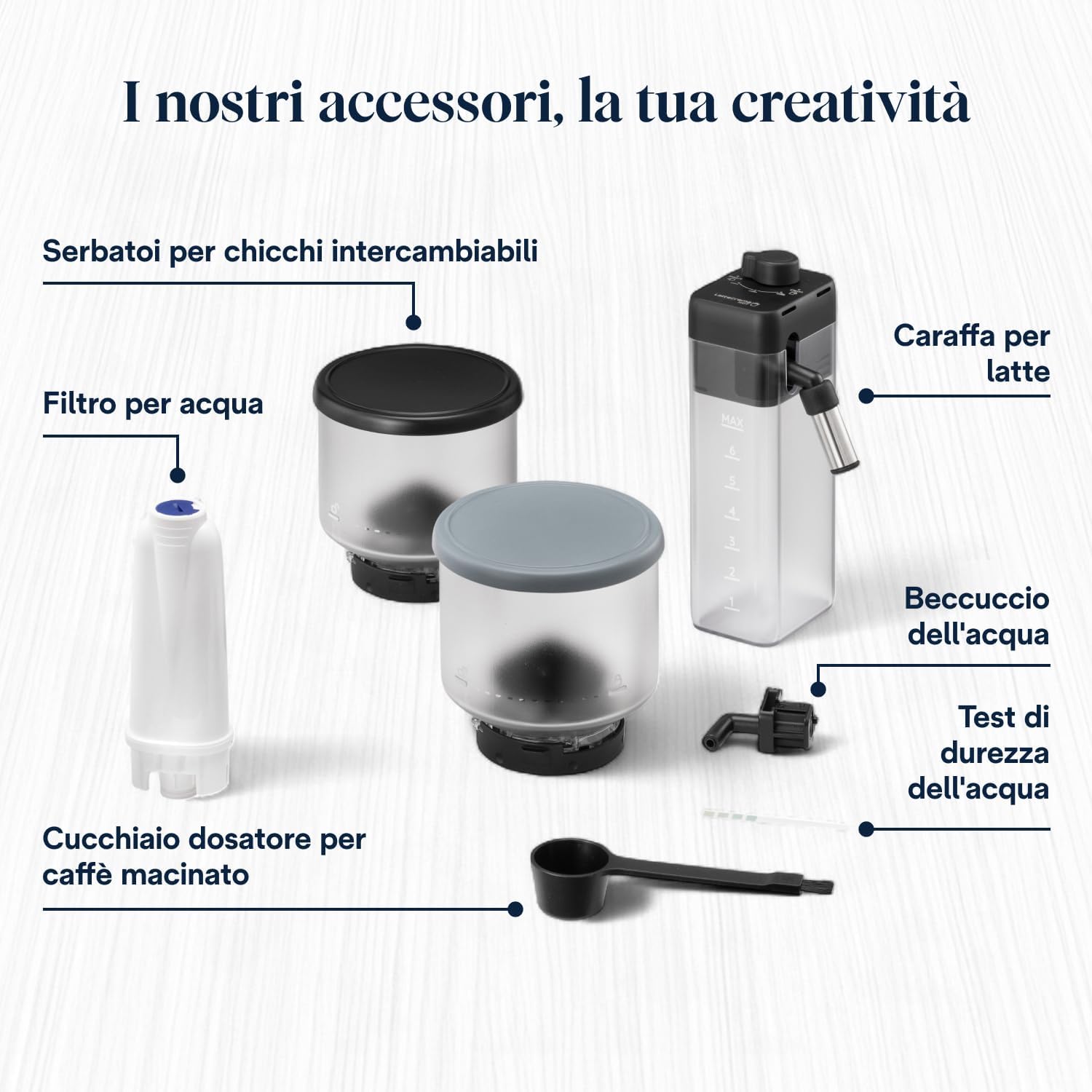
Included accessories: Interchangeable bean hoppers, water filter, milk carafe, water spout, water hardness test, and ground coffee measuring spoon.
- De'Longhi Rivelia Perfetto EXAM440.55.G Coffee Machine
- 2 Interchangeable Bean Hoppers (250g each)
- Milk Carafe (LatteCrema System)
- Vandfilter
- Vandhårdhedsteststrimmel
- Measuring Spoon for Ground Coffee
- Descaling Solution (may be included separately or purchased)
2.3 Initial Start-up and Water Preparation
- Fyld vandtanken med frisk postevand.
- Perform the water hardness test using the provided strip and set the machine accordingly via the touch display.
- Install the water filter into the water tank as per the instructions on the display.
- Sæt maskinen i en passende stikkontakt.
- Følg instruktionerne på skærmen for den første skylning. Dette klargør kredsløbene og forbereder maskinen til brug.
2.4 Installing Bean Hoppers
Place one of the interchangeable bean hoppers onto the machine's bean container opening. Ensure it is securely seated. You can switch between hoppers at any time to use different coffee beans.

Interchangeable bean hoppers allow for quick changes between coffee blends.

Filling the bean hopper with fresh coffee beans.
3. Betjeningsvejledning
3.1 Tænd/sluk
Press the power button to turn the machine on or off. The machine will perform an automatic rinse cycle upon startup and before shutdown to ensure optimal hygiene.
3.2 Selecting and Customizing Beverages
The 3.5-inch full-touch color display provides access to 16 pre-programmed beverages. Simply tap your desired drink icon to start preparation.

The touch display allows for easy selection of your preferred beverage.

Interacting with the intuitive touchscreen for beverage selection.
You can customize each beverage's strength, volume, and temperature. The machine also supports up to 4 user profiles to save personalized settings.
3.3 Using the LatteCrema System
To prepare milk-based beverages:
- Fill the milk carafe with fresh milk (dairy or plant-based).
- Attach the carafe to the machine's milk spout.
- Select a milk-based beverage from the display (e.g., Cappuccino, Latte Macchiato).
- Maskinen vil automatisk skumme og dispensere mælken, efterfulgt af kaffen.

The LatteCrema Hot Technology delivers rich and creamy milk foam.
After each use, the LatteCrema system performs an automatic cleaning cycle. For thorough cleaning, refer to the Maintenance section.
4. Vedligeholdelse
Regelmæssig rengøring og vedligeholdelse sikrer din kaffemaskines levetid og optimale ydeevne.
4.1 Daglig rengøring
- Drypbakke: Tøm og skyl drypbakken dagligt.
- Græsbeholder: Empty the coffee grounds container when prompted by the machine or daily. Rinse it with water.
- Mælkekaraffel: After each use, perform the automatic cleaning cycle. For a more thorough clean, disassemble the carafe and wash all components with warm water and mild detergent.
4.2 Ugentlig/månedlig rengøring
- Brygningsenhed: Remove the brewing unit (refer to the machine's internal instructions for removal) and rinse it thoroughly under running water. Allow it to air dry before reinserting.
- Bønnebeholdere: Periodically clean the bean hoppers, especially when switching bean types, to prevent oil buildup.
4.3 Afkalkning
The machine will prompt you when descaling is required. Follow the on-screen instructions and use a suitable De'Longhi descaling solution. Descaling is crucial for removing mineral buildup and maintaining machine efficiency.
4.4 Udskiftning af vandfilter
Replace the water filter approximately every 2 months, or when indicated by the machine. Using a water filter helps reduce limescale buildup and improves coffee taste.
The water filter is an important component for water quality and machine longevity.
5. Fejlfinding
If you encounter issues with your machine, consult the following table for common problems and solutions. For more complex issues, refer to the full user manual or contact customer support.
| Problem | Mulig årsag | Løsning |
|---|---|---|
| Der serveres ikke kaffe | Water tank empty; brewing unit blocked; no beans in hopper. | Fyld vandtanken; rengør bryggeenheden; fyld bønnebeholderen. |
| Svag kaffe | Malingsgraden er for grov; utilstrækkelig kaffemængde. | Adjust grinder to a finer setting; increase coffee strength via display. |
| Mælken skummer ikke korrekt | Mælkekanden er snavset; mælketypen er uegnet; mælken er for varm. | Clean milk carafe thoroughly; use fresh, cold milk; ensure correct milk type. |
| Maskinen viser 'Afkalkning påkrævet' | Kalkaflejringer. | Udfør afkalkningscyklussen i henhold til instruktionerne. |
6. Specifikationer
| Feature | Detalje |
|---|---|
| Mærke | De'Longhi |
| Modelnavn | Rivelia |
| Modelnummer | EXAM440.55.G |
| Kapacitet | 1.4 liter (vandtank) |
| Farve | Pebble Grå |
| Produktmål (D x B x H) | 43P x 24.5L x 38.5H cm |
| Speciel funktion | Automatic Milk Frother (LatteCrema Hot) |
| Kaffemaskine type | Espressomaskine |
| Driftstilstand | Fuldautomatisk |
| Wattage | 1450 watt |
| Voltage | 240 volt |
| User Interface Input | Touchskærm |
| Udgangstryk | 19 Bar |
| Coffee Type Used | Hele bønner |
| Strømkilde | Netstik |
| Filtertype | Permanent |
| Varens vægt | 9.7 kilo |
| Materiale | Plast |
| Oprindelsesland | Rumænien |
7. Garanti og support
7.1 Produktgaranti
This De'Longhi Rivelia Perfetto EXAM440.55.G coffee machine comes with a 2 års garanti fra købsdatoen. Gem venligst din købsbevis i tilfælde af garantikrav. Garantien dækker fabrikationsfejl under normale brugsforhold.
7.2 Kundesupport
For technical assistance, spare parts, or warranty service, please contact De'Longhi customer support. Contact details can typically be found on the official De'Longhi website or in the full product documentation provided with your machine.
When contacting support, please have your model number (EXAM440.55.G) and serial number (found on the appliance rating plate) ready.