
1. Introduktion
This manual provides detailed instructions for the proper use and maintenance of your Arlec Remote SS3136. This remote control is specifically designed to operate the Arlec Wall Fan AWDC001HA, offering convenient and effortless control over your fan's functions. Please read this manual thoroughly before first use to ensure optimal performance and longevity of your device.
2. Produktfunktioner
- Nem kontrol: Utilizes Infrared technology for seamless communication with your Arlec Wall Fan AWDC001HA from up to 10 meters away.
- Langvarig kraft: Requires 3 alkaline batteries for extended use.
- Slankt design: Finished in a sophisticated black color.
- Alsidig kompatibilitet: Designed to control Arlec Wall Fans, specifically model AWDC001HA.
- Enkel betjening: Features 3 intuitive buttons for easy fan control.
3. Pakkens indhold
Bekræft at alle varer er til stede i pakken:
- 1 x Arlec Remote SS3136
- 1 x vægmonteringsholder
- 2 x monteringsskruer
- 2 x Vægstik
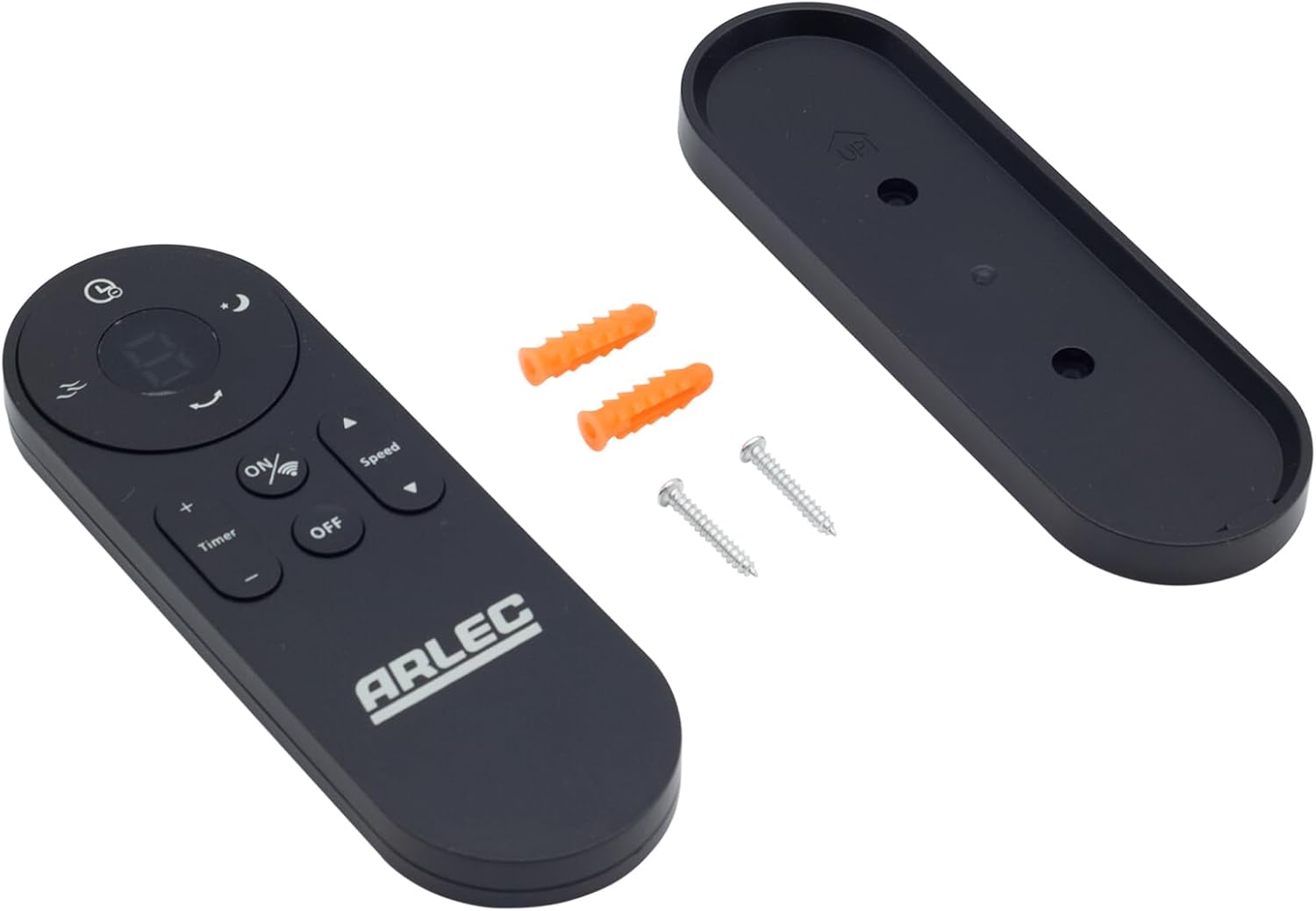
Image: Arlec Remote SS3136 shown with its included wall mount holder, two mounting screws, and two wall plugs, indicating the complete package contents.
4. Opsætning
4.1 Batteriinstallation
- Find batterirummet på bagsiden af fjernbetjeningen.
- Åbn batterirummets dæksel.
- Insert 3 Alkaline batteries (not included) into the compartment, ensuring the correct polarity (+ and -) as indicated inside the compartment. The remote requires 3 Volts (DC).
- Luk batterirummets dæksel forsvarligt.
4.2 Vægmontering (valgfrit)
- Choose a suitable location on a wall for the remote holder.
- Mark the positions for the two mounting screws using the holder as a template.
- Drill pilot holes at the marked positions. Insert the wall plugs if drilling into drywall or masonry.
- Secure the wall mount holder to the wall using the provided screws.
- Place the remote control into the installed holder for convenient storage.
5. Betjeningsvejledning
The Arlec Remote SS3136 features a simple 3-button layout for controlling your Arlec Wall Fan AWDC001HA. Ensure there is a clear line of sight between the remote and the fan's infrared receiver for optimal performance.

Billede: Nærbillede view of the Arlec Remote SS3136, highlighting its three main control buttons: ON/OFF, Speed, and Timer.
- ON/OFF knap: Tryk på denne knap for at tænde eller slukke for blæseren.
- Hastighedsknap: Use this button to cycle through the available fan speed settings (e.g., Low, Medium, High).
- Timer knap: Press this button to set or adjust the fan's timer function. Refer to your Arlec Wall Fan AWDC001HA manual for specific timer intervals.
The remote operates using Infrared (IR) technology. Point the remote directly towards the fan's IR receiver. The effective operating range is up to 10 meters (approximately 33 feet).
6. Vedligeholdelse
- Rensning: Tør fjernbetjeningen af med en blød, tør klud. Brug ikke slibende rengøringsmidler eller opløsningsmidler.
- Udskiftning af batteri: Replace batteries when the remote's performance degrades or it stops responding. Always replace all 3 batteries at the same time with new alkaline batteries.
- Opbevaring: Hvis fjernbetjeningen ikke skal bruges i længere tid, skal batterierne tages ud for at forhindre lækage. Opbevares køligt og tørt.
7. Fejlfinding
| Problem | Mulig årsag | Løsning |
|---|---|---|
| Remote not responding to fan. |
|
|
| Knapperne sidder fast eller reagerer ikke. | Snavs eller snavs under knapperne. | Clean the remote surface with a soft, dry cloth. Avoid liquids. |
8. Specifikationer
| Attribut | Detalje |
|---|---|
| Model | SS3136 |
| Fabrikant | Arlec |
| Kompatible enheder | Arlec Wall Fan AWDC001HA |
| Forbindelsesteknologi | Infrarød (IR) |
| Antal knapper | 3 |
| Controller type | Knap kontrol |
| Batteritype | Alkaline (3 required) |
| Voltage | 3 volt (DC) |
| Driftsområde | Op til 10 meter |
9. Garanti og support
For warranty information and technical support, please refer to the documentation provided with your Arlec Wall Fan AWDC001HA or contact Arlec customer service directly. Keep your purchase receipt as proof of purchase.
For further assistance, please visit the manufacturer's official webwebstedet eller kontakt deres kundesupportlinje.
