
1. Introduktion
Denne manual indeholder vigtige instruktioner til installation, betjening og vedligeholdelse af din PureLink Vuelogic VB200 Huddle Space Videobar. Læs venligst denne manual grundigt, inden du bruger produktet, for at sikre korrekt funktionalitet og forhindre skader.
PureLink Vuelogic VB200 er en alt-i-en-konferenceløsning designet til mødelokaler med mange mødesteder og små til mellemstore mødelokaler. Den integrerer et 4K-kamera, flere mikrofoner og stereohøjttalere for at give en omfattende lyd- og videooplevelse.
2. Sikkerhedsoplysninger
Overhold følgende sikkerhedsforanstaltninger for at forhindre skader på enheden og sikre brugerens sikkerhed:
- Udsæt ikke enheden for vand, fugt eller ekstreme temperaturer.
- Undgå at placere enheden i nærheden af varmekilder eller i direkte sollys.
- Brug kun den strømadapter, der fulgte med enheden.
- Forsøg ikke at åbne eller reparere enheden selv. Overlad al service til kvalificeret personale.
- Sørg for tilstrækkelig ventilation omkring enheden under drift.
3. Produktet er slutview
PureLink Vuelogic VB200 kombinerer et højkvalitetskamera, mikrofonopsætning og højttalere i én kompakt enhed til strømlinede videokonferencer.
3.1. Pakkens indhold
Bekræft at alle varer er til stede i pakken:
- PureLink Vuelogic VB200 videobjælke
- Strømadapter
- USB kabel
- Monteringsbeslag (hvis medfølger)
- Hurtig startvejledning

Figur 3.1: Detailemballagen til PureLink Vuelogic VB200 Videobar, hvilket indikerer, at det er en alt-i-en-konferenceløsning.

Figur 3.2: Detaljeret view af produktemballagen, der viser modelnummeret VL-VB200 og UPC 4251364736913.
3.2. Enhedskomponenter
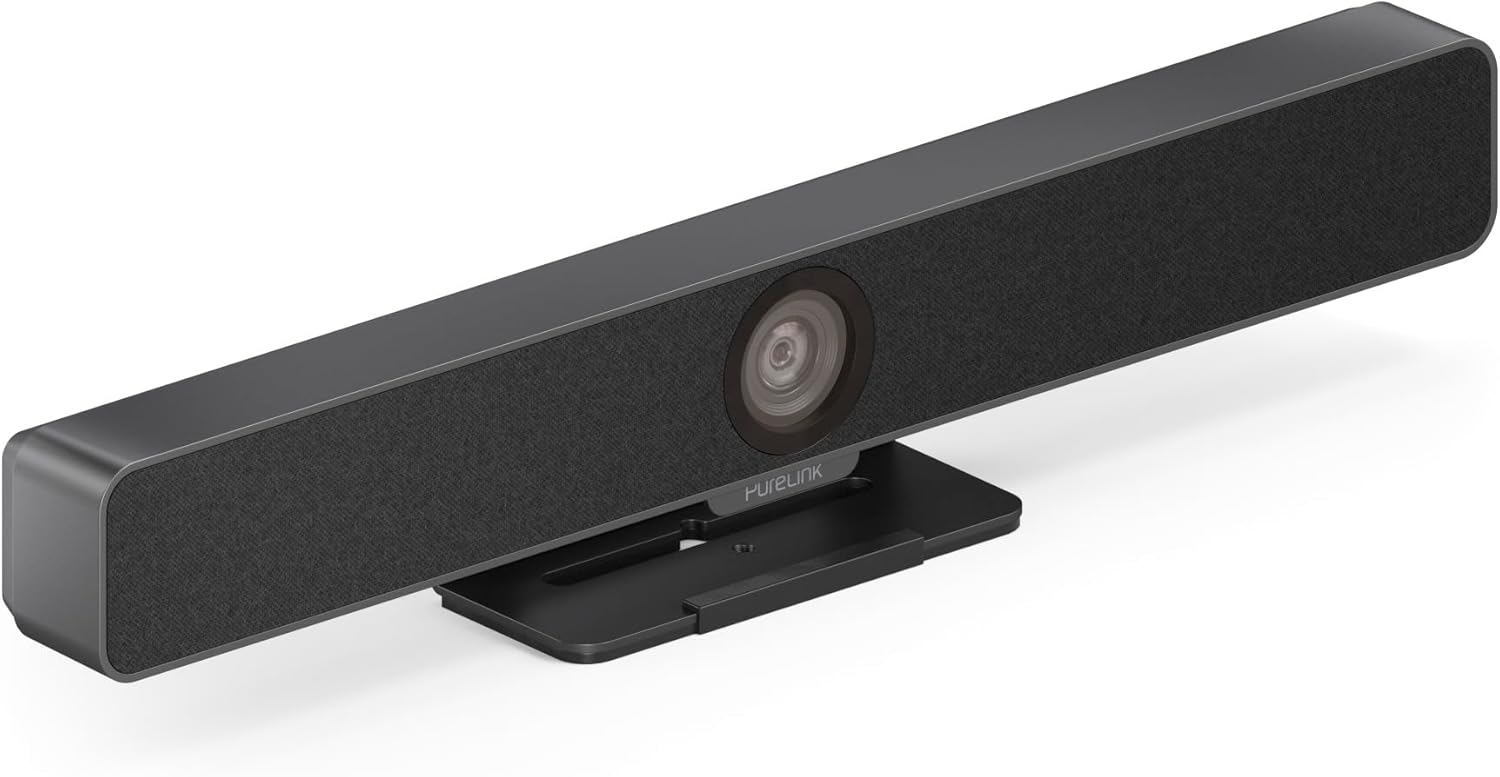
Figur 3.3: Forside view af PureLink Vuelogic VB200 Huddle Space Videobar, vistasindet integrerede kamera og højttalergitter.

Figur 3.4: Foran og bagpå views af videobjælken. Bagsiden view viser strømindgang, USB-C-port og andre tilslutningsmuligheder.
- Front: Integreret 4K-kamera, højttalergitter, PureLink-branding.
- Bag: Strømindgang, USB-C-port til data og strøm, HDMI-udgang (hvis relevant), monteringspunkter.
4. Opsætning
Følg disse trin for at konfigurere din PureLink Vuelogic VB200 Videobar:
- Placering: Placer videobjælken på en stabil overflade, f.eks. et bord eller en skærm, og sørg for, at kameraet har et klart lys. view af mødedeltagerne. Den integrerede stander muliggør fleksibel placering.
- Strømtilslutning: Tilslut den medfølgende strømadapter til videobjælkens strømindgang og derefter til en stikkontakt.
- USB-forbindelse: Tilslut videobjælken til din computer med det medfølgende USB-C-kabel. Enheden er plug-and-play og burde blive genkendt automatisk af dit operativsystem.
- Valgfri HDMI-forbindelse: Hvis din opsætning kræver videoudgang til en skærm, skal du tilslutte et HDMI-kabel fra videobjælkens HDMI-udgang (hvis tilgængelig) til din skærm.
- Softwaregenkendelse: Når den er tilsluttet, burde din computers operativsystem (Windows, macOS osv.) registrere enheden. Du skal muligvis vælge "PureLink Vuelogic VB200" som dit foretrukne kamera, mikrofon og højttaler i indstillingerne for din videokonferenceapplikation (f.eks. Zoom, Microsoft Teams, Webeks).

Figur 4.1: Videobjælken placeret på en overflade, der demonstrerer dens fleksible monteringsmuligheder til forskellige arbejdsmiljøer.
5. Betjeningsvejledning
PureLink Vuelogic VB200 er designet til brugervenlighed med populære videokonferenceplatforme.
5.1. Start af et møde
- Sørg for, at videobjælken er tilsluttet og tændt.
- Åbn din foretrukne videokonferenceapplikation (f.eks. Zoom, Microsoft Teams, WebF.eks. Google Meet, Skype, Slack, GoToMeeting).
- I applikationens lyd- og videoindstillinger skal du vælge "PureLink Vuelogic VB200" som din kamera-, mikrofon- og højttalerenhed.
- Start eller deltag i dit møde.

Figur 5.1: Videobjælken er kompatibel med førende kommunikationsplatforme som Zoom, Slack, GoToMeeting, Google Hangouts, Skype, Microsoft Teams og Google Meet.
5.2. Nøglefunktioner
- 4K videokvalitet: 120° vidvinkelobjektivet optager skarpe videoer i høj opløsning, der er velegnede til små til mellemstore rum.
- Intelligent automatisk indramning og sporing: Kameraet justerer automatisk sin ramme for at holde alle deltagere synlige og kan spore den aktive taler, hvilket sikrer optimal rammeinddeling under dynamiske møder.
- Lydoptagelse i høj kvalitet: Udstyret med 4 digitale MEMS-mikrofonarrays, der tilbyder en rækkevidde på 3-5 m og 180° dækning. Funktioner som akustisk ekkodæmpning (AEC), automatisk forstærkningskontrol (AGC) og automatisk støjreduktion (ANS) sikrer klar kommunikation.
- Hi-Fi stereohøjttalere: To 3W stereohøjttalere med basboost giver klar og kraftfuld lydudgang for en fordybende lydoplevelse.
6. Vedligeholdelse
For at sikre din videobjælkes levetid og optimale ydeevne:
- Rensning: Brug en blød, tør klud til at rengøre enhedens yderside. Brug en linserengøringsklud og -opløsning, der er specielt designet til optik, til kameralinsen. Brug ikke slibende rengøringsmidler eller opløsningsmidler.
- Opbevaring: Når enheden ikke er i brug i længere perioder, skal den opbevares køligt og tørt, væk fra direkte sollys.
- Firmwareopdateringer: Kontroller PureLink regelmæssigt webwebstedet for tilgængelige firmwareopdateringer for at sikre, at din enhed har de nyeste funktioner og ydeevneforbedringer.
7. Fejlfinding
Hvis du støder på problemer med din PureLink Vuelogic VB200, kan du se følgende almindelige problemer og løsninger:
| Problem | Mulig årsag | Løsning |
|---|---|---|
| Ingen videoudgang / Kamera ikke registreret | Løs USB-forbindelse, forkerte softwareindstillinger, driverproblem. |
|
| Ingen lyd fra højttalere / Mikrofonen virker ikke | Forkerte lydindstillinger, enhed slået fra. |
|
| Automatisk indramning fungerer ikke korrekt | Dårlig belysning, blokering, softwarefejl. |
|
8. Specifikationer
| Feature | Detalje |
|---|---|
| Mærke | PureLink |
| Modelnummer | VL-VB200 |
| Dimensioner | 20.47 x 7.87 x 5.12 tommer |
| Vægt | 2.2 pund |
| Farve | Sort |
| Videooptagelsesopløsning | 4K |
| Optisk zoom | 5x |
| Fotosensorteknologi | CMOS |
| Særlige funktioner | Automatisk indramning og sporing |
| Mikrofontype | 4 MEMS digitale mikrofonarrays |
| Mikrofon rækkevidde | 3-5 m, 180° dækning |
| Lydfunktioner | AEC, AGC, ANS |
| Højttalere | To 3W stereohøjttalere med basforstærkning |
| Forbindelsesteknologi | HDMI, USB |
| Understøttet lydformat | AAC, MP3 |
| Understøttet videoformat | MP4 |
| Kompatibilitet | Windows, macOS, Zoom, WebEks, Tencent-møde, teams osv. |
9. Garanti og support
PureLink-produkter er designet til pålidelighed og ydeevne. For specifikke garantioplysninger henvises til garantikortet, der følger med dit produkt, eller besøg den officielle PureLink-side. webwebsted.
For teknisk support, hjælp til fejlfinding eller for at forespørge om service, bedes du kontakte PureLinks kundesupport via deres officielle kanaler. Hav din købskvittering og produktmodelnummer (VL-VB200) klar, når du kontakter support.
Officiel PureLink Webwebsted: www.purelink.de