
Indledning
Thank you for choosing the Nuvance Professional Hair Clipper. This manual provides essential information for the safe and effective use, maintenance, and troubleshooting of your new hair clipper. Please read these instructions thoroughly before first use and keep them for future reference.
Vigtige sikkerhedsinstruktioner
For at mindske risikoen for elektrisk stød, personskade eller brand, skal du altid følge disse grundlæggende sikkerhedsforanstaltninger:
- Nedsænk ikke apparatet i vand eller andre væsker.
- Keep the appliance away from water sources, especially when charging.
- Do not use the clipper if it has a damaged cord or plug, or if it is not working properly.
- Dette apparat er ikke beregnet til brug af personer med nedsatte fysiske, sensoriske eller mentale evner, eller manglende erfaring og viden, medmindre de er under opsyn eller har fået instruktion i brugen af apparatet af en person, der er ansvarlig for deres sikkerhed.
- Børn skal være under opsyn for at sikre, at de ikke leger med apparatet.
- Brug kun tilbehør leveret af producenten.
- Tag stikket ud af klipperen, før du rengør eller udfører vedligeholdelse.
- Store the clipper in a dry place when not in use.
Pakkens indhold
Bekræft at alle varer er til stede i pakken:
- Nuvance Professional Hair Clipper
- 12 føringsskamme (forskellige længder)
- USB opladningskabel
- Rengøringsbørste
- Bladolie
- Brugermanual
Produkt overview
Familiarize yourself with the components of your Nuvance Hair Clipper.

Figur 1: Nuvance Hair Clipper components. This image shows the clipper from the side, highlighting the stainless steel blade, the blade adjustment lever, the power on/off switch, the battery indicator screen, and the USB charging port. The overall height of the clipper is indicated as 18.5 cm.
- Klinge i rustfrit stål: High-quality cutting blades for precise trimming.
- Justeringshåndtag for klinge: Allows fine-tuning of cutting length from 0.8mm to 2.0mm without a guide comb.
- Tænd/sluk-knap: Activates and deactivates the clipper.
- Digital skærm: Viser batteriniveau og opladningsstatus.
- USB opladningsport: Til tilslutning af USB-opladerkablet.
- Guide Comb Attachments: Forskellige størrelser til forskellige hårlængder.
Opsætning
Opladning af Clipper
Before first use, fully charge the clipper. A full charge typically takes approximately 3 hours and provides extended cordless operation.
- Sørg for, at klipperen er slukket.
- Insert the USB charging cable into the charging port at the bottom of the clipper.
- Connect the other end of the USB cable to a USB power adapter (not included) or a compatible USB port (e.g., computer, power bank).
- The digital display will show the charging progress. Once fully charged, the display will indicate 100%.

Figur 2: USB charging and digital display. The image illustrates the clipper being charged via a USB cable, with the digital screen showing the battery percentage. It also highlights the power switch for quick operation.
Montering af guidekamme
The clipper comes with 12 guide combs to achieve various hair lengths from 0.8mm to 25mm.

Figur 3: Guide comb lengths. This image displays different guide comb attachments, indicating their respective trimming lengths: 1.5mm, 3mm, 4.5mm, 6mm, 10mm, 13mm, 19mm, and 25mm. It also mentions 4 reserve attachments for 1, 2, 3, and 4.
- Vælg den ønskede guidekam til din foretrukne hårlængde.
- Ret styrekammen ind efter klippebladet, og tryk den fast, indtil den klikker på plads.
- For at fjerne den, træk forsigtigt kammen væk fra bladet.
Betjeningsvejledning
Grundlæggende betjening
- Ensure the clipper is charged and a guide comb is securely attached (if desired).
- Press the Power On/Off switch to turn on the clipper.
- Hold the clipper with the blade pointing downwards.
- Bevæg klipperen langsomt mod hårets vækstretning.
- After use, press the Power On/Off switch to turn off the clipper.
Adjusting Cutting Length (without guide comb)
The blade adjustment lever allows for precise cutting length adjustments from 0.8mm to 2.0mm without a guide comb.
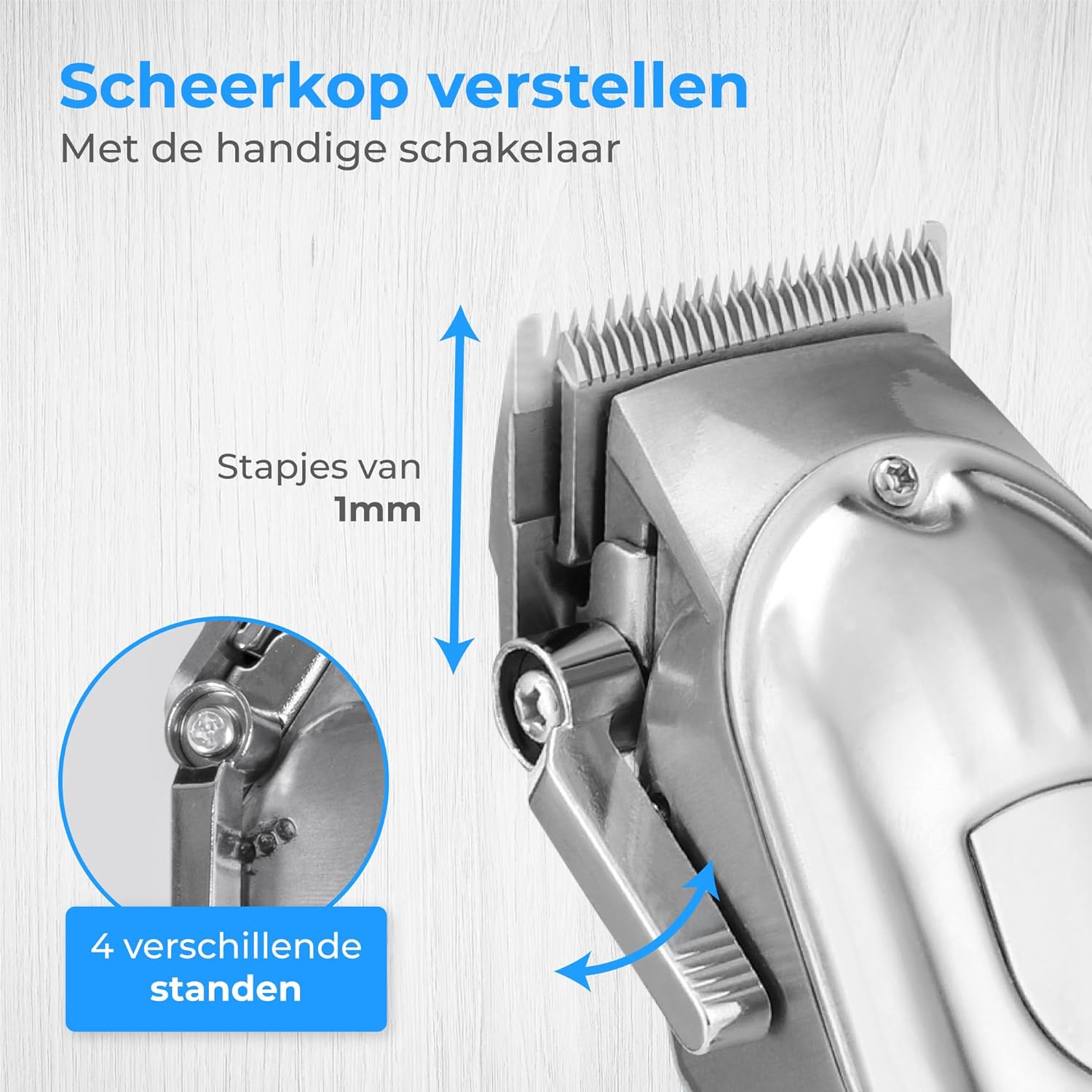
Figur 4: Blade adjustment lever. This image focuses on the side of the clipper, illustrating the lever that allows for fine adjustment of the blade's cutting length in 1mm increments, offering 4 different settings.
- Move the lever up for a shorter cut (closer to 0.8mm).
- Move the lever down for a longer cut (closer to 2.0mm).
Trimming Hair and Beard
This clipper is suitable for various grooming needs, including head hair, beard, and body hair.

Figur 5: Multi-functional use. This image highlights the clipper's ability to trim hair on various body parts, including head hair, beard, chest, and stomach, indicating its versatile application.
- For head hair: Start with a longer guide comb and gradually reduce the length until the desired style is achieved.
- For beard trimming: Use a guide comb to maintain an even length. For detailing, remove the guide comb and use the blade adjustment lever.
- For body hair: Use appropriate guide combs for sensitive areas.
Opretholdelse
Rengøring af knivene
Regelmæssig rengøring sikrer optimal ydeevne og forlænger levetiden på din klipper.
- Sluk og tag stikket ud af klipperen.
- Fjern enhver påsat føringskam.
- Brug den medfølgende rengøringsbørste til at fjerne løse hår fra bladene.
- For a more thorough clean, the blades can be carefully detached (refer to specific instructions if provided in the physical manual for blade removal). Rinse detached blades under running water and ensure they are completely dry before reattaching. Do not rinse the clipper body.
Olie af knivene
Apply a few drops of the supplied blade oil to the blades after every few uses to maintain sharpness and smooth operation.
- Apply 1-2 drops of oil to the top of the blades.
- Tænd klipperen i et par sekunder for at fordele olien jævnt.
- Tør overskydende olie af med en blød klud.
Fejlfinding
| Problem | Mulig årsag | Løsning |
|---|---|---|
| Klipperen tænder ikke. | Batteriet er afladet. | Oplad klipperen helt. |
| Klippemaskinen trækker i hår eller klipper dårligt. | Knivene er sløve, beskidte eller ikke olierede. | Rengør og smør knivene. Hvis problemet fortsætter, skal knivene muligvis udskiftes. |
| Clipperen laver usædvanlige lyde. | Knivene er ikke korrekt justeret eller smurt. | Sørg for, at knivene er rene og smurte. Kontroller, at knivene er korrekt fastgjort. |
| Digitalt display virker ikke. | Enheden er slukket, eller batteriet er helt dødt. | Turn on the clipper or connect to charger. |
Specifikationer
- Model: HF-8933
- Mærke: Nuvance
- Strømkilde: USB genopladelig
- Bladmateriale: Rustfrit stål
- Skærelængder: 0.8mm - 25mm (with 12 guide combs)
- Batteriindikator: Digitalt display
Garanti og support
Nuvance products are manufactured to high-quality standards. For warranty information or technical support, please refer to the contact details provided with your purchase or visit the official Nuvance webwebsted.
Gem venligst din købsbevis i tilfælde af garantikrav.