
Della 048-TL-W8KWD
DELLA 8000 BTU Energy Saving Window Air Conditioner
Brugermanual
Model: 048-TL-W8KWD | Brand: Della
Vigtige sikkerhedsoplysninger
Please read all instructions carefully before installing and operating your air conditioner. Keep this manual for future reference. Your safety and the safety of others are very important.
- Always follow basic safety precautions to reduce the risk of fire, electric shock, or injury to persons.
- This appliance must be properly grounded. Do not modify the power cord or plug.
- Brug ikke klimaanlægget med en beskadiget netledning eller stik.
- Ensure the unit is installed according to local electrical codes and regulations.
- Bloker ikke luftåbninger.
- Tag stikket ud af stikkontakten før rengøring eller servicering.
Elektriske krav
This unit requires a 115V/60Hz grounded outlet. Do not use extension cords or adapter plugs with this unit.
Produkt overview
The DELLA 8000 BTU Window Air Conditioner is designed to provide efficient cooling and dehumidification for your living space. It features smart controls, a remote, and a reusable filter for convenience and energy saving.

Billede: Forside view of the DELLA 8000 BTU Window Air Conditioner, showing the control panel, air vents, and included remote control and smartphone app interface.
Nøglekomponenter
- Kontrolpanel: Digital display for temperature, mode, and timer settings.
- Luftfilter: Reusable and washable filter for improved air quality.
- Fjernbetjening: Fuldfunktionel fjernbetjening for nem betjening.
- Sidepaneler: Expandable panels for secure window installation.
- Strømledning: 115V/60Hz grounded plug.
Installation
The DELLA window air conditioner features a T-design for simplified installation, saving significant time compared to traditional units. Ensure your window meets the specified dimensions before beginning.
Vindueskrav
- Vinduesbredde: 23 til 36 tommer
- Minimum vindueshøjde: 14.5 tommer
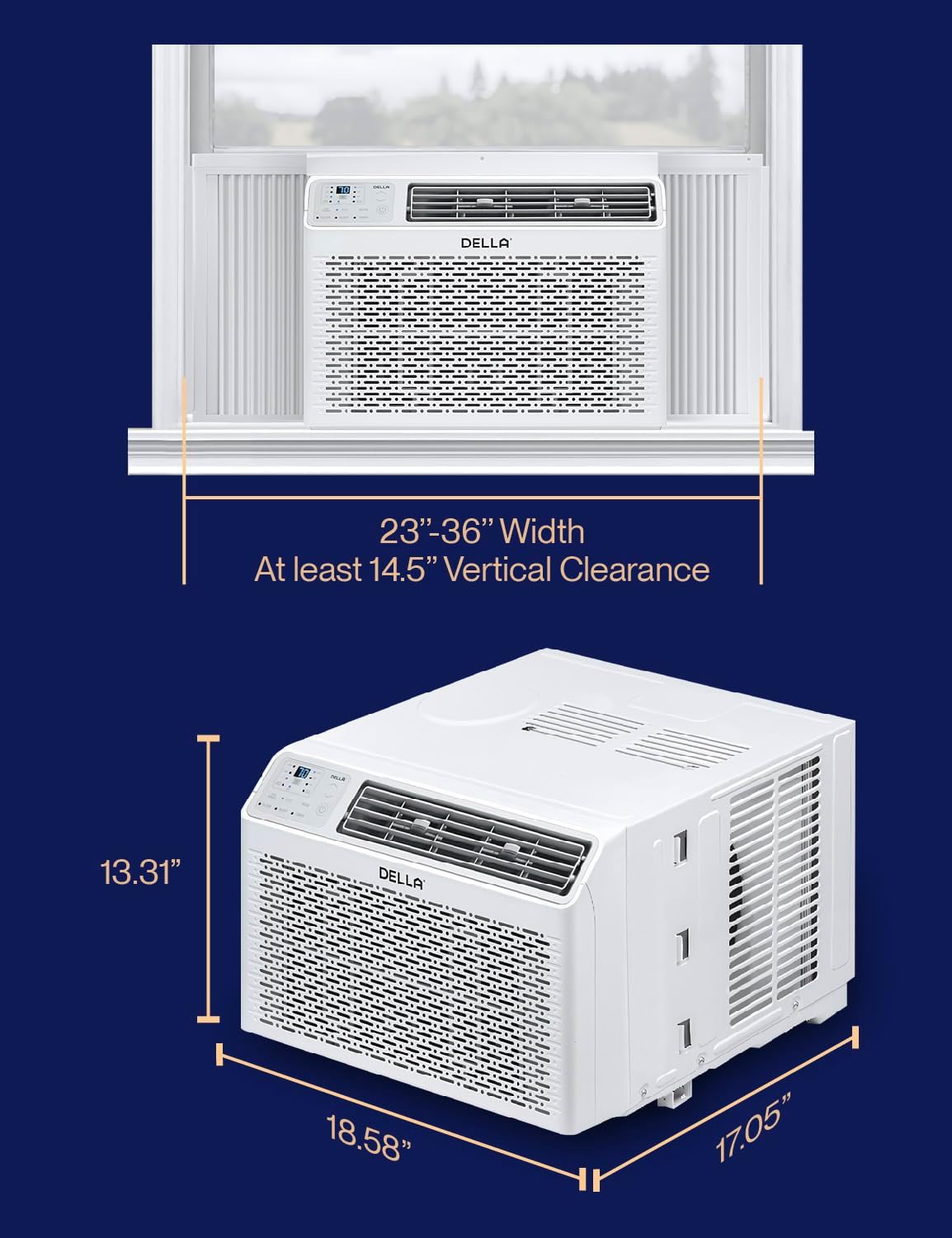
Image: Diagram illustrating the required window width (23-36 inches) and minimum vertical clearance (14.5 inches) for proper installation of the air conditioner.
Installationstrin
- Forbered vinduet: Åbn vinduet og rengør karmen.
- Install Top Mounting Rail: Attach the top mounting rail to the top of the air conditioner unit.
- Secure into Window Frame: Carefully place the air conditioner into the window opening, ensuring it is centered and level.
- Monteres med skruer: Secure the unit to the window frame using the provided screws.
- Forlæng sidepaneler: Extend the accordion side panels to fill the window opening completely, then secure them.
- Install Sash Lock and Foam Seal: Install the window sash lock to prevent the window from being opened from the outside. Apply the foam seal to prevent air leaks.

Image: Visual guide showing three simplified steps for installing the DELLA window air conditioner: securing into the window frame, mounting with screws, and extending side panels.
Included Installation Kit Components

Image: An illustration detailing the components of the installation kit, including filler panels, insulation strips, lock frame & sash lock, screws, window sash seal, and top mounting rail.
Betjeningsvejledning
Your DELLA air conditioner offers multiple modes and smart features for optimal comfort and convenience.
Kontrolpanel og fjernbetjening
The unit can be controlled via the intuitive LED control panel on the unit or the included remote control. The temperature setting range is 61°F-88°F.

Image: Close-up of the sleek black remote control for the DELLA air conditioner, showing various function buttons and a digital display.
Driftstilstande og funktioner
- Cool tilstand: Provides powerful cooling to reach your desired temperature.
- Ventilatortilstand: Circulates air without cooling. Features 3 fan speeds (Low, Mid, High).
- Tørretilstand (affugter): Reducerer luftfugtigheden i rummet.
- Automatisk tilstand: Automatically selects cooling or fan mode based on the room temperature.
- Sove mode: Adjusts temperature gradually overnight for comfortable sleep and energy saving.
- Eco Energy Saving Mode: Optimizes operation to reduce energy consumption.
- 24-timers timer: Programmér enheden til at tænde eller slukke automatisk.

Image: Infographic displaying the various features of the DELLA AC, including 4 wind speeds (Auto, Low, Mid, High), 5 modes (Cool, Auto, Dehumidify, Fan Only, ECO), reusable filter, and 24h auto on/off timer.
Smart Control with Della+ App
Control your air conditioner from anywhere using the Della+ app on your smartphone. The app allows for remote control, scheduling, and access to advanced features like GEO Location.

Image: Three smartphones displaying the Della+ app interface, showing options for custom unit naming, timer settings, and various control modes like Cool and ECO.
The unit also works with Alexa and Google Assistant for voice control integration.

Image: A person driving a car with a smartphone displaying the Della+ app's Geo Location feature, indicating the AC can automatically turn on as you approach home.
Opretholdelse
Regelmæssig vedligeholdelse sikrer optimal ydeevne og levetid for dit klimaanlæg.
Rengøring af luftfilteret
The reusable air filter should be cleaned regularly, typically every two weeks, or more often depending on usage and air quality.
- Sluk og tag stikket ud: Sluk altid enheden og tag stikket ud af stikkontakten før rengøring.
- Fjern filter: Åbn frontpanelet, og skub forsigtigt luftfilteret ud.
- Rens filter: Vask filteret med varmt sæbevand. Skyl grundigt. Ved meget støv kan en støvsuger først bruges.
- Tørt filter: Lad filteret lufttørre helt, før det sættes i igen. Brug ikke direkte varme til at tørre.
- Geninstaller filter: Slide the dry filter back into its position and close the front panel.

Billede: Et nærbillede view of the DELLA air conditioner with its front panel open, showing the reusable air filter being removed for cleaning, emphasizing the "Breathe Clean, Stay Green" aspect.
Generel rengøring
- Tør kabinettet af med en blød,amp klæde. Brug ikke skrappe kemikalier eller slibemidler.
- Sørg for, at dræningsområdet er fri for snavs.
Fejlfinding
Se dette afsnit for almindelige problemer og løsninger. Hvis problemet fortsætter, skal du kontakte kundesupport.
| Problem | Mulig årsag | Løsning |
|---|---|---|
| Enheden tænder ikke. | Ingen strøm, udløst afbryder, problem med strømledningen. | Kontroller strømtilslutningen, nulstil afbryderen, og inspicer netledningen for skader. |
| Enheden køler ikke effektivt. | Snavset luftfilter, blokerede luftventiler, for stort rum, åbne døre/vinduer. | Clean air filter, clear obstructions, ensure room size is within capacity, close doors/windows. |
| Overdreven støj. | Loose installation, fan obstruction, normal operating sounds. | Ensure unit is securely installed. Check for foreign objects near fan. Some noise is normal. |
| Vand lækker fra enheden. | Blocked drain, improper tilt. | Check and clear drain hose. Ensure unit is slightly tilted outwards for proper drainage. |
| Fjernbetjening virker ikke. | Dead batteries, obstruction, too far from unit. | Replace batteries. Remove obstructions. Operate within range. |
Specifikationer
Detailed technical specifications for the DELLA 8000 BTU Window Air Conditioner.
| Specifikation | Værdi |
|---|---|
| Mærke | Della |
| Modelnummer | 048-TL-W8KWD |
| Kølekapacitet | 8000 BTU |
| Dækningsområde | Op til 350 sq. ft. |
| Strømforsyning | 115V / 60Hz |
| Combined Energy Efficiency Rate (CEER) | 10.9 |
| Støjniveau | 54 dB |
| Produktmål (D x B x H) | 17.05 x 18.58 x 13.31 tommer |
| Varens vægt | 44.8 pund |
| Kølemiddel | R-32 |
| Særlige funktioner | Dehumidifier, Fast Cooling, WiFi Enabled |
| Inkluderede komponenter | Window Air Conditioner, Installation Kit |
Energiguide

Image: The official U.S. Government EnergyGuide label for the DELLA 8000 BTU Room Air Conditioner, showing an estimated yearly energy cost of $72 and a Combined Energy Efficiency Ratio (CEER) of 10.9.
Garanti og support
Della is committed to providing quality products and excellent customer service.
Produktgaranti
This DELLA air conditioner comes with a 1-års garanti fra købsdatoen, dækker defekter i materialer og udførelse ved normal brug.

Image: A graphic indicating "Our Warranty" with text "24/7 Customer Support" and "1 Year Warranty."
Kundesupport
For technical assistance, troubleshooting, or warranty claims, please contact Della customer support. Our team is available to assist you.
- Tilgængelighed: 24/7 support
- Kontakte: Refer to the contact information provided on the Della official webwebstedet eller din købsdokumentation.

Image: A graphic representing customer support with a headset icon and text "Customer Support You Can Count On," indicating 24/7 availability.
Ask a question about this manual
Ask about setup, troubleshooting, compatibility, parts, safety, or missing instructions. Manuals+ will review the question and use this page’s manual context to help answer it.