
symcode USA-6709DA-Green
Symcode Wireless Bluetooth Barcode Scanner User Manual
Model: USA-6709DA-Green
1. Introduktion
This user manual provides comprehensive instructions for the Symcode Wireless Bluetooth Barcode Scanner, Model USA-6709DA-Green. This device is designed for accurate and efficient data capture, supporting various 1D and 2D barcode types. It offers versatile connectivity options including Bluetooth, 2.4G wireless, and USB wired connections, making it suitable for a wide range of business applications.

Image 1: Symcode Wireless Bluetooth Barcode Scanner and accessories.
2. Pakkens indhold
Kontroller venligst, at alle varer er til stede i din pakke:
- Symcode Barcode Scanner (Model: USA-6706DA-Green)
- USB opladningskabel
- 2.4G USB-dongle
- Brugermanual

Image 2: Components included with the Symcode Barcode Scanner.
3. Produktfunktioner
- Avanceret scanningsteknologi: CMOS optical imaging for quick and precise scanning of 1D and 2D barcodes (QR, DataMatrix, PDF417, Aztec, Hanxin, etc.) even on damaged or poorly printed labels.
- Tredobbelte tilslutningsmuligheder: Supports Bluetooth, 2.4G wireless, and USB wired connections for maximum flexibility.
- Udvidet trådløs rækkevidde: Up to 200m in open environments and 30m indoors with the 2.4G USB dongle.
- Lang batterilevetid: 2000mAh battery provides up to 30 hours of continuous scanning, with a full recharge in approximately 2 hours.
- Alsidig konfiguration: Features include hands-free intelligent sensor mode, trigger scan mode, vibration/buzzer settings, data storage/instant upload modes, multiple keyboard languages, and customizable prefix/suffix options.
- Overlegen holdbarhed: Constructed with strong ABS material, designed to withstand drops of up to 2.4 meters (8 ft) and features an integrated dustproof housing (IP67 rated).
4. Opsætning og tilslutning
The scanner offers three primary connection methods:
4.1. 2.4G trådløs forbindelse
- Sæt 2.4G USB-donglen i en ledig USB-port på din computer.
- Turn on the scanner. It will automatically pair with the dongle.
- A successful connection is indicated by a specific beep sound and LED indicator.
4.2. Bluetooth-forbindelse
- Sørg for, at din enhed (smartphone, tablet, computer) har Bluetooth aktiveret.
- Scan the Bluetooth pairing barcode (usually found in the user manual or on a setup card).
- On your device, search for Bluetooth devices and select "Symcode Scanner" (or similar name).
- Bekræft parring.
4.3. USB-kablet forbindelse
- Slut scanneren til din computer ved hjælp af det medfølgende USB-kabel.
- Scanneren fungerer som en kablet enhed og oplades samtidig.

Image 3: Connectivity options for the Symcode Barcode Scanner.

Billede 4: Operativsystemkompatibilitet.
5. Betjeningsvejledning
5.1. Grundlæggende scanningsfunktion
To scan a barcode, point the scanner's window at the barcode and press the trigger button. A successful scan will be indicated by a beep and/or vibration, and the data will be transmitted to your connected device.
5.2. Datauploadtilstande
Scanneren understøtter to dataoverførselstilstande:
- Øjeblikkelig upload-tilstand: Data is transmitted to the connected device immediately after each scan. This is the default mode.
- Offline lagringstilstand: Scanned data is stored in the scanner's internal memory (up to 10,000 codes). To upload stored data, scan the specific setup code for 'Upload Data' found in your detailed user manual.

Image 5: Instant Upload Mode vs. Offline Storage Mode.
5.3. Decoding Capabilities
The scanner can decode a wide array of barcode types, including:
- 1D stregkoder: UPC/EAN, Code 39, Code 128, Codabar, Interleaved 2 of 5, Code 93, MSI, Code 11, RSS variants, etc.
- 2D stregkoder: QR Code, Data Matrix, PDF417, Aztec, Hanxin.
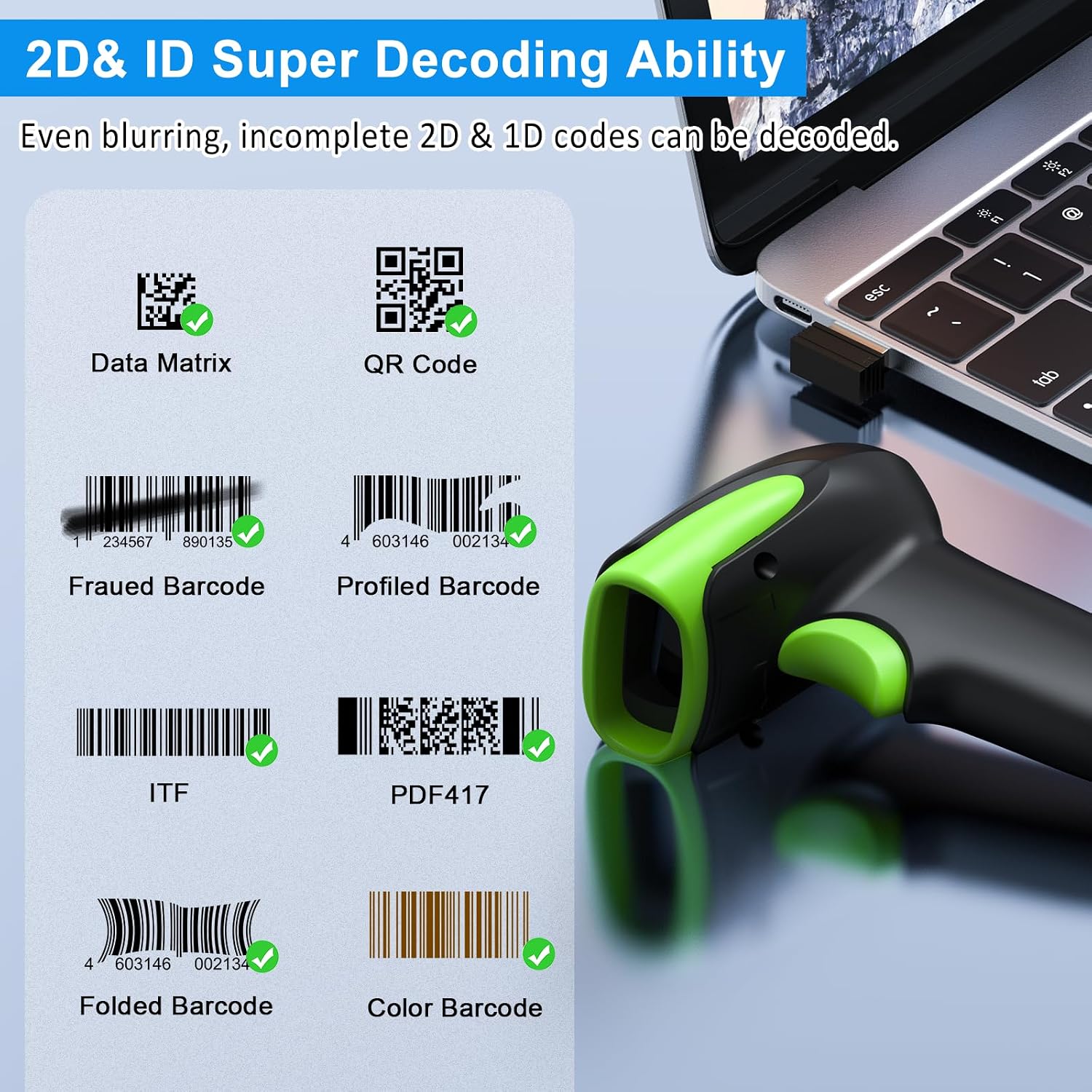
Billede 6: Eks.amples of decodable 1D and 2D barcodes.
6. Vedligeholdelse
To ensure optimal performance and longevity of your scanner:
- Rensning: Brug en blød, tør klud til at rengøre scannerens yderside. Brug en rengøringsklud til linsen til scanningsvinduet for at undgå ridser. Brug ikke slibende rengøringsmidler eller opløsningsmidler.
- Opladning: Recharge the battery using the provided USB cable. Avoid overcharging or completely draining the battery for extended periods.
- Opbevaring: Opbevar scanneren et køligt, tørt sted væk fra direkte sollys og ekstreme temperaturer.
- Holdbarhed: While rugged, avoid intentional drops or impacts. The scanner is designed to withstand accidental drops up to 2.4 meters.

Image 7: The scanner's rugged design and drop resistance.
7. Fejlfinding
If you encounter issues with your scanner, please refer to the following common problems and solutions:
- Scanneren opretter ikke forbindelse:
- Sørg for, at scanneren er opladet.
- Verify the correct connection mode (Bluetooth, 2.4G, USB) is selected and properly set up.
- For 2.4G, ensure the dongle is securely plugged in. For Bluetooth, ensure your device's Bluetooth is on and the scanner is paired.
- Prøv at genstarte både scanneren og værtsenheden.
- Scanneren læser ikke stregkoder:
- Ensure the barcode is not excessively damaged, smudged, or poorly printed.
- Check the distance and angle of the scanner to the barcode.
- Verify that the barcode type is supported by the scanner.
- Clean the scanning window if it is dirty.
- Data not transmitting:
- Confirm the scanner is successfully connected to your device.
- Check if the scanner is in 'Offline Storage Mode' and needs to be manually uploaded.
- Ensure the application on your device is ready to receive input.
For further assistance, please refer to the comprehensive troubleshooting section in the full user manual or contact Symcode customer support.
8. Specifikationer
| Feature | Specifikation |
|---|---|
| Modelnummer | USA-6709DA-Green |
| Input bindtage | DC5V±0.25v |
| Current (Work/Instantaneous) | 25 mA / 95 mA |
| Decoding Speed | 100 gange / sek |
| Trådløs rækkevidde (2.4G) | Up to 200m (open air), 30m (indoors) |
| Opladningstid | Ca. 2.5 timer |
| Batterilevetid | Up to 30 Hours (continuous scanning) |
| Batteritype | 1 Lithium Polymer batteri (medfølger) |
| Forbindelse | Bluetooth 6.1, Wireless 2.4G, USB Cable |
| Kompatible enheder | Desktop, Laptop, Smartphone, POS systems |
| Operativsystemer | Windows 11/10/8/7/XP, Mac OS, iOS, Android, Linux |
| Varens vægt | 10.2 ounce |
| Pakkedimensioner | 6.89 x 4.49 x 3.31 tommer |

Image 8: Wireless transmission range.
9. Garanti og support
This Symcode product is manufactured by USA Scanner. For any product inquiries, technical support, or warranty claims, please contact USA Scanner directly. Refer to the contact information provided in your product packaging or visit the official Symcode brand store on Amazon for support resources.
Besøg Symcode Store for mere information.
Ask a question about this manual
Ask about setup, troubleshooting, compatibility, parts, safety, or missing instructions. Manuals+ will review the question and use this page’s manual context to help answer it.