
1. Introduktion
Thank you for choosing the Moonshan 39-inch Desktop Belt Conveyor. This compact and versatile conveyor system is designed to enhance efficiency in various light-duty applications, including packaging, production lines, and home use. It features stepless speed adjustment and a durable PVC belt, making it a reliable addition to your workspace. Please read this manual thoroughly before operation to ensure safe and optimal performance.

Figur 1.1: Eksamples of Moonshan Desktop Belt Conveyor applications in various industries.
2. Sikkerhedsoplysninger
Prioritér altid sikkerheden, når du betjener maskiner. Manglende overholdelse af disse sikkerhedsretningslinjer kan resultere i personskade eller beskadigelse af udstyret.
- Læs manualen: Gør dig bekendt med alle instruktioner og advarsler før brug.
- Strømkilde: Ensure the conveyor is connected to a compatible power source as specified.
- Stabil overflade: Operate the conveyor on a stable, level surface to prevent tipping.
- Ryd område: Keep the area around the conveyor clear of obstructions and loose clothing.
- Belastningskapacitet: Do not exceed the maximum load capacity of 11 pounds (5 kg). Overloading can damage the motor and belt.
- Nødstop: Vid, hvordan du hurtigt afbryder strømmen i en nødsituation.
- Børn og kæledyr: Keep children and pets away from the operating conveyor.
3. Pakkens indhold
Bekræft at alle komponenter er til stede i pakken:
- Belt Conveyor Unit
- Monteringsbeslag (formonterede eller separate)
- Speed Controller with Power Adapter
- Allen Wrenches (for assembly/adjustment)

Figure 3.1: Main components included with the Moonshan Desktop Belt Conveyor.
4. Opsætningsvejledning
Follow these steps to set up your Moonshan Desktop Belt Conveyor:
4.1. Positioning the Conveyor
- Place the conveyor unit on a flat, stable desktop or workbench.
- Ensure the pre-attached brackets provide adequate stability. If not, adjust them using the provided Allen wrenches to secure the conveyor firmly.

Figure 4.1: The hidden motor design and solid roller ensure smooth and protected operation.
4.2. Connecting the Power and Speed Controller
- Locate the power input port on the conveyor unit.
- Connect the output cable from the speed controller to the conveyor's power input.
- Sæt strømadapteren i en almindelig stikkontakt.

Figure 4.2: The speed controller and power adapter connected to the conveyor motor.
5. Betjeningsvejledning
The Moonshan Desktop Belt Conveyor is designed for straightforward operation.
5.1. Tænd og sluk
- Once the power adapter is plugged in, the conveyor is ready for operation.
- To turn off, simply unplug the power adapter from the wall outlet.
5.2. Justering af båndhastighed
- Use the rotary knob on the speed controller to adjust the belt speed.
- Turn the knob clockwise to increase speed and counter-clockwise to decrease speed. The speed adjustment is stepless, allowing for precise control.
- The maximum speed is approximately 4 inches per second.

Figure 5.1: Conveyor in operation, demonstrating its use for moving items.
5.3. Loading Items
- Place items gently onto the moving belt.
- Ensure items are within the conveyor's dimensions and do not exceed the 11-pound load capacity.

Figure 5.2: The conveyor can handle loads up to 11 pounds.
6. Vedligeholdelse
Regular maintenance ensures the longevity and optimal performance of your conveyor.
6.1. Rengøring af bæltet
- Afbryd strømmen: Always unplug the conveyor before cleaning.
- Tør ned: Brug annonceamp cloth with mild soap to clean the PVC belt. The PVC material is waterproof and wear-resistant.
- Tør grundigt: Ensure the belt is completely dry before reconnecting power and operating.

Figure 6.1: The PVC belt is designed to be waterproof, flexible, and wear-resistant.
6.2. Belt Inspection
- Periodically inspect the belt for any signs of wear, tears, or damage.
- Check for proper belt tension. If the belt appears loose or too tight, consult the troubleshooting section or contact support.
7. Fejlfinding
If you encounter issues with your conveyor, refer to the following common problems and solutions:
| Problem | Mulig årsag | Løsning |
|---|---|---|
| Conveyor does not start | No power, loose connection, speed controller set to minimum. | Check power adapter connection, ensure outlet is functional, turn speed controller knob clockwise. |
| Belt moves unevenly or slips | Belt tension incorrect, foreign object, motor issue. | Inspect belt for obstructions, adjust belt tension if possible (refer to support if unsure), contact support if motor issue is suspected. |
| Usædvanlig støj under drift | Foreign object, worn components, motor issue. | Disconnect power and inspect for foreign objects. If noise persists, contact support. |
| Hastighedsjustering virker ikke | Faulty speed controller, motor issue. | Ensure connections are secure. If issue persists, contact support for replacement parts or assistance. |
8. Specifikationer
Detailed technical specifications for the Moonshan Desktop Belt Conveyor:
- Model: B0CCP8NSSJ
- Mærke: Moonshan
- Produktdimensioner: 39 tommer (længde) x 6 tommer (bredde)
- Materiale: Polyvinyl Chloride (PVC) belt, Aluminum Alloy profiles
- Belastningskapacitet: Op til 11 pund (5 kg)
- Hastighedstilpasning: Trinløs
- Motor: 320 RPM (for smooth, low-noise operation)
- Magt: Compatible with standard electrical outlets (via included adapter)
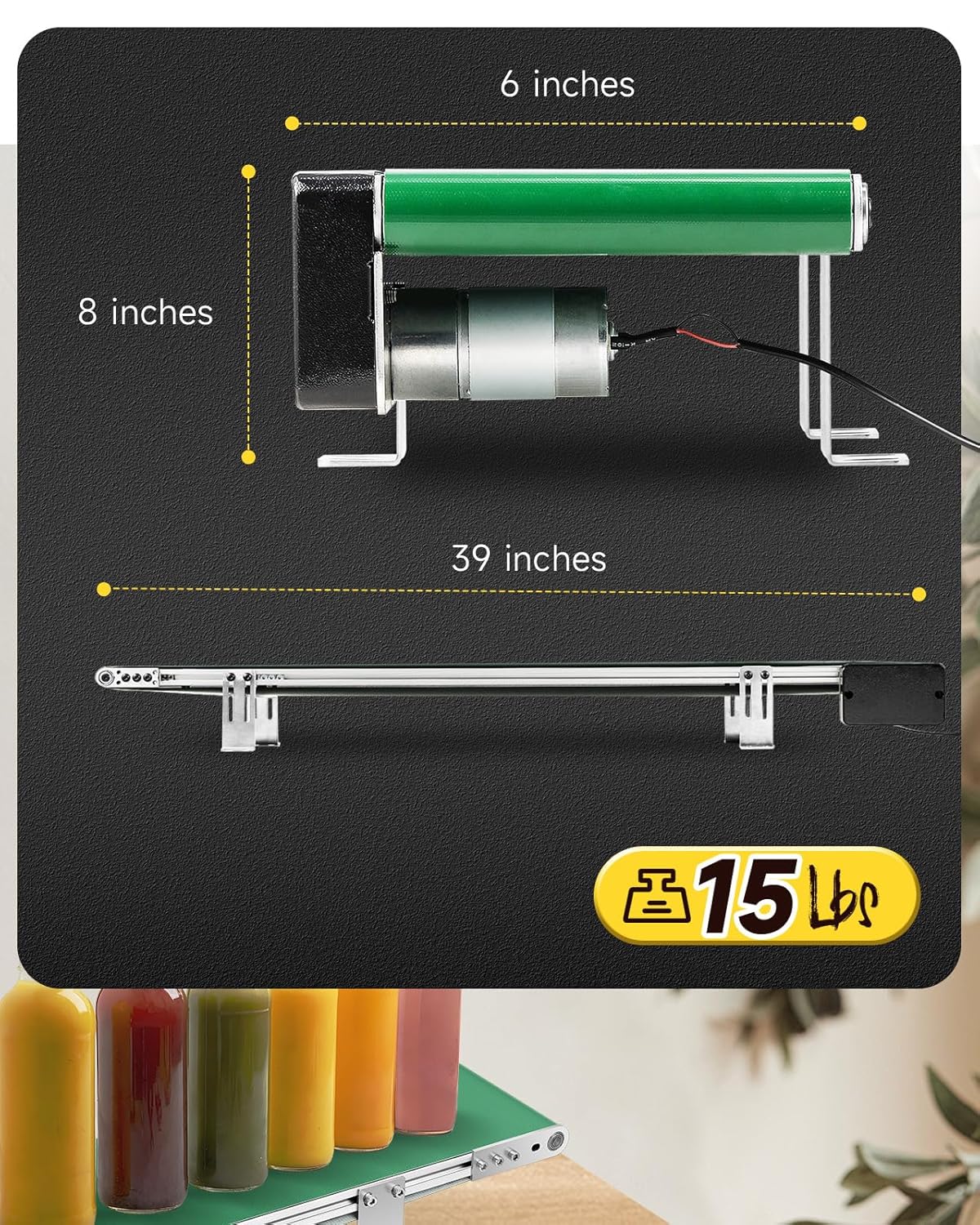
Figure 8.1: Key dimensions of the Moonshan Desktop Belt Conveyor.

Figure 8.2: Internal construction featuring all-metal gears and a pure copper coil for durability.

Figure 8.3: High-quality bearing brushes contribute to reliable performance.
9. Garanti og support
Moonshan products are designed for quality and reliability. For warranty information, technical support, or to inquire about replacement parts, please contact Moonshan customer service through the retailer where the product was purchased or visit the official Moonshan store online.
Online butik: Moonshan Store on Amazon