
1. Introduktion
Thank you for choosing the DBSOARS VOCBOOM Wireless Bluetooth Speaker. This manual provides essential information for the safe and efficient operation of your speaker. Please read it thoroughly before use and retain it for future reference.

Image: The VOCBOOM Wireless Bluetooth Speaker in purple, showcasing its waterproof design with water droplets.
2. Hvad er inkluderet
Upon unboxing your DBSOARS VOCBOOM speaker, please ensure all the following items are present:
- VOCBOOM Wireless Bluetooth Speaker
- USB opladningskabel
- 3.5mm Audio Cable (Auxiliary Cable)
- Brugervejledning (denne manual)
3. Nøglefunktioner
- Kraftfuld lydudgang: Equipped with dual woofers and dual tweeters, delivering immersive surround sound with a peak output of 80 Watts.
- IPX7 vandtæt bedømmelse: Designed to withstand rain and total water submersion, making it suitable for outdoor activities.
- Lang batterilevetid: Provides extended playtime for all-day outdoor use.
- True Wireless Stereo (TWS) funktion: Pair two VOCBOOM speakers for an enhanced stereo sound experience.
- Indbygget mikrofon: Allows for hands-free calling when connected to a smartphone.
- USB Port for Charging: Functions as a power bank to charge other mobile devices.
- Bærbart design: Har et praktisk håndtag for nem transport.
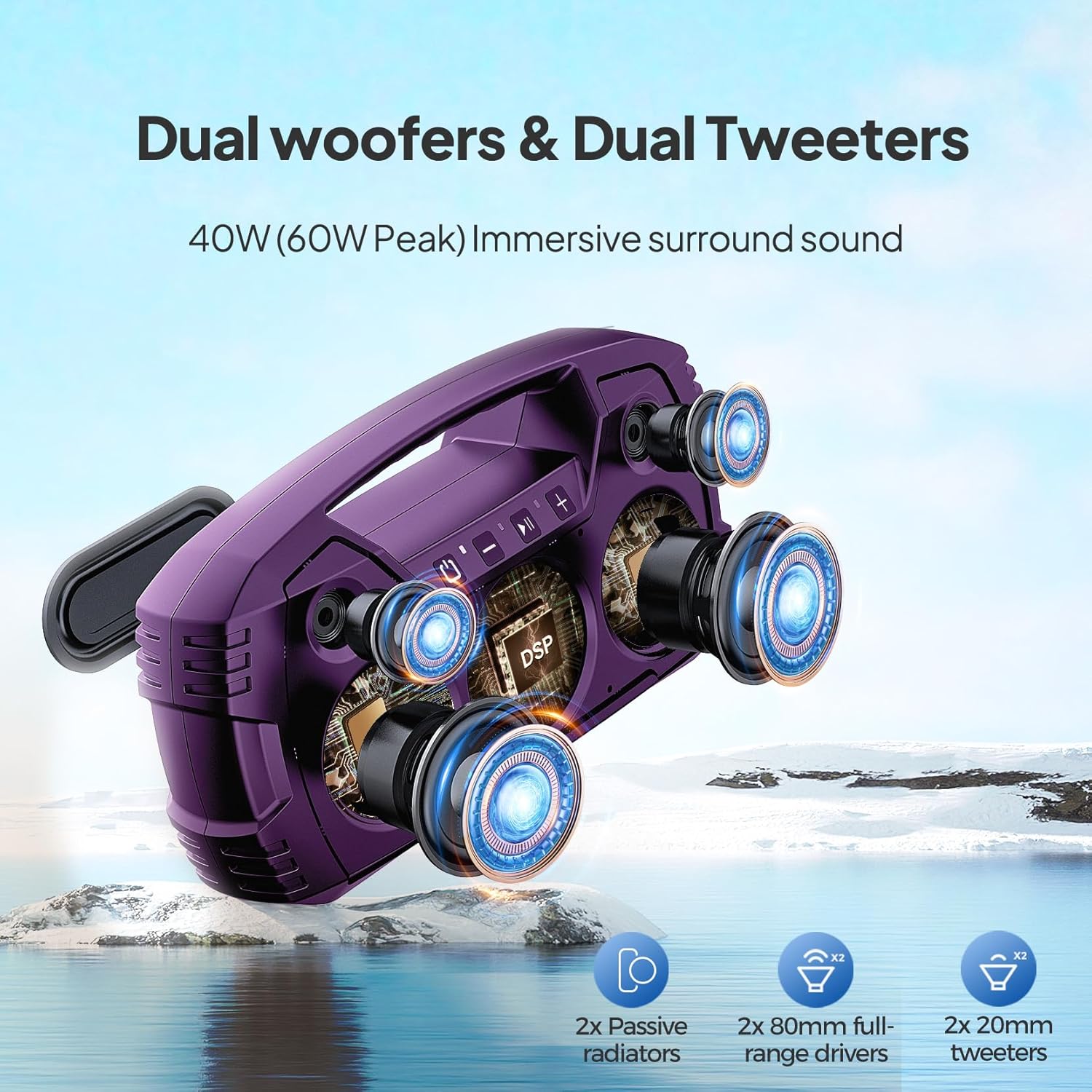
Billede: En eksploderet view illustrating the internal dual woofers and tweeters for enhanced sound.
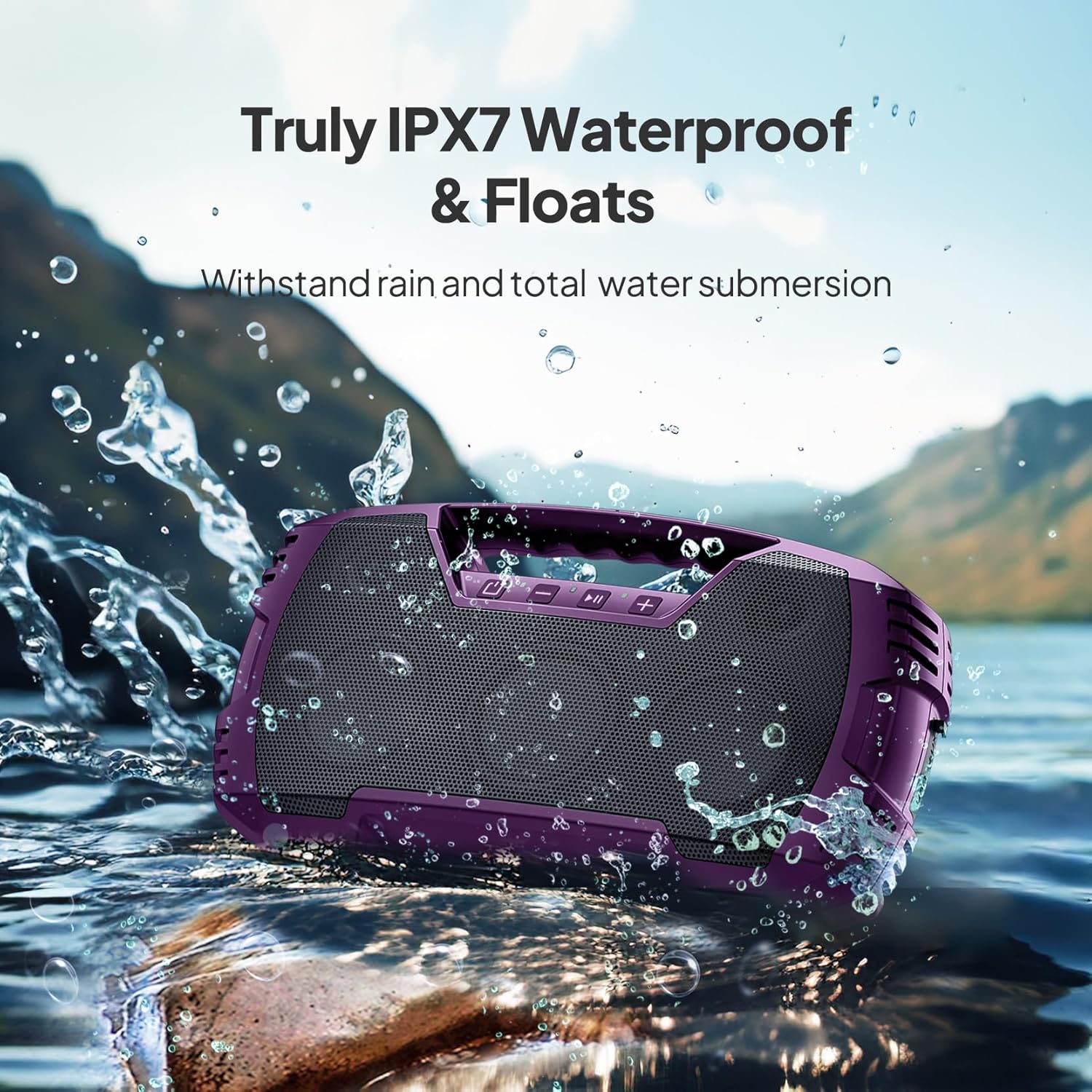
Image: The speaker floating in water, highlighting its IPX7 waterproof feature.

Image: The speaker placed on grass, connected to a smartphone for charging, illustrating its power bank function.

Image: Two speakers positioned to create a stereo sound field for outdoor entertainment.
4. Opsætning
4.1 Indledende opladning
- Before first use, fully charge the speaker using the provided USB charging cable.
- Locate the charging port on the speaker, typically protected by a rubber flap. Lift the flap gently to expose the port.
- Connect the USB charging cable to the speaker and a compatible USB power adapter (not included).
- The charging indicator will illuminate. Once fully charged, the indicator may change or turn off.
- Ensure the rubber flap is securely closed after charging to maintain the speaker's waterproof rating.
4.2 Bluetooth -parring
- Tænd for højttaleren ved at trykke på tænd/sluk-knappen og holde den nede.
- The speaker will enter Bluetooth pairing mode, indicated by a flashing LED light (usually blue).
- On your mobile device (smartphone, tablet, laptop), go to Bluetooth settings and enable Bluetooth.
- Søg efter available devices. The speaker will appear as "VOCBOOM" (or similar).
- Select "VOCBOOM" to connect. Once paired, the LED indicator will typically turn solid blue or stop flashing, and you may hear an audible confirmation.
4.3 Ægte trådløs stereo (TWS) parring (valgfrit)
To enable TWS pairing for two speakers:
- Ensure both VOCBOOM speakers are powered on and not connected to any other Bluetooth device.
- On one speaker (this will be the primary speaker), long-press the Volume "+" and Volume "-" buttons simultaneously for 3 seconds.
- The speakers will attempt to pair with each other. Once successfully paired, you will hear an audible confirmation, and the LED indicators on both speakers will synchronize.
- Tilslut nu din mobilenhed til den primære højttaler via Bluetooth som beskrevet i afsnit 4.2. Begge højttalere vil afspille lyd i stereo.
5. Betjeningsvejledning
5.1 Knapfunktioner
Højttaleren har intuitive kontrolknapper på toppanelet:
- Tænd/sluk-knap (⏻): Tryk og hold nede for at tænde/slukke. Tryk kort for at kontrollere batteristatus (hvis relevant).
- Lydstyrke ned (-): Kort tryk for at sænke lydstyrken. Langt tryk for forrige nummer.
- Afspil/pause (▶‖): Short press to play or pause music. Short press to answer/end calls. Long press to reject calls.
- Lydstyrke op (+): Kort tryk for at øge lydstyrken. Langt tryk for næste nummer.
5.2 Håndfri opkald
When your speaker is paired with a smartphone, you can use it for hands-free calls:
- Besvar opkald: Tryk kort på Play/Pause-knappen.
- Afslut opkald: Tryk kort på Afspil/Pause-knappen under et opkald.
- Afvis opkald: Long press the Play/Pause button when a call comes in.
5.3 Opladning af eksterne enheder
The USB-A port on the side of the speaker can be used to charge other devices, effectively turning your speaker into a power bank:
- Open the rubber flap on the side of the speaker to expose the USB-A output port.
- Tilslut din enheds opladningskabel til USB-A-porten på højttaleren.
- Højttaleren vil begynde at oplade din enhed.
- Remember to close the rubber flap securely after use to maintain waterproofing.
6. Vedligeholdelse og pleje
- Rensning: Brug en blød, damp cloth to clean the speaker. Avoid harsh chemicals or abrasive cleaners.
- Vandtætning: Always ensure the rubber flap covering the ports is securely closed when near water or in wet conditions to maintain the IPX7 rating.
- Opbevaring: Opbevar højttaleren et køligt, tørt sted væk fra direkte sollys og ekstreme temperaturer.
- Batteripleje: For at forlænge batteriets levetid bør du undgå at aflade højttaleren helt ofte. Oplad den regelmæssigt, selvom den ikke er i brug i længere perioder.
- Dust/Sand: While waterproof, the speaker is not explicitly rated for dust or sand. Exercise caution in sandy environments to prevent damage to ports or grilles.
7. Fejlfinding
| Problem | Mulig løsning |
|---|---|
| Højttaleren tænder ikke. | Sørg for, at højttaleren er fuldt opladet. Tilslut den til en strømkilde, og prøv igen. |
| Kan ikke parres via Bluetooth. | Make sure the speaker is in pairing mode (flashing LED). Turn off and on Bluetooth on your device. Ensure no other devices are connected to the speaker. Move closer to the speaker. |
| Ingen lyd eller lav lydstyrke. | Check volume levels on both the speaker and your connected device. Ensure the speaker is properly paired. If using Aux-in, ensure the cable is fully inserted and functional. |
| TWS-parring mislykkes. | Ensure both speakers are not connected to any other Bluetooth device. Try repeating the TWS pairing steps. Make sure both speakers are the same model. |
| Audio lags during video playback. | This can sometimes occur with Bluetooth connections. Try moving your device closer to the speaker or disconnecting and reconnecting. |
8. Specifikationer
| Feature | Detalje |
|---|---|
| Modelnummer | VOCBOOM |
| Mærke | DBSOARS |
| Forbindelsesteknologi | Bluetooth |
| Trådløs kommunikationsteknologi | Bluetooth |
| Bluetooth rækkevidde | 10 meter |
| Højttaler Maksimal udgangseffekt | 80 watt |
| Lydudgangstilstand | Stereo, Surroundlyd |
| Vandtæt vurdering | IPX7 |
| Strømkilde | Batteridrevet |
| Batterilevetid | Op til 32 timer (varierer efter brug) |
| Kontrolmetode | Røre |
| Materiale | ABS, metal grill |
| Produktdimensioner | 3.7 x 14 x 7 tommer |
| Varens vægt | 4.69 pund |
| Kompatible enheder | Smartphone, tablet, bærbar computer |

Image: A diagram illustrating the physical dimensions of the speaker.
9. Garanti og support
The DBSOARS VOCBOOM Wireless Bluetooth Speaker comes with a limited warranty. Please refer to the warranty card included in your package for specific terms and conditions. For technical support, troubleshooting assistance, or warranty claims, please contact DBSOARS customer service through the contact information provided on the product packaging or the official DBSOARS webwebsted.