
1. Introduktion
This manual provides detailed instructions for the installation, operation, and maintenance of the PowMr 80A Solar Charge Controller. This device is designed to manage power flow from solar panels to batteries, ensuring efficient and safe charging for various battery types and system voltages.
Video 1.1: Unboxing the PowMr PStar Series Solar Controller. This video demonstrates the contents of the product package, including the controller and user manual.
2. Sikkerhedsinstruktioner
- Ensure all wiring is correctly polarized and securely connected to prevent damage to the controller or battery.
- Always connect the battery to the charge controller first, then the solar panel. Disconnect in the reverse order.
- Installer styreenheden i et godt ventileret område, væk fra brandfarlige materialer og direkte sollys.
- Forsøg ikke selv at adskille eller reparere controlleren. Kontakt kvalificeret personale for service.
- Brug passende afbrydere eller sikringer til alle tilslutninger for at beskytte mod overstrøm.
3. Produktet er slutview
The PowMr 80A Solar Charge Controller features an adjustable LCD display, dual USB outputs, and supports multiple battery types. It utilizes 3-stage intelligent PWM technology for efficient charging.

Figur 3.1: Front view of the PowMr 80A Solar Charge Controller, highlighting key technical specifications such as Max. PV Open Circuit Voltage (100V), Rated Charging Current (80A), Nominal System Voltage (12V/24V/36V/48V Auto), Charging Technology (PWM), Charge Algorithm (3-Stages), USB Interface (5V/2A*2), Net weight (0.75 kg), and Operating Temperature Range (-20°C ~ +55°C).
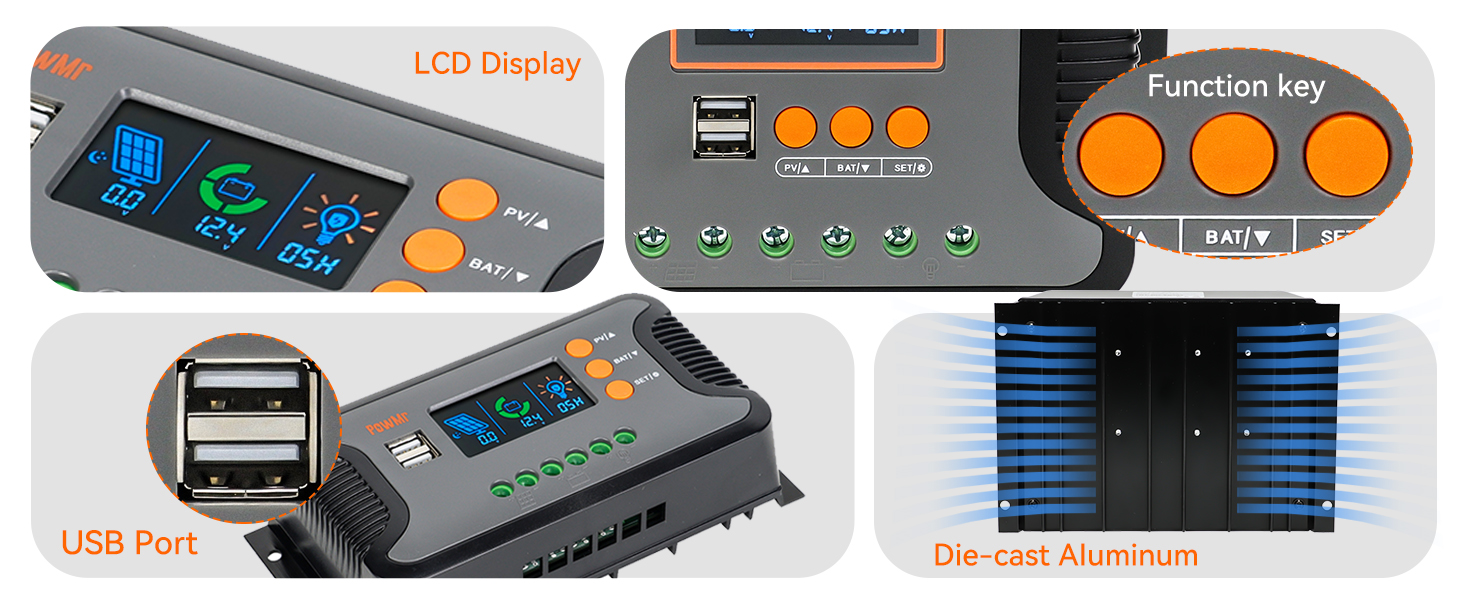
Figur 3.2: Detaljeret views of the controller's features, including the LCD display for monitoring, function keys for settings, dual USB ports for charging external devices, and the die-cast aluminum construction for heat dissipation.
3.1 Nøglefunktioner
- Auto System Voltage Detektion: Automatically detects 12V, 24V, 36V, and 48V DC systems.
- Høj PV-indgang: Supports a maximum PV input open circuit voltage på 100V.
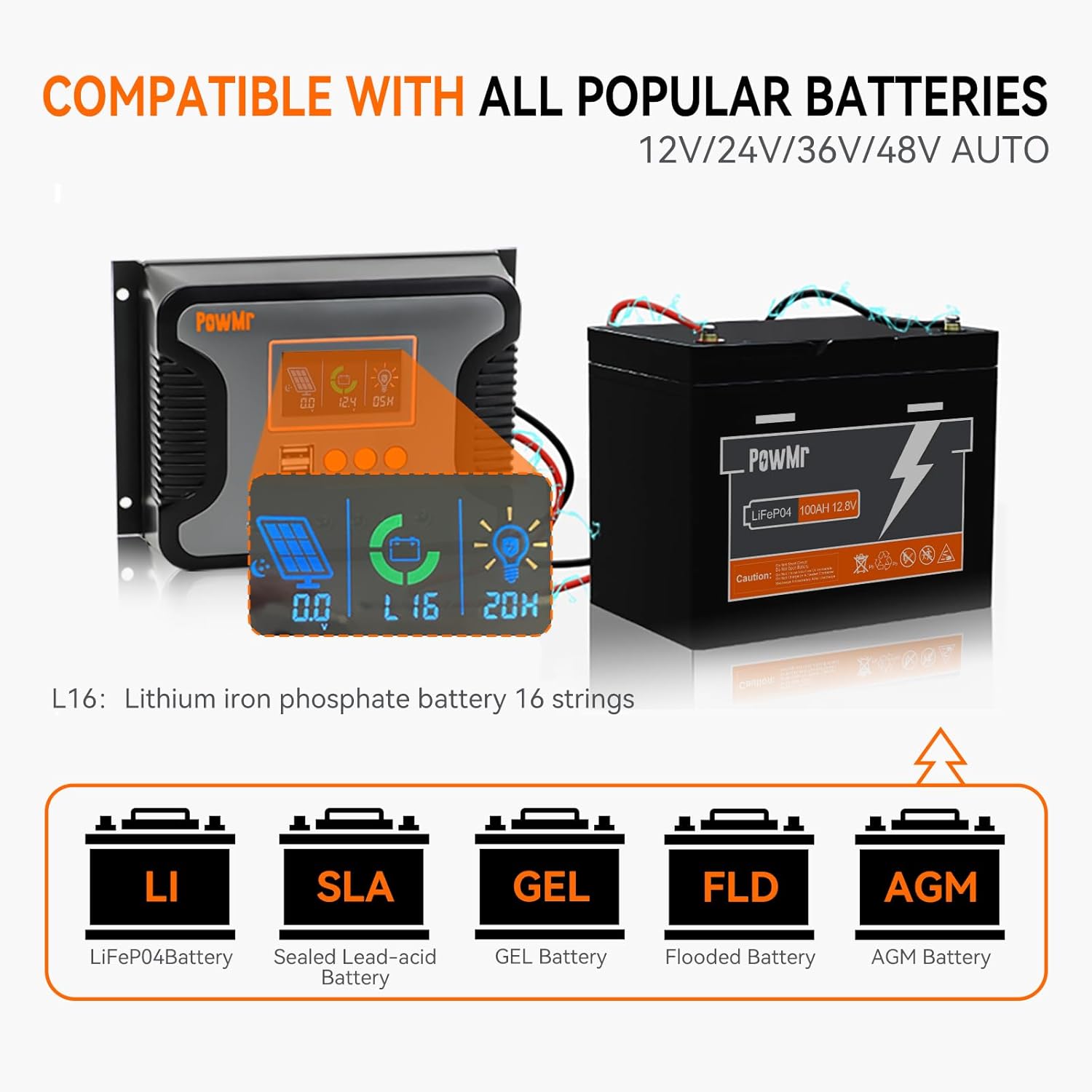
- Bred batterikompatibilitet: Compatible with Sealed, LiFePO4, Gel, Flooded, and Lithium batteries.
- Dobbelt USB-udgang: Provides 5V/2.5A (max) for charging mobile devices.
- Flere beskyttelser: Includes protection against overheating, short circuits, over-discharging, reverse polarity, and overcurrent.
- LCD-skærm: Real-time monitoring of charging current, generated energy, temperature, and battery voltage.

Figur 3.3: Illustration of the controller's compatibility with different battery types, including Lithium Iron Phosphate (LiFePO4), Sealed Lead-Acid (SLA), GEL, Flooded (FLD), and AGM batteries.
Figur 3.4: Visual representation of the comprehensive protection features integrated into the controller, ensuring safe operation and longevity of the system components.
4. Tekniske specifikationer
| Feature | Specifikation |
|---|---|
| Model | 80A |
| Nominelt System Voltage | 12V/24V/36V/48V Auto |
| Max. PV Input Open Circuit Voltage | 100V |
| Maks. PV-indgangseffekt (12V batteri) | 960W |
| Maks. PV-indgangseffekt (24V batteri) | 1920W |
| Maks. PV-indgangseffekt (36V batteri) | 2880W |
| Maks. PV-indgangseffekt (48V batteri) | 3840W |
| Nominel opladningsstrøm | 80A |
| Nominel DC-udgangsstrøm | 50A |
| Opladningsteknologi | PWM (3-Stagr) |
| USB interface | Dual USB output 5V/2.5A (max) |
| Driftstemperaturområde | -20°C ~ +55°C |
| Varens vægt | 0.7 kilo (1.54 pund) |
| Display Type | LCD |
5. Installation
Korrekt installation er afgørende for sikker og effektiv drift af din solcelleladeregulator. Følg disse trin omhyggeligt:
5.1 Montering af controlleren
- Choose a suitable location: Ensure it is dry, well-ventilated, and protected from direct sunlight and moisture.
- Secure the controller to a wall or mounting surface using four screws.
Video 5.1: Quick installation video for PowMr Pstar-80A solar controller. This video demonstrates the physical mounting of the controller and the correct wiring sequence.
5.2 Ledningsforbindelser
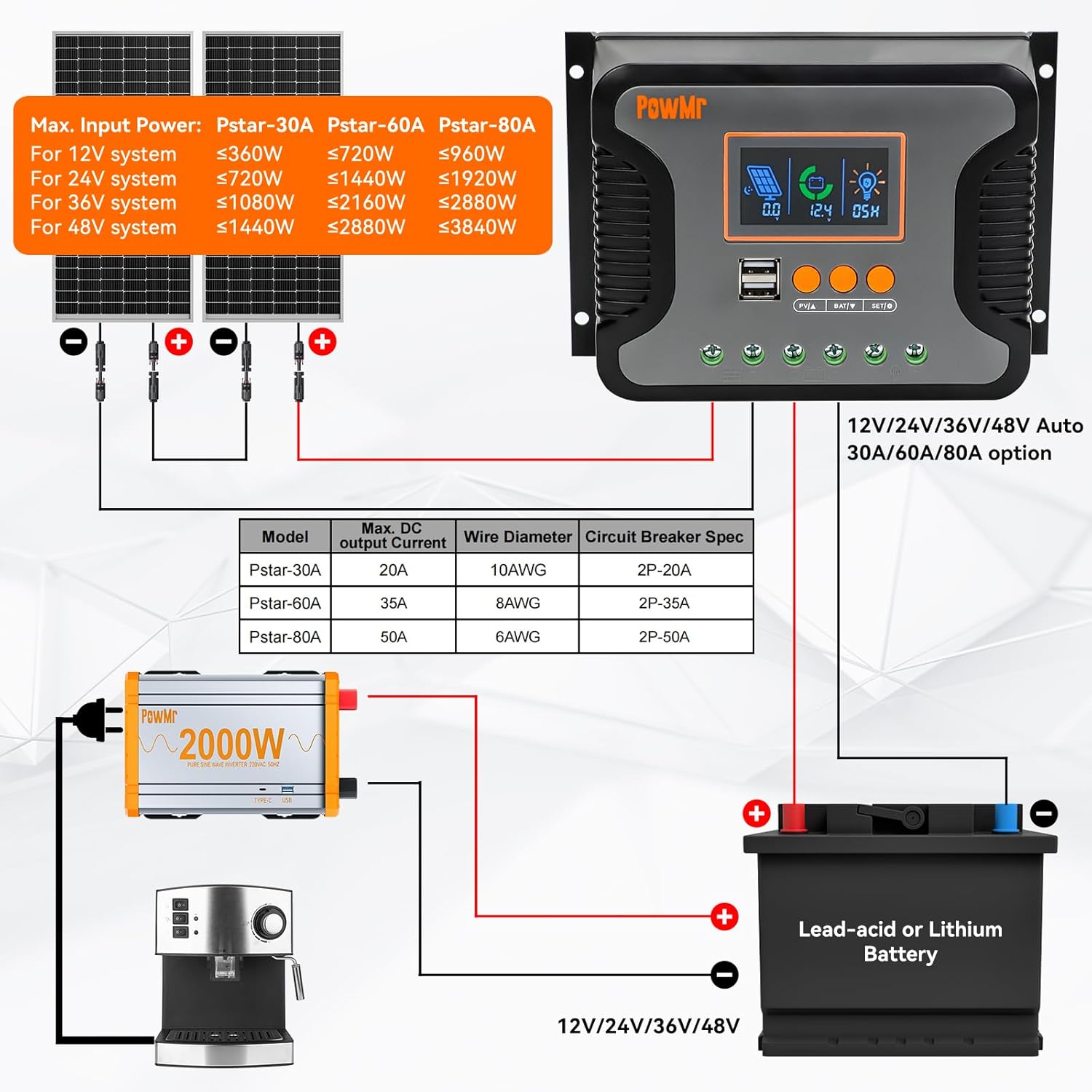
Vigtig: Always connect the battery first, then the solar panel, and finally the load. Disconnect in the reverse order (load, then solar panel, then battery).
- Tilslut batteriet: Connect the positive and negative terminals of your battery to the corresponding battery terminals on the controller. Ensure correct polarity.
- Tilslut solpanelet: Connect the positive and negative terminals of your solar panel(s) to the corresponding PV input terminals on the controller. Ensure correct polarity.
- Tilslut DC-belastningen (valgfrit): If using a DC load directly from the controller, connect its positive and negative terminals to the load terminals on the controller.
- Tænd: Close the battery circuit breaker to power on the controller.

Figur 5.1: Comprehensive wiring diagram illustrating the connection points for solar panels, battery, and DC load. It also provides a table with recommended wire diameters and circuit breaker specifications for different models (Pstar-30A, Pstar-60A, Pstar-80A).
Figur 5.2: A simplified two-step connection guide, emphasizing the correct sequence of connecting the battery first (Step 1) and then the solar panels (Step 2) to the charge controller.
6. Betjening
The controller features an LCD display and three buttons for easy monitoring and parameter adjustment.
6.1 LCD-skærm og knapper
The LCD displays real-time system information such as solar panel voltage, batteri voltage, charging current, and load status. The three buttons (PV/A, BAT/V, SET/↓) are used for navigating menus and adjusting settings.
- PV/A Button: Short press to cycle through solar panel related displays (e.g., PV voltage, ladestrøm).
- BAT/V Button: Short press to cycle through battery related displays (e.g., battery voltage, battery type).
- SET/↓ Button: Short press to enter or exit setting mode, or to decrease a value during setting. Long press to save settings.
6.2 Indstilling af batteritype
To optimize charging, select the correct battery type:
- Tryk på BAT/V button until the battery type icon flashes on the LCD.
- Brug PV/A og SET/↓ buttons to cycle through available battery types (e.g., SEL for Sealed, FLD for Flooded, GEL for Gel, Li for Lithium).
- Once the desired battery type is displayed, long press the SET/↓ knappen for at bekræfte og gemme indstillingen.
The controller will automatically return to the default display screen if no button is pressed for 100 seconds.
7. Vedligeholdelse
Regelmæssig vedligeholdelse sikrer din solcelleladeregulators levetid og optimale ydeevne:
- Kontrollér regelmæssigt alle ledningsforbindelser for tæthed og korrosion.
- Clean the controller's exterior with a dry cloth to remove dust and debris.
- Ensure the ventilation fins are clear of obstructions to allow for proper heat dissipation.
- Overvåg LCD-displayet for fejlkoder eller usædvanlige aflæsninger.
8. Fejlfinding
If you encounter issues with your PowMr 80A Solar Charge Controller, refer to the following common problems and solutions:
| Problem | Mulig årsag | Løsning |
|---|---|---|
| Controlleren tænder ikke | Batteri ikke tilsluttet eller lav spændingtage; omvendt polaritet. | Kontroller batteriforbindelser og voltage. Sørg for korrekt polaritet. |
| Ingen opladning fra solpaneler | Solar panels not connected; insufficient sunlight; PV voltage for lavt. | Verify solar panel connections. Check for shading. Ensure PV voltage er over batterivolumentage. |
| Indlæsningen virker ikke | Load not connected; battery voltage too low; overload protection activated. | Check load connections. Charge battery. Reduce load or check for short circuits. |
| Unøjagtig voltage aflæsninger | Loose connections; incorrect battery type setting. | Tighten all connections. Verify the correct battery type is selected in settings. |
9. Garanti og support
The PowMr 80A Solar Charge Controller comes with a standard manufacturer's warranty. For specific warranty terms, please refer to the warranty card included in your product packaging or contact Temank customer support.
For technical assistance, troubleshooting beyond this manual, or to inquire about replacement parts, please contact Temank customer service through their official webwebstedet eller de kontaktoplysninger, der er angivet med dit køb.