
Indledning
Thank you for choosing the HOCO EQ3 True Wireless Earbuds. This manual provides essential information for setting up, operating, and maintaining your earbuds to ensure optimal performance and longevity. The EQ3 earbuds feature Bluetooth 5.3 for stable connectivity, touch controls, clear stereo sound with high bass, and a water-resistant design.
Hvad er der i æsken
- HOCO EQ3 True Wireless Earbuds
- Opladningsetui
- USB-C ladekabel
- Ørepuder (flere størrelser)
- Beskyttende etui
Produkt overview
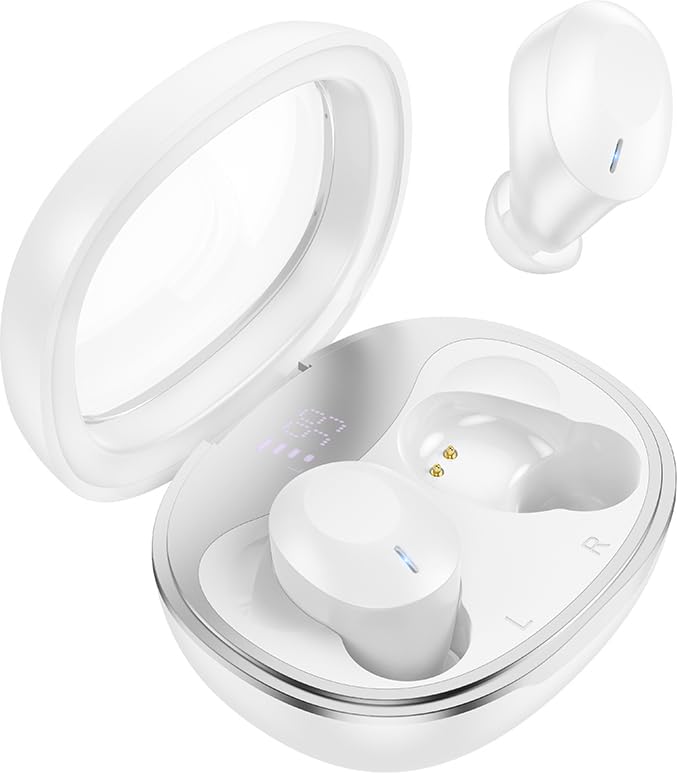
The HOCO EQ3 True Wireless Earbuds are housed in a compact, transparent charging case, designed for portability and convenience.

This infographic highlights key features such as extended battery life, high-fidelity sound quality, Bluetooth 5.3 connectivity, and intuitive touch controls.
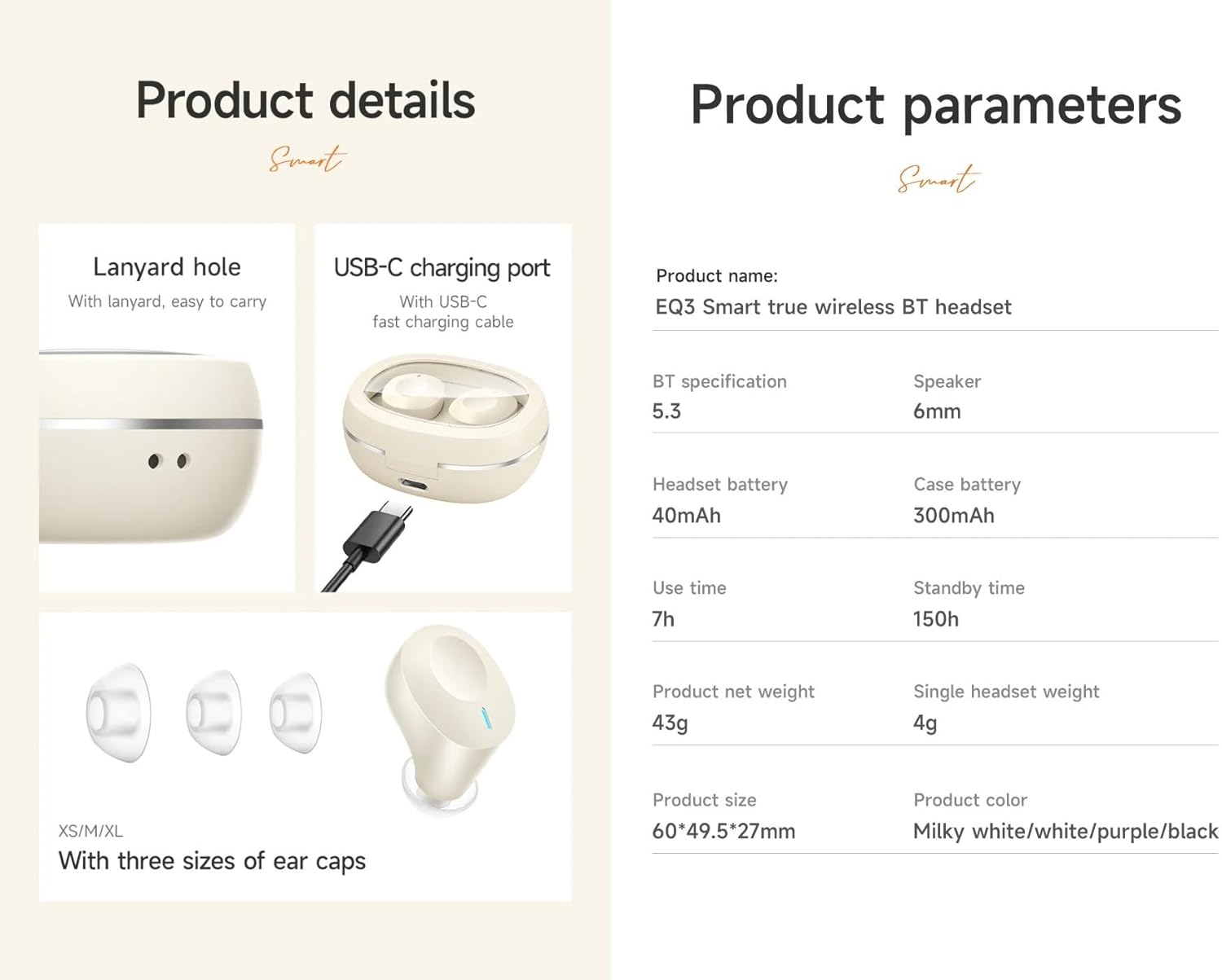
Detaljeret view of the earbuds' design, including the USB-C charging port, lanyard hole, and available ear cap sizes for a customized fit. Product parameters are also listed.
Opsætning
1. Opladning af øretelefoner og etuiet
Before first use, fully charge the earbuds and the charging case. Connect the provided USB-C cable to the charging port on the case and to a power source. The LED digital display on the case will indicate the charging status. The earbuds charge automatically when placed inside the case.
2. Parring med en enhed
- Sørg for, at opladningsetuiet har tilstrækkelig strøm, og at ørepropperne er indeni.
- Open the lid of the charging case. The earbuds will automatically enter pairing mode, indicated by a flashing light (if applicable).
- Aktiver Bluetooth på din enhed (smartphone, tablet osv.) og søg efter tilgængelige enheder.
- Select "HOCO EQ3" from the list of devices.
- Once connected, the earbuds will indicate successful pairing, and the LED light will stop flashing.
The earbuds support master-slave switching, allowing either earbud to be used independently after initial pairing.

The earbuds connect automatically to your paired device when the charging case is opened.
3. Sådan tager du ørepropperne på
Select the ear cushions that provide the most comfortable and secure fit for your ears. The HOCO EQ3 earbuds are designed for a semi-in-ear fit, ensuring comfort during extended use.

The semi-in-ear design ensures a light and comfortable fit for prolonged listening.
Betjening af øretelefonerne
Tryk på kontrolelementer
The HOCO EQ3 earbuds feature intuitive touch controls on each earbud. The functions are as follows:
- Enkelt tryk (V/H): Afspil/pause musik.
- Dobbelttryk (V/H): Næste nummer.
- Tredobbelt tryk (V/H): Forrige nummer.
- Long Press (L/R) for 2 seconds: Aktivér stemmeassistent (f.eks. Siri).

Detailed guide to the touch control functions on the HOCO EQ3 earbuds.
Foretage opkald
The earbuds support clear calls with stereo sound. Use the touch controls to manage calls:
- Enkelt tryk: Besvar/afslut et opkald.
- Langt tryk: Afvis et indgående opkald.
Stemmeassistent
Activate your device's voice assistant by long-pressing either earbud for 2 seconds. This allows for hands-free control of your device.
Opretholdelse
Rensning
Regularly clean your earbuds and charging case to maintain optimal performance and hygiene. Use a soft, dry, lint-free cloth. For ear tips, gently remove them and clean with a mild soap solution, then rinse and dry thoroughly before reattaching. Do not use harsh chemicals or abrasive materials.
Opbevaring
Når ørepropperne ikke er i brug, skal de opbevares i deres opladningsetui for at beskytte dem mod støv og skader, og for at holde dem opladede. Opbevar etuiet et køligt og tørt sted, væk fra direkte sollys og ekstreme temperaturer.
Fejlfinding
- Ørepropper parrer ikke: Ensure both earbuds are charged. Place them back in the case, close the lid, wait a few seconds, then open the lid to re-enter pairing mode. Delete "HOCO EQ3" from your device's Bluetooth list and try pairing again.
- Kun én øreprop virker: Ensure both earbuds are charged. Try placing both earbuds back in the case, closing the lid, and then reopening it. This often resets the connection between the two earbuds.
- Ingen lyd: Kontrollér lydstyrken på din tilsluttede enhed. Sørg for, at ørepropperne er korrekt parret og valgt som lydudgang.
- Opladningsproblemer: Verify the USB-C cable is securely connected to both the charging case and the power source. Ensure the charging contacts on the earbuds and inside the case are clean and free of debris.
- Stemmeassistenten svarer ikke: Ensure the earbuds are connected to your device and that the voice assistant feature is enabled on your device.
Specifikationer
| Modelnavn | EQ3 |
| Bluetooth version | 5.3 |
| Bluetooth-chip | JL AC6983D2 |
| Opladningsetui Batterikapacitet | 300mAh |
| Headset batterikapacitet | 40mAh |
| Brugstid for enkelt headset | Op til 7 timer |
| Total Use Time (with charging case) | Op til 28 timer |
| Standby tid | 150 timer |
| Dimensioner på ladetaske | 60 x 49.5 x 27 mm |
| Totalvægt (etui + ørepropper) | 43 g |
| Vægt på enkelt headset | 4g |
| Højttaler størrelse | 6 mm |
| Vandmodstandsniveau | Vandtæt |
| Kontrolmetode | Røre |
| Støjkontrol | Aktiv støjreduktion |
Garantioplysninger
HOCO products are covered by a limited warranty against manufacturing defects. Please refer to the warranty policy provided at the time of purchase or visit the official HOCO webwebstedet for detaljerede vilkår og betingelser. Gem din købsbevis til garantikrav.
Kundesupport
For further assistance, technical support, or inquiries regarding your HOCO EQ3 True Wireless Earbuds, please contact HOCO customer service through their official webwebstedet eller de kontaktoplysninger, der følger med din produktemballage.