
Indledning
The Tilta F970 Battery Plate V2 is designed to provide versatile power solutions for your camera and accessories using Sony L-Series batteries. This manual provides essential information for proper setup, operation, and maintenance.
Opsætning og installation
Mounting the Battery Plate
The battery plate features a 1/4"-20 screw with locating pins for secure attachment to camera cages or other rigging accessories. The anti-rotation design, combined with a silicone pad on the back, ensures a stable connection.

Billedbeskrivelse: Et nærbillede view of the Tilta F970 Battery Plate V2's underside, showing the 1/4"-20 thumb screw and two locating pins. The screw can be tightened by hand or with a flat-head screwdriver.
Inserting an L-Series Battery
Align your Sony L-Series battery with the battery slot on the plate and slide it in until it clicks securely into place. The design accommodates various L-Series battery sizes and brands.

Billedbeskrivelse: Two cameras with different sized L-Series batteries mounted on the Tilta F970 Battery Plate V2, demonstrating compatibility with various battery dimensions.
Betjeningsvejledning
Powering Accessories
The battery plate offers multiple power output options:
- USB-A: 5V/2.1A
- DC Out: 8V/3A (DC5521 standard)
- USB-C In/Out: 18W PD (Power Delivery)
- DC Out: 12V/2A (DC5525 standard)
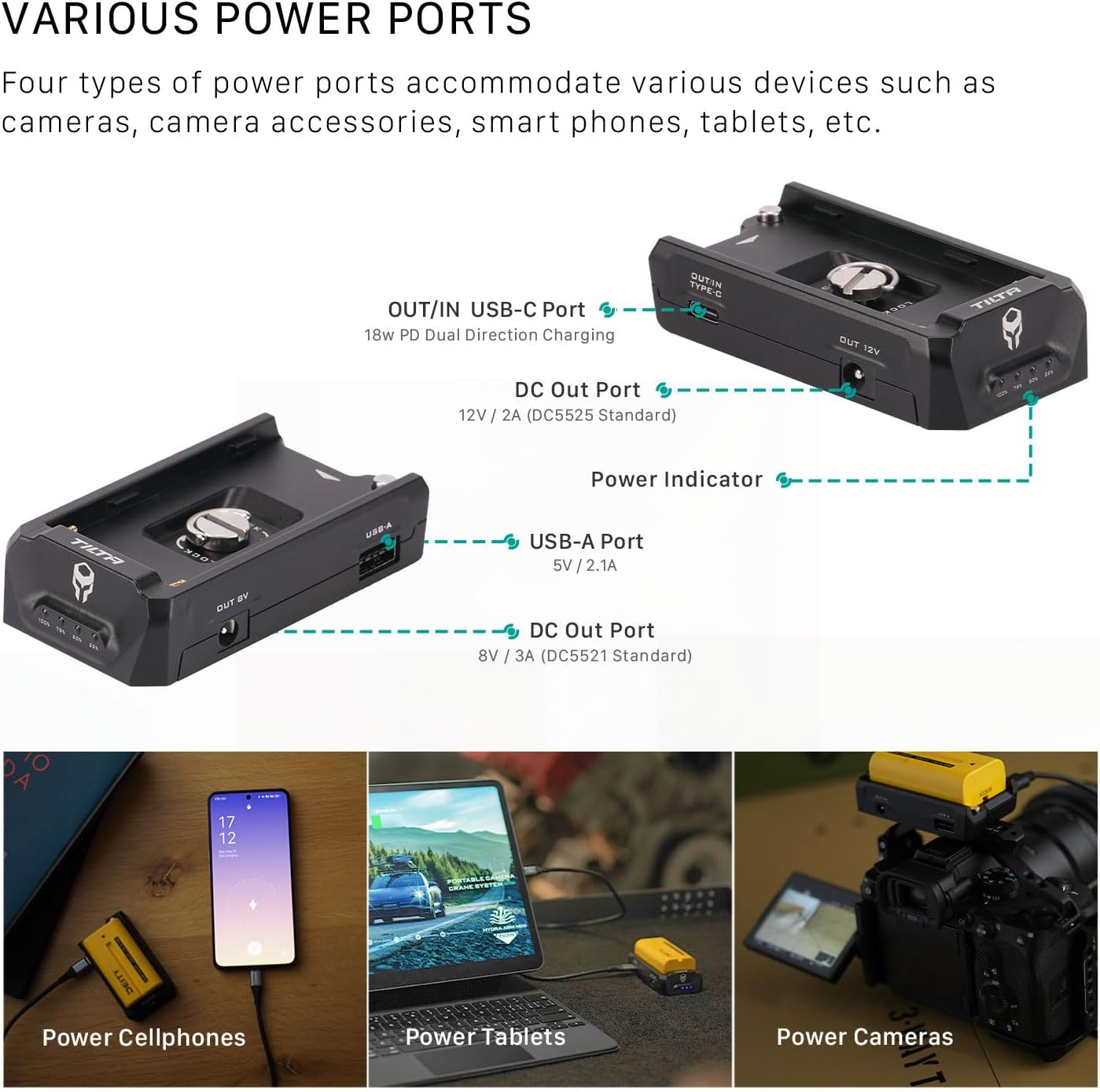
Billedbeskrivelse: A diagram illustrating the various output ports on the Tilta F970 Battery Plate V2, including USB-A, USB-C, and two DC outputs. Below the diagram, images show the plate powering a cellphone, a tablet, and a camera.
Charging L-Series Batteries
The USB-C port supports dual-directional power. Connect a USB-C PD charger to this port to charge the L-Series battery while it is connected to the plate.

Billedbeskrivelse: A close-up of the Tilta F970 Battery Plate V2 with a USB-C cable connected, indicating dual-direction fast charging capability.
Batteriindikator
The integrated battery indicator provides real-time information on battery capacity and charging status.
- Udledning: Constant light display indicates current battery capacity.
- Oplade: Blinking light indicates current battery capacity during charging.
- Indsæt batteri: The indicator turns on and displays the current capacity.
- No Charge/Discharge: Lysene slukker efter 30 sekunder.

Billedbeskrivelse: A close-up of the Tilta F970 Battery Plate V2 with an L-Series battery inserted, showing the four LED battery indicator lights.
Produktegenskaber
The Tilta F970 Battery Plate V2 offers several key features for enhanced functionality and reliability:
- Universal kompatibilitet: Designed for Sony L-Series batteries, compatible with various brands and battery sizes.
- Anti-Rotation Design: Securely mounts via a 1/4"-20 screw with locating pins and a silicone back plate to prevent rotation.
- Multiple Power Outputs: Provides power to accessories through USB-C PD, DC 8V, DC 12V, and USB-A ports.
- Dual-Directional USB-C: The USB-C port functions as both an output for powering devices and an input for charging connected L-Series batteries.
- Indikator for batterilevetid: Displays real-time battery life and charging status via LED lights.
Tekniske specifikationer
| Feature | Detalje |
|---|---|
| Mærke | Tilta |
| Modelnummer | TA-BTP2-F970-B |
| Materiale | Aluminiumslegering, silikone |
| Farve | Sort |
| Varens vægt | 0.26 pund (120 g) |
| Dimensions (excluding bottom threads) | 91.5 x 49.5 x 22 mm |
| Dimensions (including bottom threads) | 91.5 x 49.5 x 27.1 mm |
| Input bindtage | 12 volt |
| Udgang Voltage | 8V/3A (DC5521), 12V/2A (DC5525) |
| USB-A-output | 5V/2.1A |
| USB-C ind/ud | 18W PD Bi-Directional |
| Kompatible enheder | NP-F Series Batteries, Sony Cameras |
| Samlet USB-porte | 3 (1x USB-A, 1x USB-C) |
| Strømkilde | Batteridrevet |
| Montering | 1/4"-20 screw with locating pins |

Billedbeskrivelse: A visual representation of the Tilta F970 Battery Plate V2 with key dimensions and product specifications listed in a table format.
Pakkens indhold
- 1x Tilta F970 Battery Plate V2 - Black
Fejlfinding
If the battery indicator lights do not illuminate after inserting a charged battery, ensure the battery is correctly seated and fully charged. If power output issues occur, verify all cables are securely connected to the correct ports. For persistent issues, contact Tilta customer support.
Garanti og kundesupport
For warranty information, technical support, or service inquiries, please refer to the official Tilta webwebstedet eller kontakt din autoriserede forhandler. Gem din købskvittering til garantikrav.