
1. Introduktion
This manual provides essential information for the safe and efficient use of your CUBOT P80 smartphone. Please read it carefully before using the device and keep it for future reference.
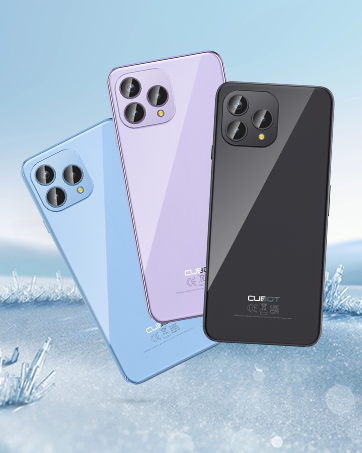
The CUBOT P80 is available in multiple color options.
2. Hvad er der i æsken
Bekræft, at alle varer er til stede i din produktpakke:
- CUBOT P80 smartphone
- Telefonbeskyttelsesetui
- Phone protection film (pre-applied or separate)
- Charger (9V2A)
- USB-kabel (Type-C)
- Type-C headphone
- SIM pin ejector tool
- Hurtig startvejledning
- Compliance regulation document

Included accessories with the CUBOT P80 smartphone.
3. Device Layout and Physical Features
The CUBOT P80 features a sleek design with a 6.58-inch FHD+ display and a triple camera system on the rear.
Dimensioner og vægt
- Tykkelse: 9.75 mm
- Vægt: 217 g

The CUBOT P80's slim profile og letvægtsdesign.
Fingeraftryksscanner
The device includes a side-mounted fingerprint scanner for secure and quick unlocking.

Fingerprint sensor location for convenient unlocking.
4. Opsætning
Inserting SIM Cards and TF Card
The CUBOT P80 supports dual SIM functionality or one SIM card with a TF (microSD) card for expanded storage.
- Find SIM-kortbakken på siden af telefonen.
- Sæt SIM-kortudkastningsværktøjet i det lille hul ved siden af bakken, og tryk godt ned, indtil bakken springer ud.
- Place your Nano SIM card(s) and/or TF card into the designated slots on the tray. Ensure the gold contacts are facing down.
- Skub forsigtigt bakken tilbage i telefonen, indtil den flugter med enhedens kabinet.

SIM and TF card installation options.
Første gang tændt
Press and hold the power button located on the side of the device until the CUBOT logo appears. Follow the on-screen instructions to complete the initial setup, including language selection, Wi-Fi connection, and Google account login.
5. Betjeningsvejledning
Android 13 operativsystem
The CUBOT P80 runs on Android 13, offering a user-friendly interface, enhanced privacy controls, and access to the Google Play Store for applications.

Overview of the Android 13 operating system.
Displayfunktioner
The device features a 6.58-inch FHD+ Capacitive Touch Screen with a resolution of 2408x1080 pixels, 400 nits peak brightness, and a 20:9 aspect ratio.

Key features of the CUBOT P80 display.
6. Kamerafunktioner
The CUBOT P80 is equipped with an AI Quad Camera System on the rear and a high-resolution front camera.
Kamera specifikationer
- Hovedkamera: 48 MP
- Forreste kamera: 24 MP
- Makro kamera: 2 MP

The CUBOT P80's AI Quad Camera System.
Hovedkamera
The 48MP main camera captures images with high detail and clarity.

High-resolution capture with the 48MP main camera.
Forreste kamera
The 24MP front camera is designed for clear selfies and video calls, featuring beauty modes.

Selfie capabilities of the 24MP front camera.
Makro kamera
The 2MP macro lens allows for detailed close-up photography of small objects.

Detailed close-up shots with the 2MP macro camera.
Multiple Camera Modes
The camera application includes various modes such as Night View, Portrait, and Panorama to enhance your photography experience.

Explore various photography modes.
7. Forbindelse
Netværk og Wi-Fi
The CUBOT P80 supports Dual 4G Dual VoLTE for cellular connectivity and 2.4/5GHz Dual Wi-Fi for stable and faster internet access.
- GSM: 850/900/1800/1900MHz
- WCDMA: B1/2/4/5/6/8/19
- FDD: B1/2/3/4/5/7/8/12/13/17/18/19/20/26/28A/28B/66
- TDD: 38/39/40/41
Cellular and Wi-Fi network support.
NFC and GPS
The device includes Multifunctional NFC for cash-free mobile payments and supports GPS, GLONASS, and Galileo for accurate global satellite positioning.
NFC for payments and advanced GPS for navigation.
8. Batteri og opladning
The CUBOT P80 is equipped with a 5200mAh battery, providing extended usage times. It supports 18W fast charging and OTG (On-The-Go) functionality.
- Standby: Op til 26 dage
- Opkald: Op til 29 timer
- Musikafspilning: Op til 26 timer
- Videoafspilning: Op til 7 timer

Battery life and charging features.
9. Lagring og ydeevne
The CUBOT P80 is powered by an MT8788 Octa-core processor and features ample memory and storage.
- Processor: MediaTek MT8788 Octa-core (12nm process, 2.0 GHz clock speed)
- VÆDDER: 8GB + 8GB Expansion RAM (total 16GB)
- Intern lagring (ROM): 256 GB
- Udvidelig lagerplads: Op til 1 TB via TF-kort

Processor and memory details.

RAM expansion technology for enhanced performance.

Internal and expandable storage options.
10. Vigtige meddelelser
Udbyderkompatibilitet
The CUBOT P80 smartphone does not support AT&T, Cricket, or Verizon networks in the United States. Please confirm your carrier's compatibility before purchasing eller ved hjælp af denne enhed.

Important information regarding network compatibility.
11. Specifikationer
| Feature | Specifikation |
|---|---|
| Modelnummer | P80-schwarz-US |
| Operativsystem | Android 13.0 |
| Processor | MediaTek MT8788 Octa-core |
| VÆDDER | 16 GB (8 GB + 8 GB udvidelse) |
| Intern opbevaring | 256 GB |
| Udvidelig opbevaring | Op til 1 TB (TF-kort) |
| Skærmstørrelse | 6.58 tommer |
| Opløsning | 1920 x 1080 (FHD+) |
| Hovedkamera | 48 MP |
| Forreste kamera | 24 MP |
| Makro kamera | 2 MP |
| Batterikapacitet | 5200 mAh |
| Opladning | 18W hurtig opladning |
| Forbindelse | 4G LTE, Dual SIM, Wi-Fi (2.4/5GHz), NFC, Bluetooth |
| Navigation | GPS, GLONASS, Galileo |
| Lydstik | 3.5 mm |
| Dimensioner | 9.29 x 7.17 x 1.81 tommer (pakke) |
| Varens vægt | 7.7 ounce |
12. Fejlfinding
Fælles problemer og løsninger
- Enheden tænder ikke: Sørg for, at batteriet er opladet. Tilslut telefonen til opladeren, og vent et par minutter, før du forsøger at tænde den igen.
- Dårligt netværkssignal: Check SIM card insertion. Ensure you are within your carrier's coverage area. Note that the CUBOT P80 is not compatible with AT&T, Cricket, or Verizon.
- Applikationer der går ned: Clear the cache of the problematic app (Settings > Apps > [App Name] > Storage > Clear Cache). If the issue persists, try reinstalling the app or performing a factory reset (backup data first).
- Batteriet aflades hurtigt: Reduce screen brightness, close unused apps running in the background, disable unnecessary notifications, and limit location services.
- Fingeraftryksscanneren virker ikke: Ensure your finger is clean and dry. Re-register your fingerprints in the security settings.
13. Garanti og support
For warranty information and technical support, please refer to the official CUBOT webwebstedet eller kontakt din forhandler. Gem din købsbevis til garantikrav.
Online ressourcer:
- Besøg CUBOT Store on Amazon for produktinformation og opdateringer.
14. Produktvideo overview
Officiel produktvideopræsentationasing the CUBOT P80's features and design.


