Indledning
Thank you for choosing the AIR 7 Mini Wireless Bluetooth Earbuds. These earbuds are designed to provide a superior audio experience with advanced features such as Bluetooth 5.3 connectivity, active noise cancellation, and a comfortable, secure fit. This manual will guide you through the setup, operation, and maintenance of your new earbuds to ensure optimal performance and longevity.
The AIR 7 Mini earbuds offer crisp tones, deep bass, and clear sound, making them ideal for music, podcasts, and calls. With their IPX4 waterproof rating, they are suitable for various activities, including workouts and outdoor use. Enjoy wireless freedom and intuitive touch controls for a seamless audio experience.
Hvad er der i æsken
- AIR 7 Mini L side earbud
- AIR 7 Mini R side earbud
- Charging station (charging case)
- Reinforced charging cable
- Brugermanual

Image: Unboxing the AIR 7 Mini Earbuds, displaying all included components.
Opsætning
Opladning af øretelefoner og etui
Before first use, fully charge the AIR 7 Mini earbuds and their charging case. Place the earbuds into the charging case, ensuring they are properly seated. Connect the provided charging cable to the charging port on the case and plug the other end into a USB power source. The indicator light on the case will show charging status.
A full charge provides 3-4 hours of playback, and the 200mAh charging case extends this significantly, offering up to 90 hours of standby time. The case can reach 50% charge in approximately 30 minutes.
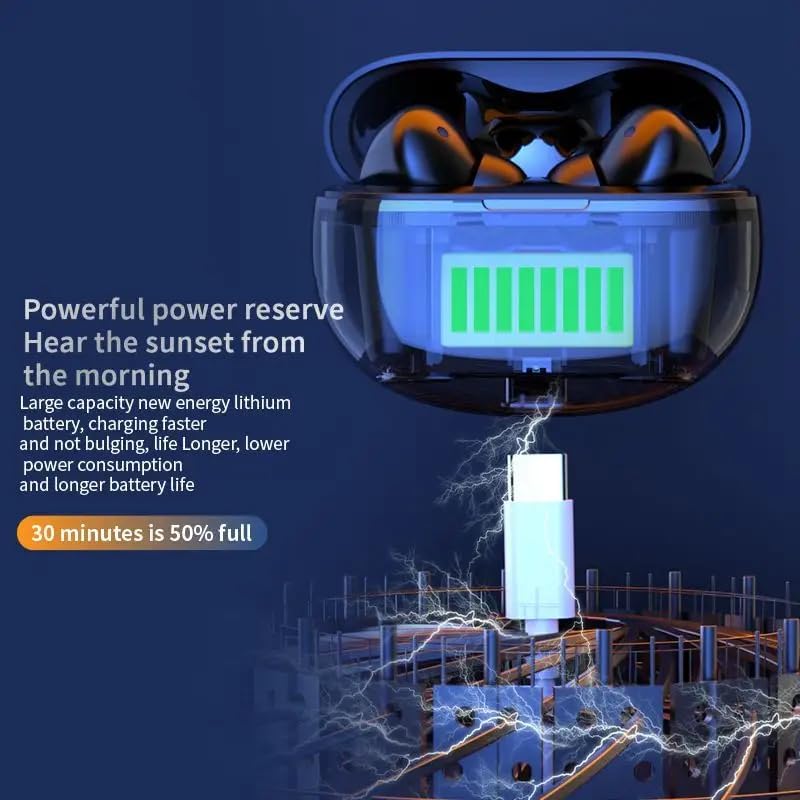
Image: The AIR 7 Mini charging case being charged via its USB-C port.
Parring med din enhed
- Sørg for, at ørepropperne er opladet og i opladningsetuiet.
- Åbn opladningsetuiet. Ørepropperne går automatisk i parringstilstand, hvilket indikeres af et blinkende lys på ørepropperne.
- Gå til Bluetooth-indstillinger på din enhed (smartphone, tablet, bærbar computer), og slå Bluetooth til.
- Søg efter available devices. Select "AIR 7 Mini" from the list.
- Når forbindelsen er oprettet, vil en stemmemeddelelse bekræfte den gennemførte parring, og øreproppernes lys vil holde op med at blinke.
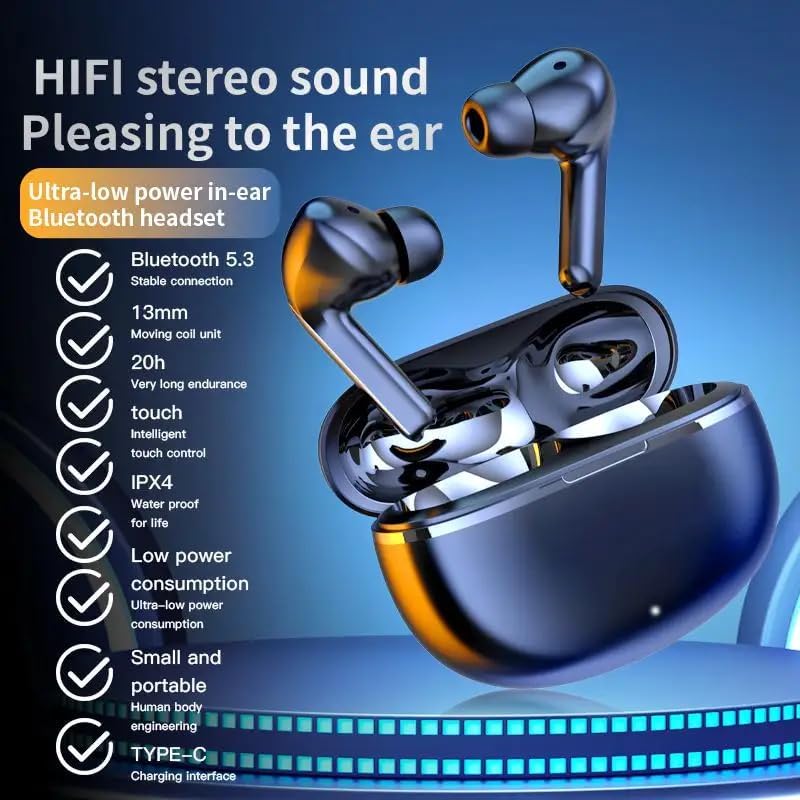
Image: Visual representation of the AIR 7 Mini earbuds' features, including Bluetooth 5.3 connectivity.
Betjeningsvejledning
Tryk på kontrolelementer
The AIR 7 Mini earbuds feature intuitive touch controls for easy management of music playback and calls. The touch-sensitive area is located on the outer surface of each earbud.
| Handling | Fungere |
|---|---|
| Enkelt tryk (venstre/højre) | Afspil/Sæt musik på pause, Besvar/Afslut opkald |
| Dobbelttryk (højre) | Næste spor |
| Dobbelttryk (venstre) | Forrige spor |
| Tredobbelt tryk (venstre/højre) | Aktiver Voice Assistant |
| Langt tryk (venstre/højre) | Skift mellem aktiv støjreduktion (ANC) / gennemsigtighedstilstand |
| Indgående opkald (langt tryk) | Afvis opkald |

Image: The AIR 7 Mini earbuds providing low sound delay for synchronized audio and visuals, ideal for gaming.
Iført øretelefoner
For optimal sound quality and comfort, ensure the earbuds are properly seated in your ears. Gently insert each earbud into the ear canal and twist slightly until it feels secure and comfortable. The ergonomic design of the AIR 7 Mini ensures a snug fit for prolonged listening sessions and active use.

Image: The AIR 7 Mini earbuds in their charging case, demonstrating their compact and ergonomic design.
Støjreduktion
The AIR 7 Mini earbuds feature Dual ENC (Environmental Noise Cancellation) technology to reduce ambient noise, allowing you to focus on your audio. This feature is particularly useful in noisy environments, such as commutes or busy offices. To activate or deactivate noise cancellation, use the designated touch control as described in the "Touch Controls" table.

Image: The AIR 7 Mini earbuds illustrating their intelligent noise reduction capabilities.
Opretholdelse
Rensning
Regular cleaning helps maintain the performance and hygiene of your earbuds. Use a soft, dry, lint-free cloth to wipe the earbuds and charging case. For stubborn dirt, slightly dampen the cloth with water. Do not use abrasive cleaners or submerge the earbuds or case in liquid.
The earbuds are IPX4 waterproof, meaning they are resistant to splashes and sweat, but they are not designed for submersion.

Image: The AIR 7 Mini earbuds showcasing their life-grade waterproof and sweat-resistant design.
Opbevaring
Når ørepropperne ikke er i brug, skal de opbevares i deres opladningsetui for at beskytte dem mod støv og skader, og for at holde dem opladede. Opbevar etuiet et køligt og tørt sted, væk fra direkte sollys og ekstreme temperaturer.

Image: The small and mini design of the AIR 7 Mini charging case, highlighting its portability.
Fejlfinding
If you encounter any issues with your AIR 7 Mini earbuds, please refer to the following common solutions:
- Ørepropper parrer ikke:
- Sørg for, at begge øretelefoner er opladet.
- Sæt ørepropperne tilbage i etuiet, luk låget, vent et par sekunder, og åbn derefter låget igen for at aktivere parringstilstand igen.
- Slå Bluetooth fra og til på din enhed.
- Forget "AIR 7 Mini" from your device's Bluetooth list and try pairing again.
- Ingen lyd fra den ene øreprop:
- Kontroller, om begge øretelefoner er opladet.
- Prøv at sætte begge ørepropper tilbage i etuiet og tage dem ud igen.
- Perform a factory reset if available (refer to specific product instructions if provided, otherwise assume long press or similar).
- Opladningsproblemer:
- Sørg for, at opladningskablet er korrekt tilsluttet til både etuiet og strømkilden.
- Prøv en anden USB-port eller strømadapter.
- Rengør opladningskontakterne på ørepropperne og indersiden af etuiet med en tør vatpind.
- Poor sound quality or connection drops:
- Ensure your device is within the effective Bluetooth range (typically 10 meters/33 feet) without significant obstacles.
- Undgå stærk elektromagnetisk interferens.
- Sørg for, at ørepropperne er rene og fri for snavs.
Specifikationer
| Feature | Detalje |
|---|---|
| Mærke | Generisk |
| Model | AIR 7 Mini |
| Farve | Sort |
| Øreplacering | In Ear |
| Formfaktor | In Ear |
| Støjkontrol | Active Noise Cancellation (Dual ENC) |
| Bluetooth version | 5.3 |
| Afspilningstid | 3-4 timer (enkelt opladning) |
| Opladeretuiet batteri | 200mAh |
| Standby tid | Op til 90 timer |
| Vandtæt vurdering | IPX4 |
| Kontroltype | Tryk på kontrolelementer |
Vigtige sikkerhedsoplysninger
- Du må ikke skille ørepropperne eller opladningsetuiet ad eller ændre dem.
- Holdes væk fra ekstreme temperaturer, direkte sollys og åben ild.
- Avoid exposing to excessive moisture or liquids beyond the IPX4 rating.
- Brug ikke beskadigede kabler eller opladere.
- Prolonged exposure to high volume levels may cause hearing damage. Adjust volume to a safe level.
- Opbevares utilgængeligt for børn og kæledyr.
Produkt video
Video: An official product video titled "Air7 Earbuds: Premium Sound" from the seller, showcasing the features and design of the AIR 7 Mini True Wireless Headset, including its sound quality, low latency, long endurance, and touch controls.


